Cycling through all six. Tap any point to stop.
Measured on six things
AI video generator for Shorts, UGC ads and Reels
Security
52HTTPS enforced with SPF and DMARC in place, but HSTS, CSP, frame protection and Referrer-Policy are all missing. No SOC 2, ISO or pen-test claim published. Standard for a days-old indie tool, not for a paid product.
Screenshots
1 / 1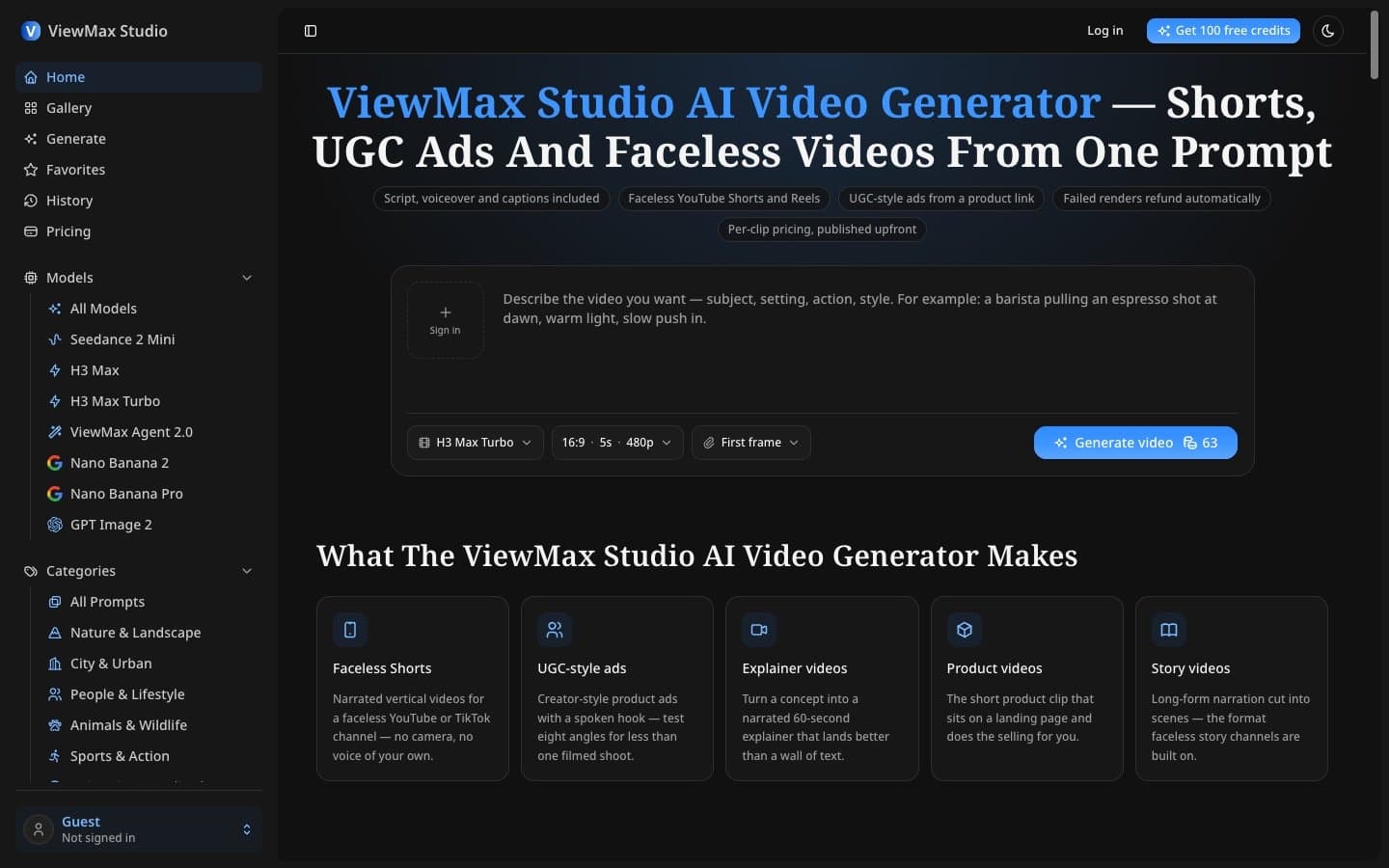
About this app
ViewMax Studio is an AI video generator for shorts that turns a single prompt into a ready-to-post video: script, shots, voiceover and burned-in captions in one render. Key features: - ViewMax Agent 2.0: describe the video or paste a script (up to 5,000 characters) and it plans the shots, renders the scenes, reads the narration and times the captions. - Faceless Shorts and Reels for YouTube and TikTok channels, no camera or voice of your own. - UGC-style ads with a spoken hook, so you can test several angles for less than one filmed shoot. - Six models from 480p to 1080p, vertical or wide. - Credit cost shown before you render; failed renders refund automatically. - Commercial rights on every plan, no watermark. Pricing: 100 free credits on signup; plans from $19.50/month ($9.90/month billed yearly), plus a one-time lifetime plan.
Key features
- 1ViewMax Agent 2.0: describe a video or paste a script (up to 5,000 characters) and it plans shots, renders scenes, reads narration, and times captions in one pass
- 2Faceless Shorts and Reels for YouTube and TikTok with no camera or personal voiceover required; vertical or wide framing at 480p to 1080p
- 3Transparent credit pricing shown on the Generate button before render; failed renders refund automatically; commercial rights on every plan with no watermark
Target customer profile
Drawn from the product itself, not from a survey.
Demographic
Faceless YouTube and TikTok channel creators
Pain points
Posting cadence collapses by week three; no camera, studio or own voice to rely on
Primary needs
Narrated vertical videos on demand with no filming or personal voiceover required
Demographic
Performance marketers and direct-to-consumer brands
Pain points
Filmed ad shoots are expensive; testing multiple creative angles costs too much
Primary needs
Eight UGC-style ad variations for the cost of one filmed take, with adjustable hooks
Demographic
Small business owners and solo founders
Pain points
Need a product clip by Friday but cannot afford agency quotes or shoot scheduling
Primary needs
A 30-second product or landing page video with no crew, no editing timeline involved
Demographic
Internal comms and L&D teams in mid-size companies
Pain points
Colleagues resist being on camera; studio scheduling is slow and costly
Primary needs
Onboarding, policy and safety training videos people watch without booking a shoot
Scout Review
Written by AI from measured evidence, scored out of 100.
ViewMax Studio is a days-old AI video generator that does one thing well: turn a prompt or script into a narrated, captioned vertical video in a single render. The pricing is transparent, the credit system is fair with auto-refunds on failure, and the 100 free credits make it easy to test. The accessibility score is genuinely strong at 95/100. But the homepage ships with an app sidebar instead of a landing page, the security headers are mostly absent, and the product is competing in a category where InVideo, HeyGen, and Synthesia already have years of head start and deep feature sets. The MCP server and API are the most interesting differentiators and they're barely mentioned. For a creator who wants to test the workflow, the free tier is worth the click. For anyone comparing it to the established players, it's not there yet.
Measure by measure
Usability
63Credit cost on the button before render, auto-refunds on failure, 100 free credits and a clear three-tier pricing page are genuinely useful. Docs are thin and the product is days old, so onboarding depth is unproven.
Design
58Dark theme with blue accents is coherent and the prompt controls are scannable, but a 10+ entry model sidebar on the marketing homepage and a stray '+ sign in' artifact in the prompt box read as unfinished.
Speed
68Lighthouse mobile 77/100 with LCP 3.3s and desktop 87/100. CLS is excellent at 0.004, but a 3.3s LCP and 324ms TBT mean the first paint is sluggish on mobile.
Security
52HTTPS enforced with SPF and DMARC in place, but HSTS, CSP, frame protection and Referrer-Policy are all missing. No SOC 2, ISO or pen-test claim published. Standard for a days-old indie tool, not for a paid product.
Accessibility
80Lighthouse accessibility 95/100 is strong for a new product. Two failing audits on ARIA role matching and accessible names for visible-text elements are real but narrow. No WCAG statement or multi-language support found.
Growth
58Real problem, specific segments (faceless creators, UGC ad testers, SMBs), and a one-pass render workflow that's a genuine wedge. But it's crowded territory and the differentiation is thin against InVideo and HeyGen.
Improvement areas
- Homepage design: the app sidebar with 10+ model entries dominates the marketing page and the prompt box contains a stray '+ sign in' artifact
- Security headers: HSTS, CSP, frame protection, X-Content-Type-Options, Referrer-Policy, and Permissions-Policy are all missing (4/12 checklist score)
- Documentation and onboarding: no help center, tutorials, or docs beyond a changelog; product launched days ago with no learning resources
Design & Usability
ViewMax Studio's design is competent but confused about what it is. The dark theme with blue accents is coherent, the prompt controls are grouped sensibly, and the five feature cards below the fold communicate the use cases clearly. But the live homepage ships with a full product sidebar — Home, Gallery, Generate, History, Pricing, plus ten-plus model entries — dominating the left third of the viewport. That's an app shell, not a landing page, and it pushes the actual marketing content rightward. The hero headline wraps awkwardly, and there's a stray '+ sign in' artifact sitting inside the prompt box that looks like a leftover from a different layout. On usability, the product does several things right: the credit cost is shown on the Generate button before anything runs, failed renders refund automatically, and the 100 free credits on signup with no card required is a genuinely low-friction entry. The pricing page is clear with three subscription tiers and five one-time credit packs. But the product launched on 2026/09/08 and shipped an MCP server the next day — there's no documentation depth, no help center, no tutorial content. You're onboarding yourself.
Speed & Security
Speed is the strongest measured dimension. Lighthouse mobile performance lands at 77/100 with an LCP of 3.3s, CLS of 0.004, and TBT of 324ms; desktop scores 87/100. The layout stability is excellent — nothing shifts while the page loads — but a 3.3-second largest contentful paint on mobile means the hero takes a beat too long to arrive. There are no published benchmarks and no user complaints about lag in the collected evidence, so the lab numbers are the whole story. Security is where the product is weakest. HTTPS is enforced and both SPF and DMARC records are present, which covers the email-spoofing basics. But the HTTP probe found HSTS, CSP, frame protection, X-Content-Type-Options, Referrer-Policy, and Permissions-Policy all missing — a 4/12 checklist score. There's no SOC 2, no ISO certification, no pen-test summary, and no bug bounty mentioned anywhere on the site. For a product that takes payment and processes user prompts, that's a thin security posture. It's normal for a days-old indie tool, but it's not nothing.
Accessibility & Growth
Accessibility is surprisingly solid for a product this young. Lighthouse scores 95/100, with only two failing audits: ARIA attributes that don't match their roles, and elements with visible text labels that lack matching accessible names. Both are real but narrow issues — the kind you fix in an afternoon. There's no accessibility statement, no WCAG conformance claim, and no multi-language support mentioned, so the automated score is the only evidence available. On growth, the idea has a real problem behind it: faceless creators and performance marketers genuinely need narrated vertical video without a camera or a voice, and the one-pass render of script, shots, voiceover, and burned-in captions is a legitimate workflow wedge. The target segments are specific and the pricing is competitive. But the category is crowded — InVideo AI, HeyGen, and Synthesia all occupy adjacent ground, and ViewMax's differentiation against them is mostly packaging. The MCP server and public API shipped on day two are the most interesting strategic move, but they're buried in a changelog and not positioned as a growth lever.
Conclusion
ViewMax Studio is a competent first release from a product that launched this week. The core workflow — prompt to script to shots to voiceover to captions in one pass — is the right bet for short-form creators, and the transparent credit pricing with auto-refunds is a genuinely user-friendly choice that bigger competitors often get wrong. The 95/100 accessibility score is impressive for a product this young. But the design needs to decide whether the homepage is a landing page or an app shell, the security headers need to be filled in before anyone trusts it with a payment method, and the growth story needs to move the MCP server and API from a changelog footnote to a headline. The bones are here. The execution needs another few weeks.
Suggestions for improvement
- Separate the marketing homepage from the app shell — move the model sidebar and navigation into the logged-in experience
- Add HSTS, CSP, frame protection, and Referrer-Policy headers; publish a security page with data handling details
- Fix the two failing accessibility audits (ARIA role matching and accessible names) and publish a WCAG conformance statement
- Promote the MCP server and public API to the homepage — it's the clearest differentiator against InVideo and HeyGen
Alternatives comparison
Named competitors, point by point. Nobody paid to appear here or to be left out.
 ViewMax Studio |  Synthesia |  InVideo AI |  HeyGen |  Pictory |  Runway | |
|---|---|---|---|---|---|---|
| Starting price (monthly) | $19.50/month (Basic); 100 free credits on signup | Free plan available; paid plans from ~$29/month | Free plan available; paid plans from ~$25/month | Free plan available; paid plans from ~$29/month | Free trial available; paid plans from ~$19/month | Free plan available; paid plans from ~$12/month |
| AI avatar / talking head | No — faceless narration and voiceover only | Yes — photorealistic AI avatars in 140+ languages | Limited — AI voiceover and some avatar features | Yes — AI avatars and video translation | No — text-to-video and repurposing focus | No — generative video and VFX focus |
| Burned-in captions on render | Yes — captions timed and burned in during the single render pass | Yes — captions and subtitles supported | Yes — auto-captions available | Yes — captions supported | Yes — auto-captions and subtitles | Limited — manual caption workflow |
| MCP server / public API | Yes — MCP server and REST API shipped in v1.1.0 (2026/09/09) | Yes — API available on enterprise plans | Limited — API access on higher tiers | Yes — API available | Yes — API available on higher plans | Yes — API available |
| Commercial rights / no watermark | Yes — commercial license on every plan and credit package, no watermark | Yes — commercial rights on paid plans | Yes — commercial rights on paid plans; watermark on free | Yes — commercial rights on paid plans | Yes — commercial rights on paid plans | Yes — commercial rights on paid plans |
Synthesia
AI video platform known for photorealistic AI avatars and studio-style corporate and training videos in 140+ languages.
InVideo AI
Prompt-to-video generator with a strong focus on reshaping scripts and generating b-roll for YouTube and social shorts.
HeyGen
AI avatar and video translation tool widely used for UGC-style ads, product demos and localized marketing clips.
Pictory
Text-to-video and long-video-to-short converter often used to repurpose blogs and webinars into social clips.
Runway
Generative video studio with advanced motion, editing and visual effects tooling aimed at filmmakers and designers.
Comparing options? See ViewMax Studio alternatives, scored side by side
More AI Generations apps
View all AI Generations
Uni-1 by Luma AI
92Uni-1 is an advanced multimodal text-to-image AI model th...

Gerty
91Private, local AI assistant for Mac that runs offline

LTX 2.3 AI Video Generator
91Fast, open-source AI video generator with 4K support, mul...

DemoVexa
90Turn your code into professional product demo videos with AI-generated scripts, animated UI, and natural voiceovers.

AI Vocals Generator
89Add AI singers or rappers to your own beat, get two takes...

Voqusa
89Transcribe social media video and audio links into text (free signup, 5 free credits, then pay-as-you-go)

All of Us
89Add deceased loved ones to photos with AI and see free pr...

PodRescale
89Every episode becomes two weeks of posts. In your voice. Posted for you.

Pixelimg
88A free online AI-powered tool that instantly converts ima...

Cantoro
88Custom AI songs with a name, heard free before paying $4....

tradutor de mangá com IA
88O tradutor de mangá com IA traduz capítulos em lote, personaliza textos e oferece edição visual para estúdios.

IraVoice
88Private on-device dictation for Apple-silicon Macs.


A platform dedicated to providing unbiased reviews of newly launched applications, analyzing everything from their features to their full potential.
info@scoutforge.net© 2026 Scoutforge. All rights reserved.
