Cycling through all six. Tap any point to stop.
Measured on six things
Find your lowest and highest notes and the voice type your range matches, with a guided singing test. Free, no ads, no account, works offline.
Speed
58Lighthouse mobile 62/100 with a 6.1s LCP and 407ms TBT — that's the Play Store page, not the app. The app itself runs fully offline with on-device mic analysis, so real in-app responsiveness should be far better than the store page suggests.
Screenshots
1 / 3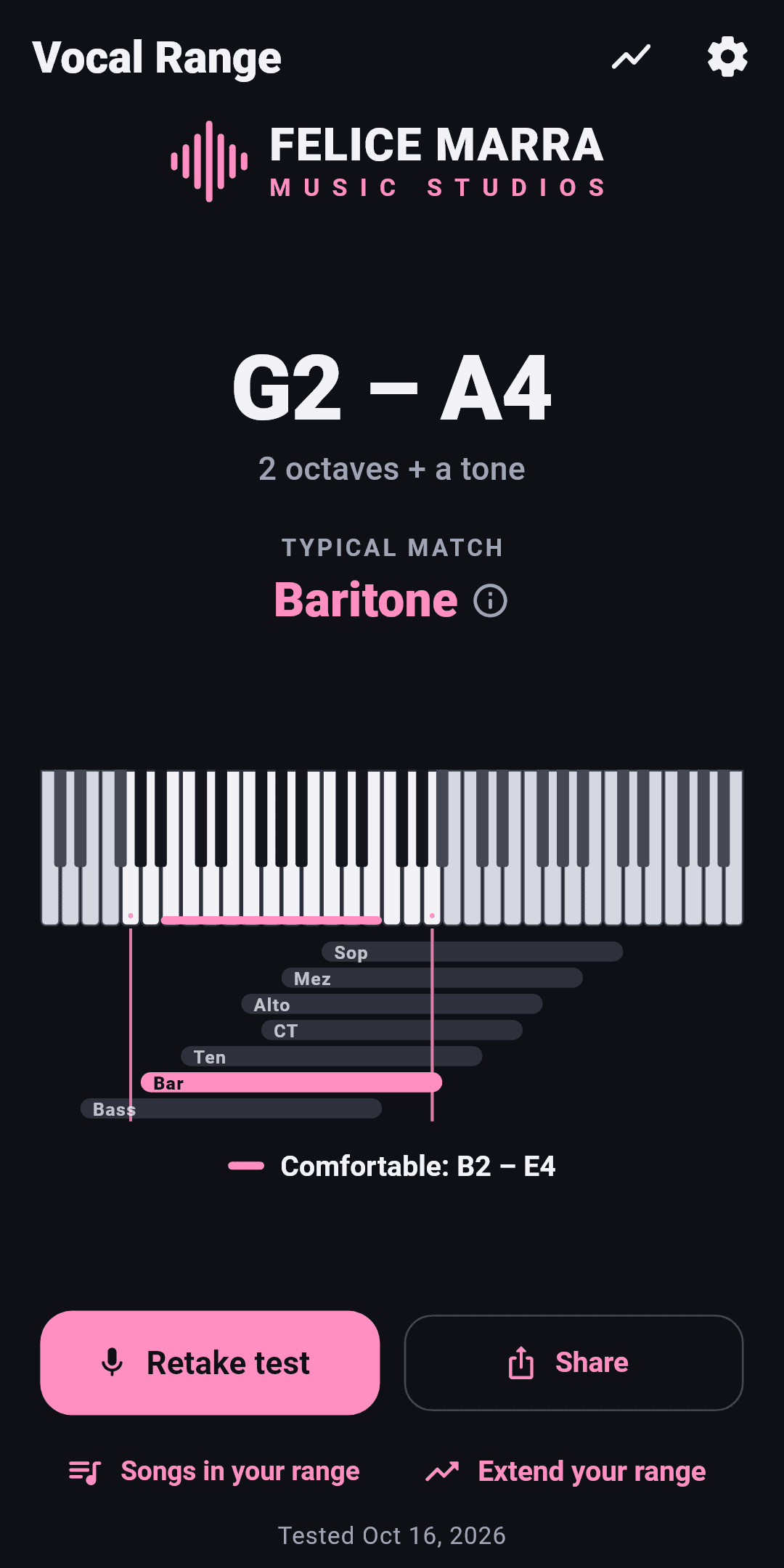
About this app
Vocal Range Test guides you through a short singing test, measures your vocal range and shows it on a piano keyboard next to the typical ranges of soprano, mezzo-soprano, contralto, countertenor, tenor, baritone and bass. The test has 3 steps: sing a few comfortable notes, go down a guided scale to your lowest note, then up to your highest. Optional piano reference notes play each target. Only steady notes held for half a second count, so shouts, vocal fry, breaths and cracks never distort the result. You get your lowest and highest notes, your range in octaves and semitones, your comfortable zone (tessitura) and the voice type your range matches, with close alternatives. Every test is saved on your device, with a chart of how your range changes over time. Share an image card, and find out how many semitones to transpose a song to suit your voice. Free, no ads, no in-app purchases, no account, no internet connection. The microphone is analysed on the device, never recorded or sent.
Key features
- 1Guided 3-step vocal range test with on-device pitch analysis; only steady notes held 0.5s count
- 2Results show lowest/highest notes, range in octaves and semitones, tessitura and matched voice type with close alternatives
- 3History chart of range over time, shareable range image card, and a semitone transposition tool for songs
- 4Free, no ads, no in-app purchases, no account, fully offline; mic never recorded or sent
- 571 languages, dark/light themes, three note-naming systems, A4 calibration 415–466 Hz
Target customer profile
Drawn from the product itself, not from a survey.
Demographic
Amateur singers and karaoke enthusiasts
Pain points
Looking for a free tool with no ads and no account
Primary needs
A free, guided way to measure range and pick singable songs
Demographic
Choir and ensemble members
Pain points
Looking for a free tool with no ads and no account
Primary needs
Track range and tessitura over time; transpose songs to fit
Demographic
Voice teachers and vocal coaches
Pain points
Looking for a free tool with no ads and no account
Primary needs
Quick on-device reference test with shareable range cards
Demographic
Beginner and self-taught musicians
Pain points
Looking for a free tool with no ads and no account
Primary needs
Key and transposition guidance in plain language
Scout Review
Written by AI from measured evidence, scored out of 100.
Vocal Range Test: Voice Type is a focused, privacy-first take on a crowded category. The guided three-step test, the on-device pitch analysis and the results screen that leads with your range and matches it to a voice type are all well executed, and the free/no-ads/no-account/offline stance is a genuine differentiator against pitch-monitor peers. The app UI is the product's best asset — restrained dark theme, one pink accent, clear hierarchy. Rough edges are real but small: notation inconsistency, a clipped chart label, a too-quiet safety note, and storefront header hygiene. For an amateur singer or choir member who wants a quick, honest range check without signing up for anything, this does the job well.
Measure by measure
Usability
74A three-step guided test with a progress bar, one obvious action per screen, and a plain-language transposition tool. 71 languages, A4 calibration and three note-name systems show real care for actual singers. The safety note is too quiet.
Design
71Judging the app UI from store screenshots: a disciplined dark theme with one pink accent, a results screen that leads with a huge 'G2 – A4' and a readable piano-plus-voice-type chart. Small notation and label collisions keep it from excellent.
Speed
58Lighthouse mobile 62/100 with a 6.1s LCP and 407ms TBT — that's the Play Store page, not the app. The app itself runs fully offline with on-device mic analysis, so real in-app responsiveness should be far better than the store page suggests.
Security
63Strong privacy posture: no account, no internet, on-device mic analysis, store Data Safety says no data collected or shared. Header probe is mixed — HSTS, CSP and frame protection present, but HTTPS not enforced, no Referrer-Policy, no DMARC. No audits published.
Accessibility
80Lighthouse a11y 99/100 with only two failing audits (missing main landmark, mismatched accessible names). 71 languages, dark/light themes and three notation systems are real inclusivity wins. No published WCAG statement, but the automated baseline is strong.
Growth
62A real, recurring problem (finding your range and singable keys) with a specific wedge: free, no ads, no account, fully offline, plus history and transposition. Category is crowded with free pitch tools, so headroom is real but not unlimited.
Improvement areas
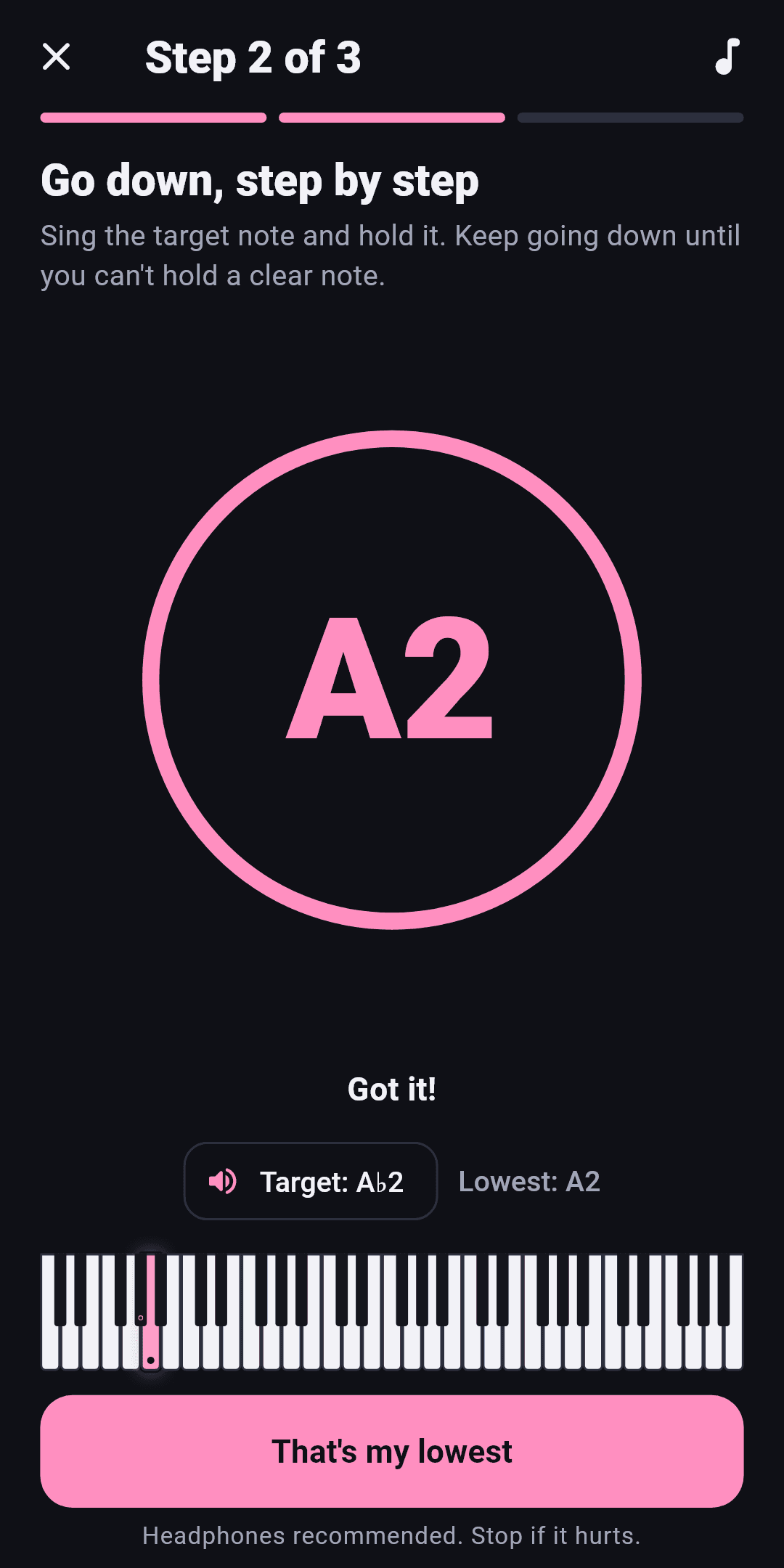
- Notation inconsistency: same note shown as 'A♭2' and 'A2' on one screen
- Results chart marker line clips the 'Bass' label; active-key highlight too thin to read
- Safety note ('Stop if it hurts') is small grey text, easy to miss before singing
- Web security hygiene: HTTPS not enforced, no Referrer-Policy, no DMARC; no published audits
Design & Usability
The app's own interface is the product here, and it's the strongest part of the package. A near-black canvas with a single pink accent carries through the icon, the range keyboard and the primary buttons, and the results screen leads with the answer people came for — a huge 'G2 – A4' — before the supporting piano and staggered voice-type chart. The three-step test keeps one dominant action per screen and a visible progress bar, so a nervous first-timer always knows what to do next. Friction is in the details: the marker line clips the 'Bass' label, the same note is spelled 'A♭2' in a pill and 'A2' in the display, the active-key highlight is too thin to read at a glance, and the 'Stop if it hurts' safety note is buried in small grey text. Fix the notation consistency and the chart collisions and this moves from good to genuinely polished.
Speed & Security
Speed is measured on the Play Store page, not the app: Lighthouse mobile 62/100, LCP 6.1s, TBT 407ms, desktop 73/100. That's a heavy storefront, but the actual product runs fully offline with on-device microphone analysis, so in-app responsiveness is not gated by any of it — the number is a storefront tax, not an app flaw. Security is the more interesting story. The privacy design is genuinely strong: no account, no internet connection, mic analysed on-device and never recorded or sent, and the store Data Safety declaration says no data collected and none shared. The web probe is weaker — HTTPS not enforced, no Referrer-Policy, no DMARC — and there are no published audits or bug bounty. For a no-account offline utility the risk surface is small, but the header hygiene is a cheap fix worth doing.
Accessibility & Growth
Accessibility scores well: Lighthouse 99/100 with only two failing audits (no main landmark, some visible labels without matching accessible names), plus 71 languages, dark and light themes and three note-naming systems — real signals of care for a global singing audience. There's no published WCAG conformance statement, so the automated baseline is doing the heavy lifting. Growth is a judgement on the idea, not the download count. The problem is real and recurring — amateur singers, choir members, karaoke fans and voice teachers all want to know their range and which key to sing in — and the wedge is specific: free, no ads, no account, fully offline, with a history chart and a plain-language transposition tool. The category is crowded with free pitch monitors, so the differentiator is the packaging and privacy rather than a moat. 100+ downloads and 'First release' show it hasn't found an audience yet; the idea can carry it further than the traction currently does.
Conclusion
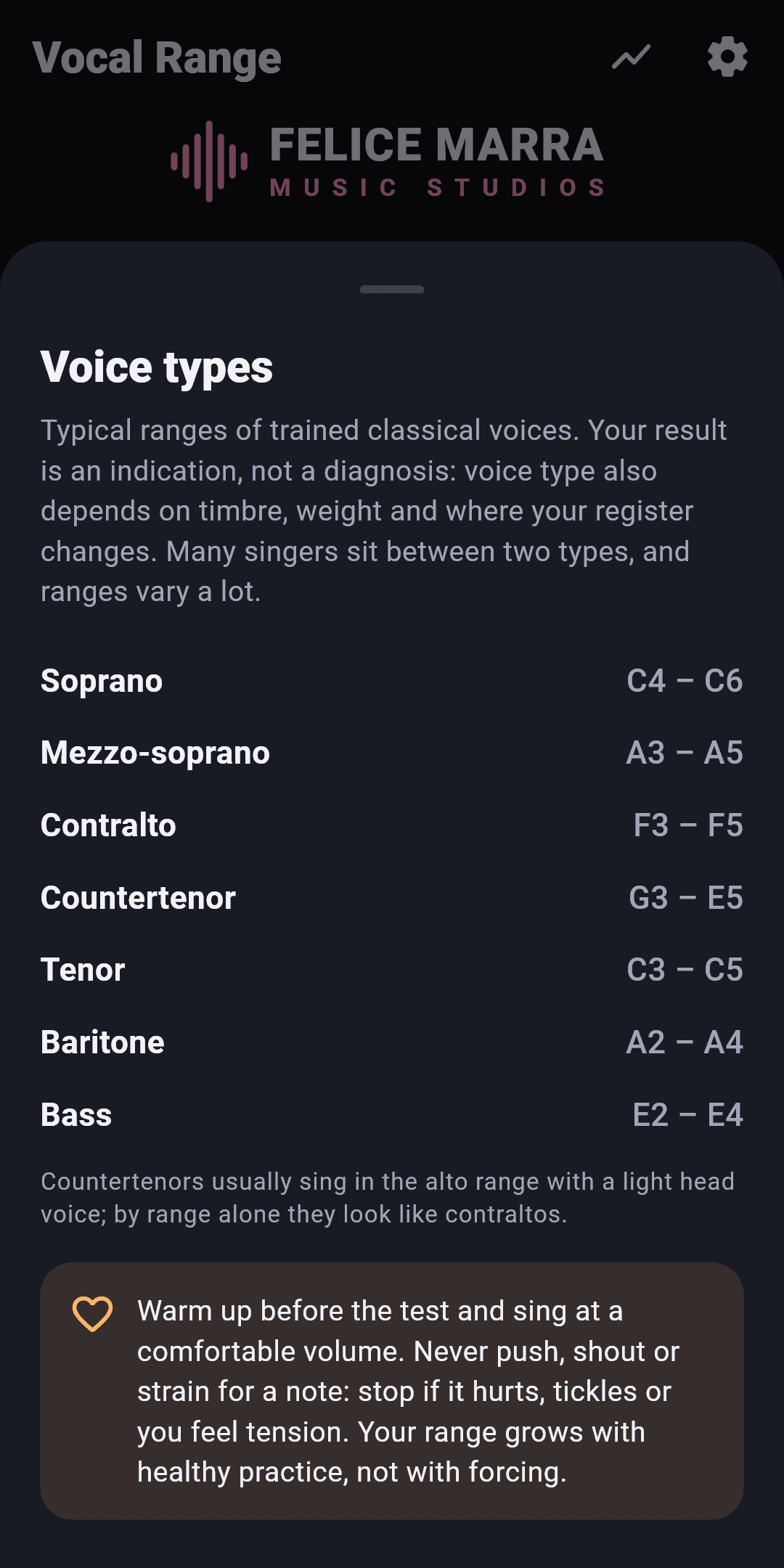
If you're a beginner, a karaoke regular or a choir member who just wants to know where your voice sits and which key to sing a song in, this is an easy install: free, offline, no account, and the mic never leaves your phone. Voice teachers will find the history chart and transposition tool useful for students. It won't replace a coach's ear — the app says as much about voice type being an indication, not a diagnosis — but as a quick, private reference test it's a solid pick. The main things to watch are the small UI polish items and the fact that it's brand new with little traction yet.
Suggestions for improvement
- Fix notation consistency: the target note shows as 'A♭2' in the pill and 'A2' in the large display on the same screen.
- Move the 'Bass' label clear of the vertical marker line on the results chart so it isn't clipped.
- Increase the visual weight and contrast of the 'Stop if it hurts' safety note before the singing step.
- Enforce HTTPS and add Referrer-Policy and DMARC to the web properties; they're cheap wins for the security posture.
Alternatives comparison
Named competitors, point by point. Nobody paid to appear here or to be left out.
 Vocal Range Test: Voice Type | Vocal Range Test by Sing Sharp | Voice Tools | Vocal Pitch Monitor | |
|---|---|---|---|---|
| Price model | Free, no ads, no in-app purchases | Free with optional in-app purchases / premium tiers | Free with ads and optional purchases | Free with ads / paid upgrade |
| Account required | No account | Optional account for cloud features | No account required | No account required |
| Offline / on-device analysis | Fully offline; mic analysed on-device, never sent | Some features require network | Mostly on-device | On-device pitch detection |
| Voice type classification | Matches range to soprano/mezzo/alto/CT/tenor/baritone/bass with close alternatives | Range test with voice type guidance | Range and pitch tools; limited voice-type labelling | Pitch monitoring; no dedicated voice-type classification |
| History tracking & transposition | Range-over-time chart + semitone transposition tool | Progress tracking in premium tiers | Basic history; limited transposition guidance | Session history; no song transposition tool |
Vocal Range Test by Sing Sharp
Another app in the same category.
Voice Tools
Another app in the same category.
Vocal Pitch Monitor
Another app in the same category.
Comparing options? See Vocal Range Test: Voice Type alternatives, scored side by side
More Lifestyle & Entertainment apps
View all Lifestyle & Entertainment
RoomCreator
92An AI-powered interior and exterior design tool that tran...

Factory Direct Mattress Overland Park
92A locally-owned mattress store in Overland Park, KS offer...

Seating Chart Generator
90Free seating chart maker for weddings and events

SheetScroll
90> You play; SheetScroll turns the page. It listens through the microphone or a MIDI piano and holds the page until it's sure where you are.

Hireci
89Save every recipe. Plan every meal.

TUNL - Cave Flyer
89A hold-to-thrust cave flyer with a new daily level, ghost races, and a global leaderboard.

Roami eSIM
88A global travel eSIM app offering instant activation, no ...

Portrait Gift
88AI-powered personalized face swap art platform creating c...

TranscriptYou
88Free YouTube transcript generator with timestamps and AI ...

Random Movie Generator
88Free random movie picker from 142k+ films—no sign-up.

FaceSwapAI
87AI face swap for photos, videos, GIFs with free trial.

youtubetomp3.ink
87Free online YouTube to MP3 converter with no signup or so...


A platform dedicated to providing unbiased reviews of newly launched applications, analyzing everything from their features to their full potential.
info@scoutforge.net© 2026 Scoutforge. All rights reserved.
