Cycling through all six. Tap any point to stop.
Measured on six things
Automated VPS snapshots, database dumps, Docker and Kubernetes backups on a schedule — every archive written to an S3 bucket you own.
Security
55HTTPS is enforced and backups go to user-owned buckets, which is a genuine security advantage. But no published SOC 2, ISO 27001, or security audit page was found.
Screenshots
1 / 1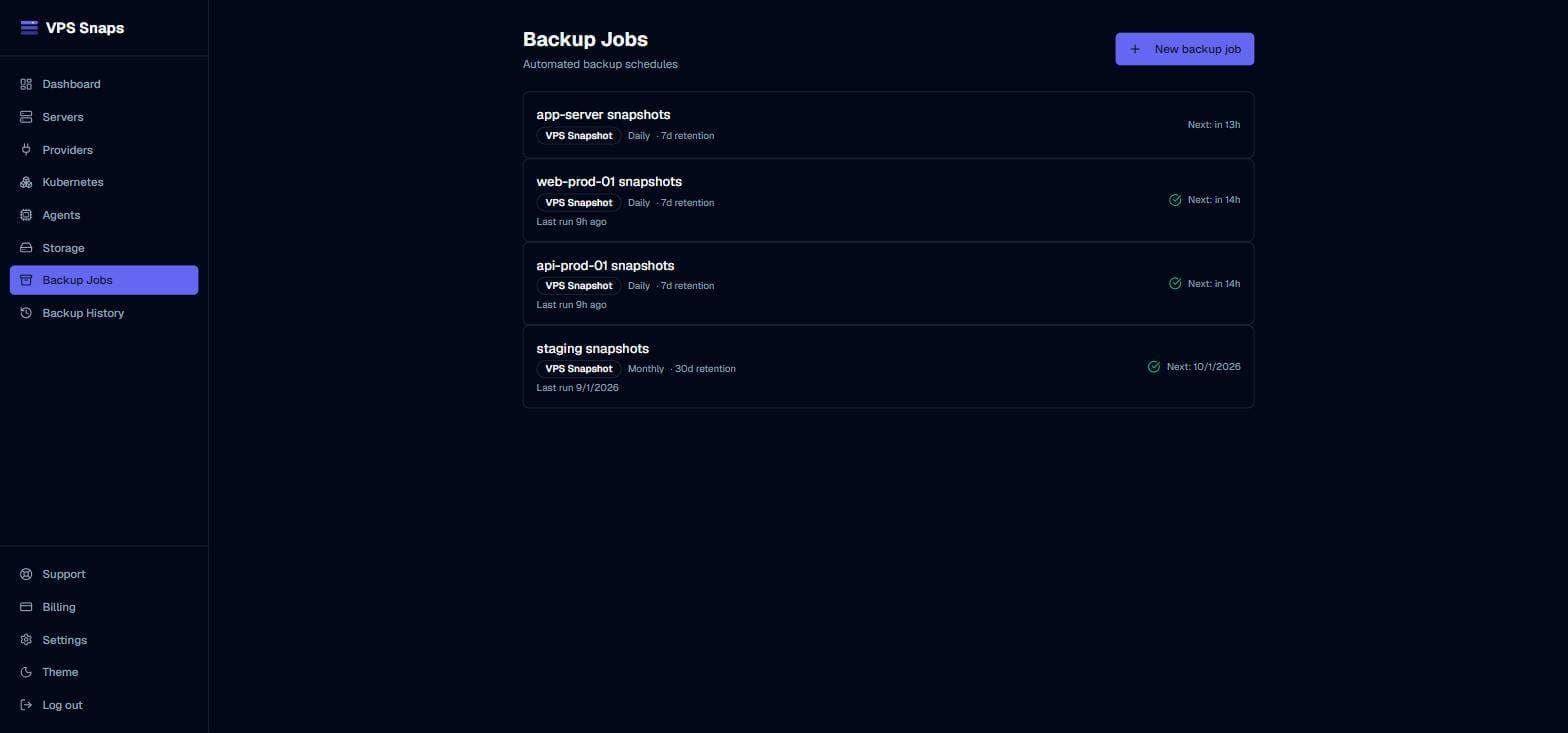
About this app
VPS Snaps is automated backup for developers who don't want to maintain a pile of cron scripts. Connect a provider and schedule snapshots through its own API — a DigitalOcean snapshot, a Hetzner image, an EC2 AMI — created inside your account and restorable from your provider's console whether or not VPS Snaps is still involved. Point a job at any SSH-reachable host for PostgreSQL, MySQL or MariaDB dumps, tar archives of any directory, Docker volumes with their compose files, or Kubernetes namespace manifests. Everything lands in an S3-compatible bucket you own — S3, Cloudflare R2, Backblaze B2, Spaces, Wasabi. Retention prunes itself, every run is checksummed and logged step by step, and alerts fire to email, Slack, Teams, Google Chat or Discord on failure or a missed schedule. Scan a server and it detects WordPress, Laravel, Craft and Ghost installs and builds the paired file and database jobs for you. Free for your first server, forever.
Key features
- 1Provider-native snapshots (DigitalOcean, Hetzner, EC2) created inside your account and restorable from the provider's console.
- 2Auto-detection of WordPress, Laravel, Craft, and Ghost installs builds paired file and database jobs automatically.
- 3Backups land in your own S3-compatible bucket (S3, R2, B2, Spaces, Wasabi) with self-pruning retention and checksummed logs.
Target customer profile
Drawn from the product itself, not from a survey.
Scout Review
Written by AI from measured evidence, scored out of 100.
VPS Snaps is a competent, well-positioned backup tool for developers who manage VPS infrastructure and are tired of maintaining cron scripts. The core value proposition is strong: connect a provider, schedule snapshots through its API, and get backups that land in your own S3-compatible bucket. The auto-detection of WordPress, Laravel, Craft, and Ghost installs is a genuine time-saver. The free tier for your first server is a smart acquisition play. Design is clean and above-average for an indie tool. Usability is solid, with structured docs and low onboarding friction. Speed is the weak point — mobile LCP of 6.7 seconds is a real flaw. Security has a genuine architectural advantage (user-owned buckets) but lacks published compliance. Accessibility is strong at 95/100 with minor fixable issues. Growth potential is real: the problem is well-named, the audience is specific, and the provider-native snapshot approach is a concrete differentiator. This is a product worth watching — and for developers in its target audience, worth trying.
Measure by measure
Usability
66Free tier for first server and auto-detection of WordPress/Laravel/Craft/Ghost installs reduce setup friction. Docs are structured. Onboarding is solid for a dev tool.
Design
68Clean dark-themed site with consistent branding and clear product screenshots. Pricing page is well-structured. Design is above-average for an indie dev tool but not exceptional.
Speed
58Lighthouse mobile 73/100 with LCP 6.7s is sluggish; desktop 90/100 is solid. The mobile LCP is the weak point — nearly 7 seconds to render the main content.
Security
55HTTPS is enforced and backups go to user-owned buckets, which is a genuine security advantage. But no published SOC 2, ISO 27001, or security audit page was found.
Accessibility
80Lighthouse accessibility 95/100 is strong. Failing audits are color contrast and heading order — both fixable. No a11y statement or WCAG claim found.
Growth
58Real problem (VPS backup scripts are a pain), specific audience (developers on DigitalOcean/Hetzner/AWS), and a concrete wedge: provider-native snapshots restorable without the tool. Category has room.
Improvement areas
- Mobile performance: 6.7-second LCP is a real flaw — optimize images and defer non-critical JavaScript.
- Security transparency: no published SOC 2, ISO 27001, or security audit page for a tool handling database dumps.
- Accessibility: fix color contrast and heading order issues; add an accessibility statement or WCAG conformance claim.
Design & Usability
VPS Snaps presents a clean, dark-themed site with consistent branding and clear product screenshots. The pricing page is straightforward with three tiers and a feature comparison. Design is above-average for an indie dev tool — not groundbreaking, but polished enough to inspire confidence. Usability is where it shines: the free tier for your first server removes signup friction, and auto-detection of WordPress, Laravel, Craft, and Ghost installs means you can go from zero to a working backup job in minutes. Documentation is structured and covers provider setup, job creation, and restore procedures. The onboarding flow is solid for a developer audience. The main usability gap is the lack of a live demo or interactive sandbox — you have to connect a real provider to see it work. For a tool that touches production infrastructure, that's a reasonable ask, but it does raise the commitment bar.
Speed & Security
Speed is a mixed bag. Desktop Lighthouse performance is 90/100, which is excellent. Mobile is 73/100 with a 6.7-second LCP — that's slow enough to lose visitors before they read the headline. CLS is 0 and TBT is 61ms, so the page is stable and responsive once it loads; the problem is the initial render. For a developer tool, mobile traffic may be lower, but 6.7 seconds is still a real flaw. Security is a tale of two halves. On the positive side, HTTPS is enforced, and backups land in S3-compatible buckets you own — S3, R2, B2, Spaces, Wasabi — rather than vendor-controlled storage. That's a genuine architectural security advantage: your data stays under your control. On the negative side, there's no published SOC 2, ISO 27001, or security audit page. For a tool that handles database dumps and server snapshots, enterprise buyers will want more transparency. The absence isn't damning for an early-stage product, but it's a gap.
Accessibility & Growth
Accessibility scores 95/100 on Lighthouse, which is strong. The two failing audits — insufficient color contrast and non-sequential heading order — are common and fixable. There's no accessibility statement or WCAG conformance claim, which is typical for an indie tool but would help. Multi-language support isn't evident. On mobile, the site is responsive, and the platform coverage (any SSH-reachable host, multiple providers) is broad. Growth potential is solid. The problem — VPS backup scripts are a pain to maintain — is real and well-named. The target customer is specific: developers running DigitalOcean, Hetzner, or AWS instances who want automated snapshots without writing cron jobs. The differentiator is concrete: provider-native snapshots (DigitalOcean snapshot, Hetzner image, EC2 AMI) created inside your account and restorable from the provider's console whether or not VPS Snaps is still involved. That's a real wedge against generic backup tools. The category has room, but the competition is fierce — every provider offers snapshots, and tools like Backblaze and Duplicati exist. The auto-detection of WordPress, Laravel, Craft, and Ghost installs is the sharpest hook and should be the lead. Domain age (0.3 years) is context only — this is early-stage, and the idea has legs if execution holds.
Conclusion
VPS Snaps isn't trying to reinvent backup — it's trying to make it less annoying for developers who already know they need it. The free tier makes it easy to test, the auto-detection makes it fast to set up, and the user-owned bucket model means you're not locked in. The mobile performance needs work, and the lack of published security compliance will give enterprise buyers pause. But for an indie dev tool at this stage, the fundamentals are solid. If you're managing VPS instances and still writing cron scripts by hand, this is worth a look. The 0.3-year-old domain says early days — the idea has room to grow if execution keeps pace.
Suggestions for improvement
- Fix the mobile LCP — 6.7 seconds is too slow. Optimize images, defer non-critical JS, and consider a CDN.
- Publish a security page with details on data handling, encryption, and any audits or certifications.
- Add an accessibility statement and fix the color contrast and heading order issues flagged by Lighthouse.
- Lead with the auto-detection feature in marketing — it's the sharpest differentiator against generic backup tools.
Alternatives comparison
Named competitors, point by point. Nobody paid to appear here or to be left out.
 VPS Snaps | ||
|---|---|---|
| Backup destination | User-owned S3-compatible bucket (S3, R2, B2, Spaces, Wasabi) | Not specified |
| Provider-native snapshots | Yes — DigitalOcean, Hetzner, EC2 AMIs created in your account | Not specified |
| Auto-detection of app stacks | Yes — WordPress, Laravel, Craft, Ghost | Not specified |
| Free tier | Free for first server, forever | Not specified |
Comparing options? See VPS Snaps alternatives, scored side by side
More Development & Engineering apps
View all Development & Engineering
CreateMyCoin
92A no-code Solana token creator that deploys SPL tokens in...

Vibe Coding Agent Skills
92A free, open-source platform offering 110 AI agent skills...

CC Switch
91Open-source desktop app for switching AI coding providers...

TaxID
90Fast EU VAT validation API for developers, covering 27 EU...

DemoVexa
90Turn your code into professional product demo videos with AI-generated scripts, animated UI, and natural voiceovers.

deed.page
89Permanent web hosting for AI agents, no human step

FontPlop
89Browser-based font viewer & tester for TTF, OTF, WOFF, WO...

BeartIMAGE
88BeartIMAGE is a free, web-based image processing platform engineered for fast, bulk photo editing and conversion directly in your browser.

Claw Messenger
88Claw Messenger is an iMessage API service that gives AI a...

DataHabibi
88AI-powered Dubai real estate data platform with 12M+ DLD ...

ButterKit
82macOS app for App Store screenshots: 3D mockups, auto-tra...

PERM Processing Time: Current DOL Queue & History
88PERM Processing Time is an independent data analysis platform that helps users navigate the U.S. Department of Labor’s permanent labor certification process.


A platform dedicated to providing unbiased reviews of newly launched applications, analyzing everything from their features to their full potential.
info@scoutforge.net© 2026 Scoutforge. All rights reserved.
