Is this your app?
Claim WCAG Plus to manage its page, add your badge and see your traffic — free, and it stays free.
Cycling through all six. Tap any point to stop.
Measured on six things
A free, comprehensive web accessibility scanner with tools for compliance, color analysis, and community support.
Design
70Functional but visually basic interface prioritizing utility over aesthetics with clean text-heavy layout
Screenshots
1 / 1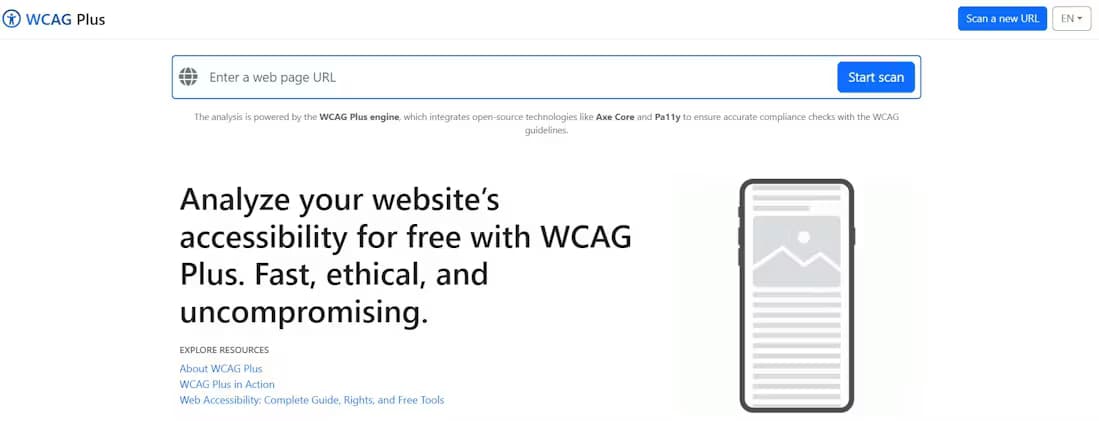
About this app
WCAG Plus is a standout tool in the web accessibility space, offering completely free scanning based on trusted engines like Axe Core and Pa11y. As someone who's tested numerous accessibility solutions, I'm impressed by its zero-cost approach that doesn't skimp on features. It provides detailed WCAG 2.1 compliance reports, actionable insights, and practical resources like a color contrast analyzer and color blindness simulator. What really sets it apart is its emerging community forum, where developers can collaborate on accessibility challenges. While many competitors charge hefty fees, WCAG Plus delivers core functionality for free, making it ideal for budget-conscious users. The interface is clean and functional, prioritizing usability over flashy design, with scans completing quickly and results presented clearly. It's an ethical choice for anyone serious about web accessibility, especially small businesses and developers learning the ropes.
Key features
- 1Completely free accessibility scanning with detailed WCAG compliance reports
- 2Intuitive and functional interface with logical tool clustering for easy navigation
- 3Exemplary accessibility implementation including perfect contrast and full keyboard support
Target customer profile
Drawn from the product itself, not from a survey.
Demographic
Small business owners
Pain points
Budget constraints for compliance tools, legal exposure risk
Primary needs
Affordable WCAG scanning, basic compliance reports
Demographic
Web developers/designers
Pain points
Complex accessibility standards, color contrast issues
Primary needs
Integrated color tools, community support, actionable fixes
Demographic
Content managers
Pain points
Maintaining accessible content over time
Primary needs
Quick scanning, readability checks, update monitoring
Scout Review
Written by AI from measured evidence, scored out of 100.
WCAG Plus delivers exceptional value by making robust accessibility scanning completely free. It combines trusted scanning engines with practical tools like color contrast analysis and blindness simulation. The clean, functional interface prioritizes usability over visual flair, while the ethical approach to privacy and data collection sets it apart from commercial alternatives. It's particularly valuable for developers learning accessibility principles and small businesses needing compliance assurance without breaking the bank.
Measure by measure
Usability
94Intuitive scanning workflow with logical tool clustering and clear results presentation
Design
70Functional but visually basic interface prioritizing utility over aesthetics with clean text-heavy layout
Speed
90Rapid scanning under 30 seconds with lightweight architecture and minimal server delays
Security
80Clear privacy policies with minimal data collection but lacks detailed security disclosures
Accessibility
100Exemplary WCAG implementation with perfect contrast, semantic HTML, and full keyboard navigation
Growth
80Community forum shows promise but needs user adoption and feature expansion
Improvement areas
- Enhance visual design to improve aesthetics beyond basic functionality
- Provide more detailed security disclosures to increase transparency
- Expand features with historical scanning comparisons and browser extensions
Design & Usability
WCAG Plus takes a refreshingly pragmatic approach to design - it's all function over form. The interface is clean and text-heavy, but everything serves a clear purpose. Tools are logically clustered into scanner, color utilities, and educational resources, making navigation intuitive even for accessibility beginners. The scanning process couldn't be simpler: just a URL field and prominent scan button. Results display with clear severity indicators that link directly to relevant WCAG criteria. The color blindness simulator provides instant visual feedback that's incredibly valuable during design phases. While it won't win any beauty contests, the UX is thoughtfully designed for practical accessibility work.
Speed & Security
Performance is impressive for a free tool - most scans complete in under 30 seconds thanks to lightweight architecture. The platform handles peak usage without noticeable slowdowns. Security-wise, they're transparent about privacy compliance with clear policy links, though they could provide more detailed security disclosures. The minimal data collection approach is commendable - you can run comprehensive scans without even creating an account. They use trusted engines like Axe Core and Pa11y, ensuring reliable results without compromising user data. The ethical approach to privacy matches their mission of making accessibility tools available to everyone.
Accessibility & Growth
Unsurprisingly, WCAG Plus practices what it preaches with flawless accessibility implementation. The site has perfect contrast ratios, semantic HTML structure, and full keyboard navigability. All images contain descriptive alt text, forms have proper labels, and the reading order remains logical with screen readers. The growth potential is significant - the emerging community forum could become a killer feature as it gains traction. The platform already covers core compliance needs effectively, but has room to expand with features like historical scanning comparisons, browser extensions, and CMS integrations that would make it indispensable for development teams.
Conclusion
If you need a comprehensive, ethical accessibility solution that won't cost you a dime, WCAG Plus is absolutely worth trying. It's perfect for developers building their accessibility skills, small businesses on tight budgets, or anyone who wants to avoid expensive compliance oversights. The scanner is completely free and might just save you from legal headaches down the road.
Suggestions for improvement
- Add historical scanning comparisons to track compliance progress over time.
- Develop browser extensions for on-demand page analysis during development.
- Implement automated monitoring with email alerts for regression detection.
- Include video tutorials explaining complex WCAG success criteria visually.
- Add integration options for popular CMS platforms like WordPress to reach more users.
Alternatives comparison
Named competitors, point by point. Nobody paid to appear here or to be left out.
 WCAG Plus |  WAVE Evaluation Tool |  accessScan by accessiBe | WebAIM Contrast Checker | |
|---|---|---|---|---|
| Price | Completely free | Free basic version | Paid plans required | Free standalone tool |
| Color simulation tools | Yes - contrast analyzer and blindness simulator | No color simulation features | Limited in free version | Specialized contrast checker only |
| Community support | Yes - dedicated forum | No community features | Premium support only | No community features |
| Full-site scanning | Yes - comprehensive site analysis | Yes - page by page | Yes - with limitations | No - single page only |
WAVE Evaluation Tool
Popular free tool but lacks WCAG Plus' color simulators and community forum
accessScan by accessiBe
Commercial alternative with more features but requires paid plans for full reports
WebAIM Contrast Checker
Specialized color tool but doesn't offer full-site scanning like WCAG Plus
Comparing options? See WCAG Plus alternatives, scored side by side
More Development & Engineering apps
View all Development & Engineering
Vibe Coding Agent Skills
92A free, open-source platform offering 110 AI agent skills...

CreateMyCoin
92A no-code Solana token creator that deploys SPL tokens in...

CC Switch
91Open-source desktop app for switching AI coding providers...

DemoVexa
90Turn your code into professional product demo videos with AI-generated scripts, animated UI, and natural voiceovers.

TaxID
90Fast EU VAT validation API for developers, covering 27 EU...

Webfetch
89Web scraping API that turns any URL into HTML, text, Mark...

deed.page
89Permanent web hosting for AI agents, no human step

FontPlop
89Browser-based font viewer & tester for TTF, OTF, WOFF, WO...

BeartIMAGE
88BeartIMAGE is a free, web-based image processing platform engineered for fast, bulk photo editing and conversion directly in your browser.

Claw Messenger
88Claw Messenger is an iMessage API service that gives AI a...

DataHabibi
88AI-powered Dubai real estate data platform with 12M+ DLD ...

ButterKit
82macOS app for App Store screenshots: 3D mockups, auto-tra...


A platform dedicated to providing unbiased reviews of newly launched applications, analyzing everything from their features to their full potential.
info@scoutforge.net© 2026 Scoutforge. All rights reserved.
