Cycling through all six. Tap any point to stop.
Measured on six things
Free online YouTube to MP4 converter with 1080p/4K suppor...
Speed
46Lighthouse mobile performance 56/100 with LCP 10.3s — painfully slow. Desktop 49/100. CLS is fine, but initial load is heavy. Needs asset optimization and faster server response.
Screenshots
1 / 1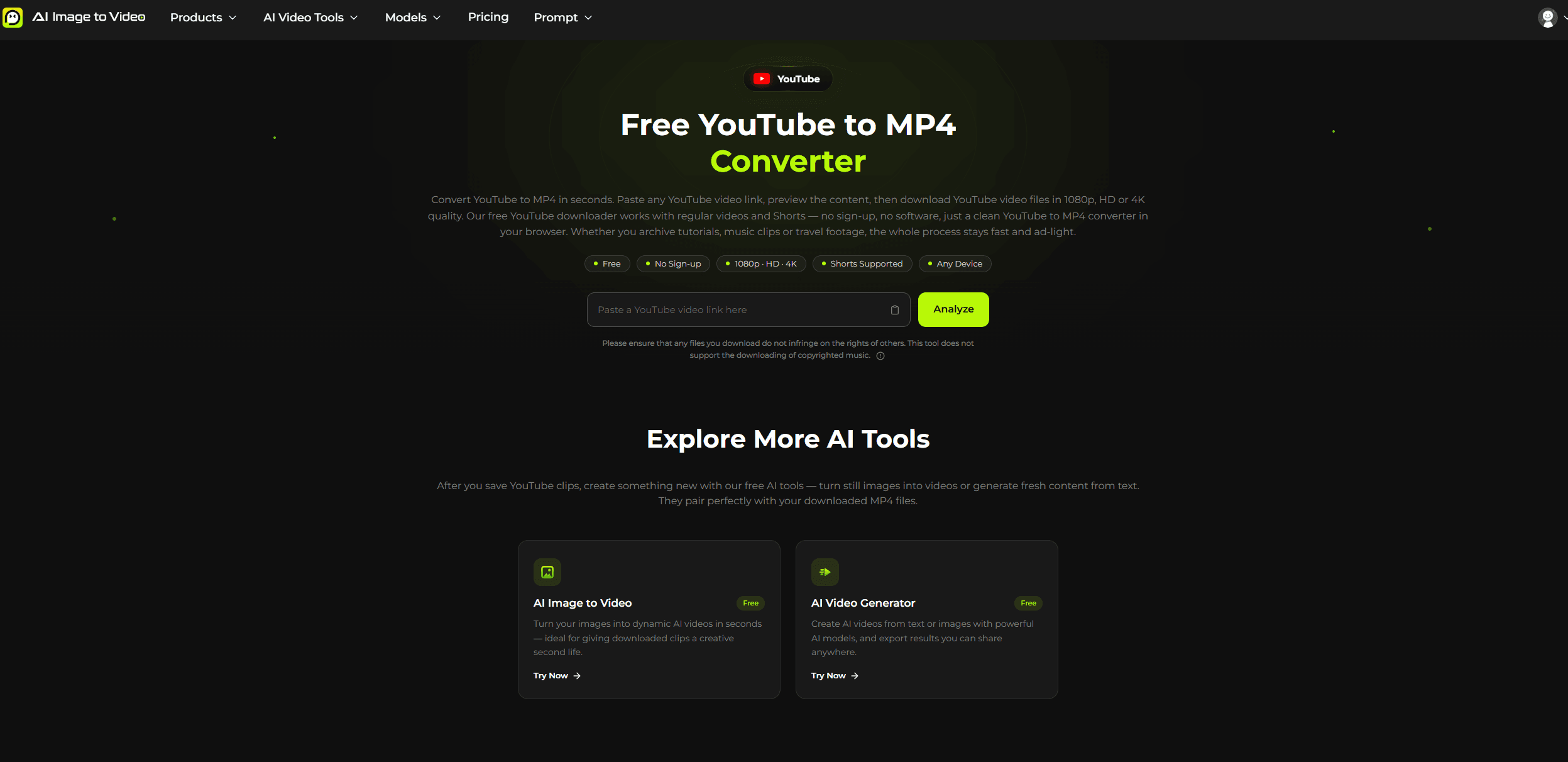
About this app
AI Image to Video's YouTube to MP4 converter is a free, browser-based tool that lets you download YouTube videos and Shorts in MP4 format up to 4K resolution. No sign-up, no software, just paste a link, analyze, and download. It offers a preview, multiple quality options (360p to 4K), and works on any device. The service is ad-light, privacy-conscious, and includes additional AI tools for video creation. Designed for anyone who wants a quick, reliable way to save videos for offline viewing.
Key features
- 1Free YouTube to MP4 conversion up to 4K, no sign-up required.
- 2Supports regular videos and Shorts with preview before download.
- 3Ad-light, privacy-conscious with no long-term URL storage.
Target customer profile
Drawn from the product itself, not from a survey.
Demographic
Students and researchers
Pain points
Need to save educational videos for offline study, research without internet connectivity.
Primary needs
Reliable, free downloads without sign-up, high resolution for clear content.
Demographic
Travelers and commuters
Pain points
Have to watch videos on the go with poor or no internet connection, want to save data.
Primary needs
Download videos in various resolutions, works on mobile data, easy to use.
Demographic
Content creators
Pain points
Need to download reference footage or clips from YouTube for inspiration, editing, or remixing.
Primary needs
Fast, high-quality downloads, support for HD/4K, ability to download Shorts.
Demographic
General users
Pain points
Want to enjoy favorite videos offline, archive content, or avoid streaming data usage.
Primary needs
Simple interface, no sign-up, free, compatible with all devices.
Scout Review
Written by AI from measured evidence, scored out of 100.
AI Image to Video's YouTube to MP4 converter is a functional, no-frills tool that does what it promises: paste a link, analyze, and download in various resolutions up to 4K. The design is modern but cluttered, and performance is a significant letdown with slow load times. Security is basic, and accessibility has room for improvement. In a crowded market, it lacks a killer differentiator, but for users who value no sign-up and a clean download experience, it's a viable option—if you can wait for the page to load.
Measure by measure
Usability
62Core flow is simple: paste, analyze, download. CTA is clear. But below the fold, sections compete for attention and the dense link grid feels like SEO stuffing. No sign-up is a plus.
Design
58Dark theme with lime accents is modern and consistent, but repetitive card grids and a cluttered nav with many dropdowns hurt clarity. Overall average for the category.
Speed
46Lighthouse mobile performance 56/100 with LCP 10.3s — painfully slow. Desktop 49/100. CLS is fine, but initial load is heavy. Needs asset optimization and faster server response.
Security
52HTTPS enforced and X-Content-Type-Options set, but no HSTS, CSP, or frame protection. No DMARC, no secure cookies. No compliance claims. Basic security for a small tool, but not robust.
Accessibility
58Lighthouse 87/100 but failing audits: heading order, missing lang attribute, links without names, no main landmark. No a11y statement. Multi-language support is a plus, but basics need fixing.
Growth
55Real problem (downloading YouTube videos) but crowded market. Differentiator: free, no sign-up, ad-light, 4K support. No unique wedge; competes with established tools. Limited headroom.
Improvement areas
- Page load speed is poor (LCP 10.3s) and needs optimization.
- Security headers like HSTS and CSP are missing.
- Accessibility issues: missing lang attribute and main landmark.
Design & Usability
The design is a mixed bag: a clean dark theme with lime accents gives it a modern feel, but the homepage suffers from repetitive card grids and a navigation bar overloaded with dropdowns. Usability-wise, the core flow is straightforward—paste a link, hit Analyze, pick a quality—and the absence of sign-up is a genuine plus. However, below the fold, sections compete for attention, and the dense link grid at the bottom feels more like SEO stuffing than helpful navigation. The step cards (01-03) are a nice touch, but overall, the page could use a more focused layout.
Speed & Security
Performance is a weak point: Lighthouse scores 56/100 on mobile with a 10.3s LCP, which is painfully slow for a tool that promises quick downloads. Desktop isn't much better at 49/100. On the security front, HTTPS is enforced and X-Content-Type-Options is set, but the absence of HSTS, CSP, and frame protection leaves room for improvement. No DMARC or secure cookies either. For a small tool, it's basic but not alarming; still, adding security headers would be a quick win.
Accessibility & Growth
Accessibility is decent but not great: Lighthouse gives 87/100, yet fails on heading order, missing lang attribute, and no main landmark. No accessibility statement is provided. Growth-wise, the tool addresses a real need—downloading YouTube videos—but the market is crowded with established players like Y2mate and SaveFrom. The differentiators (free, no sign-up, ad-light, 4K) are nice but not unique. The domain is only a year old, and traction signals are absent. It can survive, but standing out will be an uphill battle.
Conclusion
If you're patient enough to wait for the page to load, this converter gets the job done without the usual pop-up hell. But in a sea of YouTube downloaders, it needs to speed up and sharpen its focus to truly stand out. For now, it's a decent backup when the big names are blocked.
Suggestions for improvement
- Optimize page load: lazy-load images, minify CSS/JS, and consider a CDN to improve LCP.
- Add security headers: HSTS, CSP, and frame protection to boost trust and safety.
- Fix accessibility issues: add lang attribute, main landmark, and proper heading order.
- Reduce homepage clutter: consolidate feature sections and trim navigation dropdowns.
Alternatives comparison
Named competitors, point by point. Nobody paid to appear here or to be left out.
 AI Image to Video YouTube to MP4 Converter AI Image to Video YouTube to MP4 Converter | Y2mate | 4K Video Downloader |  SaveFrom.net SaveFrom.net | |
|---|---|---|---|---|
| Pricing model | Free, no sign-up, with optional paid plans for AI video tools | Free with ads and limitations | Free with ads | Freemium, paid desktop software |
| Maximum resolution | Up to 4K | Up to 1080p (varies) | Up to 4K | Up to 8K |
| Sign-up requirement | No sign-up required | No sign-up required | No sign-up required | No sign-up for basic use |
| Platform | Browser-based, works on any device | Browser-based and browser extension | Browser-based | Desktop software (Windows, macOS, Linux) |
| Ad experience | Ad-light | Ad-heavy with pop-ups | Ad-heavy with pop-ups | No ads in paid version |
Y2mate
Online video downloader supporting multiple formats.
4K Video Downloader
Desktop software offering high-quality downloads from YouTube.
SaveFrom.net
Popular YouTube downloader with browser extension support.
Comparing options? See AI Image to Video YouTube to MP4 Converter alternatives, scored side by side
More AI Generations apps
View all AI Generations
Uni-1 by Luma AI
92Uni-1 is an advanced multimodal text-to-image AI model th...

LTX 2.3 AI Video Generator
91Fast, open-source AI video generator with 4K support, mul...

DemoVexa
90Turn your code into professional product demo videos with AI-generated scripts, animated UI, and natural voiceovers.

tradutor de mangá com IA
88O tradutor de mangá com IA traduz capítulos em lote, personaliza textos e oferece edição visual para estúdios.

OBVELO
88Privacy gateway that masks personal data in LLM traffic

Pixelimg
88A free online AI-powered tool that instantly converts ima...

HeyVid AI
88HeyVid AI is a free all-in-one AI video and image generat...

RestorePhotosApp
88An AI-powered photo restoration app that brings old, blur...

IraVoice
88Private on-device dictation for Apple-silicon Macs.

Mygom SEO
87MygomSEO is an AI marketing agent that audits your site, writes SEO content, publishes to 12+ CMS platforms, posts to social, and monitors rankings 24/7.

pause.do
87A privacy-first browser extension that inserts gentle pau...

DeepSwapAI
87AI face swap online with no subscription, pay per use.


A platform dedicated to providing unbiased reviews of newly launched applications, analyzing everything from their features to their full potential.
info@scoutforge.net© 2026 Scoutforge. All rights reserved.
