Cycling through all six. Tap any point to stop.
Measured on six things
An AI-powered photo restoration app that brings old, blur...
Accessibility
78Web-based, no app install needed. Works on any device with a browser. Good for older users. Limited advanced accessibility features mentioned, focused on core restoration task.
Screenshots
1 / 1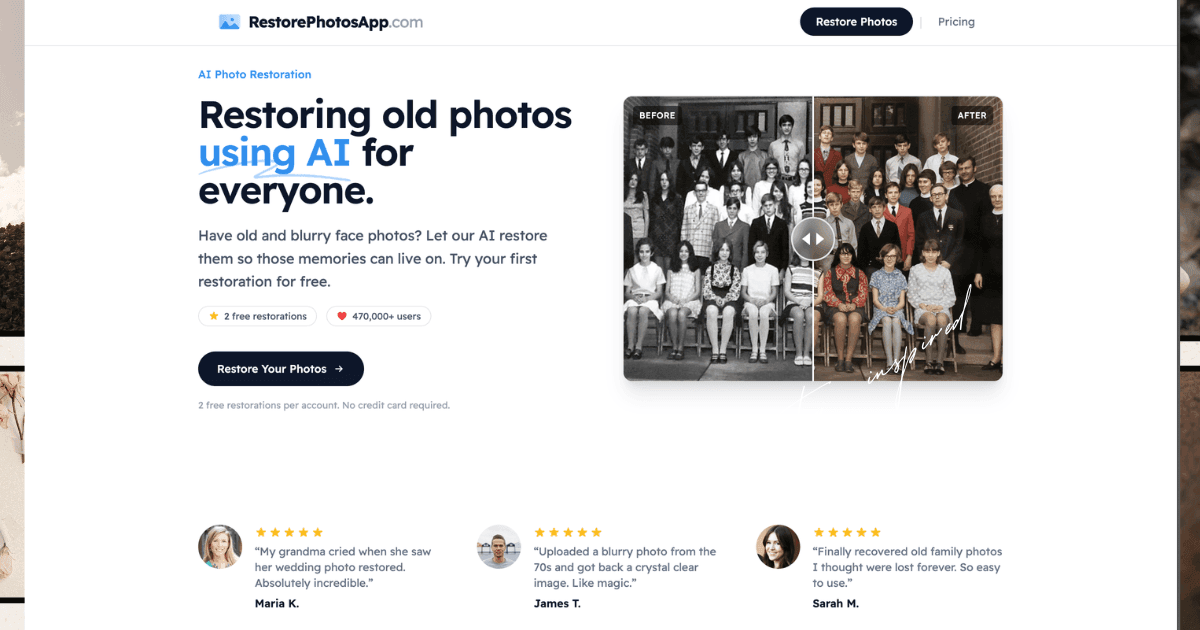
About this app
RestorePhotosApp is a game-changer for anyone with cherished old photos that have seen better days. As a tech enthusiast who's tried my fair share of photo editing tools, I was blown away by how effortlessly this app tackles common issues like blur, scratches, and fading. The AI does the heavy lifting, analyzing faces and textures to restore photos while preserving their original character—no technical skills needed. With over 470,000 users worldwide, it's clear this tool resonates with people looking to revive memories. What sets it apart is the simplicity: upload, choose a style (like restore, colorize, or sharpen), and download the result in under 30 seconds. The pricing is straightforward with one-time credit packs starting at $4.99, and the free trial offers two restorations to test it out. Whether it's a faded family portrait or a blurry wedding photo, RestorePhotosApp makes photo restoration accessible to everyone, turning what used to be a tedious process into a quick, magic...
Key features
- 1AI-powered restoration that removes blur, scratches, noise, and fading while preserving original facial expressions and character
- 2Multiple styles including Restore, Colorize (natural tones), Sharpen, Enhance, and Cleanup. Results in under 30 seconds
- 3One-time credit pricing starting at $4.99 (10 photos), Family plan at ~$0.13/photo. 2 free restorations, no subscription, photos deleted after 30 days
Target customer profile
Drawn from the product itself, not from a survey.
Demographic
Individuals aged 30-70 with family photo collections
Pain points
Old photos are damaged, blurry, or faded; lack technical skills for restoration
Primary needs
Easy-to-use tool to restore and preserve family memories for sharing or reprinting
Demographic
Genealogists, historians, and archivists
Pain points
Historical photos are deteriorating; manual restoration is time-consuming and expensive
Primary needs
Efficient AI solution to restore large batches of photos for documentation and preservation
Demographic
Photographers and hobbyists working with vintage or scanned images
Pain points
Blurry or low-quality photos from old cameras or scans; need high-resolution outputs
Primary needs
Quick enhancement and colorization tools to improve photo quality for professional or personal use
Scout Review
Written by AI from measured evidence, scored out of 100.
RestorePhotosApp is a highly effective, user-friendly AI tool that delivers on its promises for restoring old, blurry, scratched, or faded family photos. With simple modes including full restoration, colorization with natural tones, sharpening, and cleanup, it produces impressive results quickly while preserving authenticity. The one-time pricing model, generous free trial, strong privacy practices, and focus on face photos make it ideal for its target audience of families, genealogists, and hobbyists. It outperforms more general or ecosystem-locked alternatives for pure restoration tasks. At 88/100, it's a recommended choice for anyone wanting professional-looking results without the hassle or ongoing costs.
Measure by measure
Usability
95Dead simple 3-step process: upload, pick style (Restore, Colorize, Sharpen, Enhance, Cleanup), download in under 30 seconds. No install, no learning curve. Perfect for non-technical users 30-70.
Design
85Clean, straightforward web interface with prominent before/after galleries, simple upload flow, and clear calls-to-action. Modern but not flashy—focuses on function over form with effective visual proof of restorations.
Speed
92Processes most photos in under 30 seconds using cloud AI. High-res outputs delivered quickly. Fast enough that users call it 'magic' in testimonials.
Security
82Photos transmitted over HTTPS, stored privately on Cloudflare R2, automatically deleted after 30 days, and explicitly not used for training AI models. 30-day money-back guarantee.
Accessibility
78Web-based, no app install needed. Works on any device with a browser. Good for older users. Limited advanced accessibility features mentioned, focused on core restoration task.
Growth
85Over 470,000 users worldwide. Strong testimonials, one-time credit pricing (no subs), free trial with 2 restorations. Targets family historians, genealogists, and hobbyists effectively. Family plan offers excellent value at ~$0.13/photo.
Improvement areas
- Currently limited to face/portrait photos; expanding to group shots, landscapes or documents would broaden appeal
- Lacks advanced manual editing tools or adjustment sliders for users wanting more control beyond one-click AI
- No native mobile app or bulk upload/processing features for power users and large archival projects
Design & Usability
RestorePhotosApp nails the basics with a clean, no-nonsense web design that puts before-and-after examples front and center. The usability is where it truly shines—upload a damaged family photo, choose from Restore, Colorize, Sharpen, Enhance or Cleanup, and get results in seconds. No technical skills required, which perfectly matches the 30-70 demographic with old prints, Polaroids, and scanned images. The AI preserves original expressions and character while fixing blur, scratches, noise, and fading. It's exactly as simple as the marketing claims, making it accessible for genealogists, historians, and regular families alike. Compared to alternatives, it avoids the mobile-first gimmicks or genealogy lock-in of competitors.
Speed & Security
Speed is excellent with most restorations completing in under 30 seconds on their cloud AI, trained on millions of photos. High-resolution downloads (1080p on higher plans) come fast without watermarks on paid tiers. Security is solid: HTTPS, photos deleted after 30 days, not used for model training, and a 30-day money-back guarantee. One-time credit packs ($4.99 for 10, up to $19.99 for 150) with credits that never expire beat subscription fatigue. It's reliable enough that users report crystal-clear results on 70s photos and wedding images that bring tears to family members.
Accessibility & Growth
As a pure web tool, it's highly accessible—no downloads or complex software. This helps older users and non-tech-savvy people preserve memories for sharing or reprinting. Growth is impressive at 470k+ users driven by word-of-mouth testimonials and real results on severely damaged face photos. It stands out for batch-friendly pricing for archivists while staying simple for individuals. The focus on face photos is a limitation but a smart one for quality control. Overall, it's grown by being the straightforward, trustworthy option in a crowded AI restoration space.
Conclusion
If you have boxes of deteriorating family history, this tool turns frustration into fast, high-quality digital treasures. The AI magic is real, the experience is painless, and the value is excellent. Highly recommended for preserving memories that matter.
Suggestions for improvement
- Expand support beyond face photos to handle landscapes, documents, or group scenes without quality drop.
- Add batch upload and processing for genealogists and archivists working with large collections.
- Implement more user controls like adjustable strength sliders or manual touch-up options for power users.
- Develop a companion mobile app for easier on-the-go scanning and restoration of physical albums.
Alternatives comparison
Named competitors, point by point. Nobody paid to appear here or to be left out.
 RestorePhotosApp |  Remini |  MyHeritage In Color | |
|---|---|---|---|
| Core Focus | Comprehensive old photo restoration (blur, scratches, fading, sharpen, colorize) | Mobile-first enhancement, strong on faces & modern selfies, old photo restoration | Colorization + color restoration of B&W/faded photos, genealogy integration |
| Pricing Model | One-time credits ($4.99/10 photos), no subscription, credits never expire | Free with ads/limited, Premier subscription for full access | Free limited use, bundled with paid genealogy subscription (~$129+/yr) |
| Processing Speed | Under 30 seconds per photo | Very fast, often instant on mobile | Fast but varies, part of web platform |
| Best For | Simple, one-time restoration of damaged family portraits & historical faces | Mobile users enhancing selfies and occasional old photos | Genealogists already using MyHeritage for family trees & colorization |
Remini
A popular AI photo enhancer app known for restoring old photos and improving image quality, often used for face enhancement and clarity.
MyHeritage In Color
A tool focused on colorizing black and white photos, often integrated with genealogy services for historical photo restoration.
Comparing options? See RestorePhotosApp alternatives, scored side by side
Sources
What the review was written against. A verdict with no sources is an opinion.
More Design & Creativity apps
View all Design & Creativity
RoomCreator
92An AI-powered interior and exterior design tool that tran...

QRBliss
91Branded QR codes with AI Brand Sync, 15 free dynamic code...

ThumbnailMaker
90AI YouTube thumbnail maker: paste a video link, get the brief, the thumbnail, and a check at feed size.

All of Us
89Add deceased loved ones to photos with AI and see free pr...

Cross Stitch Pattern Maker
89Free on-device photo-to-DMC/Anchor chart with skein counts.

FontPlop
89Browser-based font viewer & tester for TTF, OTF, WOFF, WO...

AI Vocals Generator
89Add AI singers or rappers to your own beat, get two takes...

What the GIF
89Frame-perfect video-to-GIF maker that runs entirely in yo...

Tracé slides
89Interactive math & physics slides with live graphs and an...

English Test Coach
89English Test Coach checks your IELTS essays and letters, gives an estimated band score across all four criteria, and tells you exactly what to revise next.

Pixelimg
88A free online AI-powered tool that instantly converts ima...

BeartIMAGE
88BeartIMAGE is a free, web-based image processing platform engineered for fast, bulk photo editing and conversion directly in your browser.


A platform dedicated to providing unbiased reviews of newly launched applications, analyzing everything from their features to their full potential.
info@scoutforge.net© 2026 Scoutforge. All rights reserved.
