Cycling through all six. Tap any point to stop.
Measured on six things
Bulk migrate MBOX files to cloud, email clients, and form...
Design
45Dated homepage: a floating query popup covers the hero headline, a 15+ item bullet wall flattens all value props, and four competing CTA styles fight for attention. The email-client icon grid is the one tidy section.
Screenshots
1 / 1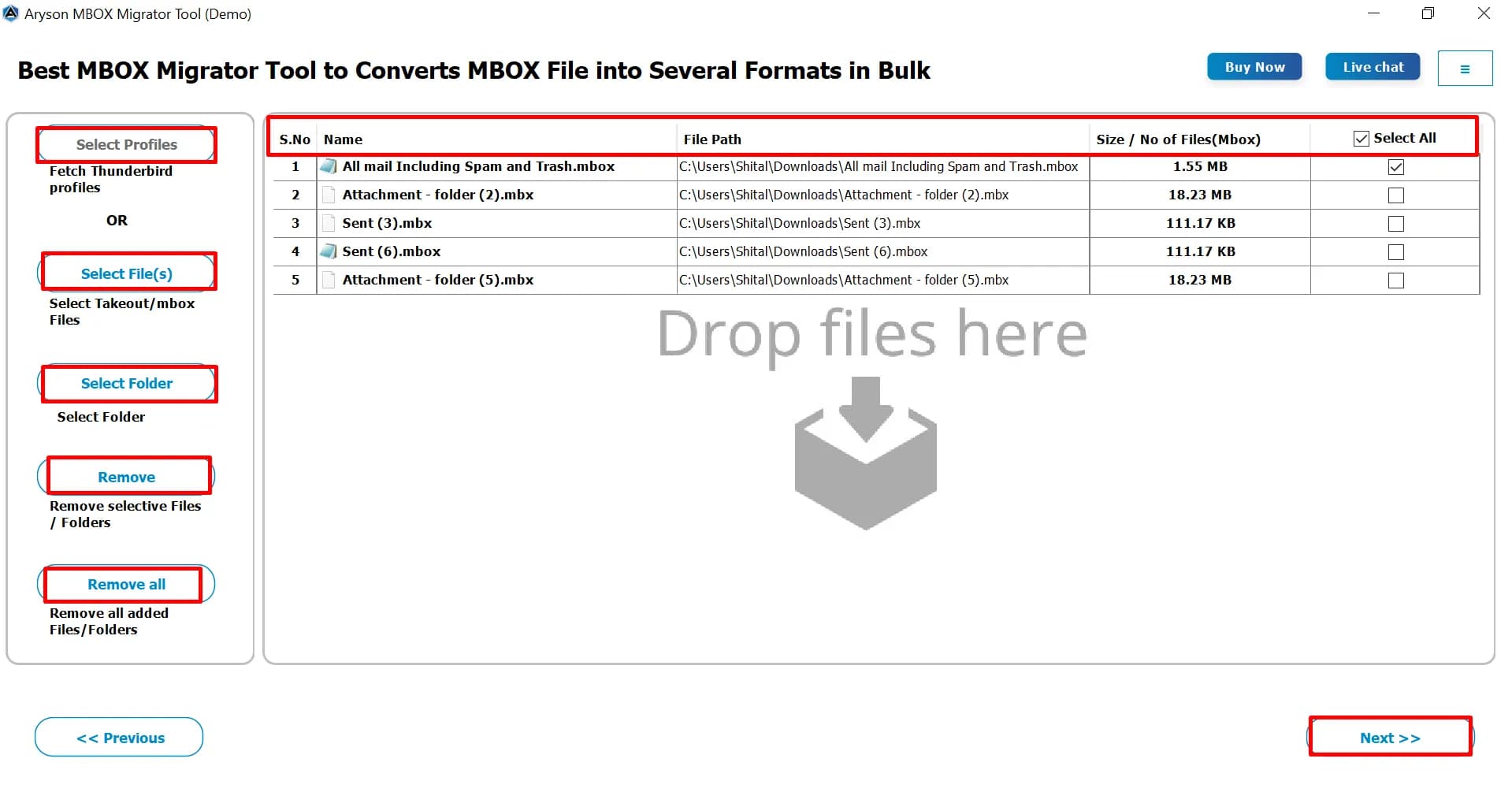
About this app
Aryson MBOX Migrator Tool is a versatile software designed to simplify the migration of MBOX files to various email platforms and formats. It supports exporting MBOX data to Office 365, Google Workspace, IMAP, Gmail, Hotmail, and GoDaddy, as well as converting to PST, EML, MSG, PDF, CSV, and Thunderbird. The tool offers advanced features like bulk migration, mailbox mapping, date filters, duplicate removal, and attachment management. With a user-friendly interface and robust security, it caters to both individual users and enterprises looking to streamline email migration processes.
Key features
- 1Migrate MBOX to Office 365, Google Workspace, IMAP, Gmail, Hotmail and GoDaddy with OAuth modern authentication
- 2Convert MBOX to PST, EML, MSG, PDF, CSV and Thunderbird with bulk processing and folder-structure preservation
- 3Mailbox mapping, date-range filters, duplicate skipping, attachment handling and file-splitting options
- 4Free version converts up to 50 emails/folders so you can evaluate before purchasing
Target customer profile
Drawn from the product itself, not from a survey.
Demographic
IT administrators and enterprise migration teams
Pain points
Complex, time-consuming manual MBOX migration; risk of data loss
Primary needs
Bulk migration, mailbox mapping, secure authentication, data integrity
Demographic
Small business owners and individual professionals
Pain points
Limited technical expertise; need for cost-effective, reliable migration
Primary needs
Simple interface, multiple output formats, affordable pricing
Demographic
Email power users (e.g., Thunderbird, Apple Mail users)
Pain points
Difficulty switching email clients or archiving emails in accessible formats
Primary needs
Preservation of folder structure, attachments, and metadata; support for various MBOX variants
Scout Review
Written by AI from measured evidence, scored out of 100.
Aryson MBOX Migrator is a competent, long-running utility with a fast site, clean security headers and a genuinely useful feature set for anyone moving MBOX archives into the cloud. The engineering underneath is fine. The problem is the shopfront: a dated homepage where a support popup covers the headline, a bullet wall flattens every feature into the same grey line, and four different button styles compete for the same click. Accessibility is the weakest dimension, with a 76/100 audit and a list of real failures — missing alt text, broken heading order, low contrast — and no WCAG statement to suggest it's being addressed. Security is solid on headers and OAuth but stops short of any published audit. Growth is real but crowded: the problem is worth paying for, the differentiators are genuine, and the competition includes a free open-source client.
Measure by measure
Usability
58Solid self-serve kit — Screenshots, Video, Guide, FAQs, Specifications, plus a 50-email free tier to test before buying. Undone by a Windows/Mac toggle that hides the right download and a demo link buried under the purchase button.
Design
45Dated homepage: a floating query popup covers the hero headline, a 15+ item bullet wall flattens all value props, and four competing CTA styles fight for attention. The email-client icon grid is the one tidy section.
Speed
82Genuinely fast: Lighthouse mobile 94/100 with LCP 1.8s and CLS 0.003, desktop 78/100. TBT of 193ms is the only real drag. For a page this content-heavy, that's a strong result.
Security
76Clean header hygiene — HTTPS, HSTS, CSP, frame protection, SPF and DMARC all present (12/12 probe). OAuth modern auth for O365/Gmail with 'no credentials stored' is a real plus. No SOC 2/ISO/pen-test published.
Accessibility
56Lighthouse 76/100 with real failures: low contrast, missing alt text, broken heading order, unnamed links, no main landmark, undersized touch targets. No WCAG statement anywhere. Works, but leaves users behind.
Growth
60Real, specific problem — MBOX-to-cloud migration with mailbox mapping and OAuth — aimed at IT admins who genuinely pay for this. Differentiated on format breadth, but Thunderbird is free and the category is crowded.
Improvement areas
- Dated homepage with a popup covering the hero and a 15+ item bullet wall that flattens all value props
- Accessibility failures: missing alt text, broken heading order, low contrast, unnamed links, no main landmark
- No published SOC 2, ISO 27001, pen-test or bug bounty — only a 'GDPR Compliant' stat card
- Windows/Mac toggle and buried demo link add friction to the download and trial paths
Design & Usability
The homepage is doing its best impression of a spec sheet stapled to a storefront. A floating 'queries about download/purchase' popup sits directly over the hero headline, so the first thing a visitor reads is a chat prompt instead of the product. Below that, fifteen-plus near-identical bullets in uniform weight, four competing CTA styles, and a Windows/Mac toggle that hides the correct download. The one bright spot is the six-column email-client icon grid — orderly, consistent, scannable. Usability is better than design: Screenshots, Video, Guide, FAQs and Specifications give real self-serve depth, and the 50-email free tier lets you test before buying. But the demo link is a grey whisper under a red Purchase button, and the long page has no in-page nav, so finding pricing after scrolling is a chore.
Speed & Security
Speed is the standout. Lighthouse mobile scores 94/100 with a 1.8s LCP, 0.003 CLS and 193ms TBT; desktop lands 78/100. For a page this dense with content, that's a genuinely well-built front end and no user complaints about lag surfaced. Security is quietly competent: the HTTP probe returns 12/12 — HTTPS enforced, HSTS, CSP, frame protection, X-Content-Type-Options, Referrer-Policy, Permissions-Policy, plus SPF and DMARC on the domain. The product also claims OAuth modern authentication for Office 365 and Gmail with no credential storage during migration, which is the right posture for a tool handling mailbox credentials. What's missing is third-party proof: no SOC 2, ISO 27001, pen-test report or bug bounty is published, and the 'GDPR Compliant' stat card is a claim, not a certification. For an enterprise-facing migration tool, that gap is the one thing keeping security out of the excellent band.
Accessibility & Growth
Accessibility is the weak link. Lighthouse scores 76/100 and the failing audits are not cosmetic: insufficient color contrast, images without alt attributes, headings out of sequential order, links with no discernible name, no main landmark, list items outside their parent lists, and touch targets too small or too close together. There is no accessibility statement or WCAG conformance claim on the site, so there's no evidence anyone is tracking this. Growth is a more interesting question. The problem is real and specific — migrating MBOX archives into Office 365, Google Workspace and IMAP with mailbox mapping, OAuth and date filters — and the target buyer (IT admins and enterprise migration teams) genuinely pays for this rather than doing it by hand. The wedge is format breadth and cloud-migration depth. The limit is the peer set: Thunderbird is free and natively handles MBOX, Mailbird is a cheap polished client, and the migration-tool category is crowded with established players. Aryson's 13-year domain and claimed 1.55M downloads give it a real base, but nothing in the material shows a moat the incumbents can't copy.
Conclusion
If you're an IT admin with a pile of MBOX files and a deadline, this tool will probably do the job — the feature list is real, the free tier lets you prove it on 50 emails, and the site loads fast enough that you won't rage-quit before downloading. If you're judging it as a product, the gap is presentation and proof: fix the hero, kill the popup, publish an accessibility statement, and put a real compliance document behind that GDPR badge. The bones are good. The packaging is 2016.
Suggestions for improvement
- Remove or reposition the floating query popup so it never covers the hero headline and intro paragraph.
- Collapse the 15+ hero bullets into 4-5 grouped value props with visual hierarchy instead of a uniform wall.
- Fix the accessibility failures: add alt text, correct heading order, raise contrast, name the links, add a main landmark.
- Publish a real compliance page (SOC 2 / ISO / pen-test summary) instead of a 'GDPR Compliant' stat card.
Alternatives comparison
Named competitors, point by point. Nobody paid to appear here or to be left out.
 Aryson MBOX Migrator Tool | Mailbird |  Thunderbird | |
|---|---|---|---|
| Native MBOX file support | Yes — core input format, supports Thunderbird, Apple Mail, Google Takeout and 15+ MBOX variants | Yes — imports MBOX files into the client | Yes — native MBOX storage format, no conversion needed |
| Cloud mailbox migration (Office 365 / Google Workspace) | Yes — direct migration with OAuth, mailbox mapping and admin credentials | Partial — connects accounts for unified inbox, not bulk migration | Partial — IMAP account setup, no dedicated migration workflow |
| Output format conversion (PST, EML, MSG, PDF, CSV) | Yes — PST, EML, MSG, PDF, CSV, MBOX and Thunderbird | Limited — primarily an email client, not a format converter | Limited — EML export via add-ons, no native PST/PDF/CSV output |
| Bulk migration and filters | Yes — bulk conversion, date-range filters, duplicate skipping, file splitting | No — client-side import, no batch migration tooling | No — manual per-folder handling |
| Pricing model | Paid license with free version limited to 50 emails/folders | Paid subscription with free tier | Free and open source |
| Target user | IT admins and enterprise migration teams, plus individuals moving to cloud | Individual professionals wanting a unified inbox | Power users and open-source advocates |
Mailbird
A popular email client that supports MBOX import and offers a unified inbox for multiple accounts.
Thunderbird
A free, open-source email client that natively supports MBOX files and allows import/export.
Comparing options? See Aryson MBOX Migrator Tool alternatives, scored side by side
More E-Mail apps
View all E-Mail
EML to PDF
88Convert .eml, .msg and .mbox emails to PDF in your browser

youtubetomp3.ink
87Free online YouTube to MP3 converter with no signup or so...

AgentiSend
87Resend alternative: email API for developers and AI agents

PitchCentric
86AI podcast booking intelligence with probability scoring.

PCDOTS PST Converter
85Convert Outlook PST files to 16 formats and clouds withou...

EmailFig
85Email marketing that gets out of your way, with all featu...

Postfleet
83Email infrastructure that turns inbound mail into safe JS...

Mailwell
83A calm, fast Mac mail app for all your accounts. Your mail stays on your Mac, with no servers in between.

CaptainVerify
82.5CaptainVerify is a powerful email and mobile number verif...

Mailmodo
82Mailmodo revolutionizes email marketing with AMP-powered interactive emails, AI tools, and automation to boost engagement and ROI.

VerifiedEmail
82A specialized tool for real-time email verification and list cleaning, boosting deliverability and compliance.

Gblock
81A Chrome extension that blocks hidden email trackers in Gmail, ensuring privacy by detecting spy pixels and anonymizing links.


A platform dedicated to providing unbiased reviews of newly launched applications, analyzing everything from their features to their full potential.
info@scoutforge.net© 2026 Scoutforge. All rights reserved.
