Cycling through all six. Tap any point to stop.
Measured on six things
Password-protect and encrypt PDF files in bulk without Ad...
Design
44Dated landing page: a chat popup covers the hero copy, a 20-bullet spec sheet replaces a value proposition, and copy errors ('more stronger', 'Window OS') undercut a security product. The desktop app's action stack is at least logically laid out.
Screenshots
1 / 1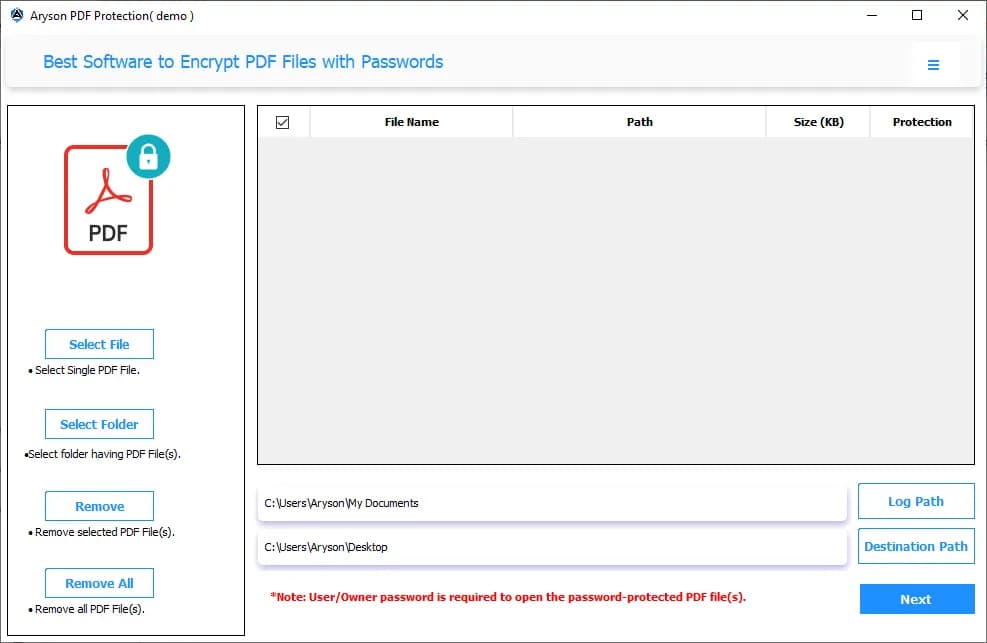
About this app
Aryson PDF Password Protection Tool is a Windows-based utility designed to lock PDF files with user and owner passwords, offering four encryption levels (AESx128, AESx256, RC4x128, RC4x40). It supports batch processing of unlimited PDFs, auto-generated or manual passwords, customizable permissions (copy, print, edit), metadata editing, and attachment handling. The tool works independently of Adobe Acrobat and is compatible with Windows 7 through 11 and Server editions. A free demo version watermarks output files, while the full license costs $29.
Key features
- 1Batch lock unlimited PDFs with user and owner passwords, no Adobe Acrobat required.
- 2Four encryption levels (AESx256, AESx128, RC4x128, RC4x40) with customizable permissions for copy, print and edit.
- 3Auto-generated or manual passwords, metadata editing, attachment handling, and Windows 7–11 / Server support.
Target customer profile
Drawn from the product itself, not from a survey.
Demographic
HR managers handling confidential employee records
Pain points
Risk of unauthorized access to sensitive payroll and policy documents
Primary needs
Strong encryption, batch protection, and permission controls
Demographic
Legal professionals managing contracts and case files
Pain points
Need to prevent tampering and unauthorized sharing of legal documents
Primary needs
Owner/user passwords, 256-bit encryption, and audit-friendly metadata
Demographic
Small business owners sharing financial reports
Pain points
Limited budget and no Adobe Acrobat license for PDF security
Primary needs
Affordable standalone PDF protection with batch processing
Demographic
IT administrators securing bulk PDFs for compliance
Pain points
Time-consuming manual encryption and inconsistent permission settings
Primary needs
Automated password generation, bulk locking, and Windows compatibility
Scout Review
Written by AI from measured evidence, scored out of 100.
Aryson PDF Password Protection Tool is a Windows utility that locks PDFs with user and owner passwords across four encryption levels, batch-processes unlimited files, and adds permission controls and metadata editing — all without Adobe Acrobat, for a $29 one-time license with a watermarked free demo. The marketing site is fast and technically well-secured but visually dated and sloppy in copy. The product's real weaknesses are the deprecated RC4 options it still advertises, the absence of any published compliance or audit documentation, and a crowded category where free tools already do the core job. It's a competent, cheap, narrow tool for someone who needs bulk PDF locking and doesn't want a subscription.
Measure by measure
Usability
58Clear primary Download/Purchase CTAs, an FAQ accordion, guides and a demo, and a desktop app whose Select File/Folder stack matches the bulk workflow. Undone by a text-heavy page and a demo link buried in small red text.
Design
44Dated landing page: a chat popup covers the hero copy, a 20-bullet spec sheet replaces a value proposition, and copy errors ('more stronger', 'Window OS') undercut a security product. The desktop app's action stack is at least logically laid out.
Speed
88Lighthouse mobile 97/100 (LCP 1.1s, CLS 0, TBT 185ms) and desktop 92/100. The marketing site is genuinely fast and stable; no lag complaints surfaced in the collected evidence.
Security
76Strong transport hygiene: HTTPS enforced, HSTS, CSP, frame protection, Referrer-Policy, Permissions-Policy, SPF and DMARC — 12/12 on the header probe. No SOC 2/ISO/pen-test claim found, so it sits below the audited tier.
Accessibility
70Lighthouse a11y 90/100, but failing audits include insufficient color contrast, non-sequential headings, small touch targets and a missing main landmark. No WCAG statement or multi-language support found.
Growth
58Real problem, specific buyers (HR, legal, IT admins), and a clear $29 one-time wedge against subscription Acrobat. But batch PDF locking is a crowded, largely commoditized niche with free QPDF underneath it.
Improvement areas
- Drop the deprecated RC4 encryption options and standardize on AES.
- Publish a security/compliance page (SOC 2, ISO, pen-test) — currently absent.
- Clean up the landing page: fix copy errors, remove the chat overlay from the hero, and lead with value over a 20-bullet list.
- Make the free demo more prominent instead of burying it in small red text under the buy buttons.
Design & Usability
The homepage is doing the product no favors. A floating chat bubble and query popup sit on top of the hero paragraph, the first screen is a twenty-line bullet spec sheet, and copy errors like 'more stronger' and 'Window OS' land on a page selling document security. The desktop app itself is more disciplined: the Select File / Select Folder / Remove / Remove All stack maps cleanly to the bulk-encryption job, and the password warning sits next to the Next button where it belongs. Usability is competent — Download and Purchase are unmistakable, there's an FAQ accordion, guides, screenshots and a demo — but the demo link is small red text under the buy buttons and the page is dense enough to slow a decision.
Speed & Security
Speed is the standout. Lighthouse measured 97/100 on mobile (LCP 1.1s, CLS 0, TBT 185ms) and 92/100 on desktop, and nothing in the collected evidence suggests users experience lag. Security is a split verdict: the site's transport layer is genuinely well configured — HTTPS enforced, HSTS, CSP, frame protection, Referrer-Policy, Permissions-Policy, SPF and DMARC, 12/12 on the header probe. But there is no SOC 2, ISO 27001, pen-test summary or bug bounty published, and the tool advertises RC4x40 and RC4x128 as encryption options alongside AES. RC4 is deprecated for good reason; offering it as a 'security level' is a credibility problem for a product whose entire job is encryption.
Accessibility & Growth
Accessibility lands at 90/100 on the automated Lighthouse audit, which is respectable, but the failing list is specific: insufficient color contrast, non-sequential heading order, undersized touch targets, no main landmark, and role=presentation conflicts. There's no accessibility statement or WCAG conformance claim, and no multi-language support visible. Growth is a judgement on the idea: the problem is real, the buyers are named (HR managers, attorneys, IT admins, small business owners), and the $29 one-time price against Acrobat's subscription is a genuine wedge. The limit is the category — batch PDF locking is commoditized, QPDF does it free, and Sejda and PDFelement bundle it into broader editors. Aryson's differentiator is price and simplicity, not a moat.
Conclusion
If you're an HR manager or small firm with a stack of PDFs to lock and no Acrobat license, $29 for batch encryption with permission controls is a reasonable trade — try the watermarked demo first and confirm the output meets your compliance needs. If you need audited security posture, AES-only encryption, or a tool that will still be defensible in a security review, look at Acrobat Pro or PDFelement instead. And if you're technical, QPDF is free and does the encryption without the marketing page.
Alternatives comparison
Named competitors, point by point. Nobody paid to appear here or to be left out.
 Aryson PDF Password Protection Tool |  Adobe Acrobat Pro |  PDFelement |  QPDF | Sejda PDF Desktop | |
|---|---|---|---|---|---|
| Price model | $29 one-time license; free demo watermarks output | Subscription (monthly/annual) | Perpetual license + subscription tiers | Free, open source | Free tier with daily limits; paid desktop license |
| Batch PDF password protection | Yes — unlimited PDFs, auto or manual passwords | Yes, via Actions/Protect | Yes, batch processing supported | Yes, via CLI scripting | Yes, within daily task limits on free tier |
| Encryption standards offered | AESx256, AESx128, RC4x128, RC4x40 | AES-256 / AES-128 | AES-256 / AES-128 | AES-256 / RC4 (configurable) | AES-256 / AES-128 |
| Requires Adobe Acrobat | No — standalone | Is Acrobat | No — standalone editor | No — standalone CLI | No — standalone |
| Ease of use for non-technical users | GUI, guided workflow | GUI, feature-dense | GUI, user-friendly | Command line only — technical users | GUI, simple |
Adobe Acrobat Pro
Industry-standard PDF editor with robust password protection and permission settings, but requires a subscription and is more expensive.
PDFelement
All-in-one PDF editor that includes encryption, password protection, and batch processing, with a user-friendly interface and OCR features.
QPDF
Open-source command-line tool for PDF encryption and decryption, free but requires technical knowledge to use.
Sejda PDF Desktop
Desktop PDF tool with password protection and permission settings, offering a free tier with limited daily tasks.
Comparing options? See Aryson PDF Password Protection Tool alternatives, scored side by side
More Security apps
View all Security
issued.live
89Free certificate transparency search and SSL lookup with ...

kosa8
88Sealed VMs for AI agents with instant rewind, audit trails & zero key exposureSealed VMs for AI agents with instant rewind and audit tr...

Vaultin AI
88Private AI for law, accounting and advisory firms that ke...

Vigilance
88Checks code AI tools install and replaces harmful updates.

OBVELO
88Privacy gateway that masks personal data in LLM traffic

Postdate
88Share one link now that opens at the time you choose.

SendVeil
88Send large original files through private, expiring links, with EU storage.

BenchFleet
88Desktop hub to control real Android phones with AI agents...

Magery Forge
87Weekly security audits for vibe-coded sites, explained in...

Tokitool
87Free, private browser tools for images, chats, QR codes, ...

C2PA Lab
87Free C2PA Content Credentials Checker

Sidenty
87Sidenty is a professional digital identity protection ser...


A platform dedicated to providing unbiased reviews of newly launched applications, analyzing everything from their features to their full potential.
info@scoutforge.net© 2026 Scoutforge. All rights reserved.
