Cycling through all six. Tap any point to stop.
Measured on six things
Repair corrupt VHD files and recover lost data safely and...
Design
45Dated Windows 7-era app UI and a hero that dumps 20+ ungrouped bullets beside a 3D box render. Chat tooltip clips the intro copy; testimonial cards look template-assembled.
Screenshots
1 / 1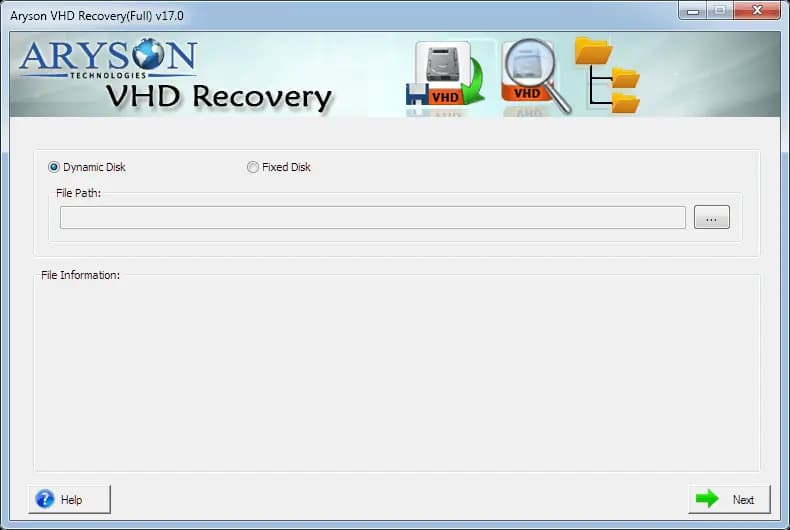
About this app
Aryson VHD Recovery is a specialized tool for repairing corrupt or damaged Virtual Hard Disk (VHD) files and extracting data from them. It supports both fixed and dynamic VHDs, as well as MBR and GPT partition tables, and offers three recovery modes (Standard, Advanced, Deep) to handle various corruption levels. The software can recover deleted VHD files, preview recoverable data before saving, and maintain original folder structures. It is compatible with Windows 7 through 11 and various file systems, making it suitable for IT professionals, system administrators, and virtual environment managers. The free demo allows scanning and previewing, while the full version ($99) enables saving recovered data. Key features include dual scan modes, selective recovery, disk image creation, and support for FAT, NTFS, HFS+, and EXT file systems.
Key features
- 1Three recovery modes (Standard, Advanced, Deep) for varying corruption levels, with MBR and GPT partition support.
- 2Free demo scans and previews recoverable files; $99 full version unlocks saving with original folder structure preserved.
- 3Supports fixed and dynamic VHDs across FAT, FAT16/32/64, NTFS, HFS+, and EXT2/3/4 file systems on Windows 7-11.
Target customer profile
Drawn from the product itself, not from a survey.
Demographic
IT professionals and system administrators managing virtual environments
Pain points
Corrupted VHD files causing data loss, downtime, and manual recovery complexity
Primary needs
Reliable, fast recovery of critical data from damaged VHDs with minimal disruption
Demographic
Small to medium businesses using virtualization for servers and workstations
Pain points
Limited budget for enterprise recovery tools; need for cost-effective solution
Primary needs
Affordable, easy-to-use software that recovers data from both fixed and dynamic VHDs
Demographic
Cloud support engineers and virtualization specialists
Pain points
Severely corrupted VHDs failing manual recovery; need for deep scanning
Primary needs
Advanced recovery modes (Deep scan), support for MBR/GPT, and selective restore
Scout Review
Written by AI from measured evidence, scored out of 100.
Aryson VHD Recovery is a competent, long-running Windows utility for a real problem: pulling data out of corrupt or damaged VHD files. The site is dated and the hero is a bullet wall, but the workflow is concrete, the demo lets you scan and preview before paying $99, and the technical fundamentals — speed and security headers — are solidly above average. Where it lags is polish, accessibility detail, and differentiation: Stellar and Kernel own the mindshare, and price is the only lever here that a competitor can match tomorrow.
Measure by measure
Usability
58Clear nav to Features, Specs, Screenshots, Video, FAQs, Download and Buy. Free demo scans and previews; $99 unlocks saving. System requirements sit buried below reviews and steps.
Design
45Dated Windows 7-era app UI and a hero that dumps 20+ ungrouped bullets beside a 3D box render. Chat tooltip clips the intro copy; testimonial cards look template-assembled.
Speed
70Lighthouse mobile 87/100 (LCP 1.1s, CLS 0, FCP 1.1s), desktop 74/100. TBT 512ms points to some main-thread blocking, likely the chat widget and scripts.
Security
74Full header hygiene: HTTPS, HSTS, CSP, frame protection, X-Content-Type-Options, Referrer-Policy, Permissions-Policy, SPF and DMARC — 12/12. No SOC 2, ISO, or security page found.
Accessibility
68Lighthouse a11y 90/100, but failing contrast, heading order, touch targets, missing main landmark and role conflicts. No WCAG statement or multi-language support observed.
Growth
55Real, specific problem (corrupt VHDs) with a $99 cost wedge for SMB admins. But Stellar and Kernel own the brand recognition, and nothing here is a structural moat.
Improvement areas
- Dated app UI and a hero bullet wall with no grouping; chat tooltip clips the intro copy at first fold.
- No security page, SOC 2, ISO, or data-handling disclosure for software that reads disk images.
- Failing a11y audits (contrast, heading order, touch targets, main landmark) and no WCAG statement or multi-language support.
Design & Usability
The homepage is a boxed-software pitch from another era: a 3D product render next to a 20-plus bullet wall, a Windows 7-era app header, and a chat tooltip that physically covers the intro paragraph. Navigation is honest and complete — Features, Specs, Screenshots, Video, FAQs, Download, Buy — and the 'How to Recover' section showing the real app window beside numbered steps is the best thing on the page. Usability is competent: a free demo scans and previews, $99 unlocks saving, and the single-screen flow (pick disk type, pick file, Next) is direct. The friction is buried requirements and a purchase button visually weaker than the download button.
Speed & Security
Speed is a genuine bright spot: Lighthouse mobile 87/100 with LCP 1.1s and CLS 0, desktop 74/100, and 512ms of total blocking time that likely traces to the chat widget. Security headers are complete — HTTPS enforced, HSTS, CSP, frame protection, X-Content-Type-Options, Referrer-Policy, Permissions-Policy, plus SPF and DMARC, a clean 12/12. What's missing is the paperwork: no SOC 2, ISO, pen-test disclosure, bug bounty, or dedicated security page. For a tool that touches disk images and recovered data, the transport layer is locked down but the data-handling story is undocumented.
Accessibility & Growth
Accessibility scores 90/100 on Lighthouse but fails contrast, heading order, touch targets, the main landmark and role conflicts — automated checks passing while real WCAG gaps remain. No accessibility statement or multi-language support was found. Growth is the harder call: the problem is real and specific (corrupt VHDs in virtualized environments), the $99 price is a legitimate wedge for SMB admins, and the three recovery modes plus MBR/GPT support are concrete. But the category is owned by Stellar and Kernel on brand, and price alone is a wedge anyone can copy. The 13-year-old domain and YouTube-only social presence show a long-running shop, not a growth engine.
Conclusion
If you're an admin with a corrupted VHD and a tight budget, the free demo is a low-risk way to find out whether it can see your data before you spend $99. If you need vendor compliance documentation, an accessibility statement, or a brand your procurement team recognizes, look at Stellar or Kernel first. The tool itself does the job; the presentation and the trust signals around it are what hold it back.
Suggestions for improvement
- Group the 20+ hero bullets into 4-5 iconised categories (file systems, disk types, recovery modes, output) so the eye has an entry point.
- Move the chat widget off the hero paragraph — it currently clips the intro copy at first fold.
- Publish a security/data-handling page covering what happens to recovered VHD data and whether anything leaves the machine.
- Fix the failing a11y audits: contrast ratios, heading order, touch target sizing, and add a main landmark.
Alternatives comparison
Named competitors, point by point. Nobody paid to appear here or to be left out.
 Aryson VHD Recovery |  Stellar VHD Recovery | Kernel VHD Recovery | |
|---|---|---|---|
| Recovery modes offered | Standard, Advanced, Deep (3 modes) | Multiple scan modes incl. deep scan | Standard and advanced recovery modes |
| Free demo / trial | Free demo scans and previews; save requires $99 license | Free trial with scan and preview | Demo version available for evaluation |
| Fixed and dynamic VHD support | Yes — both fixed and dynamic VHDs | Yes — fixed and dynamic VHDs | Yes — fixed and dynamic disks |
| MBR / GPT partition support | Yes — MBR and GPT | Yes — MBR and GPT | Yes — MBR and GPT |
| Price point | $99 full version | Tiered licensing, higher entry price | Tiered licensing, comparable to Stellar |
Stellar VHD Recovery
A comprehensive VHD recovery tool that repairs corrupt VHD files and recovers data from virtual hard disks.
Kernel VHD Recovery
Professional software to recover data from corrupt or damaged VHD files, supporting both fixed and dynamic disks.
Comparing options? See Aryson VHD Recovery alternatives, scored side by side
More Security apps
View all Security
issued.live
89Free certificate transparency search and SSL lookup with ...

OBVELO
88Privacy gateway that masks personal data in LLM traffic

kosa8
88Sealed VMs for AI agents with instant rewind, audit trails & zero key exposureSealed VMs for AI agents with instant rewind and audit tr...

C2PA Lab
87Free C2PA Content Credentials Checker

Xsilent Vault: Hide Photos
87Private Android vault for photos, videos, PDFs and files, with no required account, no ads and no mandatory cloud.

Magery Forge
87Weekly security audits for vibe-coded sites, explained in...

Sidenty
87Sidenty is a professional digital identity protection ser...

ProcessSpy
87A native macOS process explorer and advanced monitor that...

Basalt
86Eighteen PDF tools in one native Mac window: merge, split, compress, OCR, Bates numbering, forms, signing and redaction. Offline. $29 once.

PromptTrace
85Free hands-on AI security labs for prompt injection and L...

Sanctix
85Sanctions screening with verifiable SHA-256 audit trails.

Privacy Requests
84DSAR management software for small teams.


A platform dedicated to providing unbiased reviews of newly launched applications, analyzing everything from their features to their full potential.
info@scoutforge.net© 2026 Scoutforge. All rights reserved.
