Cycling through all six. Tap any point to stop.
Measured on six things
Free concrete yardage, bags & cost calculator.
Growth
58A real problem with a specific wedge — multi-area combining, reserve control, ready-mix increments, and shareable estimates — that the single-shape Omni and vendor-tied QUIKRETE calculators don't match.
Screenshots
1 / 1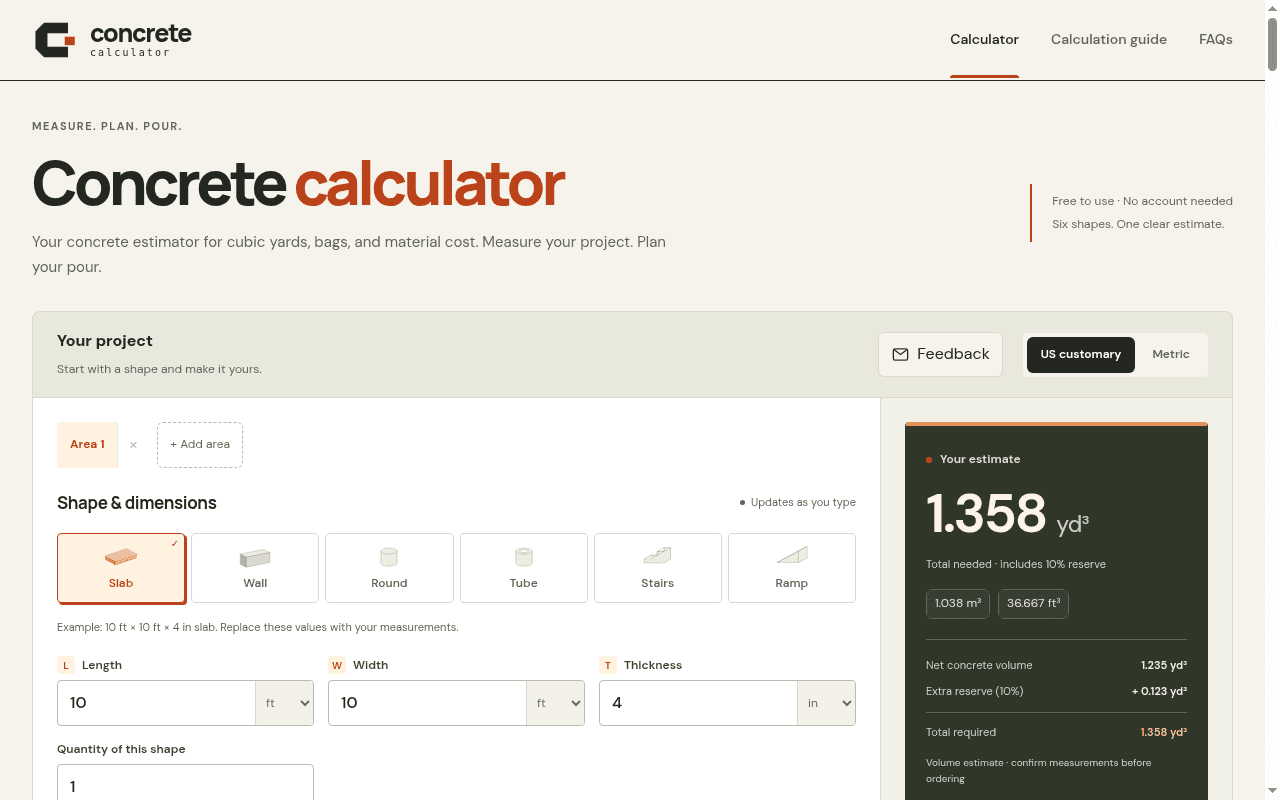
About this app
Estimates finished concrete volume, bags, and optional material costs for slabs, footings, walls, columns, stairs, and ramps. Geometry estimates only—not structural design. No account required.
Key features
- 1Six shape calculators (slab, wall, round, tube, stairs, ramp) with multi-area combining and a 0–10%+ reserve control.
- 2Whole-bag counts by product yield plus optional ready-mix order increments and material cost totals.
- 3Step-by-step math breakdown with unit conversions, shareable project links, print, copy, and .txt export.
Target customer profile
Drawn from the product itself, not from a survey.
Demographic
DIY homeowners building patios, shed bases, or driveways
Pain points
Guessing bag counts, wasting money on too much mix, unit-conversion mistakes
Primary needs
Fast, accurate yardage and whole-bag counts with a safe reserve and cost total
Demographic
Concrete contractors and small remodel crews
Pain points
Inconsistent estimates across areas, supplier order increments, quoting speed
Primary needs
Multi-area combining, reserve control, ready-mix increments, and shareable estimates
Demographic
Landscape and hardscape designers planning pours
Pain points
Mixing US and metric specs, comparing bagged vs ready-mix costs
Primary needs
Unit flexibility, 3D preview, step-by-step math, and printable documentation
Scout Review
Written by AI from measured evidence, scored out of 100.
Concrete Calculator is a focused, fast, and genuinely useful estimator for slabs, walls, columns, stairs, and ramps. It nails the core job: enter dimensions, get cubic yards, whole bags, and optional cost, with a reserve you control and a step-by-step math breakdown that shows its work. The design is confident and trade-appropriate, the speed is excellent, and the multi-area plus ready-mix increment workflow is a real step up from the single-shape Omni and vendor-tied QUIKRETE calculators. The gaps are real but fixable: a 3D preview that shows almost nothing, small low-contrast secondary text, mixed ft/in inputs that invite mistakes, and a security posture missing CSP and email authentication. Accessibility is close but fails on contrast, touch targets, and label names. For a no-account tool aimed at DIYers and small crews, this is a strong, honest utility that does one thing well.
Measure by measure
Usability
68Live-updating results, a clear shape selector, and a full step-by-step math breakdown make this genuinely easy to use. Mixed ft/in inputs and a guide buried below the calculator cost it points.
Design
71Confident two-tone palette, strong hierarchy on the dark estimate panel, and a scannable guide. The 3D preview is mostly empty grey and secondary text is small and low-contrast.
Speed
88Lighthouse mobile 98/100 with LCP 947ms and CLS 0.003; desktop 97/100. A lightweight single-page tool that loads instantly and updates without a hitch.
Security
62HTTPS enforced with HSTS, frame protection, and a full header set (8/12 checks). No CSP, SPF, or DMARC, and shared links expose measurements and prices to anyone holding the URL.
Accessibility
69Lighthouse a11y 93/100 with keyboard-rotatable 3D and US/metric units. Failing contrast, touch-target, and label-name audits keep it from the top of the band.
Growth
58A real problem with a specific wedge — multi-area combining, reserve control, ready-mix increments, and shareable estimates — that the single-shape Omni and vendor-tied QUIKRETE calculators don't match.
Improvement areas
- 3D preview is mostly empty pale grey with faint model and helper text; make it legible or shrink it.
- Secondary text and captions fail contrast; touch targets are too small; some labels don't match accessible names.
- Mixed ft/in inputs on one row invite mistakes; consider one unit per row or inline validation.
- No CSP, SPF, or DMARC; shared links expose measurements and prices to anyone with the URL.
Design & Usability
The design is the strongest part of this tool. The near-black and rust palette on warm cream is disciplined and suits a construction audience far better than generic SaaS blue, and the dark 'Your estimate' panel with its 1.358 yd³ readout and Net/reserve/total breakdown makes the number feel trustworthy. The shape selector and segmented reserve control are clear. Where it slips: the 3D preview is a large pale-grey panel with a faint model and faint helper text, taking up real estate without earning it, and secondary text throughout the guide and estimate panel is small and low-contrast. Usability is solid — results update as you type, the step-by-step math section exposes every conversion and formula, and the CTA hierarchy (Share project over Print estimate over Copy/Download) is sensible. The mixed ft/in inputs on one row are the main risk, softened by the example line. The guide is deep but only reachable by scrolling past the calculator.
Speed & Security
Speed is the standout measured result: Lighthouse mobile 98/100 with LCP 947ms, CLS 0.003, and TBT 155ms, and desktop 97/100. For a single-page estimator this is exactly what you want — instant load, no layout shift, live updates that don't stutter. Security is competent but not exceptional: HTTPS is enforced with HSTS, frame protection, X-Content-Type-Options, Referrer-Policy, and Permissions-Policy all present, for 8/12 checklist points. What's missing is CSP, SPF, and DMARC — the last two matter less for a no-account tool, but the absent CSP is a real gap. The share-link model is transparent about its exposure (anyone with the link sees measurements and prices), which is the right call for a tool with no accounts. No SOC 2 or audit claims, which is normal at this stage.
Accessibility & Growth
Accessibility scores 93/100 on Lighthouse, which is strong, but the failing audits are the ones that matter for real users: insufficient color contrast (compounding the small secondary text), touch targets too small or tightly spaced, and visible text labels not matching accessible names. The 3D model does support keyboard rotation with arrow keys and Home to reset, and the tool offers US customary and metric units — both genuine positives. Growth is a judgment about the idea: the problem (guessing bag counts, wasting mix, unit mistakes) is real and the target customer is specific. The wedge over the listed alternatives is concrete — Omni Calculator is a broad multi-calculator with single-shape concrete estimation, and QUIKRETE's calculator is tied to their own bag yields. This tool adds multi-area combining, reserve control, ready-mix order increments, and shareable estimates in one place. That's a real differentiator, but the category is mature and the ceiling is a well-executed utility, not a platform.
Conclusion
If you're pouring a patio, a shed base, or a driveway and you're tired of guessing bag counts, this is a better starting point than the vendor calculator or a broad multi-tool site. It's free, needs no account, and the math is transparent. Go in with your measurements in one unit where you can, double-check the reserve, and treat the 3D preview as a rough sanity check rather than a design tool. The improvements that would move this from good to excellent are concrete: make the 3D preview actually render something legible, raise the contrast on secondary text, split mixed-unit inputs into a single unit per row, and add a CSP. None of those are hard, and the foundation is solid.
Suggestions for improvement
- Make the 3D preview render a legible, well-lit model or shrink the panel — right now it's a large pale-grey area with faint content.
- Raise contrast on secondary text (captions, 'Net concrete volume' rows, reserve notes) to meet WCAG AA.
- Split mixed ft/in inputs into a single unit per row, or add inline validation that flags implausible thicknesses.
- Add a Content-Security-Policy header and publish SPF/DMARC records for the domain.
Alternatives comparison
Named competitors, point by point. Nobody paid to appear here or to be left out.
 Concrete Calculator |  Omni Calculator – Concrete Calculator |  QUIKRETE Concrete Calculator | |
|---|---|---|---|
| Shape coverage | Six shapes: slab, wall, round, tube, stairs, ramp | Common shapes (slab, footing, column, stairs) | Basic slab/footing shapes tied to QUIKRETE products |
| Multi-area combining | Yes — add multiple areas, combine, reserve applied once | No — single calculation per shape | No — single calculation per shape |
| Bag count by product yield | Yes — QUIKRETE 40/50/60/80/90 lb plus custom yield | Yes — generic bag yield | Yes — QUIKRETE product yields only |
| Ready-mix order increments | Yes — supplier increment rounding (e.g. 0.25 yd³) | No | No |
| Cost estimation | Yes — bag cost and ready-mix cost, multi-currency | Limited — generic cost per volume | No — product quantity only |
| 3D preview | Yes — interactive, keyboard-rotatable (currently faint) | No | No |
| Account required | No — free, no account | No — free, no account | No — free, no account |
Omni Calculator – Concrete Calculator
Broad multi-calculator site with a concrete volume and bag estimator for common shapes.
QUIKRETE Concrete Calculator
Vendor calculator tied to QUIKRETE product yields; useful when buying their bagged mix.
Comparing options? See Concrete Calculator alternatives, scored side by side
More Consumer Tools apps
View all Consumer Tools
QRBliss
91Branded QR codes with AI Brand Sync, 15 free dynamic code...

Cross Stitch Pattern Maker
89Free on-device photo-to-DMC/Anchor chart with skein counts.

Random Movie Generator
88Free random movie picker from 142k+ films—no sign-up.

Cromagnon
88Free, private browser-based PDF, Word, Excel, and study t...

Chickadee Bandit
87Private, all-in-one family organizer with 100+ apps, one price per household

SeatCanvas
87Drag-and-drop seating charts for weddings, quinceañeras and events. Import your guest list from Excel, export print-ready PDFs. Free up to 40 guests, no signup.

Cat Years to Human Years
86Free cat age calculator converting cat years to human years.

CapyToolkit
86A growing collection of free, privacy-first browser tools. Test gamepad drift, mouse polling rate, dead pixels, mics, and speakers. No install needed.

Compound Interest Calculator
84Free compound interest calculator for savings & goals.

EchoWi
83Track and optimize your brand's visibility in AI answers.

Peptide Dosage Calculator
82Free peptide dosage calculator—dose to mL and U-100 units. No signup. Educational arithmetic only; not medical advice.

Receipt Generator
82An online tool for creating realistic store receipts with...


A platform dedicated to providing unbiased reviews of newly launched applications, analyzing everything from their features to their full potential.
info@scoutforge.net© 2026 Scoutforge. All rights reserved.
