Cycling through all six. Tap any point to stop.
Measured on six things
Copy any viral AI video with one photo.
Security
52HTTPS with HSTS, SPF and DMARC in place, plus clear photo-handling and deletion promises. Missing CSP, frame protection and most hardening headers; no SOC 2 or audit claims.
Screenshots
1 / 1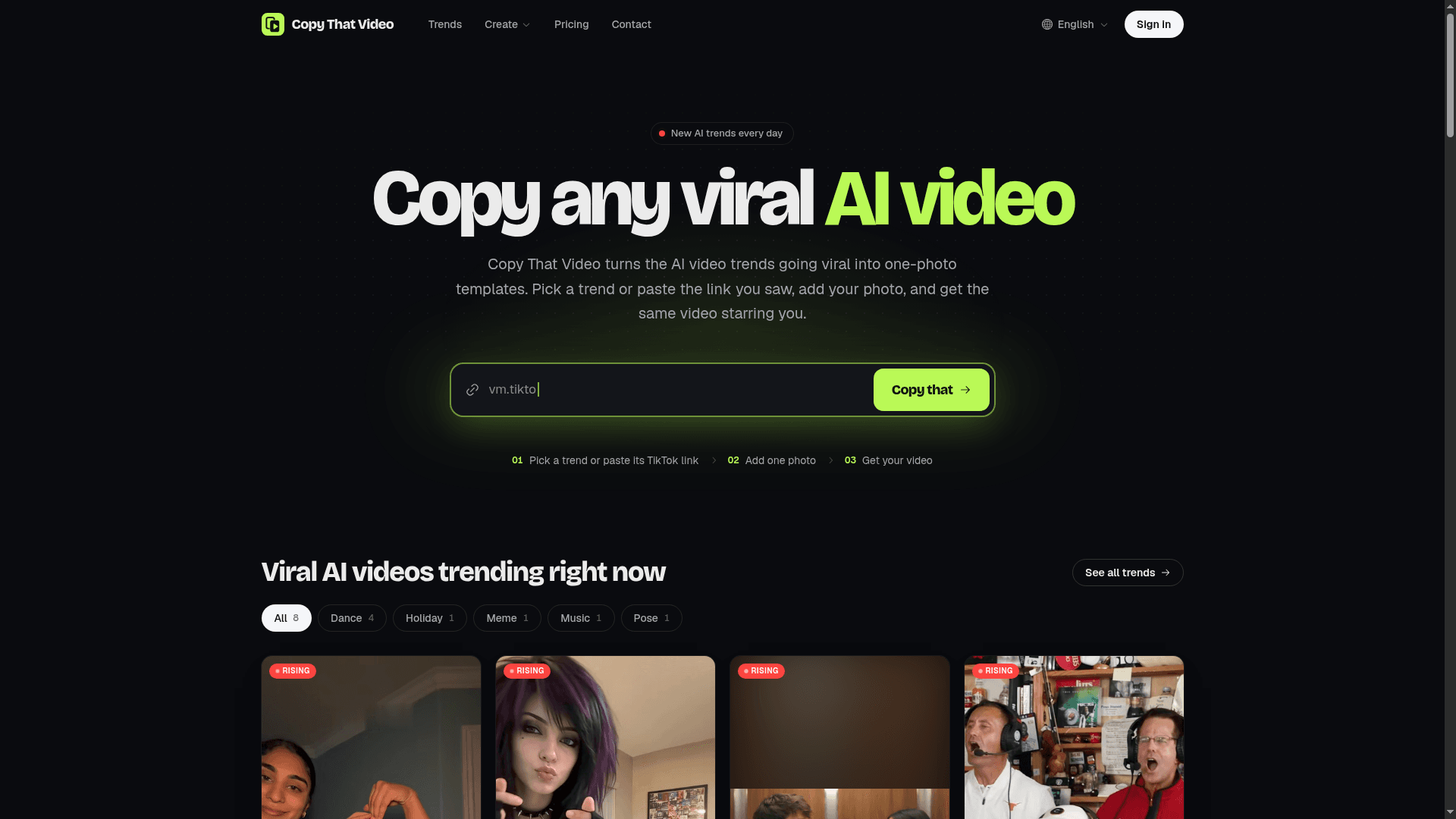
About this app
Every few days a new AI video takes over TikTok: a dance, a costume, a memorial clip, a fake goal. Copy That Video gives each viral AI video trend its own page, with the versions people remake as ready-made templates. Pick the trend from the wall or paste the TikTok link you saw, add one clear photo, and you get your own vertical MP4 of the same video, starring you, with its sound and no watermark. Some trends work with a photo of your pet, your car or a loved one. There is also plain text-to-video and image-to-video. Pricing is Paid / One-time credit packs with no subscription: packs start at $9.90 for 150 credits, credits never expire, and a render that fails gives its credits back. Photos are used only to make your video and are never used to train models.
Key features
- 1Curated viral AI trend wall with per-trend template pages and TikTok link paste for one-photo cloning.
- 2Before/after comparison slider demonstrating the original trend versus your version.
- 3One-time credit packs from $9.90 with no subscription, credits never expire, failed renders refunded.
- 4Text-to-video and image-to-video modes alongside trend cloning, with no watermark on output.
Target customer profile
Drawn from the product itself, not from a survey.
Demographic
Social media content creators and influencers (TikTok, Instagram Reels)
Pain points
Keeping up with fast-moving trends; lack of video editing skills; expensive production
Primary needs
Quick trend replication; easy one-photo input; viral-ready output with sound
Demographic
Small business owners and social media managers
Pain points
Limited budget for video ads; time-consuming content creation; low engagement
Primary needs
Affordable, on-brand video content; no subscription; fast turnaround
Demographic
Casual users and meme enthusiasts who want to join trends
Pain points
No technical skills; fear of complicated tools; privacy concerns
Primary needs
Simple three-step process; automatic safety checks; pay-as-you-go credits
Scout Review
Written by AI from measured evidence, scored out of 100.
Copy That Video is a focused, well-executed take on a real and fast-moving need: copying viral AI video trends with one photo. The trend wall, TikTok link paste and before/after slider communicate the promise clearly, and the no-subscription credit model is a genuine differentiator against CapCut, Runway and Pika. Speed is excellent (Lighthouse mobile 93), accessibility is strong (97), and the design is disciplined. The gaps are security hardening (missing CSP and most headers, no audit claims) and small design legibility issues. Growth potential is solid: a specific wedge in a category with visible headroom, though the moat is curation speed rather than anything structural.
Measure by measure
Usability
68Hero input, three-step hint and comparable pricing tiers make the path to value obvious. FAQ covers credits, refunds and photo handling. No live demo or docs beyond the FAQ.
Design
71Disciplined dark palette with a single lime accent, a strong before/after slider and a scannable trend grid. Small low-contrast grey body copy and uneven thumbnails hold it back.
Speed
79Lighthouse mobile 93/100 with LCP 1.4s and CLS 0; desktop 84/100. Fast, stable page with no reported lag complaints in the collected evidence.
Security
52HTTPS with HSTS, SPF and DMARC in place, plus clear photo-handling and deletion promises. Missing CSP, frame protection and most hardening headers; no SOC 2 or audit claims.
Accessibility
80Lighthouse accessibility 97/100 with a single contrast failure. English language selector present; no WCAG statement or dedicated a11y page found in the collected content.
Growth
62Real, fast-moving need with a concrete wedge: a curated trend wall plus TikTok link paste that CapCut, Runway and Pika don't offer as a one-photo cloning workflow. Early stage (domain 0.1 years old).
Improvement areas
- Security hardening: add CSP, frame protection, X-Content-Type-Options, Referrer-Policy and Permissions-Policy headers.
- Publish a trust/security page documenting photo handling, deletion timelines and any audit or pen-test.
- Fix low-contrast grey body copy flagged by both the design audit and the Lighthouse contrast failure.
- Standardize trend thumbnail treatment so the grid reads as one consistent system.
Design & Usability
The homepage is a well-organised system: a heavy grotesk headline with 'AI video' in lime, a dominant hero input, and a trend grid with consistent card anatomy. The before/after slider is the strongest asset — it shows the promise in one glance. Usability follows the same discipline: the hero input is the first thing you see, a three-step hint explains the flow, and pricing tiers are directly comparable with credits-per-dollar and video-minutes breakdowns. The weak spots are small: low-contrast grey body copy, uneven thumbnail treatments, and ghost secondary buttons that fade next to the lime primary CTA. No live demo or docs beyond the FAQ, but the FAQ is unusually thorough on credits, refunds and photo handling.
Speed & Security
Speed is a clear strength: Lighthouse mobile 93/100 with LCP 1.4s, CLS 0 and FCP 1.4s; desktop 84/100. The page is light and stable, and no lag complaints surfaced in the collected evidence. Security is more mixed. HTTPS is enforced with HSTS, and SPF and DMARC are present, but the header probe found no CSP, frame protection, X-Content-Type-Options, Referrer-Policy or Permissions-Policy — 6 of 12 checklist points. The site makes clear, specific promises about photo handling: automatic nudity checks, deletion with the video, and no model training. Those are good claims, but there is no SOC 2, ISO, pen-test or bug bounty evidence to back them up, so the score stays in the category-typical band.
Accessibility & Growth
Accessibility scores well: Lighthouse 97/100 with a single failing audit for insufficient color contrast — the same low-contrast grey the visual audit flagged in body copy. An English language selector is present, but no WCAG statement or dedicated accessibility page was found. Growth is a judgement on the idea. The problem is real and fast-moving: viral AI video trends appear every few days and most people lack the editing skills to join in. The wedge is specific — a curated trend wall with per-trend template pages plus TikTok link paste, which CapCut, Runway and Pika do not offer as a one-photo cloning workflow. One-time credit packs with no subscription and no watermark sharpen the pitch against subscription-heavy competitors. The honest limit: the moat is curation speed, and a platform or a bigger competitor could copy the trend-wall format. Early stage — domain registered 0.1 years ago — but the idea has room.
Conclusion
If you make short-form video and you have watched a trend pass you by because you cannot edit, this is aimed squarely at you. The one-photo flow, the trend wall and the credit model all line up with how creators actually work. What it needs next is the boring stuff: proper security headers, a published audit or at least a security page, and a fix for the low-contrast grey text that both the design and accessibility audits flagged. The idea is good enough to deserve that polish.
Suggestions for improvement
- Add CSP, frame protection, X-Content-Type-Options, Referrer-Policy and Permissions-Policy headers to close the 6/12 security checklist gap.
- Publish a security or trust page documenting photo handling, deletion timelines and any third-party audit or pen-test.
- Fix the low-contrast grey body copy and three-step hint line flagged by both the design audit and the Lighthouse contrast failure.
- Standardize trend thumbnail treatment so the grid reads as one system rather than eight different crops.
Alternatives comparison
Named competitors, point by point. Nobody paid to appear here or to be left out.
 Copy That Video |  CapCut |  Runway ML |  Pika Labs | |
|---|---|---|---|---|
| One-photo cloning of a specific viral TikTok trend | Yes — curated trend wall plus TikTok link paste, one photo in, vertical MP4 out | No — AI templates and effects, but manual editing required and no trend cloning from one photo | No — text-to-video and image-to-video, but no curated viral trend library | No — generates clips from text or images, but does not copy specific TikTok trends |
| Curated viral trend library with per-trend pages | Yes — trending grid with categories, view counts and per-trend template pages | Partial — template library, but not organized around current viral AI trends | No — no trend library; professional generation tools | No — no trend library; prompt-based generation |
| Pricing model | One-time credit packs from $9.90; credits never expire; failed renders refunded | Freemium with Pro subscription | Subscription-based credit plans | Freemium with paid subscription tiers |
| No watermark on output | Yes — no watermark on any paid pack | Watermark removed on paid plans | No watermark on paid plans | Watermark on free tier; removed on paid |
| Target user | Casual creators, influencers and small businesses joining viral trends | General video editors and social creators | Professionals and studios needing AI video generation | Creators experimenting with AI-generated clips |
CapCut
A popular video editing app with AI-powered templates and effects, but requires more manual editing and lacks direct trend cloning from a single photo.
Runway ML
A powerful AI video generation suite with text-to-video and image-to-video capabilities, but geared toward professionals and lacks a curated viral trend library.
Pika Labs
An AI video platform that generates short clips from text or images, but doesn't focus on copying specific TikTok trends with one photo.
Comparing options? See Copy That Video alternatives, scored side by side
More AI Generations apps
View all AI Generations
Uni-1 by Luma AI
92Uni-1 is an advanced multimodal text-to-image AI model th...

Gerty
91Private, local AI assistant for Mac that runs offline

LTX 2.3 AI Video Generator
91Fast, open-source AI video generator with 4K support, mul...

DemoVexa
90Turn your code into professional product demo videos with AI-generated scripts, animated UI, and natural voiceovers.

AI Vocals Generator
89Add AI singers or rappers to your own beat, get two takes...

All of Us
89Add deceased loved ones to photos with AI and see free pr...

Voqusa
89Transcribe social media video and audio links into text (free signup, 5 free credits, then pay-as-you-go)

Pixelimg
88A free online AI-powered tool that instantly converts ima...

Cantoro
88Custom AI songs with a name, heard free before paying $4....

tradutor de mangá com IA
88O tradutor de mangá com IA traduz capítulos em lote, personaliza textos e oferece edição visual para estúdios.

IraVoice
88Private on-device dictation for Apple-silicon Macs.

OBVELO
88Privacy gateway that masks personal data in LLM traffic


A platform dedicated to providing unbiased reviews of newly launched applications, analyzing everything from their features to their full potential.
info@scoutforge.net© 2026 Scoutforge. All rights reserved.
