Cycling through all six. Tap any point to stop.
Measured on six things
A Mac menu bar app for a full disk. See what is using your space, read whether it comes back on its own, and remove only what you tick.
Security
52HTTPS enforced with SPF and DMARC, and the product's core pitch is local-only, read-only scanning with no account. But the site ships no HSTS, CSP, frame protection or Referrer-Policy (4/12 header checklist) and publishes no audit or security page.
Screenshots
1 / 3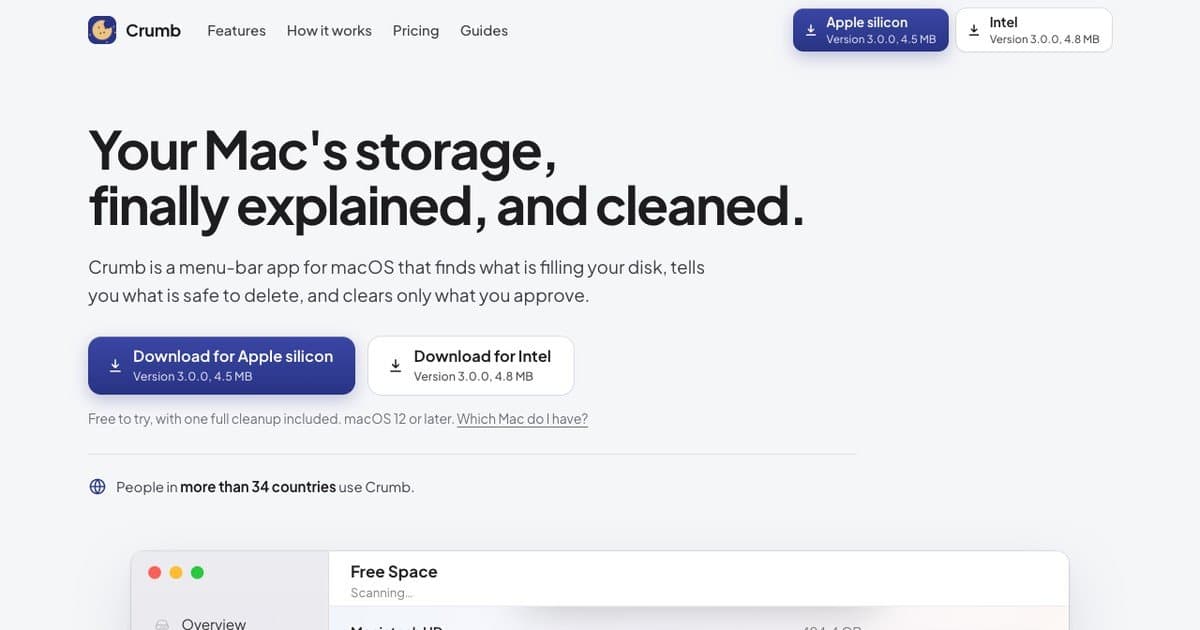
About this app
Crumb is a Mac menu bar app for a full disk. A read-only scan maps what is using your space: System Data, Xcode build data, developer caches, old iPhone backups, app leftovers and your biggest folders. Every item gets a plain English note on whether it comes back on its own, and only the items you tick are removed. No account, and your files stay on your Mac. The scan and one full cleanup are free. Crumb Pro is $9 once, with a 7-day money back guarantee.
Key features
- 1Read-only scan that maps System Data, Xcode build data, developer caches, old iPhone backups and app leftovers with plain-English notes on what regenerates.
- 2Six tools in one menu-bar app: Free Space, Visualize, Uninstall, Duplicates, Organize, and Safe? checks on any folder.
- 3Free tier includes full scan and one cleanup; Crumb Pro is $9 once for unlimited cleanups and all tools, on up to 2 Macs.
Target customer profile
Drawn from the product itself, not from a survey.
Scout Review
Written by AI from measured evidence, scored out of 100.
Crumb is a Mac menu-bar disk cleaner that does the one thing macOS Storage settings won't: tell you what's actually in System Data. The site is well-crafted, the docs are unusually thorough for the category, and the free tier (full scan plus one cleanup) is a fair try-before-you-buy. The developer angle — Xcode build data, developer caches, old Claude Code versions — is specific and underserved. The $9 one-time price undercuts every subscription cleaner on the market. Where it falls short: mobile page performance is sluggish, the security headers are thin for a tool that touches your whole disk, and the category itself is crowded. But for a developer with a full Mac and no patience for a subscription, the pitch is honest and the product looks like it delivers.
Measure by measure
Usability
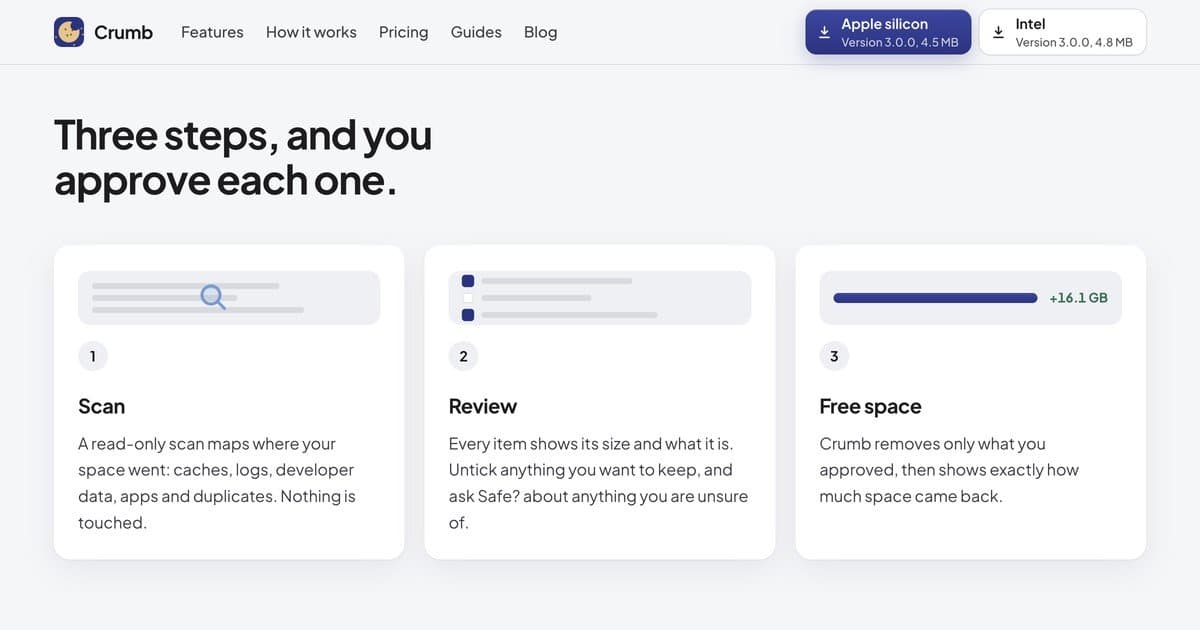
68Three-step Scan/Review/Free space flow is spelled out on the homepage and mirrored in the app screenshot. Docs hub lists 11 screen-by-screen guides plus quick answers and a support email. Free scan plus one cleanup lowers the try barrier.
Design
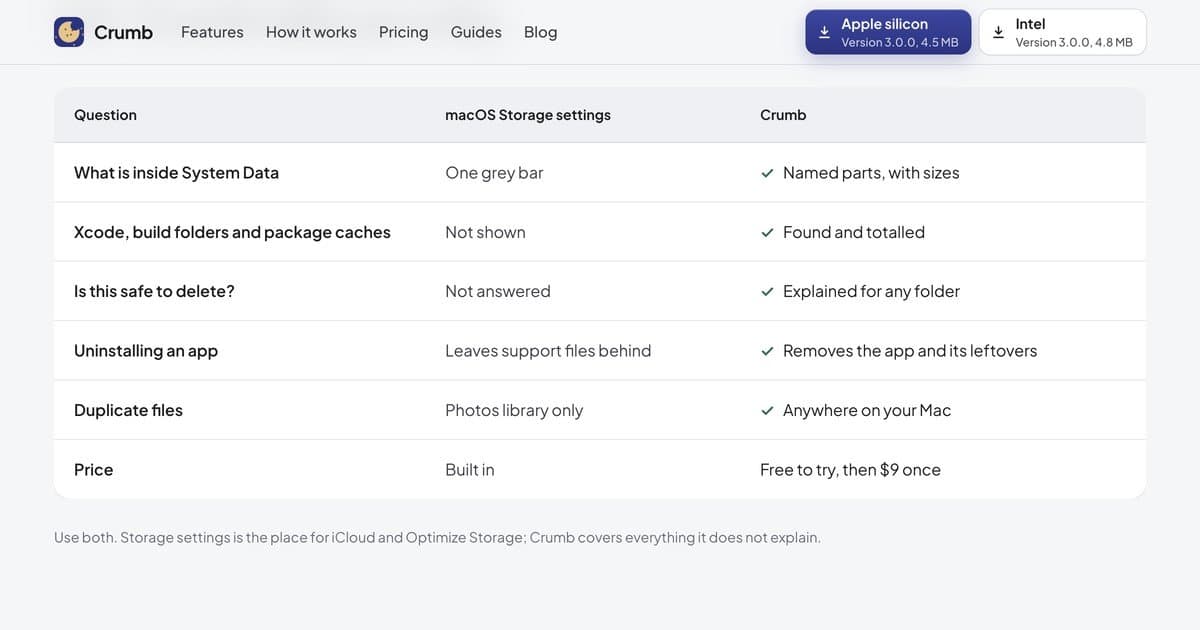
71Polished, restrained landing page with consistent card styling, a clear icon color system, and a scannable comparison table. Two near-identical hero download buttons and a juvenile cookie illustration in the app shot cost it a few points.
Speed
58Desktop Lighthouse 95/100, but mobile drops to 65 with a 5.5s LCP and 357ms TBT — the hero and screenshot are heavy on phones. The app itself is a 4.5 MB download, so the product is light even where the site isn't.
Security
52HTTPS enforced with SPF and DMARC, and the product's core pitch is local-only, read-only scanning with no account. But the site ships no HSTS, CSP, frame protection or Referrer-Policy (4/12 header checklist) and publishes no audit or security page.
Accessibility
80Lighthouse accessibility 96/100 with a single contrast failure. Clean semantic structure and readable layout, but no accessibility statement, no WCAG claim, and English-only — automated checks only cover part of the story.
Growth
58Real, specific problem (full Mac disks, System Data opacity) with a sharp developer wedge — Xcode build data, Claude Code leftovers, node_modules — and a $9 one-time price against subscription cleaners. Early (domain 0.4 years) but the positioning is concrete.
Improvement areas
- Security headers are thin (4/12) and there's no published security page or audit for a tool that touches the whole disk.
- Mobile Lighthouse performance is 65/100 with a 5.5s LCP — the hero and screenshot are heavy on phones.
- No accessibility statement or WCAG claim; one contrast failure remains on the site.
- Category is crowded and the developer wedge is copyable — needs a stronger moat than 'we know what DerivedData is'.
Design & Usability
Crumb's site is a cut above the usual indie Mac utility: consistent card styling, a color-coded icon system, a comparison table that actually explains the difference from macOS Storage settings, and a three-step Scan/Review/Free space flow that mirrors the app screenshot above it. The two hero download buttons are nearly identical in weight, which is a small friction point, and the cookie illustration inside the app shot undercuts an otherwise restrained aesthetic. Usability is where it earns its keep: the free tier includes a full scan and one cleanup, the docs hub lists 11 screen-by-screen guides, and there's a real support email. The 'Safe?' feature — explaining whether a folder regenerates before you delete it — is the kind of thing that turns a scary cleanup into a confident one.
Speed & Security
Speed is a tale of two devices. Desktop Lighthouse lands at 95/100, but mobile drops to 65 with a 5.5-second LCP and 357ms TBT — the hero and embedded screenshot are heavy on phones. The app itself is a 4.5 MB download, so the product is genuinely lean even where the marketing site isn't. Security is the weakest measured dimension: HTTPS is enforced and SPF/DMARC are set, but the site ships no HSTS, CSP, frame protection, X-Content-Type-Options, Referrer-Policy or Permissions-Policy — 4 of 12 header checklist points. The product's own pitch (read-only scan, local-only, no account, personal folders never pre-ticked) is the right posture, but there's no security page, no audit, no bug bounty to back it up. For a tool that touches your entire disk, that gap matters more than it would for a to-do app.
Accessibility & Growth
Accessibility scores 96/100 on Lighthouse with a single failing audit — insufficient color contrast. That's a strong automated result, but there's no accessibility statement, no WCAG claim, and the site is English-only, so the human side of the story is unverified. Growth is the more interesting question. The problem is real and specific: macOS Storage settings show System Data as one grey bar, and Crumb names the parts. The wedge is developer-focused — Xcode build data, developer caches, old Claude Code versions, node_modules — a segment the subscription cleaners treat as a footnote. The $9 one-time price against CleanMyMac-style subscriptions is a genuine structural advantage. The limit is category ceiling: Mac cleaners are a crowded, low-differentiation market, and Crumb's developer angle is copyable. It's a good wedge, not a moat.
Conclusion
If you're a developer whose Mac keeps filling up and you're tired of guessing which folder is safe to nuke, Crumb is worth the $9 — the Safe? explanations alone justify it. If you're a casual user who just wants a cleaner, macOS Storage settings plus a manual cache clear will get you most of the way for free. The product is early (domain registered mid-2026) and the security posture needs work, but the core idea — read-only scan, you approve every deletion, no account, no subscription — is the right shape for this category. Try the free scan first; if it finds 16 GB you didn't know about, the $9 will feel cheap.
Suggestions for improvement
- Add HSTS, CSP, and Referrer-Policy headers — 4/12 is thin for a tool that scans your entire disk.
- Fix the mobile LCP (5.5s) by compressing the hero screenshot and lazy-loading below-fold media.
- Publish a short security page explaining the read-only architecture and local-only processing.
- Add an accessibility statement and fix the contrast failure flagged by Lighthouse.
Alternatives comparison
Named competitors, point by point. Nobody paid to appear here or to be left out.
 Crumb Crumb | ||
|---|---|---|
| Pricing model | $9 one-time (Pro); free tier with full scan + one cleanup | Not provided |
| Developer-specific cleanup (Xcode, node_modules, caches) | Yes — Xcode build data, developer caches, old Claude Code versions named explicitly | Not provided |
| Read-only scan with per-item approval | Yes — nothing removed until you tick and approve | Not provided |
| Account required | No account, no sign-in, local-only | Not provided |
| Safe-to-delete explanations | Yes — 'Safe?' explains what a folder is and whether it regenerates | Not provided |
| Platform | macOS 12+ (Apple silicon and Intel native builds) | Not provided |
Comparing options? See Crumb alternatives, scored side by side
More Consumer Tools apps
View all Consumer Tools
SeatCanvas
87Drag-and-drop seating charts for weddings, quinceañeras and events. Import your guest list from Excel, export print-ready PDFs. Free up to 40 guests, no signup.

CapyToolkit
86A growing collection of free, privacy-first browser tools. Test gamepad drift, mouse polling rate, dead pixels, mics, and speakers. No install needed.

EchoWi
83Track and optimize your brand's visibility in AI answers.

Receipt Generator
82An online tool for creating realistic store receipts with...

SoloCatalog
81Find genuine OEM auto parts with VIN-first catalogues

Aidrobe
81AI virtual try-on for confident clothes shopping

PasteDL
81Free Instagram & TikTok downloader with no login or water...

Body Type Calculator
81Find your body shape instantly from measurements—for men ...

Zenor AI
80Zenor AI is a multimodal AI shopping assistant for Shopify that boosts sales with voice, image, and text search.

KAR Auto Research
80AI car research for Greece & Europe

Peel
79An AI-powered Chrome extension that automatically compares prices while you shop online, helping you find better deals across major retailers.

Samurai Scribe
78Local AI meeting transcription with speaker detection


A platform dedicated to providing unbiased reviews of newly launched applications, analyzing everything from their features to their full potential.
info@scoutforge.net© 2026 Scoutforge. All rights reserved.
