Cycling through all six. Tap any point to stop.
Measured on six things
Download video, audio and existing YouTube captions from 46 platforms
Security
41HTTPS is enforced, but the probe found no HSTS, CSP, frame protection, Referrer-Policy or Permissions-Policy, and DMARC is missing — 3/12 checklist points. No SOC 2, pen-test or bug bounty published. Standard for a free indie tool, thin for anything handling media.
Screenshots
1 / 1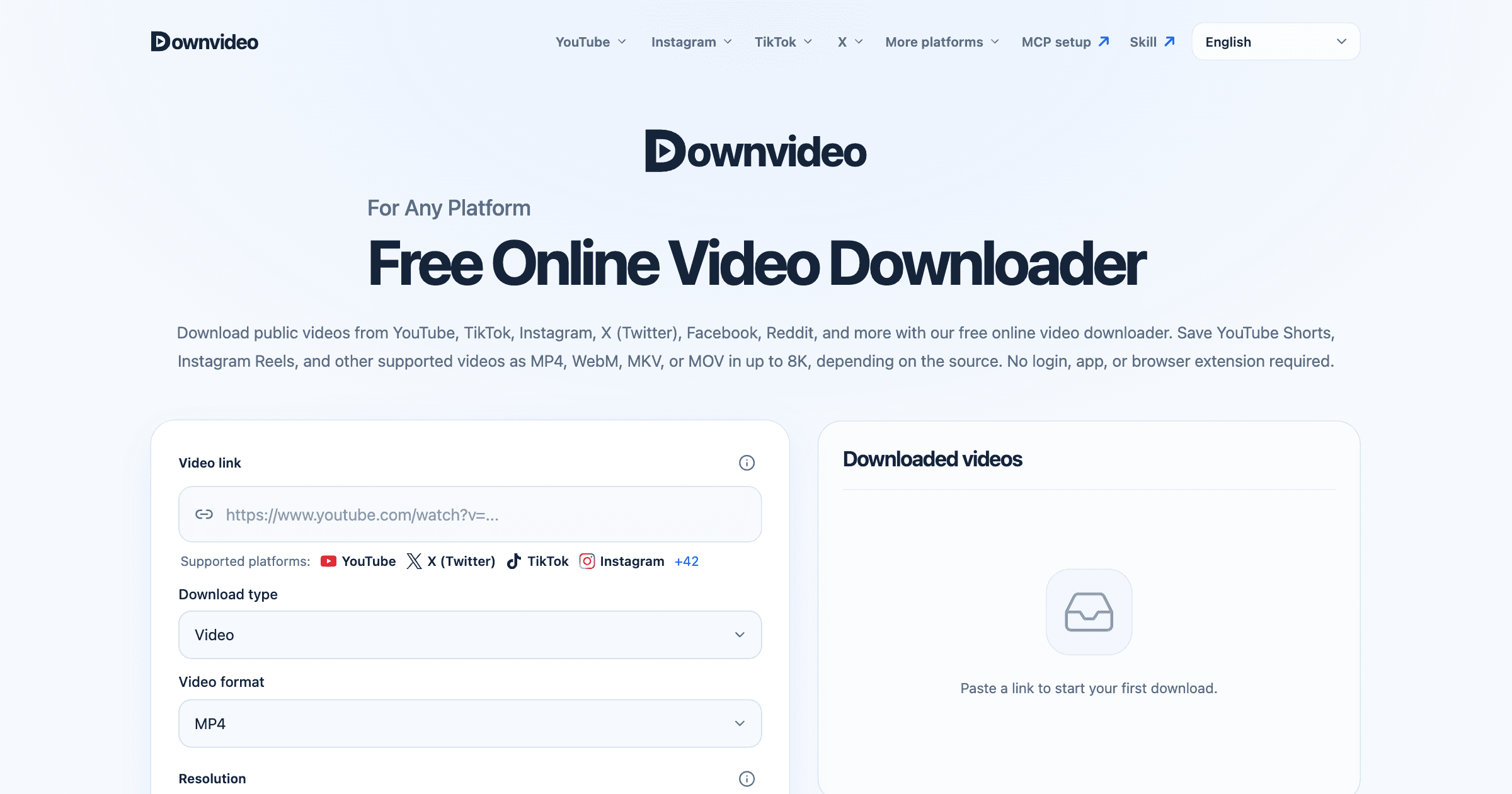
About this app
downvideo Online Video Downloader is a free browser-based tool for public media you own or have permission to save. It supports 46 platforms including YouTube, TikTok, Instagram, X, Facebook, Reddit, Pinterest, Twitch, Vimeo and Bilibili. Save video as MP4, WebM, MKV or MOV at source-dependent quality up to 8K, without upscaling. Extract audio as MP3, M4A, AAC, Opus, WAV, FLAC or ALAC. Download existing YouTube captions as SRT, VTT, ASS, LRC or TXT; the tool does not generate transcripts or translate captions. No account, app or extension is required. Standard limits are one hour of source video, 1 GB output and 24-hour file availability in the same anonymous browser session. Paste a supported link, choose the available options, follow processing progress and save the resulting file.
Key features
- 146 supported platforms including YouTube, TikTok, Instagram, X, Bilibili, Douyin and Weibo, with no login or extension
- 2Video output as MP4, WebM, MKV or MOV up to 8K, with no upscaling beyond the source resolution
- 3Audio extraction in MP3, M4A, AAC, Opus, WAV, FLAC or ALAC, plus YouTube captions as SRT, VTT, ASS, LRC or TXT
Target customer profile
Drawn from the product itself, not from a survey.
Scout Review
Written by AI from measured evidence, scored out of 100.
downvideo is a fast, no-login browser downloader that covers 46 platforms and does the boring parts well: paste, choose format and resolution, track progress, grab the file within 24 hours. The tool card is clean, the empty state teaches the flow, and mobile Lighthouse at 93/100 with a 1.1s LCP means it feels instant. The problems are visible on the homepage itself — a live 'Job list temporarily unavailable' error banner and a primary button that looks disabled — plus a security posture of 3/12 header checks and four accessibility failures behind an 89/100 score. It's a competent free utility with a genuinely broad platform list and no clear reason yet for anyone to remember its name over the dozen tabs already open.
Measure by measure
Usability
63Input-first flow is right: paste, pick format and resolution, go. Empty-state prompt and documented cancel/retry help. But the disabled-looking CTA plus the error banner leave users guessing, and the page buries the next step under SEO links.
Design
58Restrained navy-on-pale-blue palette and disciplined type, with a well-structured tool card as the focal point. Undercut by a live red error banner, a CTA that looks disabled, and a 46-card grid of tiny glyphs.
Speed
82Lighthouse mobile 93/100 with LCP 1.1s, CLS 0 and FCP 1.1s — genuinely fast. Desktop drops to 78/100, so the win is real but not uniform. No lag complaints surfaced in the collected evidence.
Security
41HTTPS is enforced, but the probe found no HSTS, CSP, frame protection, Referrer-Policy or Permissions-Policy, and DMARC is missing — 3/12 checklist points. No SOC 2, pen-test or bug bounty published. Standard for a free indie tool, thin for anything handling media.
Accessibility
68Lighthouse 89/100, but four real failures: prohibited ARIA attributes, insufficient contrast, undersized touch targets and labels that don't match accessible names. No WCAG statement, English-only. Above the low bar, short of solid.
Growth
56A real, permanent demand — but a crowded free-tool category with no account, no paid tier and no network effect. 46-platform coverage and 8K/no-upscaling are a genuine wedge; nothing yet compounds.
Improvement areas
- Live homepage shows a red 'Job list temporarily unavailable' error banner directly under the main tool
- Primary CTA is a pale low-contrast blue that reads as disabled before a link is pasted
- Security headers thin: no HSTS, CSP, frame protection, Referrer-Policy or Permissions-Policy; DMARC missing
- Four Lighthouse accessibility failures: ARIA attributes, contrast, touch targets, accessible-name mismatch
Design & Usability
The homepage is competently built: a restrained navy-and-pale-blue palette, disciplined typography, and a tool card that earns its place as the focal point with evenly spaced fields and a scannable 360p-to-8K segmented control. The input-first flow is the right call — paste a link, pick format and resolution, hit go — and the empty 'Downloaded videos' panel with its 'Paste a link to start your first download' prompt is a clean onboarding cue. Two things drag it down. A red 'Job list temporarily unavailable' banner sits directly under the tool on the live page, which is the loudest status message a first-time visitor sees. And the primary CTA is a washed-out light blue that reads as disabled, so the main action looks unavailable before you've even pasted anything. Below the fold, a 46-card platform grid with tiny low-contrast glyphs plus a dense legal block and SEO link wall make the page feel like a directory rather than a product.
Speed & Security
Speed is the standout. Lighthouse mobile scores 93/100 with LCP 1.1s, FCP 1.1s and CLS 0 — the page paints fast and doesn't shift under your thumb. Desktop lands at 78/100, so the optimization is phone-first rather than uniform, but nothing in the collected evidence suggests users experience lag. Security is the weak flank. HTTPS is enforced and SPF is published, but the probe found no HSTS, no Content-Security-Policy, no frame protection, no X-Content-Type-Options, no Referrer-Policy and no Permissions-Policy — 3 of 12 checklist points — and DMARC is missing. There is no SOC 2, ISO, pen-test summary or bug bounty page in the collected evidence. For a free tool that ingests arbitrary URLs and hands back files, that's a thin defensive posture, though it's roughly what indie peers ship. The site does publish a clear copyright and authorized-use disclaimer.
Accessibility & Growth
Accessibility scores 89/100 on Lighthouse, but the failing audits are the ones that matter to real users: prohibited ARIA attributes, insufficient background/foreground contrast, touch targets too small or too tightly spaced, and visible text labels that don't match their accessible names. There's no WCAG conformance statement and the interface is English-only, with a language selector in the header. On growth, the idea has real legs — downloading public media is permanent demand, and this product's wedge is unusually concrete: 46 platforms including Bilibili, Douyin, Weibo and Kakao TV, an 8K ceiling explicitly without upscaling, seven audio formats and five subtitle formats, all with no login. The honest limit is the category itself: free downloader sites are abundant, there's no account to retain anyone, no paid tier visible, and no network effect or accumulating data advantage. Domain registration is recent, so this is early-stage. The wedge is real; the moat is not yet.
Conclusion
If you need a public video saved right now and don't want an account, downvideo will do it, quickly, on your phone. What it won't do is give you a reason to come back by name, or much reassurance that the service underneath is hardened. Fix the error banner, make the CTA look clickable, ship the security headers, and this becomes a genuinely good free tool rather than a fast one with a visible crack in it.
Suggestions for improvement
- Remove or gracefully hide the 'Job list temporarily unavailable' banner so a backend hiccup never becomes the homepage's loudest element.
- Restyle the primary CTA to a saturated, high-contrast blue so it reads as enabled before a link is pasted.
- Ship HSTS, CSP, X-Content-Type-Options, Referrer-Policy and Permissions-Policy, and publish a DMARC record.
- Fix the four Lighthouse a11y failures: ARIA attributes, contrast, touch-target spacing and accessible-name matching.
Alternatives comparison
Named competitors, point by point. Nobody paid to appear here or to be left out.
 downvideo Online Video Downloader |  | |
|---|---|---|
| Account required | No — no login, app or extension | Not specified in provided details |
| Supported platforms | 46 platforms incl. YouTube, TikTok, Instagram, X, Bilibili, Douyin | Not specified in provided details |
| Maximum video resolution | Up to 8K, source-dependent, no upscaling | Not specified in provided details |
| Output formats | MP4, WebM, MKV, MOV; audio MP3/M4A/AAC/Opus/WAV/FLAC/ALAC | Not specified in provided details |
| Subtitle download | Yes — existing YouTube captions as SRT, VTT, ASS, LRC, TXT | Not specified in provided details |
| Usage limits | 1 hour source video, 1 GB output, 24-hour file availability | Not specified in provided details |
| Mobile Lighthouse performance | 93/100 (LCP 1.1s, CLS 0) | Not measured |
Comparing options? See downvideo Online Video Downloader alternatives, scored side by side
More Entertainment & Fun apps
View all Entertainment & Fun
Pushup RPG: Fitness Quest
90Pushup RPG is a camera-based push-up counter and fitness RPG for home workouts. Real push-ups and squats become attacks as you defeat 48 foes across 8 biomes, earn XP and loot, join guilds, and battle in live 40-second duels. Free on iOS and Android.

SheetScroll
90> You play; SheetScroll turns the page. It listens through the microphone or a MIDI piano and holds the page until it's sure where you are.

Peanut Tennis
89Find tennis courts & tournaments in Australia

TUNL - Cave Flyer
89A hold-to-thrust cave flyer with a new daily level, ghost races, and a global leaderboard.

i Word Unscrambler
88Free Word Unscramble for scrabble and words games.

AI Dance Trend
88Turn one photo into a 10-second AI dance video — no app, ...

Random Movie Generator
88Free random movie picker from 142k+ films—no sign-up.

Video to Frames
88Free browser video frame extractor: PNG, JPG, or WebP, nothing uploaded.

How Long Timer
88HowLongHowManyDays.com is a free online countdown timer that lets you track the time remaining until specific times, dates, holidays, and special even

Cantoro
88Custom AI songs with a name, heard free before paying $4....

TinyDesk-AI.fun
87Tiny Desk AI makes your own version of the viral "Outstanding" Tiny Desk meme. Add a photo to any of the five seats on the stage (lead mic, keys, two backing vocals, sax), from one person to the whole band, and get a fresh 19-second 9:16 720p clip cut like the original post, usually about 10 minutes after paying. $8.99 once, no account, no prompts. The MP4 is silent so you attach the licensed meme sound inside TikTok. Not affiliated with NPR.

FaceSwapAI
87AI face swap for photos, videos, GIFs with free trial.


A platform dedicated to providing unbiased reviews of newly launched applications, analyzing everything from their features to their full potential.
info@scoutforge.net© 2026 Scoutforge. All rights reserved.
