Cycling through all six. Tap any point to stop.
Measured on six things
Free browser video frame extractor: PNG, JPG, or WebP, nothing uploaded.
Growth
66Real problem, specific segments (creators, educators, ML/VFX, legal), and a genuine wedge: local no-upload GUI extraction vs CloudConvert's server uploads and FFmpeg's CLI. Category has headroom, but no network effects.
Screenshots
1 / 1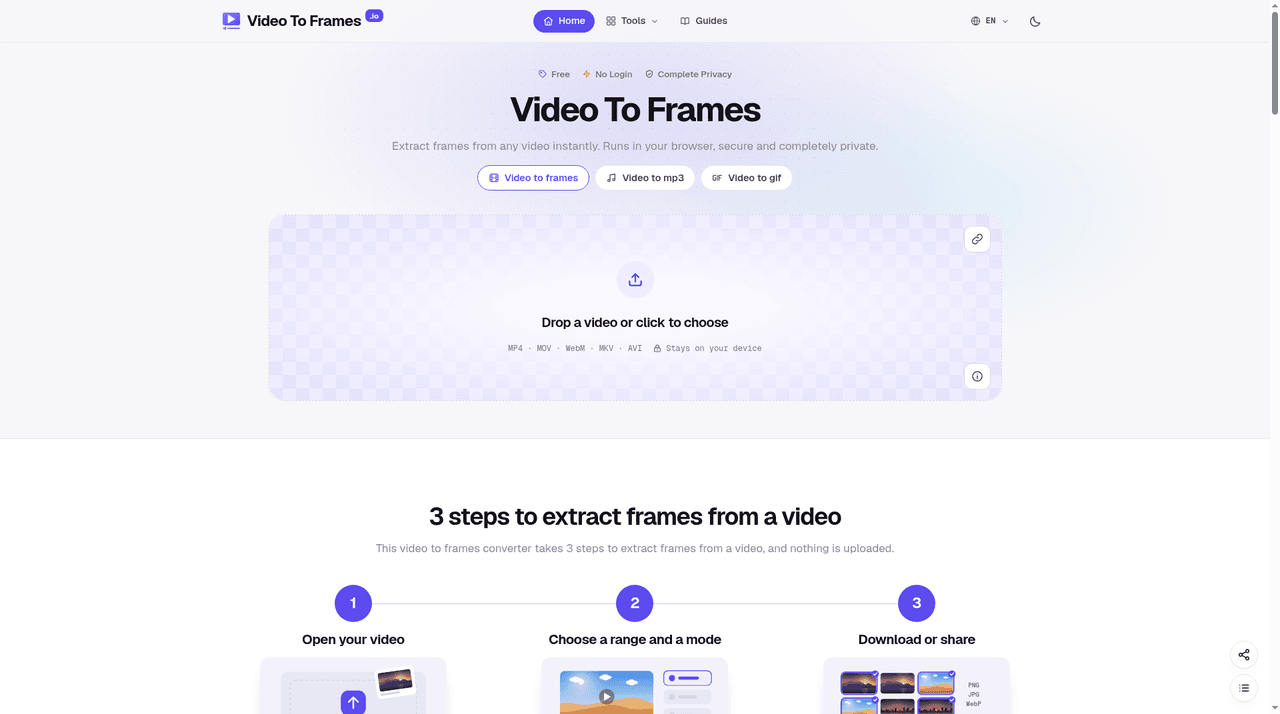
About this app
Video to Frames turns videos into frames without uploads. Open MP4, MOV, WebM, or MKV files, trim the section you need on a timeline, and extract by interval, FPS, keyframe, or scene detection. Export frames as PNG, JPG, or WebP, download as ZIP, save to a folder, copy a single frame, or build a contact sheet.
Key features
- 1Local, no-upload frame extraction from MP4, MOV, WebM, MKV and AVI in the browser
- 2Seven extraction modes: interval, FPS, keyframe, scene detection and more
- 3Export as PNG, JPG or WebP with ZIP download, folder save, single-frame copy and contact sheets
- 4Timestamped filenames and frame-accurate numbering for traceable stills
Target customer profile
Drawn from the product itself, not from a survey.
Demographic
Content creators, YouTubers, and social media managers
Pain points
Need quick thumbnails and cover images without uploading private footage to unknown servers
Primary needs
Fast, private extraction of evenly spaced or sharpest frames for thumbnails and reaction images
Demographic
Students and educators converting lecture or webinar recordings
Pain points
Turning hour-long screen recordings into one image per slide without duplicates or manual screenshots
Primary needs
Interval mode with skip-duplicates and timestamped filenames for easy referencing
Demographic
3D artists, VFX professionals, and machine-learning engineers
Pain points
Extracting every frame or exact FPS sequences for photogrammetry, Gaussian splatting, or training datasets
Primary needs
Full-sequence export with exact frame numbering and support for high-resolution codecs like HEVC and AV1
Demographic
Journalists, researchers, and legal analysts
Pain points
Needing traceable stills from video evidence with timecode and frame numbers intact
Primary needs
Frame-accurate capture with filename metadata and local processing for sensitive footage
Scout Review
Written by AI from measured evidence, scored out of 100.
Video to Frames is a browser-based frame extractor that does the work locally, so private footage never leaves the machine. It supports MP4, MOV, WebM, MKV and AVI, offers seven extraction modes (interval, FPS, keyframe, scene detection and more), and exports PNG, JPG or WebP with ZIP download, folder save, single-frame copy and contact sheets. The site is fast and well-organized, the tool is genuinely useful for the segments it names, and the privacy angle is a real differentiator against CloudConvert. The polish is uneven — a placeholder-looking hero, low-contrast text, a buried tool, no CSP and no published security or accessibility documentation.
Measure by measure
Usability
68Upload zone sits above the fold with formats and 'stays on your device' right under the CTA, answering the first two questions instantly. Mode tabs are clear, but the format line is tiny and the tool is buried under long explainer scroll.
Design
70Coherent indigo brand thread, tidy 4x2 mode-card grid, and monospace formula/table typography that suits the technical audience. Undone by a checkerboard hero fill that reads as a placeholder and low-contrast small text.
Speed
88Lighthouse 100/100 on both mobile and desktop: LCP 1.1s, CLS 0, TBT 0ms. Genuinely snappy, and local processing means the heavy lifting never touches a server round-trip.
Security
74HTTPS with HSTS, frame protection, X-Content-Type-Options, Referrer-Policy, Permissions-Policy, SPF and DMARC all present (10/12). Local-only processing shrinks the data surface. No CSP header and no published audit or bug bounty.
Accessibility
80Lighthouse 97/100, but two real failures: insufficient color contrast and visible labels not matching accessible names. No a11y statement or multi-language support found. Solid automated baseline, gaps in the details.
Growth
66Real problem, specific segments (creators, educators, ML/VFX, legal), and a genuine wedge: local no-upload GUI extraction vs CloudConvert's server uploads and FFmpeg's CLI. Category has headroom, but no network effects.
Improvement areas
- Hero upload zone reads as a placeholder; needs a finished surface
- Low-contrast small text and an accessible-name mismatch fail WCAG checks
- No CSP header and no published security, privacy or accessibility documentation
- Tool is buried below several screens of explainer copy
Design & Usability
The landing page has a real point of view: an indigo accent used sparingly, a tidy 4x2 grid of the seven extraction modes, and monospace typography for the frame-count formula and table that tells the technical audience 'we get you.' The hero puts the upload zone above the fold with formats and the 'stays on your device' promise right beneath it, so the two questions every visitor has are answered before they scroll. The cracks are in the finish: the hero's checkerboard fill reads like a transparency placeholder rather than a designed surface, the small gray descriptive text is low-contrast, and the actual tool sits below several screens of explainer copy. Good bones, unfinished edges.
Speed & Security
Speed is the standout: Lighthouse reports 100/100 on both mobile and desktop with LCP 1.1s, CLS 0 and TBT 0ms, and because processing is local the heavy work never waits on a server. Security is competent rather than exceptional — HTTPS with HSTS, frame protection, X-Content-Type-Options, Referrer-Policy, Permissions-Policy, SPF and DMARC are all in place (10/12 on the header checklist), and local-only processing genuinely shrinks the data-handling surface. What's missing is the CSP header and any published audit, security page or bug bounty, so the privacy promise rests on the maker's word rather than independent verification.
Accessibility & Growth
Accessibility scores 97/100 on the automated Lighthouse audit, which is a strong baseline, but two real failures remain: insufficient color contrast on descriptive text and visible labels that don't match their accessible names. There's no accessibility statement and no multi-language support in the collected evidence. On growth, the idea holds up: it names specific segments — creators needing thumbnails, educators turning lectures into slide stills, ML and VFX engineers building training datasets, journalists needing traceable evidence frames — and its wedge is concrete. Against VLC and FFmpeg it wins on no install and no CLI; against CloudConvert it wins on privacy; against Premiere it wins on price and simplicity. The limit is that it's a utility with no network effects, so growth depends on distribution, not on the product getting stickier with use.
Conclusion
If you need frames from a video and you don't want to install FFmpeg or hand your footage to a cloud converter, this is the obvious pick — it's fast, it's local, and the seven modes cover everything from thumbnails to training datasets. Go in expecting a competent utility rather than a finished product: the hero needs a real surface, the contrast needs fixing, and the security story needs a page behind it. None of that is hard to fix, and the core is worth the bookmark.
Suggestions for improvement
- Replace the checkerboard hero fill with a finished surface so the upload zone doesn't look like a broken image
- Raise contrast on the small gray descriptive and format text to pass WCAG AA
- Add a Content-Security-Policy header and a short security/privacy page documenting local processing
- Fix the accessible-name mismatch on labeled elements and publish an accessibility statement
Alternatives comparison
Named competitors, point by point. Nobody paid to appear here or to be left out.
 Video to Frames |  VLC Media Player |  FFmpeg |  CloudConvert |  Adobe Premiere Pro | |
|---|---|---|---|---|---|
| Processing location | Local in browser, no upload | Local desktop app | Local command line | Uploads to external servers | Local desktop app |
| Installation required | None, runs in browser | Desktop install | CLI install and setup | None, web-based | Desktop install, paid license |
| Batch / interval extraction | Yes: interval, FPS, keyframe, scene detection | Manual snapshots or scene filter with setup | Yes, via command flags | Limited video-to-frame option | Export frame, manual per frame |
| Cost | Free browser tool | Free | Free | Free tier with usage limits | Paid subscription |
VLC Media Player
Free desktop player that can save snapshots or use scene filters, but requires installation and manual settings for batch extraction.
FFmpeg
Command-line powerhouse for precise frame extraction, but demands installation and technical know-how.
CloudConvert
Online file converter with a video-to-frame option, but uploads files to external servers and has usage limits.
Adobe Premiere Pro
Professional video editor with export-frame features, but expensive and overkill for simple still extraction.
Comparing options? See Video to Frames alternatives, scored side by side
More Design & Creativity apps
View all Design & Creativity
RoomCreator
92An AI-powered interior and exterior design tool that tran...

QRBliss
91Branded QR codes with AI Brand Sync, 15 free dynamic code...

ThumbnailMaker
90AI YouTube thumbnail maker: paste a video link, get the brief, the thumbnail, and a check at feed size.

FontPlop
89Browser-based font viewer & tester for TTF, OTF, WOFF, WO...

Cross Stitch Pattern Maker
89Free on-device photo-to-DMC/Anchor chart with skein counts.

Tracé slides
89Interactive math & physics slides with live graphs and an...

English Test Coach
89English Test Coach checks your IELTS essays and letters, gives an estimated band score across all four criteria, and tells you exactly what to revise next.

What the GIF
89Frame-perfect video-to-GIF maker that runs entirely in yo...

All of Us
89Add deceased loved ones to photos with AI and see free pr...

BeartIMAGE
88BeartIMAGE is a free, web-based image processing platform engineered for fast, bulk photo editing and conversion directly in your browser.

Portrait Gift
88AI-powered personalized face swap art platform creating c...

TranscriptYou
88Free YouTube transcript generator with timestamps and AI ...


A platform dedicated to providing unbiased reviews of newly launched applications, analyzing everything from their features to their full potential.
info@scoutforge.net© 2026 Scoutforge. All rights reserved.
