Cycling through all six. Tap any point to stop.
Measured on six things
Real Chrome for AI agents on your server. Take over for login and 2FA, then let the agent finish and download the result.
Growth
63Real, specific pain (agents stalling at login/2FA) with a concrete wedge: real Chrome on your own server, human takeover, reusable encrypted profiles, MCP + REST, AGPL with no usage fee. Early-stage (domain weeks old) but the idea has room.
Screenshots
1 / 1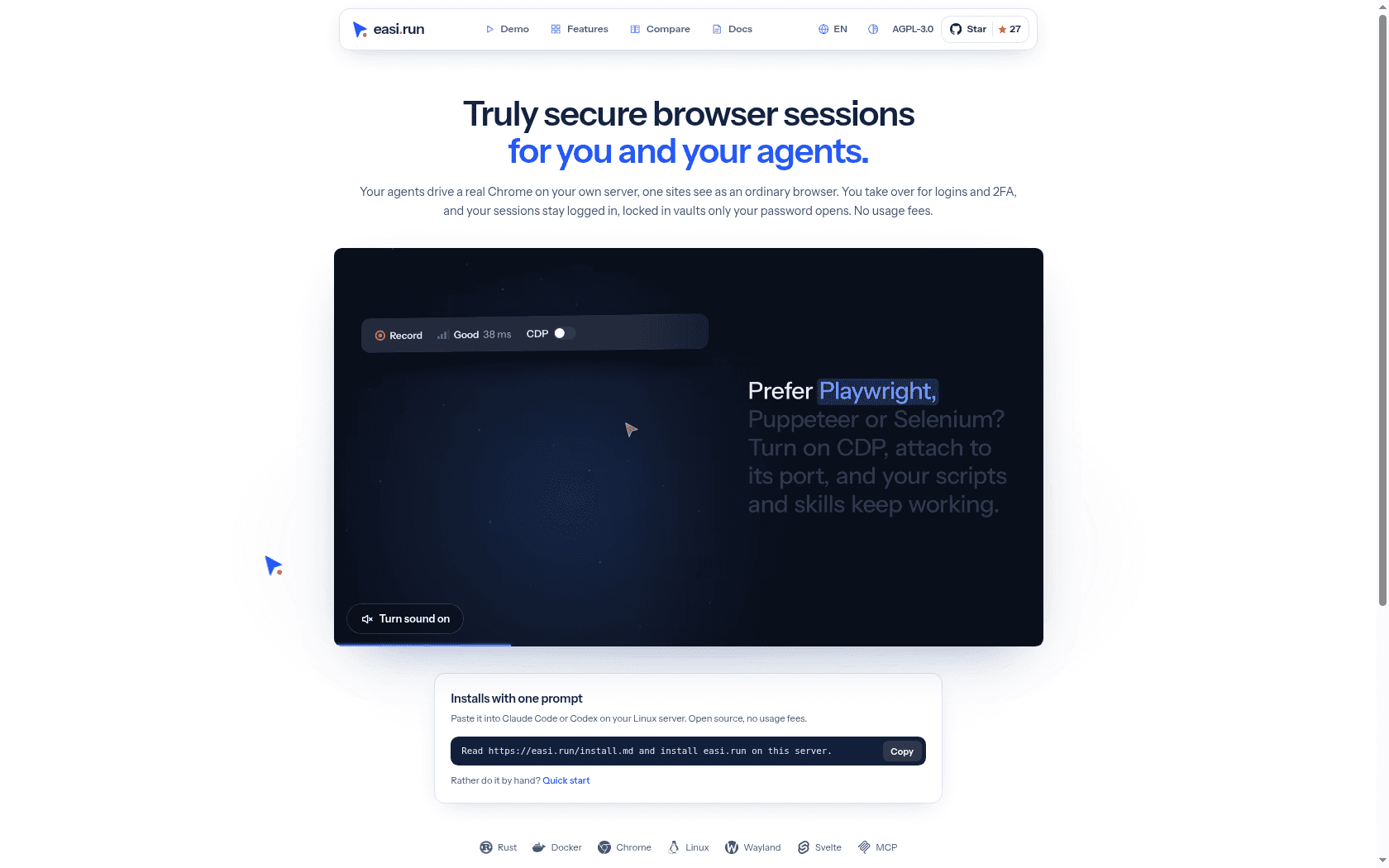
About this app
Browser agents often stop at a login, 2FA prompt or approval. easi.run gives your agent real Chrome on your own server. Watch the task live, take control for the human sign-in step, then hand the browser back so the agent can continue and download the result. Connect through MCP or REST. Reuse encrypted browser profiles, isolate sessions in separate containers, upload files and download outputs to your device. Recordings and an action timeline help review what happened. Built for developers and technical teams using coding agents. Open source under AGPL-3.0 with no software usage fee; infrastructure and model costs apply. Requires Linux x86-64 and Docker Engine. Source: https://github.com/julianosig/easi.run Docs: https://docs.easi.run Try the browser UI: https://easi.run/demo Official video: https://easi.run/film/en-997a5b9681d22834.mp4
Key features
- 1Real Chrome on your own Linux server, with human takeover for login/2FA then handback to the agent.
- 2MCP and REST access, reusable encrypted browser profiles, and container-isolated sessions.
- 3Session recordings, action timeline, file uploads and downloads to your device.
- 4Open source under AGPL-3.0 with no software usage fee; infrastructure and model costs apply.
Target customer profile
Drawn from the product itself, not from a survey.
Demographic
Developers building agents with Claude Code, Codex or other MCP clients.
Pain points
Browser tasks stop at login or 2FA and lose context when restarted.
Primary needs
Watch real Chrome, handle the human step, then let the agent continue.
Demographic
Technical teams running their own Linux infrastructure.
Pain points
Need reusable signed-in sessions and isolation between browser tasks.
Primary needs
Encrypted browser profiles, separate session containers, MCP and REST.
Demographic
Operators reviewing agent-driven browser workflows.
Pain points
Hard to see what happened and retrieve files from a remote browser.
Primary needs
Session recordings, action timeline, uploads and downloads to a device.
Scout Review
Written by AI from measured evidence, scored out of 100.
easi.run is an open-source tool that gives your coding agent a real Chrome instance on your own Linux server, lets you take over for logins and 2FA, then hands the browser back so the agent can finish and download the result. It connects via MCP or REST, reuses encrypted browser profiles, isolates sessions in containers, and records what happened with an action timeline. The marketing site is fast (Lighthouse 100/100 mobile), visually coherent, and aimed squarely at developers — one-prompt install, monospace command card, live demo panel. Security headers are thorough apart from missing SPF/DMARC, and there is no published compliance certification yet. Accessibility audits perfectly, though small grey body text is a real contrast issue. The idea targets a genuine, well-known pain point with a credible self-hosted wedge; the open question is adoption in a crowded agent-browser category.
Measure by measure
Usability
68One-prompt install card with Copy sits right under the hero, backed by a Quick start fallback and clear Demo/Features/Compare/Docs nav. Onboarding path for the target developer is short and obvious; dense grey subtext hurts first-glance scannability.
Design
71Coherent developer-focused brand: two-tone headline, red/blue accents, and a dark mock-browser demo panel that shows the login-dropout problem instead of describing it. Held back by small low-contrast grey text and a stray cursor graphic.
Speed
88Lighthouse mobile 100/100 with LCP 1.7s, CLS 0.025, TBT 0ms, FCP 906ms; desktop also 100/100. A genuinely fast, lightweight marketing page with no measurable layout shift or blocking work.
Security
74HTTPS enforced with HSTS, CSP, frame protection and full header set (10/12 probe points). Encrypted profiles and password-gated session vaults are core claims, and AGPL source is inspectable. SPF and DMARC are missing; no SOC 2/ISO/pen-test published.
Accessibility
79Lighthouse accessibility audit 100/100, a language selector in the nav, and a clean semantic marketing page. Automated checks don't cover everything, and the visual audit flagged small light-grey body text as a real contrast concern.
Growth
63Real, specific pain (agents stalling at login/2FA) with a concrete wedge: real Chrome on your own server, human takeover, reusable encrypted profiles, MCP + REST, AGPL with no usage fee. Early-stage (domain weeks old) but the idea has room.
Improvement areas
- No SPF or DMARC DNS records on a security-positioned domain.
- No published SOC 2, ISO or penetration-test report; no dedicated security page.
- Small, low-contrast grey body text hurts readability despite a 100/100 automated a11y score.
- Very early stage — new domain, minimal community footprint, single social profile.
Design & Usability
easi.run's homepage is built for exactly one reader: a developer with a Linux box and an agent that keeps getting logged out. The hero leads with a two-tone headline and a dark mock-browser panel showing 'You've been signed out' with floating status chips — the problem is demonstrated, not described. The install card is a monospace command bar with a Copy button, placed immediately under the hero, which is the right call-to-action for this audience. Navigation is a compact floating pill with Demo, Features, Compare, Docs, language, license badge and GitHub stars. Where it slips: body and subhead text is small, light grey and centered over several lines, which hurts scannability, and a stray blue cursor graphic sits outside the grid. The onboarding path itself is short — paste one prompt, or fall back to Quick start — and the demo panel signals a live product walkthrough. Solid, developer-appropriate execution with a couple of polish gaps.
Speed & Security
Speed is the standout: Lighthouse mobile scores 100/100 with LCP 1.7s, CLS 0.025, TBT 0ms and FCP 906ms, and desktop also hits 100/100. There is no measurable layout shift or blocking work, and the marketing page reads as lightweight rather than a heavy SPA. Security is strong on transport and headers — HTTPS enforced, HSTS, CSP, frame protection, X-Content-Type-Options, Referrer-Policy and Permissions-Policy all present, 10 of 12 probe points. The product's core promise is encrypted browser profiles and session vaults opened only by your password, and the AGPL source is publicly inspectable, which is a meaningful trust signal for a tool that holds logged-in sessions. The gaps: no SPF or DMARC records on the domain, and no published SOC 2, ISO or pen-test report. For an early open-source project that is a normal stage, but email spoofing protection is a cheap fix worth making.
Accessibility & Growth
Accessibility scores a clean 100/100 on the Lighthouse axe-core audit, and the site ships a language selector in the nav, suggesting multi-language support. Automated audits only cover part of WCAG, and the visual review flagged small light-grey body text on white as a genuine contrast concern that the audit missed — a manual contrast pass would close the gap. On growth: the problem easi.run names is real and specific. Browser agents routinely stall at login, 2FA or approval prompts and lose session context on restart, and the fix here is concrete — real Chrome on your own server, human takeover for the sign-in step, reusable encrypted profiles, container isolation, MCP and REST access, recordings and an action timeline. The AGPL license with no usage fee is a sharp wedge against hosted browser-automation incumbents like BrowserStack. The category is crowded and moving fast, and the domain is only weeks old, so the idea's ceiling depends on execution and community adoption rather than novelty.
Conclusion
If you are running Claude Code, Codex or another MCP client on your own Linux infrastructure and your agent keeps dying at a login screen, easi.run is aimed directly at you and the install is a single prompt. The AGPL license and no-usage-fee model lower the barrier to trying it. Before you trust it with real signed-in sessions, read the source, confirm how profile encryption keys are stored, and add SPF/DMARC to the domain. It is early — the domain is weeks old and the community is small — so treat it as a promising tool to evaluate rather than a settled dependency.
Suggestions for improvement
- Add SPF and DMARC DNS records — cheap fix, closes an obvious spoofing gap on a security-branded product.
- Increase body and subhead text size/contrast; the small light-grey copy on white is the main readability issue.
- Publish a short security page covering how profile encryption keys are stored and what the session vault protects.
- Remove or reposition the stray blue cursor graphic sitting outside the layout grid in the left margin.
Alternatives comparison
Named competitors, point by point. Nobody paid to appear here or to be left out.
 easi.run |  BrowserStack | |
|---|---|---|
| Deployment model | Self-hosted on your own Linux x86-64 server via Docker | Cloud-hosted browser grid managed by BrowserStack |
| Primary use case | Agent-driven browser automation with human takeover for logins/2FA | Manual and automated cross-browser testing |
| Agent integration | MCP and REST for Claude Code, Codex and other MCP clients | Selenium, Playwright, Cypress and other test frameworks |
| Session persistence | Reusable encrypted browser profiles that stay signed in | Ephemeral test sessions; persistence via test config, not vaulted profiles |
| Pricing model | Open source AGPL-3.0, no usage fee; you pay infra and model costs | Subscription plans based on parallel sessions and minutes |
| Observability | Session recordings and an action timeline for review | Video recordings, logs and test reports per run |
Comparing options? See easi.run alternatives, scored side by side
More Development & Engineering apps
View all Development & Engineering
CreateMyCoin
92A no-code Solana token creator that deploys SPL tokens in...

Vibe Coding Agent Skills
92A free, open-source platform offering 110 AI agent skills...

CC Switch
91Open-source desktop app for switching AI coding providers...

TaxID
90Fast EU VAT validation API for developers, covering 27 EU...

DemoVexa
90Turn your code into professional product demo videos with AI-generated scripts, animated UI, and natural voiceovers.

deed.page
89Permanent web hosting for AI agents, no human step

Denpex
89AI-powered GPU failure diagnosis for distributed ML training

FontPlop
89Browser-based font viewer & tester for TTF, OTF, WOFF, WO...

Webfetch
89Web scraping API that turns any URL into HTML, text, Mark...

Claw Messenger
88Claw Messenger is an iMessage API service that gives AI a...

ButterKit
82macOS app for App Store screenshots: 3D mockups, auto-tra...

BeartIMAGE
88BeartIMAGE is a free, web-based image processing platform engineered for fast, bulk photo editing and conversion directly in your browser.


A platform dedicated to providing unbiased reviews of newly launched applications, analyzing everything from their features to their full potential.
info@scoutforge.net© 2026 Scoutforge. All rights reserved.
