Cycling through all six. Tap any point to stop.
Measured on six things
AI Video Generator & Creative Studio
Security
40HTTPS is enforced and SPF is set, but HSTS, CSP, frame protection, Referrer-Policy, Permissions-Policy and DMARC are all missing — 3/13 on the header checklist. No SOC 2, ISO or security page found.
Screenshots
1 / 1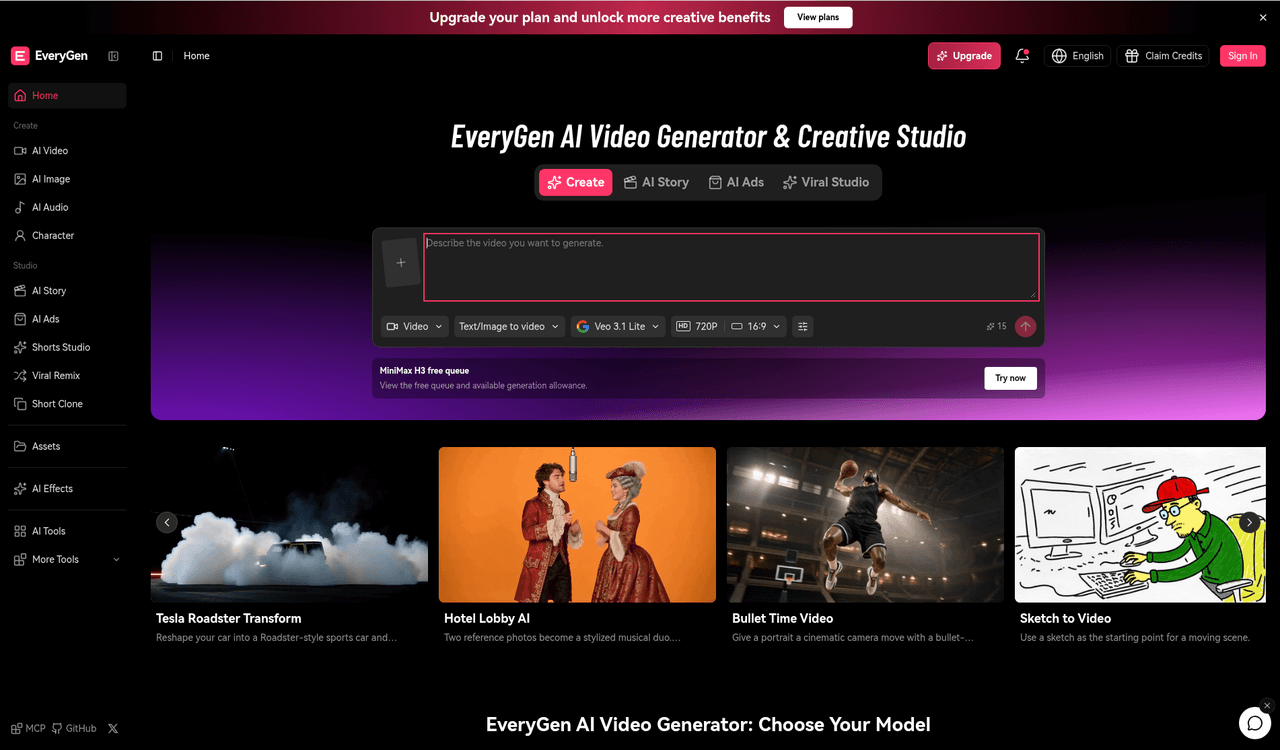
About this app
Everygen is an AI video generator and creative studio that turns text and images into videos, images, music and voiceovers in one place, with multiple leading models and a director mode for multi-scene projects.
Key features
- 120+ leading video and image models (Veo 3.1, Seedance 2.5, Kling 3.0, Wan 3, Nano Banana 2, GPT Image 2.5) in one workspace
- 2Studio / director mode for multi-scene projects with reusable assets, voices and soundtrack
- 3Text-to-video, image-to-video, reference-to-video and video editing workflows up to 30 seconds
- 4Tiered pricing from $19 to $99/month plus credit packs, with an output estimator
Target customer profile
Drawn from the product itself, not from a survey.
Demographic
Content creators and social media managers
Pain points
Juggling multiple AI tools for video, image, and audio; inconsistent style across posts; tight deadlines.
Primary needs
Fast, unified generation of short-form video and visuals with brand consistency and easy editing.
Demographic
Small marketing teams and agencies
Pain points
High cost of video production; need for rapid ad variants; limited technical skills in AI workflows.
Primary needs
Affordable, scalable video ad generation with guided planning and multi-model flexibility.
Demographic
E-commerce and product teams
Pain points
Creating product demos and visuals without a studio; maintaining accuracy and brand fit across assets.
Primary needs
Image-to-video and reference-based generation to turn product shots into engaging clips and ads.
Scout Review
Written by AI from measured evidence, scored out of 100.
Re-reviewed Oct 20, 2026 · previously 30/100
EveryGen is a competent multi-model AI creative studio: 20+ video and image models (Veo 3.1, Seedance 2.5, Kling 3.0, Wan 3, Nano Banana 2, GPT Image 2.5) in one workspace, a Studio mode for multi-scene projects, and clear pricing from $19 to $99 a month. Accessibility scores 96/100 and the pricing page is better than most. Against it: a 45/100 mobile performance score with a 62.2s LCP, a 3/13 security header checklist with no compliance documentation, and a UI so dense and dark that new users will hunt for the core flow. The idea is sound and the execution is uneven — fix speed and contrast and this moves up a tier fast.
Measure by measure
Usability
62Prompt box, format/quality selectors and an example gallery put generation front-and-center, and 20+ models are one click away. The dense sidebar and no visible free trial make first-run value slower than it should be.
Design
58Dark, model-dense studio UI with a purple-gradient prompt box and strong example imagery. The 15+ item sidebar and near-illegible low-contrast sections drag it to average.
Speed
44Lighthouse mobile performance 45/100 with a 62.2s LCP and 906ms TBT. The homepage loads long model lists and an 18-card gallery before anything is usable.
Security
40HTTPS is enforced and SPF is set, but HSTS, CSP, frame protection, Referrer-Policy, Permissions-Policy and DMARC are all missing — 3/13 on the header checklist. No SOC 2, ISO or security page found.
Accessibility
80Lighthouse accessibility scores 96/100, with contrast as the one failing audit — consistent with the near-black sections seen in the visual audit. No WCAG statement or a11y docs found.
Growth
60A real, growing problem — creators juggling five AI tools — with a genuine wedge: 20+ models and a multi-scene Studio in one workspace. Aggregation is copyable, so the moat is thin.
Improvement areas
- Mobile performance: 45/100 Lighthouse with a 62.2s LCP and 906ms TBT
- Security headers at 3/13 — no HSTS, CSP, frame protection, Referrer-Policy or DMARC
- Low-contrast near-black sections and a 15+ item sidebar with weak visual grouping
- No visible free tier or trial below the $19/month entry plan
Design & Usability
EveryGen's interface is built for people who already know what they want: a purple-gradient prompt box with model, resolution and aspect-ratio selectors sits front and center, and an example gallery (Tesla Roadster, Hotel Lobby musical, Bullet Time) does the onboarding a tutorial would otherwise have to. The problem is density. The sidebar carries 15+ entries — Create, AI Video, AI Image, Character, AI Audio, Studio, Shorts Studio, Viral Remix, Assets, AI Effects, AI Tools — with little visual grouping, and several homepage sections render so dark that text is nearly illegible. For a power user this is a cockpit; for a first-timer it's a wall. The pricing page is unusually clear, with four tiers, credit packs and an output estimator, which is a genuine usability win most competitors skip.
Speed & Security
Speed is the weak link. Lighthouse mobile performance lands at 45/100 with a 62.2s Largest Contentful Paint and 906ms Total Blocking Time — the homepage loads long model lists and an 18-card inspiration gallery before it becomes usable, which is a rough first impression for a tool whose whole promise is speed. Security is thin: HTTPS is enforced and SPF is configured, but HSTS, CSP, frame protection, Referrer-Policy, Permissions-Policy and DMARC are all absent, landing at 3/13 on the header checklist. No SOC 2, ISO certification, security page or bug bounty was found. For a product handling uploaded reference images, video and audio, that's a gap worth closing before agencies start trusting it with client assets.
Accessibility & Growth
Accessibility is the strongest measured dimension: Lighthouse scores 96/100, with insufficient color contrast as the single failing audit — which lines up exactly with the near-black, low-contrast sections the visual audit flagged. Fix the contrast and this is close to clean; there's no WCAG statement or a11y documentation, but the automated baseline is solid. Growth is a judgement on the idea: the problem is real (creators and small teams juggling separate video, image and audio tools), and the wedge — 20+ leading models plus a multi-scene Studio with reusable assets, voices and soundtrack — is concrete and useful. The honest limit is that model aggregation is copyable; Runway and Pika own their own models and can undercut or out-feature a reseller. EveryGen's defensible ground is workflow and price, not technology.
Conclusion
EveryGen's bet is that convenience beats ownership: why subscribe to five AI tools when one tab has all the models? That's a real pitch, and the Studio mode plus reusable assets give it more substance than a pure reseller. But the fundamentals are lagging. A 62-second LCP will lose users before they ever see a model list, and a 3/13 security posture is hard to defend to the agencies and e-commerce teams in the target audience. The path forward is unglamorous: cut the homepage weight, fix the contrast, ship the security headers, and add a real free tier so people can feel the workflow before paying $19. Do that and the aggregation story starts to hold up.
Suggestions for improvement
- Cut homepage weight: lazy-load the 18-card gallery and model lists to fix the 62.2s LCP and 906ms TBT.
- Ship the missing security headers (HSTS, CSP, frame protection, Referrer-Policy, DMARC) and publish a security page.
- Raise contrast on the near-black sections and the tiny colored dots flagged by the Lighthouse audit.
- Add a real free tier or trial — the pricing page starts at $19/mo with no visible way to test the workflow.
Alternatives comparison
Named competitors, point by point. Nobody paid to appear here or to be left out.
 Everygen Everygen |  Runway Runway |  Pika Pika | |
|---|---|---|---|
| Multi-model access | 20+ third-party models (Veo 3.1, Seedance 2.5, Kling 3.0, Wan 3, Nano Banana 2, GPT Image 2.5) | Proprietary Gen-family models plus select third-party integrations | Proprietary Pika models focused on stylized short clips |
| Entry price | $19/month Lite (1,000 credits), up to $99/month Ultra | Free tier plus paid plans starting around $12-15/month | Free tier plus paid plans starting around $8-10/month |
| Multi-scene / director mode | Yes — Studio mode with reusable assets, voices and soundtrack | Yes — timeline editing and multi-shot workflows | Limited — focused on single clips rather than scene projects |
| Image generation included | Yes — Nano Banana 2, GPT Image 2.5, Wan 2.7, Seedream 5.0 | Yes — image generation alongside video | Limited — image input for video, not a full image studio |
| Free tier / trial | Free credits mentioned; no visible trial below $19/month | Free tier with limited credits | Free tier with limited generations |
Runway
A popular AI video generation suite with strong editing tools and model variety, often used by professionals for creative projects.
Pika
An accessible AI video generator focused on quick, stylized clips from text or images, with a friendly interface for beginners.
Comparing options? See Everygen alternatives, scored side by side
More AI Generations apps
View all AI Generations
Uni-1 by Luma AI
92Uni-1 is an advanced multimodal text-to-image AI model th...

LTX 2.3 AI Video Generator
91Fast, open-source AI video generator with 4K support, mul...

IraVoice
88Private on-device dictation for Apple-silicon Macs.

OBVELO
88Privacy gateway that masks personal data in LLM traffic

tradutor de mangá com IA
88O tradutor de mangá com IA traduz capítulos em lote, personaliza textos e oferece edição visual para estúdios.

Pixelimg
88A free online AI-powered tool that instantly converts ima...

HeyVid AI
88HeyVid AI is a free all-in-one AI video and image generat...

RestorePhotosApp
88An AI-powered photo restoration app that brings old, blur...

Mygom SEO
87MygomSEO is an AI marketing agent that audits your site, writes SEO content, publishes to 12+ CMS platforms, posts to social, and monitors rankings 24/7.

pause.do
87A privacy-first browser extension that inserts gentle pau...

DeepSwapAI
87AI face swap online with no subscription, pay per use.

ContentIQ
87AI writer that fact-checks before writing, with real sour...


A platform dedicated to providing unbiased reviews of newly launched applications, analyzing everything from their features to their full potential.
info@scoutforge.net© 2026 Scoutforge. All rights reserved.
