Cycling through all six. Tap any point to stop.
Measured on six things
AI video and image generation from text or images
Speed
46Lighthouse mobile 50/100 with an 8.1s LCP and 0.222 CLS; desktop 58/100. A heavy SPA stuffed with example cards and model grids makes the first paint crawl.
Screenshots
1 / 1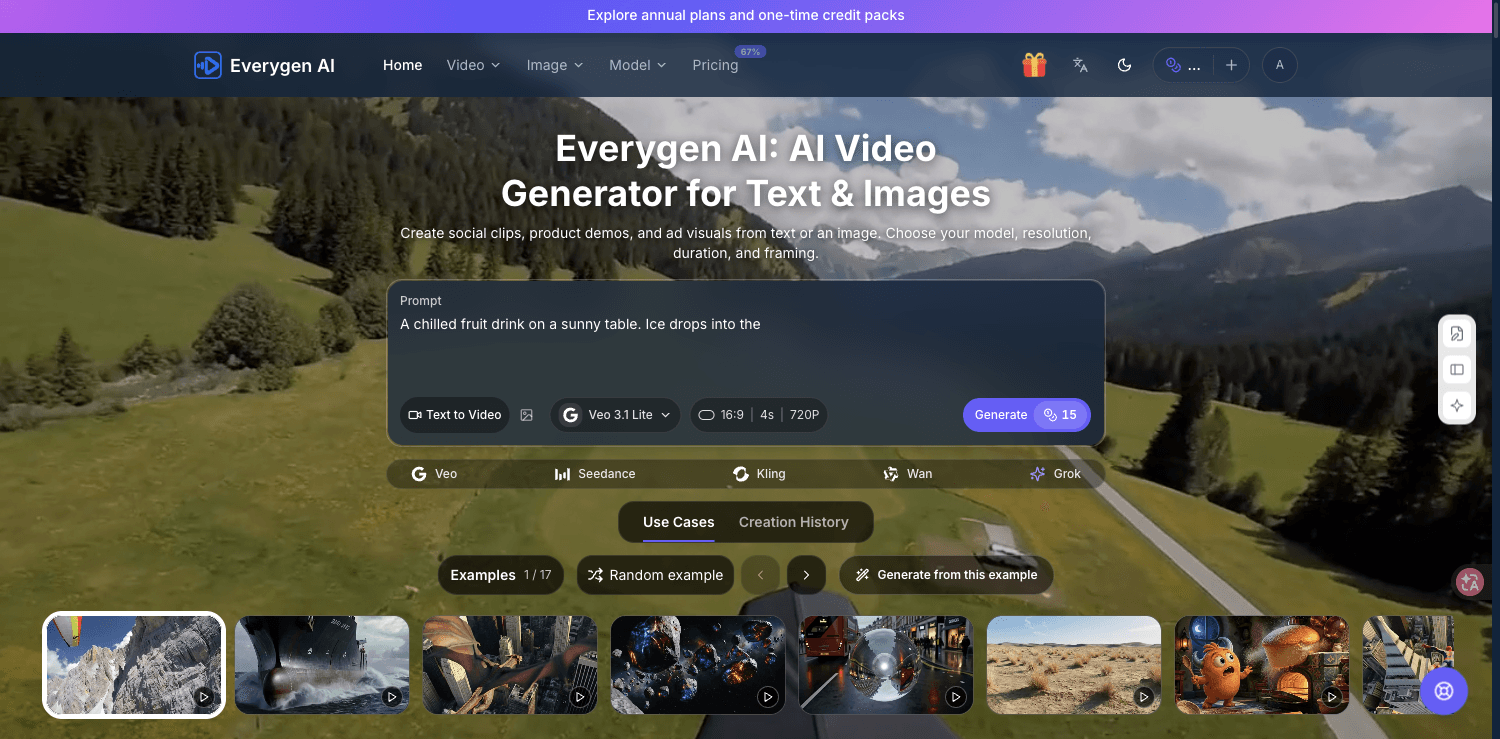
About this app
Everygen AI is a browser-based AI image and video generator for creating social clips, product demos, ad visuals, product images, portraits, and creative scenes from text prompts or reference images. Choose a video or image workflow, select a model, resolution, duration, and framing, then preview examples or generate from a prompt. The service offers one-time credit packs and annual plans; one-video credit packs start at $9.90. Available models and credit costs are shown in the generator and pricing page. The demo explores workflows and examples; no clips are rendered in the demo.
Key features
- 1Multi-model video generation: Veo 3.1, Seedance, Kling, Wan and Grok Imagine behind one prompt box
- 2Single credit balance spanning image and video tools, with credit packs from $9.90 and annual plans
- 3Parameter control per generation: model, aspect ratio, duration and resolution before you spend credits
Target customer profile
Drawn from the product itself, not from a survey.
Demographic
Creators working on social clips, product demos and ad visuals
Pain points
Need images and video content from text or reference images
Primary needs
Choose model, resolution, duration and framing
Demographic
Creators working on social clips, product demos and ad visuals
Pain points
Need images and video content from text or reference images
Primary needs
Choose model, resolution, duration and framing
Demographic
Creators working on social clips, product demos and ad visuals
Pain points
Need images and video content from text or reference images
Primary needs
Choose model, resolution, duration and framing
Scout Review
Written by AI from measured evidence, scored out of 100.
Everygen AI is a browser-based AI image and video generator that aggregates third-party models — Veo 3.1, Seedance, Kling, Wan, Grok Imagine — behind a single credit balance, with credit packs from $9.90 and annual plans at $100/$500/$600. The pitch is convenience: one balance, many models, pick your resolution, duration and framing. The execution is early. The demo renders nothing, four of six video tools are marked 'Coming soon,' mobile performance sits at 50/100 with an 8.1s LCP, and the security headers are largely absent. Accessibility is the standout at 92/100. It is a reasonable aggregator play in a hot category, priced competitively, but it currently promises more than it ships.
Measure by measure
Usability
54Prompt box is prominent and 'Click to use' examples help, but you must pick model, aspect, duration and resolution before generating, and the demo renders nothing. Pricing demands a saved video before checkout.
Design
58Dark navy theme with a clean hero prompt box and strong example thumbnails. Undercut by four 'Coming soon' overlays in the tools row and a cramped 20+ card Get Inspired grid with inconsistent heights.
Speed
46Lighthouse mobile 50/100 with an 8.1s LCP and 0.222 CLS; desktop 58/100. A heavy SPA stuffed with example cards and model grids makes the first paint crawl.
Security
52HTTPS enforced, secure cookies, SPF and DMARC present, and card data is not stored. But no HSTS, CSP, frame protection or Referrer-Policy — 5/13 on the header checklist, and no audit claims.
Accessibility
70Lighthouse a11y 92/100 with a language switcher and theme toggle. Failing audits: aria roles mismatched, low contrast text, and visible labels without matching accessible names.
Growth
58Real, growing demand for AI video, and one credit balance across Veo, Kling, Seedance and Wan is a genuine wedge. But four of six tools are 'Coming soon' and nothing here is defensible against the model makers themselves.
Improvement areas
- Demo renders no clips — users cannot judge output quality before paying
- Mobile Lighthouse performance 50/100 with 8.1s LCP and 0.222 CLS on a heavy card grid
- Security headers thin (5/13): no HSTS, CSP, frame protection or Referrer-Policy on a payment site
- Four of six listed video tools are 'Coming soon,' making the product feel unfinished
Design & Usability
Everygen AI's homepage is a competent dark-theme aggregator: a compact hero prompt box with model, aspect, duration and resolution selectors, four strong example thumbnails, and a 3x3 model grid covering Veo, Seedance, Kling, Wan and Grok. The problem is honesty about maturity — four of six video tools carry 'Coming soon' overlays, and the Get Inspired section crams 20+ cards into a masonry grid with inconsistent heights. Usability is gated: the demo renders nothing, so 'try before you buy' means reading example prompts, and the pricing flow requires configuring and saving a video before you can pay $9.90. 'Click to use' buttons on examples are a genuinely nice touch that lowers the blank-page problem, but the multi-selector prompt box front-loads decisions before a first-time user has seen a single output.
Speed & Security
Speed is the weak spot. Lighthouse mobile scores 50/100 with an 8.1s LCP, 5.1s FCP and a 0.222 CLS; desktop only reaches 58/100. That is a heavy SPA carrying dozens of example cards and model grids, and the layout shift means the page visibly reflows as it loads. Security is a mixed bag: HTTPS is enforced, cookies are secure, SPF and DMARC are configured, and the pricing page states card numbers are not stored. But the header probe returns 5/13 — no HSTS, no CSP, no frame protection, no X-Content-Type-Options, no Referrer-Policy, no Permissions-Policy. For a site that takes payments, that is a thin defensive posture, and there are no published audits, pen-test results or bug bounty to compensate.
Accessibility & Growth
Accessibility is the strongest measured dimension: Lighthouse scores 92/100, and the header offers both a language switcher and a theme toggle. Three audits still fail — aria attributes that do not match their roles, insufficient color contrast, and visible text labels without matching accessible names — which are exactly the kind of issues that hit screen reader and low-vision users hardest. Growth is a judgement call. The problem is real and the category is expanding fast, and consolidating Veo, Kling, Seedance, Wan and Grok behind one credit balance is a legitimate convenience wedge for creators who do not want five subscriptions. But the moat is thin: the underlying models are owned by companies that can sell direct, four of six tools are vaporware, and the domain is brand new. The idea can grow; the defensibility is the open question.
Conclusion
If you need one place to try several video models without five subscriptions, Everygen AI is worth a look — just go in knowing the demo shows you nothing rendered, the tools row is mostly placeholders, and the site itself is slow. Buy the $9.90 single-video pack before committing to an annual plan; the credit math is transparent enough that you can test the workflow cheaply. The category is moving fast and the model owners may eventually cut out the middleman, so treat this as a convenience layer, not a platform. It works, it is priced fairly, and it has real room to improve — but right now it is a promising early build, not a finished studio.
Suggestions for improvement
- Render at least one real, watermarked clip in the demo so users can judge output quality before paying.
- Fix the 8.1s mobile LCP and 0.222 CLS — trim the example card grid and lazy-load offscreen thumbnails.
- Add HSTS, CSP and frame protection headers; a payment site with 5/13 header coverage is an easy fix.
- Ship or hide the four 'Coming soon' tools — a roadmap on the homepage reads as unfinished product.
Alternatives comparison
Named competitors, point by point. Nobody paid to appear here or to be left out.
 Everygen AI Everygen AI |  |  | |
|---|---|---|---|
| Multi-model access (Veo, Kling, Seedance, Wan, Grok) | Yes — 9 model cards across 5 providers in one generator | Not specified in provided data | Not specified in provided data |
| Entry price for a single video generation | $9.90 one-time, no subscription | Not specified in provided data | Not specified in provided data |
| Free trial / demo that renders output | Demo explores workflows only — no clips rendered | Not specified in provided data | Not specified in provided data |
| Annual subscription plans | Yes — Basic $100/yr, Pro $500/yr, Studio $600/yr | Not specified in provided data | Not specified in provided data |
| Accessibility audit score (Lighthouse) | 92/100 with 3 failing audits | Not specified in provided data | Not specified in provided data |
| Published security compliance (SOC 2 / ISO / pen-test) | None found; header checklist 5/13 | Not specified in provided data | Not specified in provided data |
Comparing options? See Everygen AI alternatives, scored side by side
More AI Generations apps
View all AI Generations
Uni-1 by Luma AI
92Uni-1 is an advanced multimodal text-to-image AI model th...

LTX 2.3 AI Video Generator
91Fast, open-source AI video generator with 4K support, mul...

IraVoice
88Private on-device dictation for Apple-silicon Macs.

OBVELO
88Privacy gateway that masks personal data in LLM traffic

tradutor de mangá com IA
88O tradutor de mangá com IA traduz capítulos em lote, personaliza textos e oferece edição visual para estúdios.

Pixelimg
88A free online AI-powered tool that instantly converts ima...

HeyVid AI
88HeyVid AI is a free all-in-one AI video and image generat...

RestorePhotosApp
88An AI-powered photo restoration app that brings old, blur...

Mygom SEO
87MygomSEO is an AI marketing agent that audits your site, writes SEO content, publishes to 12+ CMS platforms, posts to social, and monitors rankings 24/7.

pause.do
87A privacy-first browser extension that inserts gentle pau...

DeepSwapAI
87AI face swap online with no subscription, pay per use.

ContentIQ
87AI writer that fact-checks before writing, with real sour...


A platform dedicated to providing unbiased reviews of newly launched applications, analyzing everything from their features to their full potential.
info@scoutforge.net© 2026 Scoutforge. All rights reserved.
