Cycling through all six. Tap any point to stop.
Measured on six things
AI video and banner editor in a chat
Design
30The live homepage renders as a near-black void with no hero, a clipped tilted card at the edge, and huge dead gaps between sections. The nav and promo card copy are sharp; the page they sit on is not.
Screenshots
1 / 1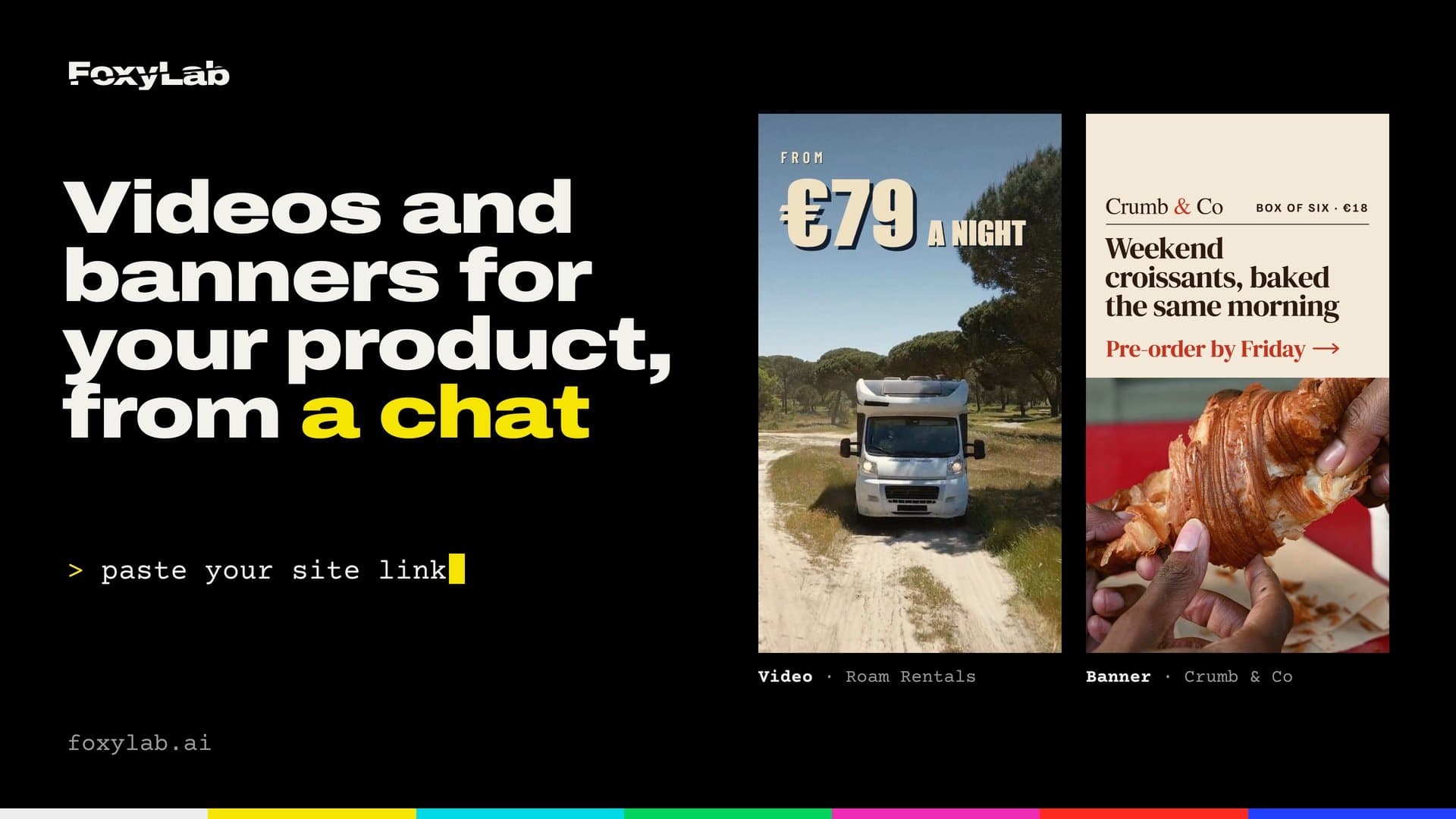
About this app
FoxyLab is an AI video and banner editor that works in a chat. You write what you need or paste your site link. FoxyLab does the rest. How it works: paste your site link or describe the product in one line. FoxyLab reads your brand: logo, colours, fonts, tone and screenshots. It asks a few short questions and offers three ideas. It writes the script, records the voice, builds the shots, reviews them and renders the video. You give notes in plain words, and FoxyLab remakes only the parts a note touches. What you get: video ads, launch films, product explainers and social videos. Banner sets for feeds and Google Display. Videos in 9:16, 4:5, 1:1 and 16:9, each size with its own layout, not a crop. A REST API, webhooks and an MCP server for your own agent. FoxyLab designs each video for its brand. It uses no templates. Free makes up to one video a week; paid plans start at $29.99 a month.
Key features
- 1Chat-driven video and banner creation: paste a site URL or describe the product, and FoxyLab reads logo, colours, fonts and tone to build the assets.
- 2Per-format layouts for 9:16, 4:5, 1:1 and 16:9 — each size composed independently rather than cropped from one master.
- 3Note-scoped re-renders: describe a fix in plain words and only the shots the note touches are rebuilt.
- 4REST API, webhooks and an MCP server with scoped Bearer keys, idempotency support and structured usage-limit errors.
- 5Transparent usage model: weekly meter resetting Friday 00:00 UTC, with per-job cost published (first cut, edits, re-renders).
- 6Free tier with one video a week; paid plans from $29.99/mo (Starter) up to $199.99/mo (Max) with 4K output.
Target customer profile
Drawn from the product itself, not from a survey.
Demographic
Social media managers and content creators
Pain points
Spending hours editing videos for multiple platforms and formats
Primary needs
Quick generation of vertical and square videos for Reels, TikTok, and Shorts
Demographic
Small business owners and startup marketers
Pain points
Lack of video editing skills and budget for professional agencies
Primary needs
Easy tool that turns a site link or one line into promotional videos and banners
Demographic
Product managers and launch teams
Pain points
Tight deadlines for launch videos and inconsistent brand assets
Primary needs
Fast creation of product videos and banners with consistent branding and multiple export formats
Scout Review
Written by AI from measured evidence, scored out of 100.
FoxyLab is a chat-driven video and banner studio that reads your site for brand, generates per-format layouts instead of crops, and lets you fix things by describing them in plain words. The underlying product thinking is genuinely strong: the pricing page documents usage down to per-job percentages, the API docs are complete enough to build against, and the MCP server plus webhooks signal a team that understands where agent-driven content is heading. The execution on the front door is where it falls apart. The live homepage renders as a black void with no hero, a clipped card at the edge, and dead space between sections — a visitor gets no explanation of the product above the fold. Mobile LCP of 10.1s compounds that. Security is table stakes with a thin header posture and no published audit. Accessibility scores a clean 100/100 on automated checks. If the homepage rendered and the hero loaded in under three seconds, this would read as a serious contender. Right now it reads as a good product behind a broken window.
Measure by measure
Usability
58Pricing publishes a real usage model down to per-job percentages, and the API docs are legitimately complete with scopes and error shapes. But the homepage explains nothing above the fold, so the first minute is guesswork.
Design
30The live homepage renders as a near-black void with no hero, a clipped tilted card at the edge, and huge dead gaps between sections. The nav and promo card copy are sharp; the page they sit on is not.
Speed
55Lighthouse mobile 67/100 and desktop 65/100 with a clean CLS of 0 and 75ms TBT, but LCP lands at 10.1s — the largest element takes ten seconds to paint on mobile, well past the 2.5s good threshold.
Security
50HTTPS is enforced and SPF/DMARC are set, and the API uses scoped Bearer keys with sensible server-side guidance. But the header probe scores 4/12: no HSTS, CSP, frame protection, Referrer-Policy or Permissions-Policy, and no published audit.
Accessibility
80Lighthouse accessibility scores a perfect 100/100, with one failing audit on visible text labels lacking matching accessible names. No WCAG statement or language options surfaced, so the automated score is the strongest signal available.
Growth
62A real problem (multi-format video and banners without an editor) with a specific wedge: read the brand from a URL, re-render only what a note touches, ship an API and MCP server. Canva and Pictory don't work that way.
Improvement areas
- Homepage hero does not render — the captured top viewport is flat black with no headline, imagery or body copy.
- Mobile LCP of 10.1s is four times the 'good' threshold; the largest element is the clear bottleneck.
- Security headers score 4/12: no HSTS, CSP, frame protection, Referrer-Policy or Permissions-Policy.
- No accessibility statement or WCAG claim, and one failing audit on visible text labels lacking matching accessible names.
Design & Usability
The design story splits cleanly in two. The marketing craft is there: the promo card's 'CHAT IN, VIDEO OUT' headline, the yellow accent, the believable sample outputs, and a nav that puts a high-contrast Start free button exactly where your eye lands. The live page is the problem — the captured hero is a flat black field with no headline or imagery, section two shows a rotated card clipped at the viewport edge, and long black gaps between sections read as a render failure rather than a choice. Usability is stronger than that first impression suggests. Pricing documents its usage model with unusual honesty, breaking down what a first cut, a round of edits and a re-render each cost as a percentage of the week, and the API docs are complete enough to build against: base URL, Bearer auth, two scopes, a create endpoint, a renders endpoint, and a worked 402 example. The gap is onboarding. Nothing above the fold tells a visitor what FoxyLab does; the only cue is a small monospace prompt pill tucked in the corner. Fix the hero and the product's own clarity does the rest.
Speed & Security
Speed is a mixed bag with one loud number. The good parts are real: cumulative layout shift of 0 means nothing jumps, total blocking time of 75ms means the JavaScript isn't fighting the user, and first contentful paint at 1.7s is respectable. Then largest contentful paint arrives at 10.1 seconds on mobile, which is roughly four times the threshold where users start leaving. Mobile performance lands at 67/100 and desktop at 65/100 — not a disaster, but the hero element is clearly the bottleneck, and on a page whose hero reportedly doesn't render, that's a problem worth chasing. Security is table stakes met and not much more. HTTPS is enforced, SPF and DMARC are configured, and the API design shows real thought: scoped keys, a warning to keep them server-side, idempotency keys on film creation, and a structured 402 that tells you exactly how much usage a job needs and when the limit resets. Against that, the header probe scores 4 of 12. No HSTS, no Content-Security-Policy, no frame protection, no Referrer-Policy, no Permissions-Policy. No SOC 2, ISO or pen-test claim appears anywhere in the collected material. For an early-stage tool handling brand assets and API keys, that's a normal gap — but it's a gap.
Accessibility & Growth
Accessibility is the strongest measured dimension: a perfect 100/100 on the Lighthouse audit, with a single failing check about visible text labels not matching accessible names. That's a genuinely good automated result and rare enough to note. What's missing is everything automated checks can't see — no accessibility statement, no WCAG conformance claim, no language options surfaced in the collected content — so the score sits at the top of what the evidence supports rather than beyond it. Growth is a judgement about the idea, and the idea holds up. The problem is real and expensive: social managers and small marketing teams need a dozen formats of the same message and don't have an editor or an agency. The wedge is specific — paste a URL, FoxyLab reads logo, colours, fonts and tone, then builds per-size layouts rather than cropping one master. The note-driven re-render ('only the parts a note touches') is the kind of thing that turns a novelty into a workflow, and shipping a REST API, webhooks and an MCP server means agents can drive it too. Against Canva, which is a design suite you still have to operate, and Pictory, which turns text into video without reading your brand, there's a defensible position. The honest limit: AI video generation is crowded and the incumbents can bolt on URL-based brand reading. The wedge is real but not structural — it buys time, not a moat.
Conclusion
The pattern here is a team that built the hard part well and shipped the easy part unfinished. Usage accounting, API scoping, idempotency keys, per-size layouts, note-scoped re-renders — that's real engineering, and it's the stuff that usually gets skipped. The homepage is the stuff that usually gets done first, and here it's a black rectangle. That's fixable in a week, and it's the single highest-leverage change available: get the hero to render, put the 'CHAT IN, VIDEO OUT' message where the void is, and get LCP under 2.5 seconds. Add HSTS and a Content-Security-Policy while you're in there — they're an afternoon. Then the product can be judged on what it actually does, which by the evidence is more interesting than most of what's in this category.
Suggestions for improvement
- Fix the homepage hero render — the captured top viewport is flat black with no headline, imagery or body copy, so first-time visitors get nothing to read.
- Cut mobile LCP from 10.1s to under 2.5s; the largest element is the bottleneck and it's costing you bounces before anyone sees the product.
- Add HSTS, Content-Security-Policy, X-Content-Type-Options, Referrer-Policy and Permissions-Policy — the probe scores 4/12 and these are cheap wins.
- Publish an accessibility statement and fix the failing audit where visible text labels don't match accessible names, so the 100/100 has something behind it.
Alternatives comparison
Named competitors, point by point. Nobody paid to appear here or to be left out.
 FoxyLab |  Canva |  Pictory | |
|---|---|---|---|
| Starting price | Free tier (1 video/week); paid from $29.99/mo | Free tier; Pro from ~$15/mo | Free trial; paid from ~$19/mo |
| Brand read from a site URL | Yes — reads logo, colours, fonts, tone and screenshots from a pasted link | Brand Kit is manual upload; no URL-based brand extraction | No URL-based brand reading |
| Per-format layouts (not crops) | 9:16, 4:5, 1:1, 16:9 each with its own layout | Resize tool adapts designs per format, with manual adjustment | Multiple aspect ratios; layout adaptation is limited |
| Note-driven partial re-render | Yes — plain-word notes rebuild only the shots they touch | Manual editing; no note-driven regeneration | Scene-level regeneration; not note-scoped |
| Developer API / agent integration | REST API, webhooks and MCP server with scoped keys | Connect APIs for enterprise; no MCP server | Limited API access; no MCP server |
| AI voice-over included | Yes — script and voice recorded as part of the pipeline | AI voice-over available on paid plans | Yes — AI voice-over is a core feature |
Canva
Design tool with video editing and AI features.
Pictory
AI video generator that turns text into videos.
Comparing options? See FoxyLab alternatives, scored side by side
More AI Generations apps
View all AI Generations
Uni-1 by Luma AI
92Uni-1 is an advanced multimodal text-to-image AI model th...

Gerty
91Private, local AI assistant for Mac that runs offline

LTX 2.3 AI Video Generator
91Fast, open-source AI video generator with 4K support, mul...

DemoVexa
90Turn your code into professional product demo videos with AI-generated scripts, animated UI, and natural voiceovers.

AI Vocals Generator
89Add AI singers or rappers to your own beat, get two takes...

All of Us
89Add deceased loved ones to photos with AI and see free pr...

Voqusa
89Transcribe social media video and audio links into text (free signup, 5 free credits, then pay-as-you-go)

PodRescale
89Every episode becomes two weeks of posts. In your voice. Posted for you.

RestorePhotosApp
88An AI-powered photo restoration app that brings old, blur...

HeyVid AI
88HeyVid AI is a free all-in-one AI video and image generat...

Cantoro
88Custom AI songs with a name, heard free before paying $4....

tradutor de mangá com IA
88O tradutor de mangá com IA traduz capítulos em lote, personaliza textos e oferece edição visual para estúdios.


A platform dedicated to providing unbiased reviews of newly launched applications, analyzing everything from their features to their full potential.
info@scoutforge.net© 2026 Scoutforge. All rights reserved.
