Cycling through all six. Tap any point to stop.
Measured on six things
Backup any IMAP email to PST, MBOX, EML, MSG, & more on W...
Security
41HTTPS enforced and SPF present, but no HSTS, CSP, frame protection, or DMARC, and secure cookies unset — 3/13 header checklist. No SOC 2, ISO, or security page despite handling IMAP credentials.
Screenshots
1 / 3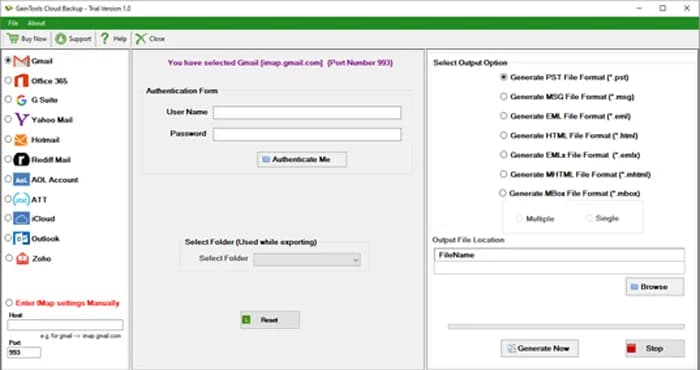
About this app
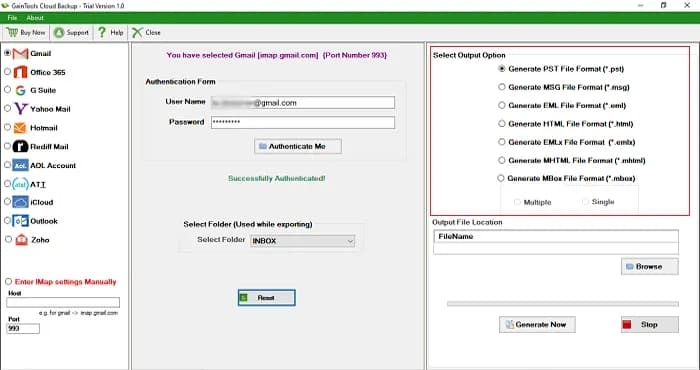
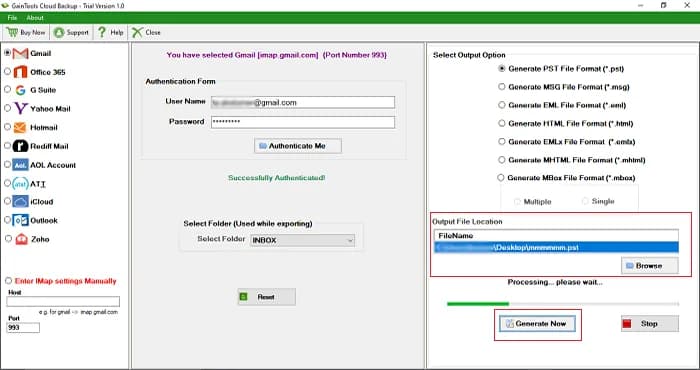
GainTools Cloud Backup Tool is a Windows based application that can backup emails from any IMAP server to local storage. It supports popular email services like Gmail, Yahoo, Office 365, Hotmail, and AOL. It allows saving emails in formats like PST, EML, EMLX, MSG, MBOX, HTML, MHTML, PDF. User-friendly interface, which preserves email formatting, attachments and folder structure. This tool has selective backup, separate saving of attachments and 24/7 support. It works with all versions of Windows and comes with a free trial and 30-day money-back guaranty. A secure solution for individuals and companies looking to protect their cloud emails. More Info:- https://www.gaintools.com/backup/
Key features
- 1Backup IMAP email from Gmail, Yahoo, Office 365, Hotmail, AOL to local storage in PST, EML, EMLX, MSG, MBOX, HTML, MHTML, PDF
- 2Selective folder backup (Inbox, Sent, Drafts, custom) with separate attachment saving
- 3Preserves folder structure, formatting, headers, and attachments; 24/7 support and 30-day money-back guarantee
Target customer profile
Drawn from the product itself, not from a survey.
Demographic
Individual email users with multiple accounts
Pain points
Fear of losing emails if account is compromised or closed; limited storage.
Primary needs
Secure backup of important emails to local storage in accessible formats.
Demographic
IT administrators in small to medium businesses
Pain points
Need to comply with data retention policies; manage email backups for employees.
Primary needs
Efficient, bulk backup of multiple IMAP accounts with customizable output.
Demographic
Users migrating from one email service to another
Pain points
Difficulty in transferring emails between platforms; risk of data loss.
Primary needs
Backup emails in a format that can be imported into other email clients.
Scout Review
Written by AI from measured evidence, scored out of 100.
GainTools Cloud Backup Tool is a competent, long-running Windows utility for backing up IMAP email to local storage in PST, EML, MBOX, PDF, and more. The site is genuinely fast (mobile Lighthouse 100/100) and the trial is frictionless (3.74 MB, no registration). The app UI is dated WinForms, the homepage is text-heavy and repetitive, and the security posture is weak for a tool handling email credentials — 3/13 on header checks with no SOC 2 or security page. Accessibility is strong at 95/100 with two fixable label issues. Growth is real but generic: a solid niche product competing against a free MailStore Home and a feature-matched SysTools.
Measure by measure
Usability
62Free 3.74 MB trial with no registration, step-by-step guide, FAQ, and 24/7 support lower the barrier. But the app UI looks dense for non-technical users and the page repeats itself endlessly.
Design
46Dated WinForms-era app UI and a text-heavy homepage with abrupt dark-to-white color shifts. Consistent icon cards and clear CTAs help, but Windows XP support listed proudly dates it badly.
Speed
88Lighthouse mobile 100/100 with LCP 1.1s, CLS 0, TBT 69ms; desktop 89/100. The 3.74 MB installer is featherweight. Genuinely fast site with no bloat.
Security
41HTTPS enforced and SPF present, but no HSTS, CSP, frame protection, or DMARC, and secure cookies unset — 3/13 header checklist. No SOC 2, ISO, or security page despite handling IMAP credentials.
Accessibility
79Lighthouse a11y 95/100 with only two failing audits (unnamed buttons, mismatched labels). No WCAG statement and English-only, but the automated baseline is strong.
Growth
58Real problem (email loss, migration, retention) with a specific wedge: multi-format export and selective backup. But positioning is generic and MailStore Home is free for personal use.
Improvement areas
- Security headers (HSTS, CSP, DMARC, frame protection) and a public security/data-handling page
- Modernize the dated WinForms desktop UI and trim the repetitive, text-heavy homepage
- Fix the two accessibility failures (unnamed buttons, mismatched labels) and add a WCAG statement
Design & Usability
The homepage is a time capsule: dark navy hero with product box art, a 4.8-star badge from 522 reviews, and green/red CTAs that scream 'buy now.' Below the fold it's eight identical dark feature boxes, then three white cards, then four more — the visual hierarchy is a flat line. The actual app screenshots reveal a WinForms interface with a green title bar, cramped panels, and radio-button output options that look a decade old. Usability is better than design: a 3.74 MB trial with no registration, a step-by-step guide, FAQ, and 24/7 support. But the app UI shown is dense for non-technical users, and the page repeats 'backup IMAP' so many times it becomes noise. It works; it just doesn't feel like 2025.
Speed & Security
Speed is the standout: Lighthouse mobile 100/100 with LCP 1.1s, CLS 0, and TBT 69ms, plus a 3.74 MB installer that downloads in a blink. Desktop scores 89/100 — still strong. Security is the opposite story. HTTPS is enforced and SPF is set, but there's no HSTS, CSP, frame protection, X-Content-Type-Options, Referrer-Policy, or DMARC, and secure cookies aren't flagged — 3/13 on the header checklist. For a tool that asks users to enter IMAP credentials for Gmail and Office 365, the absence of a security page, SOC 2, or any data-handling transparency is a real gap. The site is fast; the trust signals are thin.
Accessibility & Growth
Accessibility scores 95/100 on Lighthouse with only two failing audits — buttons without accessible names and mismatched visible labels. That's a strong automated baseline, though there's no WCAG statement, no multi-language support, and the product is Windows-only. Growth is a judgment call: the problem (email loss, migration, retention compliance) is real, and the wedge — multi-format export to PST/EML/MBOX/PDF, selective folder backup, separate attachment saving — is concrete. But the positioning is generic 'backup IMAP to local,' MailStore Home is free for personal use, and SysTools competes on the same features. Nine years of domain age and a single YouTube profile suggest a steady niche business, not a category disruptor.
Conclusion
If you need a no-nonsense Windows tool to pull IMAP mail down to local files in a dozen formats, GainTools does the job and the trial costs nothing but 3.74 MB. If you're handing over Gmail or Office 365 credentials, though, the missing HSTS, CSP, DMARC, and security page should give you pause — especially when MailStore Home archives personal mail for free. It's a workhorse, not a show pony, and it's been trotting since 2017.
Suggestions for improvement
- Publish a security page covering credential handling, encryption in transit, and data retention — and add HSTS, CSP, and DMARC headers.
- Modernize the desktop UI: the WinForms green title bar and radio buttons undercut trust for a paid tool.
- Trim the homepage: consolidate the eight feature boxes and four key-feature cards into a tighter, scannable layout.
- Fix the two accessibility failures (unnamed buttons, mismatched labels) and add a WCAG statement to lock in the 95/100.
Alternatives comparison
Named competitors, point by point. Nobody paid to appear here or to be left out.
 GainTools Cloud Backup Tool GainTools Cloud Backup Tool |  MailStore Home MailStore Home |  SysTools Mail Backup SysTools Mail Backup | |
|---|---|---|---|
| Price | $69 lifetime license; free trial | Free for personal use | Paid license (tiered) |
| Output formats | PST, EML, EMLX, MSG, MBOX, HTML, MHTML, PDF | Proprietary archive + EML/PDF export | PST, EML, MSG, MBOX, PDF and more |
| Platform | Windows only | Windows only | Windows only |
| Selective folder backup | Yes — Inbox, Sent, Drafts, custom folders | Yes — folder-level selection | Yes — folder and date filters |
| Free trial | Yes — 3.74 MB, no registration | Free for personal use | Yes — trial version |
MailStore Home
Free email archiving software for personal use; supports backup from various email clients and IMAP servers.
SysTools Mail Backup
Professional email backup tool to back up emails from IMAP servers to multiple formats.
Comparing options? See GainTools Cloud Backup Tool alternatives, scored side by side
More Online Backup apps
View all Online Backup
PCDOTS Email Recovery Software
83Recovers emails from corrupt mailboxes across 50+ platforms.

Alcazar Dead Man's Switch
82An encrypted digital legacy service that securely deliver...
PCDOTS Thunderbird Converter
81Recover and migrate Thunderbird profiles & MBOX files wit...

RemoteDrive by FileZilla Pro
80Integrates cloud storage into macOS Finder for seamless file management across services like Google Drive and Dropbox.

S3FileHub
80A user-friendly web app for managing AWS S3 storage with AI summarization and analytics.

Filifly
79A secure, web-based file sharing platform with end-to-end encryption and no login requirements for quick transfers.

Softaken Data Recovery Software
79Recover deleted files from Windows with ease.

Very Good Calendar Sync
78Privacy-first on-device Mac calendar sync tool.

ArchiveMind
78Private, local-first catalogue and search for large file ...
PCDOTS Evernote File Converter
77Convert Evernote ENEX, HTML, MHT exports to PDF, DOCX, Ma...

Lingera
76Lingera saves your AI conversations with one click — across ChatGPT, Claude, Grok, Gemini, Perplexity, and DeepSeek. Capture, highlight, and understand your thinking across every AI platform.

Trust Vault
76Secure, open-source data storage and transfer app with AES-256 encryption, operating locally without internet or sign-ups.


A platform dedicated to providing unbiased reviews of newly launched applications, analyzing everything from their features to their full potential.
info@scoutforge.net© 2026 Scoutforge. All rights reserved.
