

A platform dedicated to providing unbiased reviews of newly launched applications, analyzing everything from their features to their full potential.
info@scoutforge.net© 2026 Scoutforge. All rights reserved.
A platform dedicated to providing unbiased reviews of newly launched applications, analyzing everything from their features to their full potential.
info@scoutforge.net© 2026 Scoutforge. All rights reserved.
A platform dedicated to providing unbiased reviews of newly launched applications, analyzing everything from their features to their full potential.
info@scoutforge.net© 2026 Scoutforge. All rights reserved.
Cycling through all six. Tap any point to stop.
Measured on six things
Recovers emails from corrupt mailboxes across 50+ platforms.
Real problem (corrupt mailboxes are a genuine IT pain), specific audience (helpdesks, forensics, archivists), and 50+ format coverage is a real wedge. But the category is crowded with established players and the differentiation is breadth, not depth.
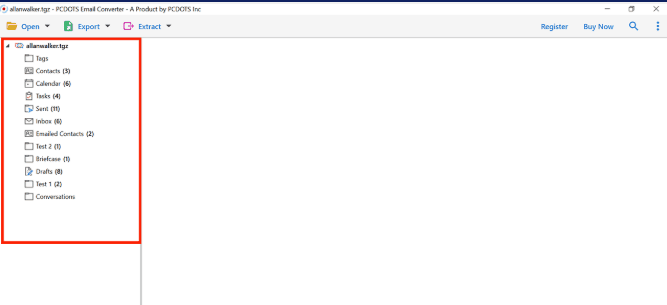
PCDOTS Email Recovery Software is a desktop tool designed to salvage emails, attachments, contacts, calendars, and more from corrupt mailbox files across over 50 platforms, including PST, OST, OLM, MBOX, EML, and MSG. It uses deep scanning to rebuild indexes and recover messages even from severely damaged files, with output to PDF, EML, MSG, MBOX, HTML, CSV, or vCard while preserving folder hierarchy. The software handles cloud accounts via IMAP and requires no original email client, making it ideal for IT helpdesks, forensic analysts, and archivists. With a 4.8/5 rating from over 1,000 reviews, it offers a free trial and a $49 lifetime license.
Drawn from the product itself, not from a survey.
Demographic
IT helpdesk professionals
Pain points
Outlook profile errors, Thunderbird crashes, scanpst failures
Primary needs
Quickly recover corrupt PST/OST files, restore user mailboxes
Demographic
Forensic analysts
Pain points
Corrupt evidence files, need for clean recovered data, no client installs
Primary needs
Byte-level scanning, read-only source handling, output to standard formats
Demographic
Compliance archivists
Pain points
Legacy formats from retired servers, inaccessible mailboxes
Primary needs
Convert old MBOX/Eudora files to modern formats, preserve folder structure
Demographic
End users
Pain points
Lost emails after crashes, cloud account lockouts
Primary needs
Restore Thunderbird profiles, recover Gmail/Office 365 emails
Written by AI from measured evidence, scored out of 100.
PCDOTS Email Recovery Software is a Windows desktop utility for salvaging emails, attachments, contacts, and calendars from corrupt mailbox files across 50+ formats including PST, OST, OLM, MBOX, EML, and MSG. It targets IT helpdesks, forensic analysts, and compliance archivists — people who deal with corrupt mailboxes professionally and need reliable recovery without installing the original email client. The product uses byte-level scanning to recover messages even when the file's table of contents is damaged, and outputs to PDF, EML, MSG, MBOX, HTML, CSV, or vCard while preserving folder hierarchy. Pricing is a $49 lifetime license with a free trial. The marketing site is fast (100/100 Lighthouse) and well-documented, with a thorough step-by-step guide covering four data-loading paths. Security headers are mostly present (10/12) but DMARC is missing and no compliance certifications are published. Accessibility scores 91/100 with several fixable ARIA and heading issues. The category is crowded with established competitors, but the format breadth and price point give it a real wedge. For IT professionals who need broad format support at a low one-time cost, it's a reasonable choice — just don't expect enterprise-grade security documentation.
Detailed step-by-step guide at /guide.html covers loading from files, clients, accounts, and servers. Free trial and live chat support onboarding. Desktop-only Windows tool limits reach. Docs are thorough for a $49 utility.
Clean, modern landing page with clear hero, feature blocks, and embedded walkthrough video. The site is marketing for a Windows desktop app, so the actual product UI is only visible via screenshots. Solid but not distinctive.
Lighthouse mobile and desktop both score 100/100. LCP 1.2s, CLS 0, TBT 0ms, FCP 1.1s. The marketing site is genuinely fast with no measurable layout shift or blocking time.
HTTPS enforced with HSTS, CSP, frame protection, X-Content-Type-Options, and Referrer-Policy. 10/12 header checklist points. Missing Permissions-Policy and DMARC. No published SOC 2, ISO, or security page found.
Lighthouse accessibility 91/100. Failing audits include aria-hidden focusable descendants, prohibited ARIA attributes, non-sequential headings, and mismatched accessible names. No WCAG statement or a11y page found. Responsive layout works.
Real problem (corrupt mailboxes are a genuine IT pain), specific audience (helpdesks, forensics, archivists), and 50+ format coverage is a real wedge. But the category is crowded with established players and the differentiation is breadth, not depth.
PCDOTS Email Recovery presents a clean, modern marketing site with a clear hero, feature breakdowns, and an embedded walkthrough video. The design is competent but generic — the kind of landing page that could sell anything from VPNs to project management software. The actual product is a Windows desktop application, so the site is marketing material rather than the product UI itself, and the screenshots shown look dated compared to the polished web presence. Usability is stronger: the /guide.html documentation is genuinely thorough, covering four different data-loading paths (files, desktop clients, cloud accounts, servers) with numbered steps and screenshots. A free trial lowers the barrier, and live chat offers support. The main usability limitation is platform lock-in — Windows only, which excludes Mac and Linux users who also deal with corrupt mailboxes. For a $49 lifetime license targeting IT professionals, the onboarding and documentation are above average for the price point.
Speed is where PCDOTS shines on the measurable side: Lighthouse scores 100/100 on both mobile and desktop, with LCP at 1.2 seconds, zero cumulative layout shift, and zero total blocking time. The marketing site is genuinely fast — no heavy SPA framework, no bloated tracking scripts slowing the first paint. That said, this measures the website, not the desktop application's scan performance, which is what users actually care about. Security is solid but not exceptional: HTTPS is enforced with HSTS, CSP, frame protection, X-Content-Type-Options, and Referrer-Policy headers all present, scoring 10/12 on the header checklist. The gaps are Permissions-Policy (missing) and DMARC (not detected), the latter being a real concern for a company whose product touches email — domain spoofing in phishing campaigns is a live risk. There's no published SOC 2, ISO 27001, or security page, and no bug bounty program. For a tool that reads entire mailbox files, more transparency about data handling would be appropriate. The privacy policy exists but no security-specific documentation was found.
Accessibility scores 91/100 on the automated Lighthouse audit, which sounds strong until you read the specific failures: aria-hidden elements containing focusable descendants (a classic screen-reader trap), prohibited ARIA attributes, heading elements out of sequential order, and visible text labels not matching accessible names. These are fixable issues, but their presence suggests accessibility wasn't a priority during development. No WCAG conformance statement or accessibility page was found on the site. On growth, the idea has merit: corrupt mailbox recovery is a real, recurring problem for IT helpdesks, forensic analysts, and compliance archivists, and PCDOTS targets these groups specifically. The 50+ format coverage (PST, OST, OLM, MBOX, EML, MSG, and more) is a genuine differentiator against alternatives like Stellar Repair for Outlook (PST/OST only), DataNumen (PST only), and Aid4Mail (broader but pricier and steeper). The $49 lifetime license undercuts most competitors. However, the category is mature and crowded, the differentiation is breadth rather than depth, and there's no network effect or data moat — a competitor could match the format list. The domain has been registered since 2019, suggesting an established operation, and the site claims over 1,000 verified reviews, though the review counts are inconsistent (4.8/5 from 1,010 vs. 4.6/5 from 1,408 on the same page). Growth potential is real but capped by the commodity nature of the category.
Conclusion
If you're an IT admin staring at a corrupt PST file and a user who needs their email back yesterday, PCDOTS is worth the $49 — the format coverage is genuinely broad, the free trial lets you verify recovery before paying, and the documentation won't leave you guessing. The lifetime license is refreshing in a world of subscription creep. Where it falls short is on the trust signals: no SOC 2, no security page, no DMARC, and accessibility issues that suggest the team hasn't prioritized inclusive design. For a tool that reads your entire mailbox, that's a gap worth closing. It's a competent, fairly priced utility that does one job well — just not one that's trying to be more than that.
Named competitors, point by point. Nobody paid to appear here or to be left out.
 PCDOTS Email Recovery Software PCDOTS Email Recovery Software |  Stellar Repair for Outlook Stellar Repair for Outlook |  Aid4Mail Aid4Mail |  DataNumen Outlook Repair DataNumen Outlook Repair | |
|---|---|---|---|---|
| Supported source formats | 50+ formats: PST, OST, OLM, MBOX, EML, MSG, OFT, EMLX, DBX, and more | PST and OST only | Broad format support for conversion and recovery | PST only |
| Requires original email client installed | No — reads source files directly | Yes — requires Outlook installed | No — standalone tool | Yes — requires Outlook installed |
| Pricing model | $49 lifetime license with free trial | Tiered licensing, typically higher than $49 | More expensive, tiered pricing | Per-license pricing, varies by edition |
| Output format flexibility | PDF, EML, MSG, MBOX, HTML, CSV, vCard | PST, MSG, EML, PDF, HTML, RTF | Extensive conversion output formats | PST and limited export formats |
| Learning curve | Wizard-based, step-by-step guide available | Moderate — guided interface | Steeper — more complex configuration | Moderate — focused on PST repair |
Stellar Repair for Outlook
A tool to repair and recover corrupt PST and OST files, but requires Outlook installed and has limited format support.
Aid4Mail
A comprehensive email conversion and recovery tool, but it is more expensive and has a steeper learning curve.
DataNumen Outlook Repair
A specialized tool for repairing corrupt Outlook PST files, but it doesn't support other formats like MBOX or OLM.
Comparing options? See PCDOTS Email Recovery Software alternatives, scored side by side

An encrypted digital legacy service that securely deliver...

Recover and migrate Thunderbird profiles & MBOX files wit...

A user-friendly web app for managing AWS S3 storage with AI summarization and analytics.

Integrates cloud storage into macOS Finder for seamless file management across services like Google Drive and Dropbox.

A secure, web-based file sharing platform with end-to-end encryption and no login requirements for quick transfers.

Recover deleted files from Windows with ease.

Privacy-first on-device Mac calendar sync tool.

Secure, open-source data storage and transfer app with AES-256 encryption, operating locally without internet or sign-ups.

Lingera saves your AI conversations with one click — across ChatGPT, Claude, Grok, Gemini, Perplexity, and DeepSeek. Capture, highlight, and understand your thinking across every AI platform.

Back up Zoom cloud recordings to Google Drive automatically. Optional auto-delete frees Zoom storage. 60-second setup, then forget it.
Convert Mac Outlook OLM files to PST or many other formats

Save public Reels and videos as MP4 — no sign-in, no wate...
A platform dedicated to providing unbiased reviews of newly launched applications, analyzing everything from their features to their full potential.
info@scoutforge.net© 2026 Scoutforge. All rights reserved.
