Cycling through all six. Tap any point to stop.
Measured on six things
Google DeepMind's multimodal AI video generator & editor
Design
30Live homepage renders as near-empty black voids with no hero imagery, no video thumbnails, and three competing CTAs in one row. Dark theme is consistent but the page has no visual proof of the product it sells.
Screenshots
1 / 1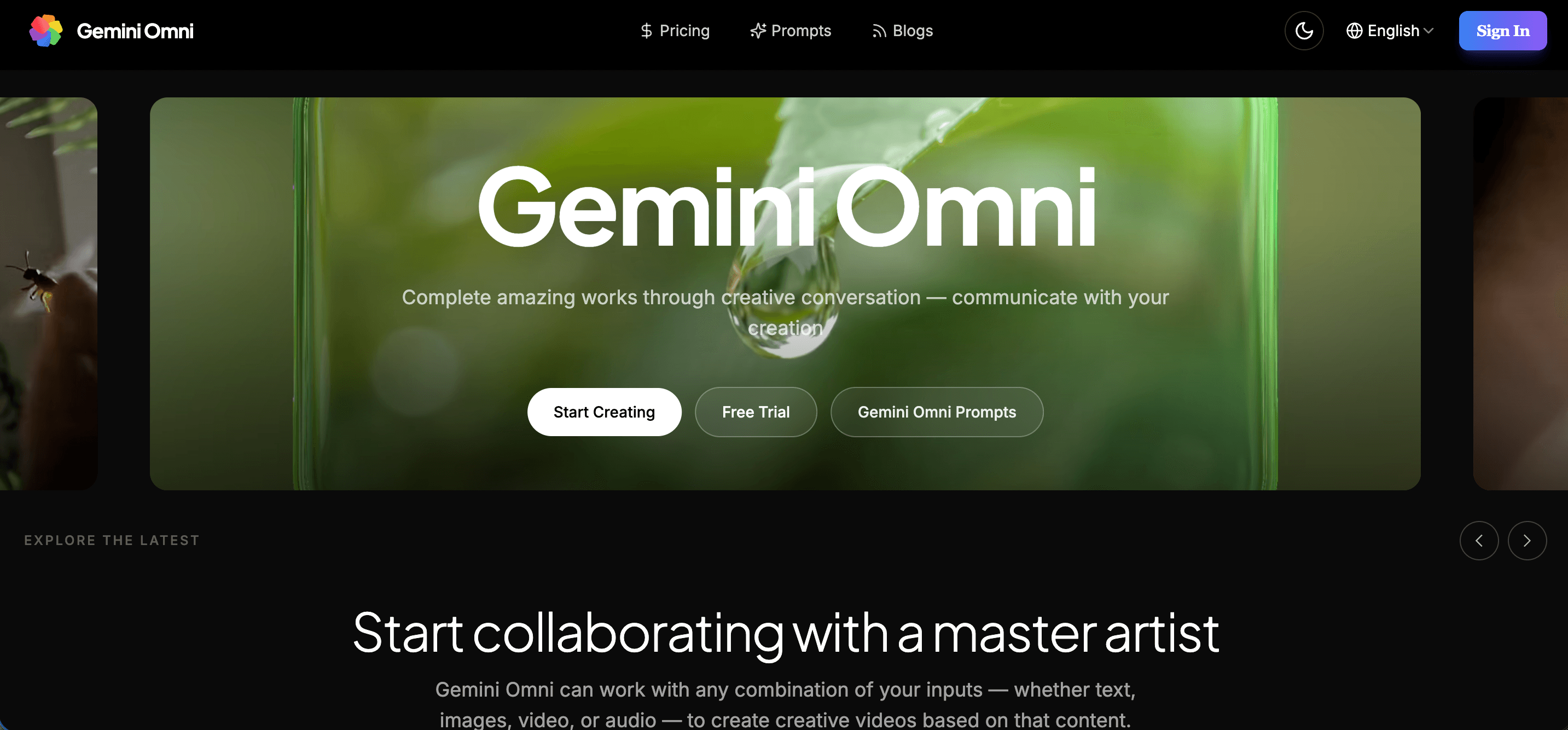
About this app
Gemini Omni is an advanced multimodal AI video generator and editor powered by Google DeepMind. Unlike conventional AI video tools that demand complex timeline editing, Gemini Omni lets you create, direct, and modify videos through natural conversational prompts — simply describe scene tweaks like "change the background to night" or "add dramatic camera zoom". Seamlessly combining text, image, audio, and video inputs, it delivers studio-quality video creation at your fingertips. Key features include chat-based video editing and remix, character and scene consistency using Neural Expressive technology, class-leading text and native audio rendering, and strong prompt adherence. It offers text-to-video, image-to-video, image-to-image, and multi-image fusion capabilities. With pricing starting at $17.90/month and a free trial of 30 credits, Gemini Omni is ideal for digital artists, content creators, marketers, and e-commerce entrepreneurs seeking to streamline video production and enhan...
Key features
- 1Chat-based video editing and remix — modify scenes, backgrounds, and camera angles through natural language prompts instead of timeline editing
- 2Multimodal input fusion — combine text, image, audio, and video references into a single cohesive output
- 3Character and scene consistency via 'Neural Expressive' technology, plus native synchronized audio generation
Target customer profile
Drawn from the product itself, not from a survey.
Demographic
Digital Artists and Creative Professionals
Pain points
Limited by traditional video editing software complexity; struggling to maintain character consistency across shots.
Primary needs
AI-powered video generation with realistic motion, consistent characters, and intuitive chat-based editing.
Demographic
Content Creators and Social Media Influencers
Pain points
High demand for daily video content; lack of time or skills for professional editing.
Primary needs
Fast, high-quality video creation from text prompts; easy remixing and editing for social platforms.
Demographic
Marketing and E-commerce Professionals
Pain points
Expensive and time-consuming production of product demos and brand stories.
Primary needs
Automated video production with consistent branding, professional visuals, and commercial licensing.
Scout Review
Written by AI from measured evidence, scored out of 100.
Re-reviewed Sep 16, 2026 · previously 44/100
Gemini Omni is a chat-native AI video generator and editor that lets you create and remix video through natural language prompts, with claimed character consistency via 'Neural Expressive' technology and native audio. The pitch is solid and the pricing is transparent: $15.92–$79.92/month subscriptions plus one-time credit packs, with 30 free credits and no card required to start. The problem is the presentation. The live homepage renders as near-empty black sections with no video examples, no thumbnails, and three competing CTAs — for a video product, showing nothing is a serious miss. Mobile performance is sluggish (LCP 5.4s), security headers are half-configured, and accessibility has real gaps despite a 90/100 score. The idea is differentiated; the execution is not yet at the level the idea deserves.
Measure by measure
Usability
55Clear three-tier pricing plus one-time credit packs, 30 free credits with no card required, and a documented FAQ. But no visible onboarding, example prompts, or output previews on the homepage.
Design
30Live homepage renders as near-empty black voids with no hero imagery, no video thumbnails, and three competing CTAs in one row. Dark theme is consistent but the page has no visual proof of the product it sells.
Speed
46Desktop Lighthouse 98/100, but mobile 59/100 with LCP 5.4s and TBT 857ms. The mobile experience is heavy enough to feel sluggish on first load.
Security
52HTTPS enforced with HSTS, SPF and DMARC in place. But no CSP, no frame protection, no secure cookies, and 6/13 on header hardening. No published audit or compliance claim.
Accessibility
68Lighthouse a11y 90/100, but failing audits include unnamed ARIA input fields, unnamed buttons, and insufficient color contrast — the last confirmed visually on the nav bar.
Growth
58Real problem (video production is slow and expensive), specific segments named, and a chat-native editing wedge vs. Veo, Sora and Runway. Early-stage domain (0.3 yrs) is context, not the score.
Improvement areas
- Homepage shows no video examples, thumbnails, or output gallery — critical for a video generation product
- Mobile performance is sluggish (LCP 5.4s, TBT 857ms) despite desktop scoring 98/100
- Security headers incomplete (6/13) and accessibility failures include unnamed buttons and inputs plus low contrast
Design & Usability
The design is the weakest link. The live homepage renders as a series of near-empty black sections with no hero imagery, no video thumbnails, and no visual proof that this is a video tool at all — which is a strange choice for a product whose entire pitch is 'look what we can generate'. Three CTAs sit in a tight row ('Start Creating', 'Free Trial', 'Gemini Omni Prompts') with inconsistent styling and no clear primary. Usability is better than design: pricing is transparent with three subscription tiers and three one-time credit packs, the 30-credit free trial requires no card, and the FAQ answers the obvious billing questions. But onboarding is invisible — no example prompts, no sample outputs, no walkthrough on the rendered page. You land, you read marketing prose about a 'master artist', and you're on your own.
Speed & Security
Speed is split down the middle. Desktop Lighthouse scores 98/100, which is genuinely fast. Mobile scores 59/100 with an LCP of 5.4s and TBT of 857ms — that's a heavy first load on a phone, and for a product aimed at creators who will absolutely check it on mobile, it matters. Security is mid-tier: HTTPS is enforced, HSTS is on, and SPF/DMARC are configured, which covers the basics. But the header checklist lands at 6/13 — no Content-Security-Policy, no frame protection, no X-Content-Type-Options, no Referrer-Policy, no Permissions-Policy, and no secure cookie flag. There's no published SOC 2, ISO, or pen-test report, and no bug bounty. For a tool handling user uploads (images, video, audio), the missing CSP and frame protection are the ones worth fixing first.
Accessibility & Growth
Accessibility scores 90/100 on Lighthouse, which sounds strong until you read the failing audits: ARIA input fields without accessible names, buttons without accessible names, and insufficient color contrast. The contrast issue is confirmed visually — the secondary nav links and language selector sit at low contrast on a near-black bar. There's no accessibility statement or WCAG conformance claim anywhere on the site, and no keyboard-navigation documentation. On growth: the problem is real (video production is slow and expensive), the segments are specific (artists, creators, marketers/e-commerce), and the wedge — chat-native editing and remix with claimed character consistency — is a genuine differentiator against Veo 3.1, Sora 2, and Runway, which are more timeline- or prompt-and-pray oriented. The limit is that the underlying model is Google's, so the moat is the interface, not the tech. Domain age (0.3 years) is early-stage context, not a verdict.
Conclusion
If you're evaluating Gemini Omni, start with the free 30 credits and test the chat-editing workflow specifically — that's the actual differentiator, not the raw generation quality, which you can get from Veo or Sora directly. Compare output quality side-by-side with Runway before committing to a subscription, since Runway's manual controls may suit some workflows better despite the steeper learning curve. The pricing is competitive and the commercial license is included at every tier, which is a real plus for marketers and e-commerce users. What's missing is proof: no gallery, no case studies, no example outputs on the site. Until that changes, you're buying on faith. The product may well deliver — but the site doesn't make the case for it.
Suggestions for improvement
- Add a video gallery or example outputs to the homepage — a video tool with no visible videos is the single biggest conversion problem here.
- Fix mobile performance: LCP 5.4s and TBT 857ms need work; lazy-load below-fold assets and reduce main-thread JS.
- Add the missing security headers (CSP, X-Frame-Options, X-Content-Type-Options, Referrer-Policy) and set the secure cookie flag.
- Fix the accessibility failures: name the ARIA input fields and buttons, and raise contrast on the nav links and language selector.
Alternatives comparison
Named competitors, point by point. Nobody paid to appear here or to be left out.
 Gemini Omni Gemini Omni |  Veo 3.1 Veo 3.1 |  Sora 2 Sora 2 |  Runway Runway | |
|---|---|---|---|---|
| Chat-based conversational editing | Yes — core feature; edit and remix via natural language prompts | Limited — primarily prompt-to-video, not chat-native editing | Limited — text-to-video generation, minimal conversational editing | No — manual timeline-based editing interface |
| Native audio generation | Yes — synchronized dialogue and background music, claimed better than Veo 3.1 | Yes — native audio generation | Limited — audio support is not a primary strength | Partial — audio handled separately from generation |
| Character consistency across shots | Yes — 'Neural Expressive' technology maintains character identity | Partial — improving but not a headline feature | Limited — known weakness in consistency | Partial — requires manual reference management |
| Pricing model | $15.92–$79.92/month subscriptions plus one-time credit packs; 30 free credits | Access via Google AI subscription tiers | Included with ChatGPT Plus/Pro subscriptions | Tiered subscription plans, credit-based |
| Multimodal input (text, image, audio, video) | Yes — text, image, audio, and video inputs with multi-image fusion | Yes — text and image inputs | Yes — text and image inputs | Yes — text, image, and video inputs |
Veo 3.1
An AI video generation model by Google, offering high cinematic realism but limited chat-native editing and multimodal unification compared to Gemini Omni.
Sora 2
OpenAI's text-to-video model, known for its creative capabilities but limited in native audio and character consistency.
Runway
AI-powered video editing platform with advanced features, but requires more manual editing and lacks chat-based interaction.
Comparing options? See Gemini Omni alternatives, scored side by side
More AI Generations apps
View all AI Generations
Uni-1 by Luma AI
92Uni-1 is an advanced multimodal text-to-image AI model th...

Gerty
91Private, local AI assistant for Mac that runs offline

LTX 2.3 AI Video Generator
91Fast, open-source AI video generator with 4K support, mul...

DemoVexa
90Turn your code into professional product demo videos with AI-generated scripts, animated UI, and natural voiceovers.

Pixelimg
88A free online AI-powered tool that instantly converts ima...

OBVELO
88Privacy gateway that masks personal data in LLM traffic

HeyVid AI
88HeyVid AI is a free all-in-one AI video and image generat...

RestorePhotosApp
88An AI-powered photo restoration app that brings old, blur...

IraVoice
88Private on-device dictation for Apple-silicon Macs.

tradutor de mangá com IA
88O tradutor de mangá com IA traduz capítulos em lote, personaliza textos e oferece edição visual para estúdios.

Mygom SEO
87MygomSEO is an AI marketing agent that audits your site, writes SEO content, publishes to 12+ CMS platforms, posts to social, and monitors rankings 24/7.

pause.do
87A privacy-first browser extension that inserts gentle pau...


A platform dedicated to providing unbiased reviews of newly launched applications, analyzing everything from their features to their full potential.
info@scoutforge.net© 2026 Scoutforge. All rights reserved.
