Cycling through all six. Tap any point to stop.
Measured on six things
Turn a photo into a rap video with AI vocals, beats, and ...
Security
52HTTPS + HSTS, SPF and DMARC in place, but no CSP, frame protection, Referrer-Policy or Permissions-Policy — 6/13 on headers. No SOC 2, ISO or bug bounty published; standard for an early indie tool.
Screenshots
1 / 3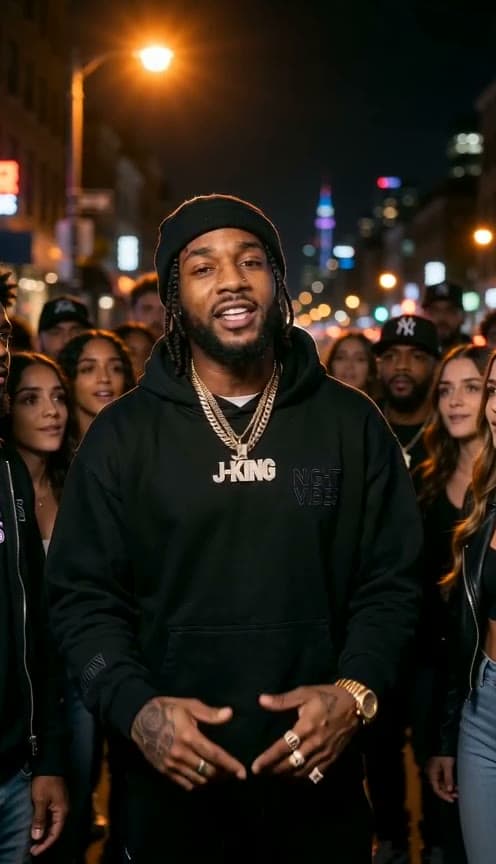


About this app
GetAIRapVideo is a specialized AI video generator that transforms a single photo into a short, lip-synced rap performance. You upload a clear portrait, pick a stage (like a studio booth or arena), choose a beat (trap, boom bap, drill, or party), and either provide a topic or paste your own lyrics. The AI—powered by ByteDance's Seedance 2 models—then generates a vertical video with vocals, beat, and lip-sync in about 2–4 minutes. It's a niche tool for creating personalized, shareable content for TikTok, Reels, and Shorts. The platform supports English and Mandarin, offers a pay-per-video credit system (no subscription), and includes a clever QR-code feature to transfer photos from phone to desktop. While it's not a full-fledged video editor, it excels at one specific task: making quick, fun rap clips from stills. The generated videos are short (8–12 seconds) and best suited for social media. The service is clear about usage rights and prohibits impersonation or harmful content, which...
Key features
- 1Photo-to-rap-video generator with 6 stages, 4 beats, and 7 rap languages including Mandarin.
- 2Two-rapper mode for duets and rap battles from one or two photos.
- 3QR-code phone-to-desktop photo transfer and 'Send to phone' delivery for finished clips.
- 4Pay-per-video credit pricing from $9.90 with 150 free credits and no subscription.
Target customer profile
Drawn from the product itself, not from a survey.
Demographic
Social media content creators (TikTokers, Instagram Reel creators)
Pain points
Constantly need fresh, engaging video ideas; limited time or budget for professional editing; want to stand out with unique content.
Primary needs
Quick, easy-to-use tool to produce shareable, trendy videos that can boost engagement and follower growth.
Demographic
Small business owners and marketers
Pain points
Lack of video production skills; expensive agencies; need to create buzz for product launches or promotions on a budget.
Primary needs
Affordable, do-it-yourself solution to create attention-grabbing promotional content with a personal touch.
Demographic
Friends and family groups (for birthdays, roasts, etc.)
Pain points
Want to create personalized, humorous gifts or greetings but lack technical know-how; traditional cards feel impersonal.
Primary needs
Fun, easy way to turn a photo into a memorable, entertaining video clip to share in group chats or social media.
Demographic
Aspiring musicians and hobbyist rappers
Pain points
Limited resources to produce music videos; want to visualize lyrics or hooks quickly to share with peers or on social platforms.
Primary needs
Fast, low-cost way to generate a visual teaser for their music using just a photo and lyrics, without complex software.
Scout Review
Written by AI from measured evidence, scored out of 100.
GetAIRapVideo is a narrow, well-executed tool that does one thing and mostly does it well: turn a photo into a short lip-synced rap clip for social. The generator UI is clean, the sample videos are shown rather than described, the QR phone-transfer is a genuinely clever touch, and the pay-per-video pricing with 150 free credits is a fair try-before-you-buy. Weaknesses are real but stage-appropriate: mobile LCP of 4.9s, a 6/13 security header score with no published audits, two accessibility fails on form labels and contrast, and a differentiation story that leans on UX rather than technology. It's a competent indie product in a crowded category, priced honestly, with a clear audience.
Measure by measure
Usability
74150 free credits for a real draft, QR phone-to-desktop upload, auto-refund on failed renders, and seven practical guides. Onboarding path from photo to posted MP4 is short and documented.
Design
71Clean, focused generator UI with stage/beat pickers, live sample videos with sound prompts, and a two-rapper mode surfaced up front. Landing page reads as a product demo, not a brochure.
Speed
68Lighthouse mobile 81/100 (LCP 4.9s, TBT 85ms) and desktop 97/100. LCP is the weak spot on mobile; generation itself is quoted at 2–4 minutes with background rendering.
Security
52HTTPS + HSTS, SPF and DMARC in place, but no CSP, frame protection, Referrer-Policy or Permissions-Policy — 6/13 on headers. No SOC 2, ISO or bug bounty published; standard for an early indie tool.
Accessibility
70Lighthouse a11y 92/100 with two real fails: low-contrast text and unlabeled form elements. Seven-language UI is a genuine strength; no public a11y statement or WCAG claim found.
Growth
58Real, specific wedge — rap-specific stages, beats, battles and pay-per-video pricing — aimed at a creator segment D-ID and Synthesia don't serve. Category has headroom; differentiation is thin enough that copying is cheap.
Improvement areas
- Security headers at 6/13 — no CSP, frame protection, Referrer-Policy or Permissions-Policy.
- Mobile Lighthouse LCP of 4.9s drags the otherwise strong 81/100 performance score.
- Two accessibility fails: unlabeled form elements and insufficient color contrast.
- No published security, privacy-retention or accessibility documentation.
Design & Usability
The landing page does the one thing AI video tools usually fail at: it shows the output. Sample clips with 'Turn sound on' prompts, a stage picker with six real environments, four beats, and a two-rapper mode that's surfaced in the UI rather than buried in a changelog. The generator itself is a single screen — photo, stage, beat, topic-or-lyrics, language, format, quality — which is the right amount of choice for an 8–12 second output. Usability is where it earns its keep: 150 free credits cover a real draft, failed renders auto-refund, and the QR-code phone-to-desktop upload solves a friction point most desktop AI tools ignore. The guides section is seven articles deep on genuinely useful topics (photo choice, lyric length, birthday raps, rights). The gap is depth — no template library, no saved presets, no obvious way to iterate on a clip without re-uploading.
Speed & Security
Speed is a split verdict: desktop Lighthouse 97/100 is excellent, but mobile lands at 81 with a 4.9-second LCP, which is the metric that actually matters for a TikTok-adjacent audience. TBT of 85ms and CLS of 0 suggest the page is well-built and just heavy on the hero media. Generation is quoted at 2–4 minutes with background rendering, which is reasonable for video. Security is the weakest dimension: HTTPS and HSTS are enforced, SPF and DMARC are configured, but the header checklist is 6/13 — no CSP, no frame protection, no Referrer-Policy, no Permissions-Policy. No SOC 2, ISO 27001 or bug bounty program is published, which is normal for an early-stage indie tool but means anyone uploading a face photo is trusting the operator on faith. The site does address consent and impersonation in its FAQ and rights guide, which is the right instinct.
Accessibility & Growth
Accessibility scores 92/100 on Lighthouse with two concrete failures: insufficient color contrast and form elements without associated labels — the second is the more serious one for a tool whose entire flow is a form. Seven-language support (English, German, Spanish, French, Italian, Portuguese, Mandarin) is a real strength and matches the multilingual rap output. No WCAG conformance claim or accessibility statement is published. Growth is the interesting question: the wedge is genuinely specific — rap-specific stages, beats, two-rapper battles, pay-per-video pricing from $9.90 with no subscription — and it targets a creator segment that D-ID and Synthesia structurally don't serve because their business models depend on enterprise seats. The limit is defensibility: the underlying Seedance 2 models are available to anyone, so the moat is UX and brand, not technology. The category has headroom; the product needs distribution to claim it.
Conclusion
If you're a creator who wants a 12-second rap clip of a friend's birthday photo and you don't want another subscription, this is a reasonable $9.90 to spend. If you're a business evaluating it for anything involving other people's faces or commercial campaigns, wait for a security page and a real compliance posture. The product knows what it is — a fun, fast, niche generator — and it doesn't pretend to be an editor. That honesty is worth more than the missing headers.
Suggestions for improvement
- Fix the two Lighthouse a11y fails: add labels to form inputs and raise contrast on secondary text.
- Add CSP, Referrer-Policy, Permissions-Policy and X-Content-Type-Options headers — cheap wins on the 6/13 score.
- Publish a short security/privacy page covering photo storage, retention and deletion timelines.
- Cut mobile LCP below 2.5s by lazy-loading the hero sample videos or serving lighter poster frames.
Alternatives comparison
Named competitors, point by point. Nobody paid to appear here or to be left out.
 GetAIRapVideo GetAIRapVideo |  D-ID D-ID |  Synthesia Synthesia |  Kaiber Kaiber | |
|---|---|---|---|---|
| Primary use case | Photo → short lip-synced rap video for social | Photo → talking avatar for presentations, support, marketing | Text → AI avatar video for training and corporate content | Audio + images → artistic music videos |
| Pricing model | Pay-per-video credits from $9.90, no subscription, 150 free credits | Tiered subscription with free trial | Subscription tiers, enterprise pricing | Subscription credits |
| Rap-specific features (beats, stages, battles) | 4 beats, 6 stages, two-rapper battles, 7 rap languages | No rap-specific beats or stages | None — corporate avatar focus | Music video styles, no rap battle mode |
| Output length | 8–12 seconds, vertical/square/wide | Longer talking-head clips | Multi-minute avatar videos | Longer music-video style output |
| Phone-to-desktop upload | QR code transfer, no phone app or sign-in | Standard upload | Standard upload | Standard upload |
| Published compliance / security posture | HTTPS + HSTS, SPF/DMARC; no SOC 2 or ISO published | Enterprise compliance and security documentation | SOC 2, GDPR, enterprise security program | Standard privacy policy, limited public compliance detail |
D-ID
An AI video generator that animates still photos to speak or rap, similar to GetAIRapVideo, but with broader use cases including digital avatars for presentations and customer service. It offers more customization and longer video durations.
Synthesia
An AI video creation platform that turns text into videos with AI avatars. While not focused on rap, it provides a similar photo-to-video animation capability for professional and educational content, with a subscription-based model.
Kaiber
An AI creative tool that generates music videos from audio and images, often used by musicians. It offers more artistic styles and longer video generation, but requires more input and is less automated than GetAIRapVideo.
Comparing options? See GetAIRapVideo alternatives, scored side by side
More AI Generations apps
View all AI Generations
Uni-1 by Luma AI
92Uni-1 is an advanced multimodal text-to-image AI model th...

LTX 2.3 AI Video Generator
91Fast, open-source AI video generator with 4K support, mul...

DemoVexa
90Turn your code into professional product demo videos with AI-generated scripts, animated UI, and natural voiceovers.

tradutor de mangá com IA
88O tradutor de mangá com IA traduz capítulos em lote, personaliza textos e oferece edição visual para estúdios.

OBVELO
88Privacy gateway that masks personal data in LLM traffic

Pixelimg
88A free online AI-powered tool that instantly converts ima...

HeyVid AI
88HeyVid AI is a free all-in-one AI video and image generat...

RestorePhotosApp
88An AI-powered photo restoration app that brings old, blur...

IraVoice
88Private on-device dictation for Apple-silicon Macs.

Mygom SEO
87MygomSEO is an AI marketing agent that audits your site, writes SEO content, publishes to 12+ CMS platforms, posts to social, and monitors rankings 24/7.

pause.do
87A privacy-first browser extension that inserts gentle pau...

DeepSwapAI
87AI face swap online with no subscription, pay per use.


A platform dedicated to providing unbiased reviews of newly launched applications, analyzing everything from their features to their full potential.
info@scoutforge.net© 2026 Scoutforge. All rights reserved.
