Cycling through all six. Tap any point to stop.
Measured on six things
All-in-one AI image platform for generating, editing, and...
Accessibility
65Web-based design aids broad device access (phone to desktop). Clear 3-step instructions and simple interfaces help beginners. No explicit WCAG compliance, keyboard navigation, or screen reader mentions found on site.
Screenshots
1 / 1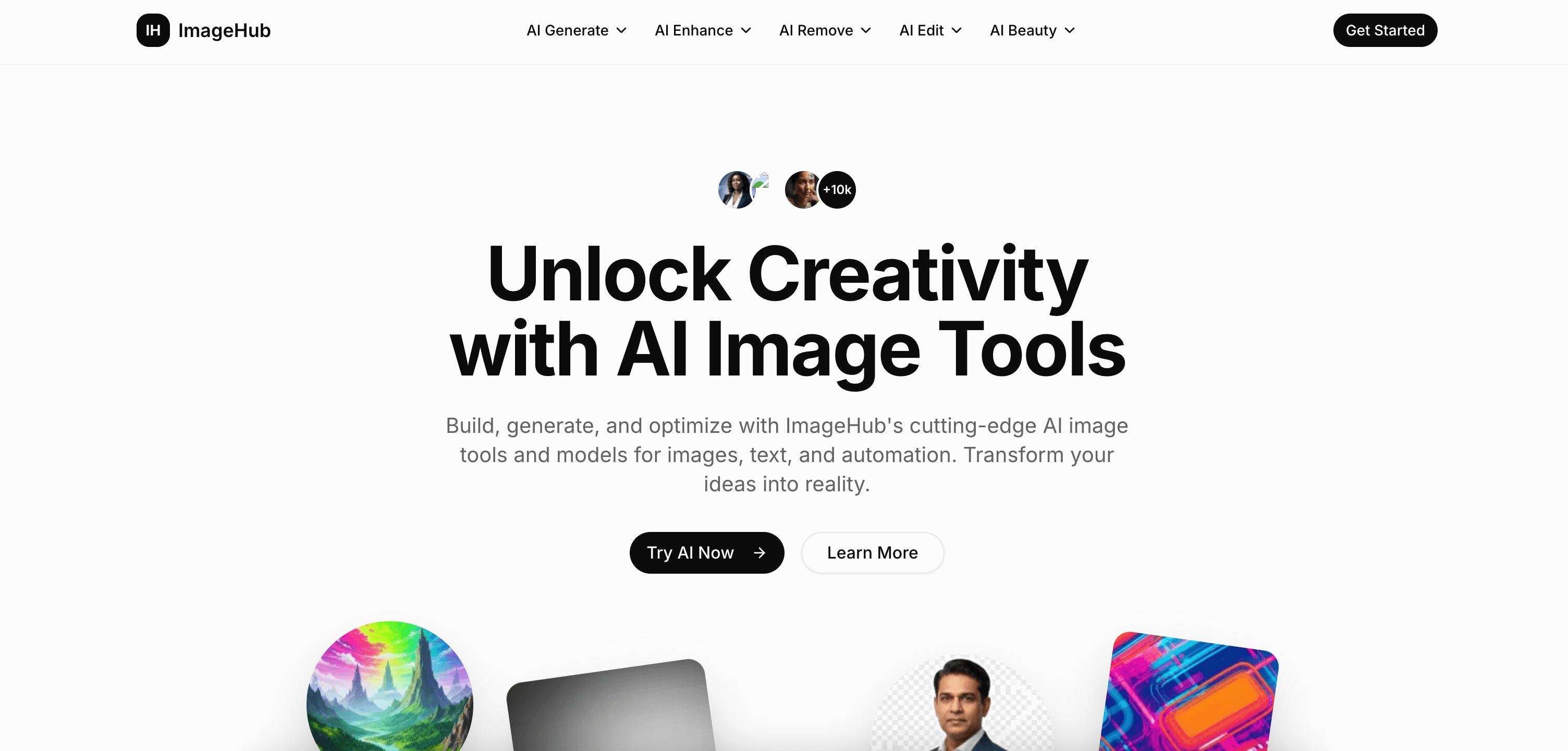
About this app
ImageHub is a cloud-based AI image processing platform that brings together a comprehensive suite of tools for generating, editing, enhancing, and optimizing images. It supports leading AI models like DALL-E, Stable Diffusion, and Midjourney, and offers features such as text-to-image, image-to-image, object removal, background removal, upscaling to 8K, portrait beautification, and format optimization. Designed for both professionals and hobbyists, ImageHub provides an intuitive interface with no installation required, ensuring quick results for social media, marketing, e-commerce, and personal projects. Its strengths lie in speed, privacy (encrypted and no permanent storage), and integration of multiple workflows into one seamless experience.
Key features
- 1All-in-one AI tools: text-to-image, image-to-image, object/background removal, generative fill, upscaling to 8K, photo restoration, portrait beauty editor, logo/poster design, smart optimization with batch processing
- 2Browser-based, no installation or sign-up required for core tools, no watermarks, automatic image deletion for privacy
- 3Fast processing with positive user feedback on speed for editing, enhancement, and generation; tailored solutions for e-commerce, social media, and marketing
Target customer profile
Drawn from the product itself, not from a survey.
Demographic
Graphic designers and digital artists
Pain points
Need to switch between multiple tools for generation, editing, and enhancement; desire for quick, professional results without complex software.
Primary needs
Seamless workflow, high-quality AI generation, and advanced editing capabilities.
Demographic
Social media managers and content creators
Pain points
Time-consuming image creation and optimization for different platforms; need for fast, on-brand visuals.
Primary needs
Batch processing, format conversion, and platform-specific optimization tools.
Demographic
E-commerce business owners
Pain points
Require clean product images with background removal and enhancements to increase conversion; limited technical skills.
Primary needs
Easy-to-use background removal, object erasure, and image upscaling for professional listings.
Demographic
Marketers and small business owners
Pain points
Need to quickly create marketing materials without hiring designers; budget constraints.
Primary needs
Affordable AI design tools for logos, posters, and social media graphics.
Scout Review
Written by AI from measured evidence, scored out of 100.
ImageHub is a genuinely useful all-in-one AI image platform that lives up to its promise of combining generation (text-to-image, image-to-image), smart editing (object removal, generative fill), enhancement (up to 8K upscaling, restoration), beauty tools, design assets, and optimization in one fast, browser-based experience. It's particularly strong for the target audiences: e-commerce sellers get clean product photos quickly, content creators get on-brand visuals without complex software, and marketers produce materials affordably. Strengths include no sign-up friction for many tools, no watermarks, solid speed, and privacy focus. It won't fully replace Photoshop for pixel-level pros or Midjourney for the absolute highest artistic generation quality, but it dramatically reduces tool-switching friction.
Measure by measure
Usability
85No-install, browser-based with simple 3-step workflow (select, upload, magic). Drag-and-drop, instant processing, batch support, and dedicated free tools for upscaling, editing, beauty, and generation make it highly accessible for non-technical users.
Design
82Clean, modern homepage with intuitive grid layouts, clear CTAs, drag-and-drop emphasis, and visually appealing feature cards. Professional yet approachable aesthetic that effectively showcases before/after potential.
Speed
80Claims instant/in-seconds processing powered by high-performance GPU servers. Multiple pages emphasize fast results for enhancement, removal, generation, and face swap. Batch processing adds efficiency for volume work.
Security
70Privacy-focused messaging across tools: images processed securely in the cloud, automatically deleted after processing, no permanent storage, no watermarks. Specific emphasis on sensitive portrait/body photos. No full independent audit visible.
Accessibility
65Web-based design aids broad device access (phone to desktop). Clear 3-step instructions and simple interfaces help beginners. No explicit WCAG compliance, keyboard navigation, or screen reader mentions found on site.
Growth
75+10k users claimed. Strong momentum with many dedicated free tool pages (upscaler, editor, beauty, generator, restoration). Positive user testimonials across pages, positioning as unlimited free alternative to paid tools. Growing library of specialized AI features.
Improvement areas
- Publish specific supported models (mentions DALL-E, Stable Diffusion, Midjourney-compatible but details light) and allow selection
- Add clear pricing tiers, usage limits, and commercial rights information
- Improve accessibility compliance and documentation
- Consider API, advanced masking/history features, and platform integrations (e.g. Shopify, social tools)
Design & Usability
ImageHub delivers exactly what its target customers (graphic designers tired of tool-switching, social managers needing fast assets, e-commerce owners wanting clean product shots, and budget marketers) actually want: one browser tab that does generation, precise object/background removal, 8K upscaling, portrait beautification, and platform optimization without downloading Photoshop or learning Discord commands for Midjourney. The clean interface and 3-step process make complex AI feel simple. It integrates workflows that usually require jumping between Midjourney for generation, Photoshop for editing, and separate upscalers—saving serious time. Compared to alternatives, it's far more approachable than Adobe's steep curve and more complete than pure generation tools like Midjourney.
Speed & Security
Processing is marketed as 'instant' and user testimonials support quick results (10 seconds for object removal, fast restoration). High-performance server claims hold up for web standards. On security, the repeated emphasis on automatic deletion, no permanent storage, and privacy-first handling of sensitive images (especially portraits and body photos) is reassuring for professionals wary of cloud tools. No watermarks on free outputs is a major win over many competitors. It won't match enterprise-grade compliance, but for the described use cases it's more than adequate and beats tools that require accounts or store everything indefinitely.
Accessibility & Growth
While not explicitly optimized for accessibility standards, the straightforward web design and no-install nature broaden reach to non-technical users across devices. Growth appears solid with +10k users and an expanding suite of free specialized tools (AI upscaler, beauty editor, generative fill, photo restoration). The model of truly free, unlimited access (positioned against DALL-E credit limits and Midjourney subscriptions) drives adoption among small businesses and creators. It fills a clear gap for quick, professional results without hiring designers or managing multiple subscriptions.
Conclusion
For most professionals and small businesses described in the target customers, ImageHub is a smart, time-saving choice that delivers professional results faster and cheaper than piecing together alternatives. The free-heavy model with strong performance makes it stand out in a crowded AI tools space. If you're tired of context-switching between Canva, Photoshop, and Discord bots, this consolidates the workflow effectively.
Suggestions for improvement
- Clearly publish supported AI models (DALL-E, Stable Diffusion, Flux, etc.) and allow user selection for advanced generation control.
- Add transparent pricing details for higher limits, priority processing, or commercial usage rights beyond free tier.
- Implement explicit accessibility improvements like better keyboard navigation, ARIA labels, and color contrast options.
- Provide API access or direct integrations with popular platforms (Shopify, social schedulers, Figma) to boost workflow for e-commerce and marketing users.
Alternatives comparison
Named competitors, point by point. Nobody paid to appear here or to be left out.
 ImageHub ImageHub |  Canva Canva |  Adobe Photoshop Adobe Photoshop |  Midjourney Midjourney | |
|---|---|---|---|---|
| All-in-one generation + editing + enhancement | Strong: Full suite including text-to-image, object removal, 8K upscaling, beauty, batch optimization | Good: Magic Studio features but lighter on advanced generation models and upscaling | Excellent for editing (Generative Fill, Neural Filters) but weaker native generation and requires desktop/subscription | Best-in-class artistic generation but no built-in editing, removal, upscaling or optimization tools |
| Ease of Use / Learning Curve | Very High: Browser-based, 3-step workflow, no install, minimal friction | Very High: Drag-and-drop template focused, beginner friendly | Low: Professional tool with steep learning curve | Medium: Discord-based commands, prompt engineering required |
| Free / Pricing Accessibility | Excellent: Many tools fully free, no sign-up, no watermarks, unlimited claims | Good: Strong free tier with AI features, paid for advanced | Poor: Subscription required for full access | Poor: Subscription-based with no strong free tier |
| Privacy & Data Handling | Strong claims: Automatic deletion after processing, no permanent storage, privacy emphasis on sensitive images | Standard enterprise privacy with account storage | Enterprise-grade but cloud features involve storage | Discord-based, images often publicly visible during generation |
Canva
Popular graphic design platform with AI-powered features like Magic Eraser and background removal, but less focus on AI generation models.
Adobe Photoshop
Professional image editing software with advanced AI tools like Generative Fill and Neural Filters, but requires subscription and steeper learning curve.
Midjourney
Specialized AI image generation tool known for artistic quality, but lacks editing, enhancement, and optimization features.
Comparing options? See ImageHub alternatives, scored side by side
Sources
What the review was written against. A verdict with no sources is an opinion.
More AI Generations apps
View all AI Generations
Uni-1 by Luma AI
92Uni-1 is an advanced multimodal text-to-image AI model th...

LTX 2.3 AI Video Generator
91Fast, open-source AI video generator with 4K support, mul...

IraVoice
88Private on-device dictation for Apple-silicon Macs.

OBVELO
88Privacy gateway that masks personal data in LLM traffic

tradutor de mangá com IA
88O tradutor de mangá com IA traduz capítulos em lote, personaliza textos e oferece edição visual para estúdios.

Pixelimg
88A free online AI-powered tool that instantly converts ima...

HeyVid AI
88HeyVid AI is a free all-in-one AI video and image generat...

RestorePhotosApp
88An AI-powered photo restoration app that brings old, blur...

Mygom SEO
87MygomSEO is an AI marketing agent that audits your site, writes SEO content, publishes to 12+ CMS platforms, posts to social, and monitors rankings 24/7.

pause.do
87A privacy-first browser extension that inserts gentle pau...

DeepSwapAI
87AI face swap online with no subscription, pay per use.

ContentIQ
87AI writer that fact-checks before writing, with real sour...


A platform dedicated to providing unbiased reviews of newly launched applications, analyzing everything from their features to their full potential.
info@scoutforge.net© 2026 Scoutforge. All rights reserved.
