Cycling through all six. Tap any point to stop.
Measured on six things
Smarter Website Crawling for Technical SEO
Growth
58Real problem (technical SEO crawling), specific segments (agencies, freelancers, devs), and a timely GEO/EEAT wedge. Local-first privacy angle is a genuine differentiator, but the category is crowded and the wedge is narrow.
Screenshots
1 / 5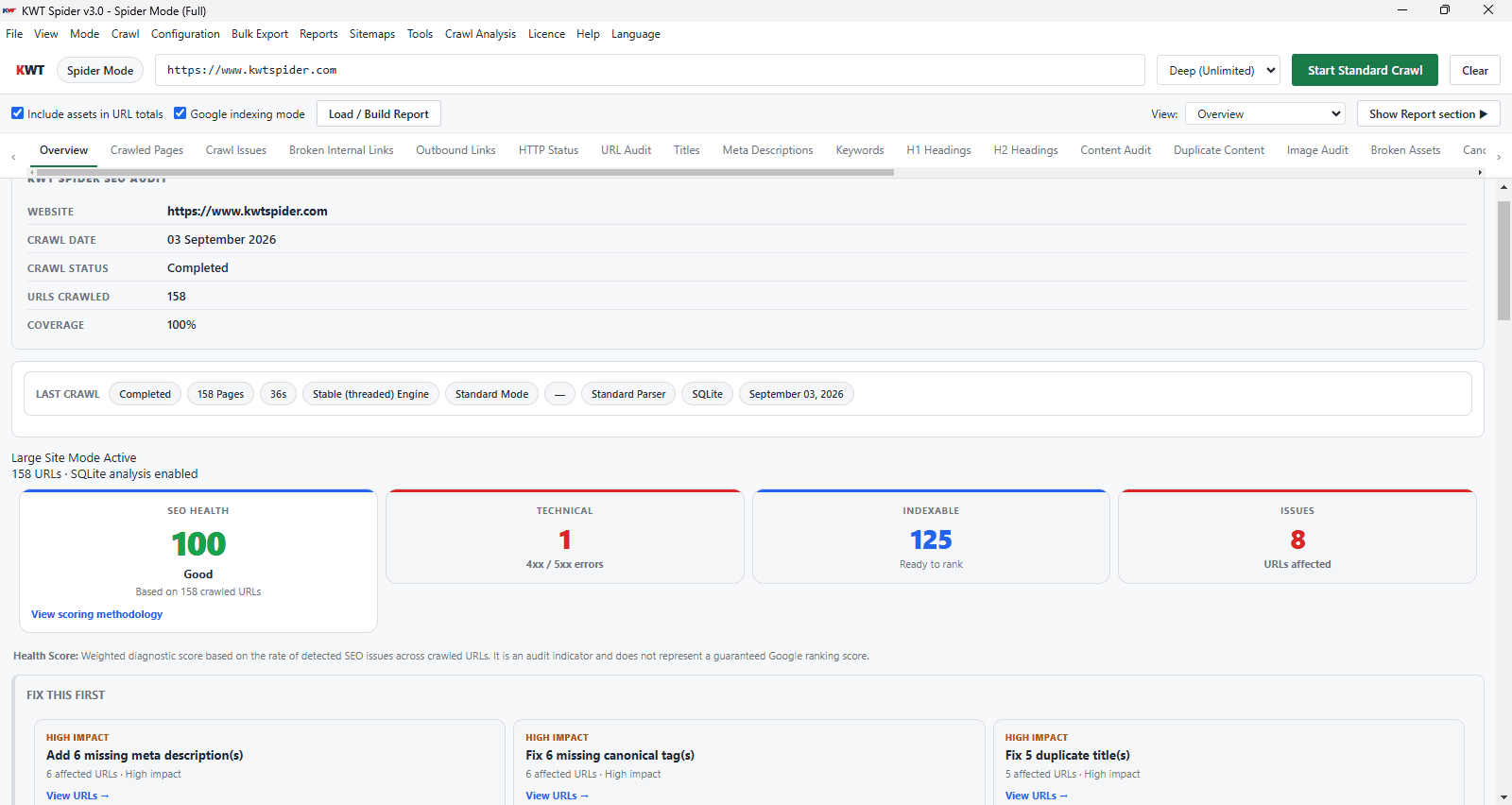
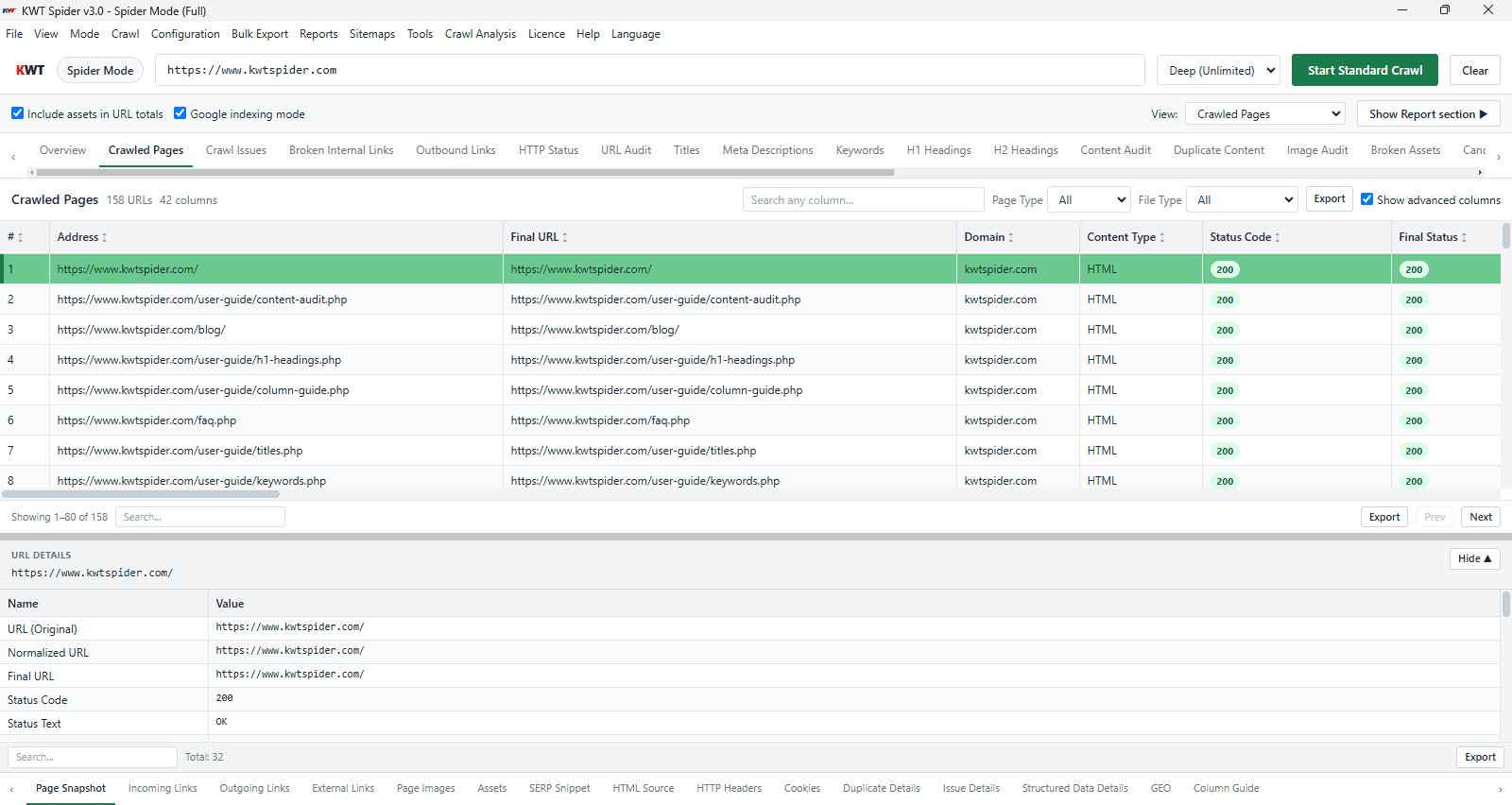
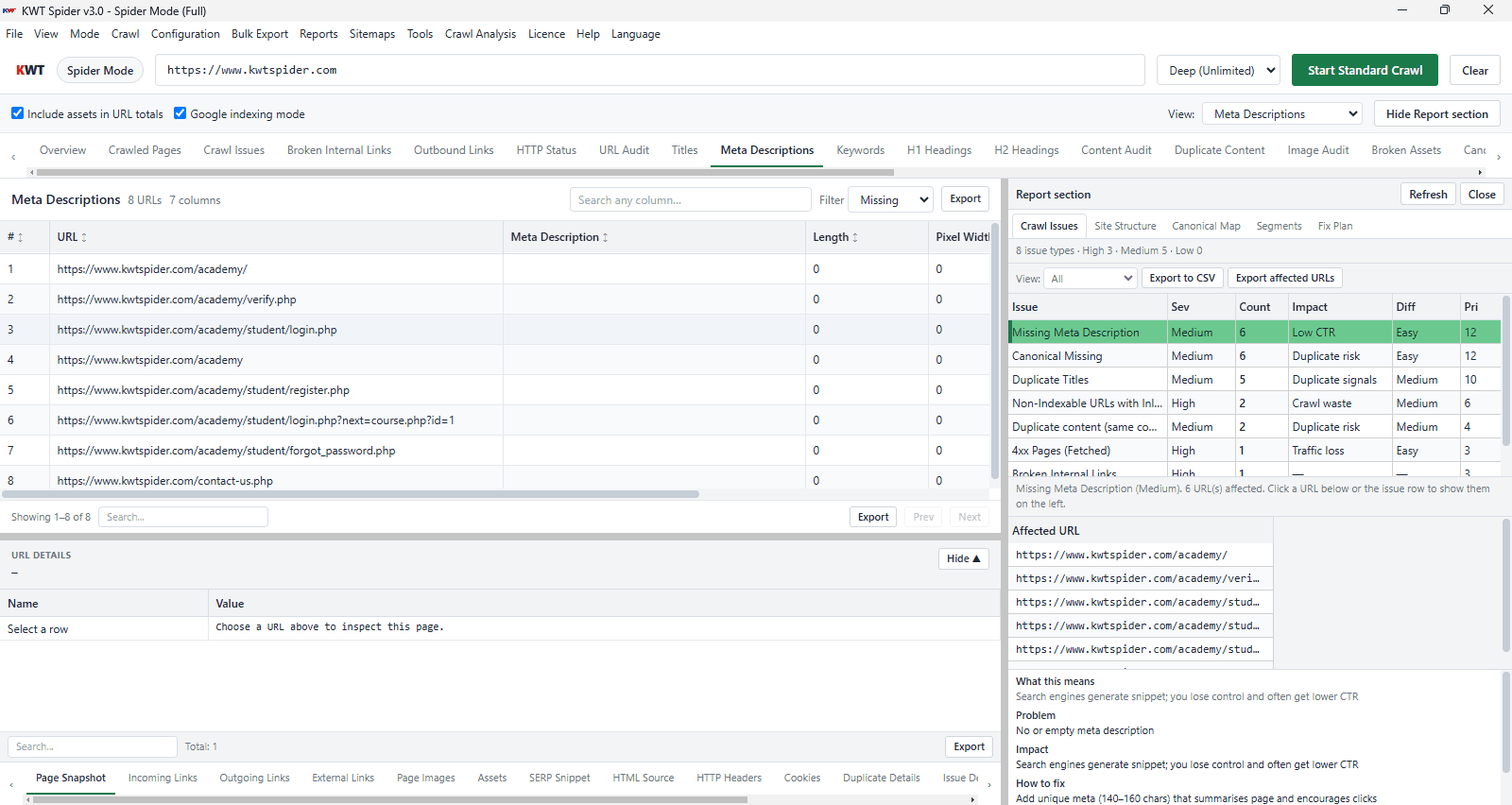
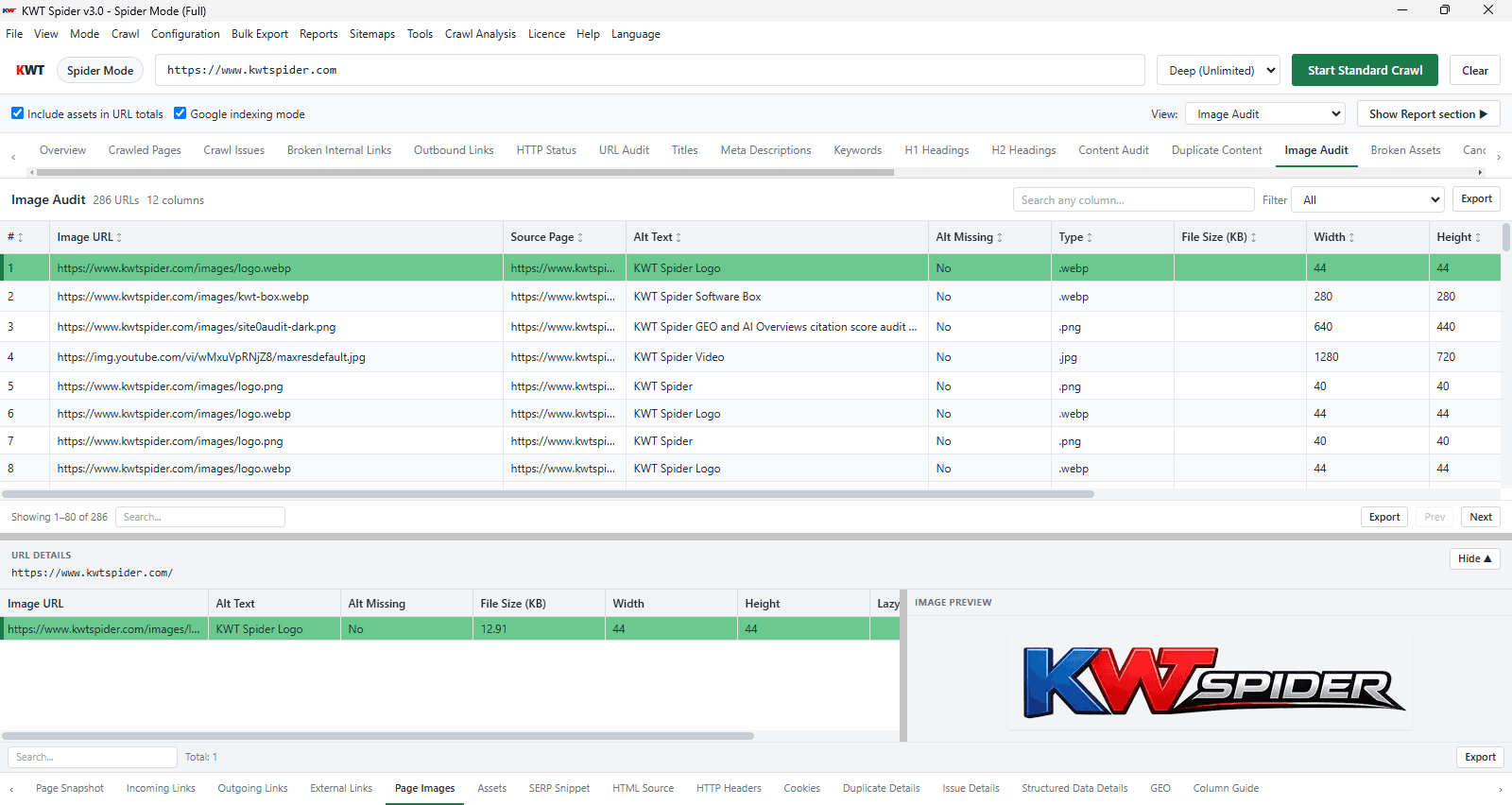
About this app
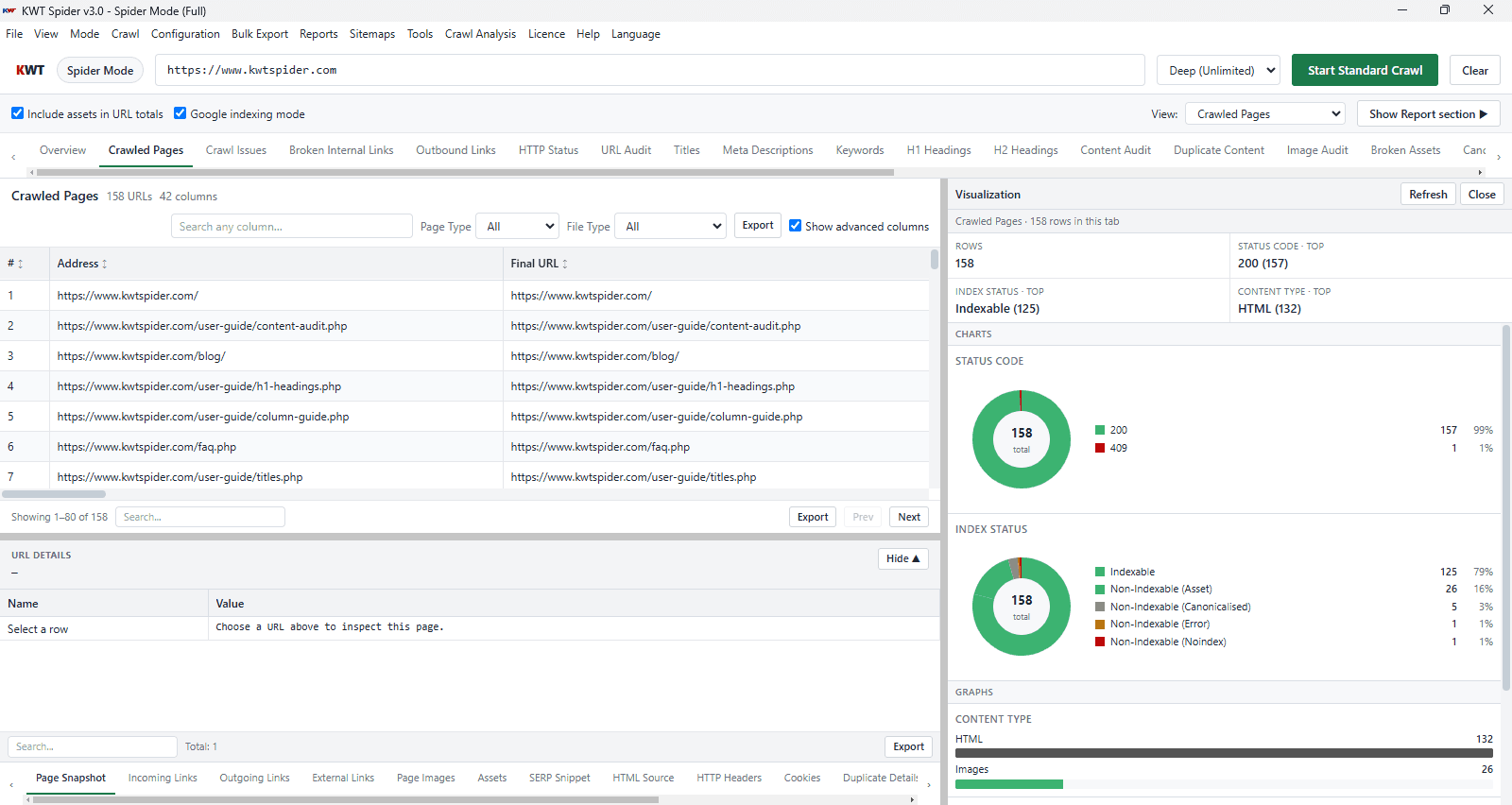
KWT Spider is a technical SEO crawler for website owners, SEO professionals, agencies and developers to analyze site structure and find issues that affect crawling, indexing and search visibility. It crawls websites locally and displays the crawl results in specialized diagnostic views and makes it easy to read technical audits. Major features include checking status codes, broken links, metadata, canonicals, indexability, internal links, images, structured data and other website signals. Additionally, it offers GEO and EEAT analysis to help users assess pages for AI citation readiness. Users can use Spider, List, and Offline modes for different operations such as website audits, URL-based inspections, migrations, and pre-launch folder reviews. It runs on Windows, macOS and Linux platforms. Users can download a free trial without an account, and it can handle up to 250 URLs per session, while advanced features such as limitless crawls and improved GEO functionality require a license.
Key features
- 1Local-first desktop crawler for Windows, macOS, and Linux with 250 URLs/session on the free tier
- 229 diagnostic tabs covering status codes, canonicals, metadata, links, images, schema, and security
- 3Three modes: Spider (full crawl), List (URL-based inspection), and Offline (local folder audit)
- 4GEO/EEAT scoring for AI citation readiness with page-level fix hints and llms.txt export
Target customer profile
Drawn from the product itself, not from a survey.
Demographic
Freelance SEO consultants
Pain points
Limited budget for cloud crawlers; need to audit client sites without uploading sensitive data.
Primary needs
Affordable, local crawling with essential diagnostics and export options.
Demographic
Digital marketing agencies
Pain points
Managing multiple client sites; ensuring data privacy; scaling crawls for large websites.
Primary needs
Unlimited crawls, team-friendly licensing, session save/resume, and comprehensive reporting.
Demographic
In-house SEO teams
Pain points
Handling enterprise-scale sites; integrating SEO with AI-readiness (GEO/EEAT).
Primary needs
SQLite mode for large sites, advanced diagnostics, and AI-readiness scoring.
Demographic
Web developers
Pain points
Catching broken links and assets before deployment; auditing local folders.
Primary needs
Offline folder auditing, pre-flight checks, and integration with development workflows.
Scout Review
Written by AI from measured evidence, scored out of 100.
KWT Spider is a desktop technical SEO crawler that competes on local-first data privacy, a 29-tab diagnostic interface, and a GEO/EEAT scoring feature aimed at AI citation readiness. The marketing site is fast and polished, the free trial requires no account, and the three-mode workflow (Spider/List/Offline) is clearly explained. The weaknesses are documentation (none visible), security hardening (7/12 headers, no compliance disclosures), and accessibility (88/100 with real ARIA and contrast failures). Growth potential is real but bounded — the category is crowded and the differentiator is price and privacy, not a structural moat. At 0.6 years old with minimal traction signals, this is an early-stage tool with a competent foundation and clear room to mature.
Measure by measure
Usability
63Free online audit with no signup and a no-account trial download are genuinely low-friction. Three modes (Spider/List/Offline) are clearly explained, but there's no visible docs site, help center, or onboarding walkthrough.
Design
74Dark, modern SaaS landing page with clear numbered feature blocks and app screenshots showing the 29-tab diagnostic UI. Polished and consistent, though copy density is high and the page leans on text over visual proof.
Speed
78Lighthouse mobile 91/100, desktop 98/100, with CLS 0 and TBT 14ms. Mobile LCP of 3.4s is the weak spot but overall the marketing site is fast and the desktop app is native, not a heavy SPA.
Security
60HTTPS enforced with HSTS, frame protection, and X-Content-Type-Options. Missing CSP, Referrer-Policy, Permissions-Policy, and DMARC. No SOC 2, ISO, or pen-test claims — typical for an early-stage desktop tool.
Accessibility
68Lighthouse accessibility 88/100 with real failures: ARIA role mismatches, missing required ARIA children, and insufficient color contrast. No WCAG statement or a11y documentation found. English-only.
Growth
58Real problem (technical SEO crawling), specific segments (agencies, freelancers, devs), and a timely GEO/EEAT wedge. Local-first privacy angle is a genuine differentiator, but the category is crowded and the wedge is narrow.
Improvement areas
- No public documentation site, help center, or onboarding walkthrough for a 29-tab interface
- Missing security headers (CSP, Referrer-Policy, Permissions-Policy, DMARC) and no compliance disclosures
- Accessibility failures: ARIA role mismatches, missing required ARIA children, insufficient color contrast
- No published benchmarks for large-site crawls (50k+ pages) to substantiate enterprise positioning
Design & Usability
KWT Spider's landing page is a competent, dark-themed SaaS site that leads with the product's strongest visual asset: screenshots of its 29-tab diagnostic interface. The numbered feature blocks (01-04) and mode explanations (Spider/List/Offline) give the page structure, though the copy is dense enough that it reads more like a spec sheet than a pitch. On usability, the low-friction entry is genuinely good — a free online audit with no signup and a trial download that doesn't require an account. But that's where the hand-holding ends. There's no visible documentation site, no help center, no onboarding walkthrough, and no API docs. For a tool with 29 diagnostic tabs and three distinct operating modes, that's a real gap. A first-time user downloads a 169 MB installer and is expected to figure out the workflow from the landing page alone.
Speed & Security
Speed is a genuine strength. The marketing site scores 91/100 on mobile and 98/100 on desktop Lighthouse, with CLS 0 and TBT 14ms — the only blemish is a 3.4s mobile LCP. The desktop app itself is native (Windows/macOS/Linux), not an Electron-heavy SPA, which means crawl performance is bounded by the machine, not the browser. Security is more mixed. HTTPS is enforced with HSTS, frame protection, and X-Content-Type-Options, but CSP, Referrer-Policy, Permissions-Policy, and DMARC are all missing. There's no SOC 2, ISO 27001, or pen-test disclosure. For a desktop tool that keeps crawl data local, the privacy story is actually a security advantage — but the web-facing hardening is incomplete and the compliance posture is undocumented.
Accessibility & Growth
Accessibility lands at 68: Lighthouse scores 88/100, but the failing audits are real — ARIA role mismatches, missing required ARIA children, and insufficient color contrast. There's no WCAG conformance statement and no multi-language support. For a tool aimed at agencies and enterprise SEO teams, that's a gap worth closing. Growth is the more interesting question. The problem KWT Spider names is real: technical SEO crawling is a genuine, paid-for need. The target segments are specific (freelance consultants, agencies, in-house teams, developers), and the local-first privacy angle is a legitimate differentiator against cloud crawlers like Screaming Frog's cloud offering or Deepcrawl. The GEO/EEAT scoring is a timely wedge as AI citation becomes a real concern. But the category is crowded, the domain is 0.6 years old, and the product is competing on price and privacy rather than a structural advantage. It can grow, but the ceiling is bounded by how many SEOs care enough about local-first to switch.
Conclusion
If you're an SEO consultant or agency tired of paying per-crawl credits and uploading client data to someone else's cloud, KWT Spider is worth a download. The free trial requires no account, the 250-URL session limit is enough to evaluate it on a real site, and the local-first architecture is a genuine privacy win. But go in knowing you'll be figuring out the workflow yourself — there's no docs site, no help center, and the security and accessibility posture is undocumented. It's a competent early-stage tool, not a finished enterprise product. Try it on a client site you know well, and see if the 29 tabs earn their keep.
Suggestions for improvement
- Publish a documentation site or help center covering the three modes, the 29 diagnostic tabs, and common workflows — the landing page alone isn't enough onboarding
- Add CSP, Referrer-Policy, Permissions-Policy, and DMARC to the web-facing stack; publish a security page with data-handling details
- Fix the ARIA role mismatches and color contrast failures flagged by Lighthouse; add a WCAG conformance statement
- Publish benchmark data on crawl speed and memory usage for large sites (50k+ pages in SQLite mode) to substantiate the enterprise positioning
Alternatives comparison
Named competitors, point by point. Nobody paid to appear here or to be left out.
 KWT Spider | ||
|---|---|---|
| Pricing model | Free tier (250 URLs/session); paid license for unlimited crawls and full GEO | Not available |
| Deployment | Desktop app (Windows, macOS, Linux) with local-first crawling | Not available |
| Diagnostic depth | 29 diagnostic tabs including GEO/EEAT scoring and llms.txt export | Not available |
| Free trial | Free trial download with no account required; 250 URLs/session | Not available |
| Data privacy | Local-first crawling; crawl data stays on user's machine | Not available |
Comparing options? See KWT Spider alternatives, scored side by side
More SEO Tools apps
View all SEO Tools
Geogrid
92A UULE-powered local rank tracker for SEO agencies, offer...

Kerbrank
91Local rank tracker for UK businesses with Google Maps heatmaps, ChatGPT visibility checks and a weekly fix list.

BACKLNK
90Backlnk is a free SEO and AI visibility website: 15 website checks, a full audit as a PDF report, and guides to get found in search and AI answers.

AuditCloser
89White-label website audits that close deals for digital a...

CitableReport
89CitableReport is an AI visibility audit:

named.ae
88named.ae asks ChatGPT, Claude, Gemini, Perplexity and Grok your buyers' questions live, and shows who they name and the pages they read.

Wajido
88See how your company appears in AI answers

Mover Marketing AI Local SEO
88Specialized SEO services for moving companies to dominate...

Askray
88See who ChatGPT, Gemini & Claude recommend instead of you...

Spek
88Grow your app with self-learning ASO agents

Cromagnon
88Free, private browser-based PDF, Word, Excel, and study t...

Indexaro
88AI visibility tracker for SEO, AEO, and GEO


A platform dedicated to providing unbiased reviews of newly launched applications, analyzing everything from their features to their full potential.
info@scoutforge.net© 2026 Scoutforge. All rights reserved.
