Cycling through all six. Tap any point to stop.
Measured on six things
Check whether a law firm website makes it easy for visitors to get in touch.
Security
52HTTPS enforced with HSTS and SPF published, but the probe scored 5/12: no CSP, no frame protection, no Referrer-Policy, no DMARC. Standard for a small marketing site, thin for one collecting law firm contact details.
Screenshots
1 / 1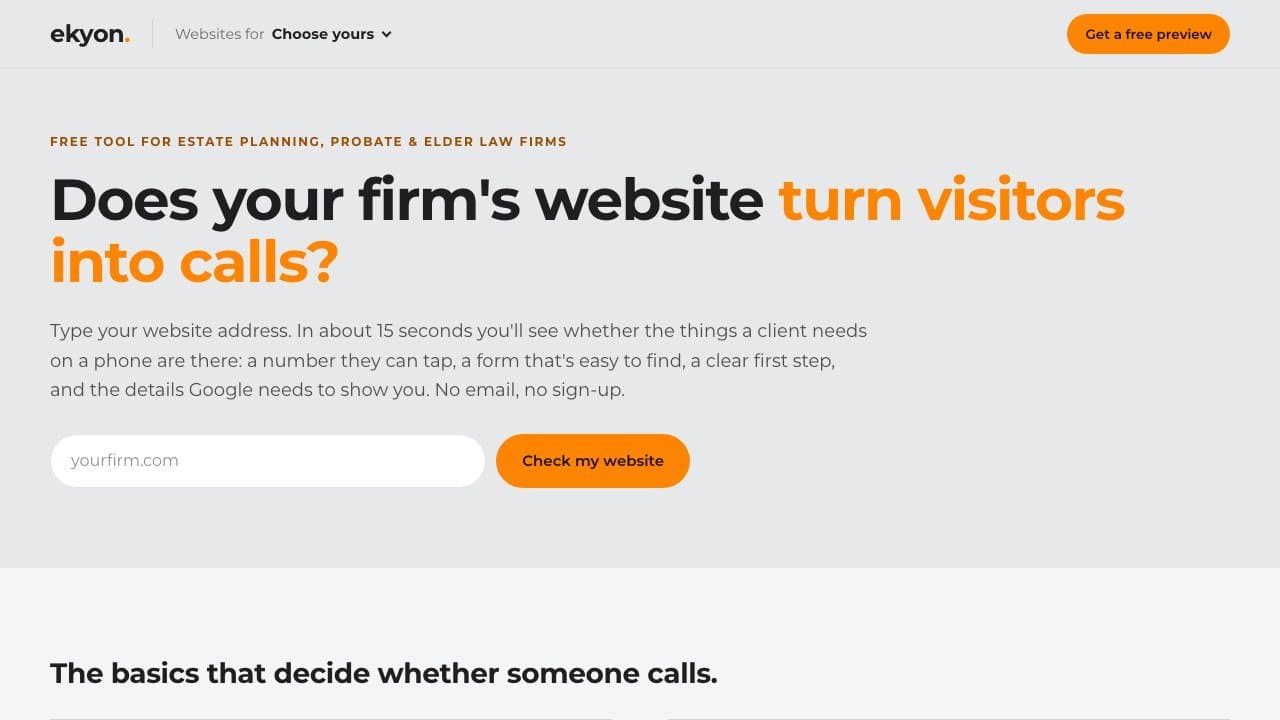
About this app
Ekyon built this free browser tool for estate planning, probate and elder law practices. Enter your website address and see whether visitors on a phone can tap to call, find a consultation form and see what to do next. The check also looks at the search title and business details. Results are available in about 15 seconds, with no account or email required.
Key features
- 1Free instant website check for estate planning, probate and elder law firms — no account or email required, results in about 15 seconds.
- 2Eight-point audit covering tap-to-call, consultation form, clear first step, mobile fit, HTTPS, search title, business details and freshness.
- 3Fixed-price US$2,200 website build plus three months of SEO, paid only after the finished site is approved on a private link.
- 4Flags firms currently on FindLaw, Scorpion or Justia and offers a dedicated 'what to check before leaving' guide.
Target customer profile
Drawn from the product itself, not from a survey.
Demographic
Small estate planning law firms
Pain points
Visitors struggle to find the next step from a phone
Primary needs
Check tap-to-call and consultation form visibility
Demographic
Probate law practices
Pain points
Executors need clear contact options on mobile
Primary needs
Check whether key contact paths are easy to reach
Demographic
Elder law practices
Pain points
Business details can be hard to find or inconsistent
Primary needs
Review the page title and business details
Scout Review
Written by AI from measured evidence, scored out of 100.
Ekyon's Law Firm Website Check is a lead magnet dressed as a public utility, and it's a well-built one. Type your firm's URL and in about 15 seconds you get a verdict on the things that actually decide whether a phone rings: tap-to-call, a findable consultation form, a clear first step, HTTPS, a search title that says estate planning or probate, readable business details. No account, no email, no friction. The page around it is fast (Lighthouse 100/100, LCP 1.1s) and cleanly designed, with a numbered checklist that does more selling than the copy does. The gaps are proof and posture: no sample report to show what the verdict looks like, no docs, and a security header set that scored 5/12 on our probe while collecting contact details from law firms. None of it is disqualifying. All of it is fixable in an afternoon.
Measure by measure
Usability
68One input, no signup, results in ~15 seconds, and a checklist that mirrors exactly what the tool reports. Lead form asks for four fields with 'no call, no payment' above it. Held back by zero docs or sample report.
Design
71Confident type hierarchy, one orange accent on neutral greys, and a hero with exactly one job. The numbered basics checklist is genuinely well-composed. Docked for a cropped demo preview and dense pricing bullets.
Speed
88Lighthouse 100/100 on both mobile and desktop: LCP 1.1s, CLS 0, TBT 2ms. That is a genuinely fast marketing page, not a fast-looking one. No lag complaints anywhere in the evidence.
Security
52HTTPS enforced with HSTS and SPF published, but the probe scored 5/12: no CSP, no frame protection, no Referrer-Policy, no DMARC. Standard for a small marketing site, thin for one collecting law firm contact details.
Accessibility
79Lighthouse 97/100 with only two failing audits: contrast and mismatched accessible names on labelled elements. Responsive and phone-first by design. No WCAG statement published, which keeps it out of the top of the band.
Growth
63Sharp wedge: a free 15-second audit aimed squarely at estate, probate and elder law firms, converting into a US$2,200 fixed-price build. Named incumbents (FindLaw, Scorpion, Justia) make the displacement story concrete.
Improvement areas
- No sample report or documentation — the tool's actual output is never shown in full, only a cropped demo preview.
- Security headers scored 5/12 on the probe: no CSP, frame protection, Referrer-Policy or DMARC on a page collecting firm contact details.
- Two failing accessibility audits (colour contrast, mismatched accessible names) and no published WCAG or accessibility statement.
- Growth is bounded by a done-for-you service model; no self-serve tier or scalable delivery path is described.
Design & Usability
The page knows exactly what it is selling and says it in one glance: a heavy headline, one orange phrase, one URL field. The eight-item basics checklist is the strongest design decision here — it turns an abstract 'is my site good' question into a scannable list of things a probate client actually needs on a phone. Usability follows the same logic: no account, no email, results in about 15 seconds, and a lead form that asks for four fields with 'no call, no payment' sitting right above it. What's missing is proof of the output. The only demonstration of a report is a browser-framed preview cropped mid-headline, and there is no sample report, no docs, no help page. For a tool whose entire value is the verdict it produces, showing a real one would do more than any copy on the page.
Speed & Security
Speed is the standout: Lighthouse 100/100 on mobile and desktop, LCP 1.1s, CLS 0, TBT 2ms. That is a genuinely lean marketing page, and it matters here because the pitch is a 15-second check — a slow page would undercut the promise before the tool even ran. Security is the weak flank. HTTPS is enforced with HSTS and SPF is published, but the header probe scored 5/12: no Content-Security-Policy, no frame protection, no X-Content-Type-Options, no Referrer-Policy, no Permissions-Policy, and no DMARC. For a page collecting names, emails, firm names and current website addresses from law firms — a profession with a professional obligation around client data — that is a thin posture. None of it is a breach, and none of it is unusual for a small marketing site, but the fixes are cheap and the audience is unusually sensitive to exactly this.
Accessibility & Growth
Accessibility lands at 97/100 on the automated audit with two failures: insufficient colour contrast and visible text labels that don't match their accessible names. Both are small, both are real, and both are the kind of thing a keyboard pass would surface in minutes. The site is responsive and phone-first by construction, which is the right instinct for a tool about mobile visitor behaviour, but there is no accessibility statement or WCAG claim anywhere. Growth is the more interesting question. The wedge is unusually specific: a free instant audit for estate planning, probate and elder law firms, which converts into a US$2,200 fixed-price website plus three months of SEO. The site names its incumbents outright — FindLaw, Scorpion, Justia — and even offers a 'what to check before leaving FindLaw' page. That is a real displacement story aimed at a segment with money and a genuine pain. The limit is scale: the offer is a done-for-you build, so growth is bounded by how many firms one operator can serve, and the free tool's reach depends on law firms finding it.
Conclusion
If you run a small estate planning or elder law practice and you've never actually checked your site on a phone, this costs you fifteen seconds and nothing else — run it. If you're evaluating Ekyon as a vendor, the free check is a fair audition: it shows you the diagnostic thinking before you're asked for US$2,200, and the 'you don't pay until you approve the finished site' terms are unusually favourable. Go in knowing what you're getting: a fixed-price build with three months of SEO attached, not a subscription platform. And go in having asked about the security headers and where your enquiry data lands, because the site itself won't tell you.
Suggestions for improvement
- Publish a real sample report — a full annotated output for a fictional firm — so visitors can see the verdict before typing their URL.
- Add a Content-Security-Policy, X-Frame-Options, Referrer-Policy and a DMARC record; all are cheap and the audience is law firms.
- Fix the two failing Lighthouse audits: raise contrast on the low-contrast text and align visible labels with accessible names.
- Un-crop the 'Two sites that pass' demo preview and add a short docs/FAQ page explaining what each of the eight checks means.
Alternatives comparison
Named competitors, point by point. Nobody paid to appear here or to be left out.
 Law Firm Website Check |  | |
|---|---|---|
| Free website audit without signup | Yes — URL in, eight-point verdict in ~15s, no account or email | Not described in the provided alternative data |
| Built specifically for estate planning, probate and elder law | Yes — checks reference probate/estate planning search titles and practice details | Not described in the provided alternative data |
| Paid offering and pricing model | US$2,200 one-time website build + 3 months SEO; paid after approval, no monthly fee | Not described in the provided alternative data |
| Mobile visitor-path checks (tap-to-call, form, first step) | Yes — core of the eight-point checklist | Not described in the provided alternative data |
| Account or email required to see results | No — explicitly no email, no sign-up | Not described in the provided alternative data |
Comparing options? See Law Firm Website Check alternatives, scored side by side
More SEO Tools apps
View all SEO Tools
Geogrid
92A UULE-powered local rank tracker for SEO agencies, offer...

Kerbrank
91Local rank tracker for UK businesses with Google Maps heatmaps, ChatGPT visibility checks and a weekly fix list.

BACKLNK
90Backlnk is a free SEO and AI visibility website: 15 website checks, a full audit as a PDF report, and guides to get found in search and AI answers.

AuditCloser
89White-label website audits that close deals for digital a...

CitableReport
89CitableReport is an AI visibility audit:

named.ae
88named.ae asks ChatGPT, Claude, Gemini, Perplexity and Grok your buyers' questions live, and shows who they name and the pages they read.

Wajido
88See how your company appears in AI answers

Mover Marketing AI Local SEO
88Specialized SEO services for moving companies to dominate...

Askray
88See who ChatGPT, Gemini & Claude recommend instead of you...

Spek
88Grow your app with self-learning ASO agents

Cromagnon
88Free, private browser-based PDF, Word, Excel, and study t...

Indexaro
88AI visibility tracker for SEO, AEO, and GEO


A platform dedicated to providing unbiased reviews of newly launched applications, analyzing everything from their features to their full potential.
info@scoutforge.net© 2026 Scoutforge. All rights reserved.
