Cycling through all six. Tap any point to stop.
Measured on six things
Convert Apple Mail EMLX files to PST, PDF, MBOX, MSG and ...
Design
45Dated, template-assembled homepage: consistent blue palette and a scannable comparison table, but inconsistent icon styles, keyword-stuffed copy, a cramped app UI, and QA typos ('License Tyes', duplicate PST) undercut polish.
Screenshots
1 / 3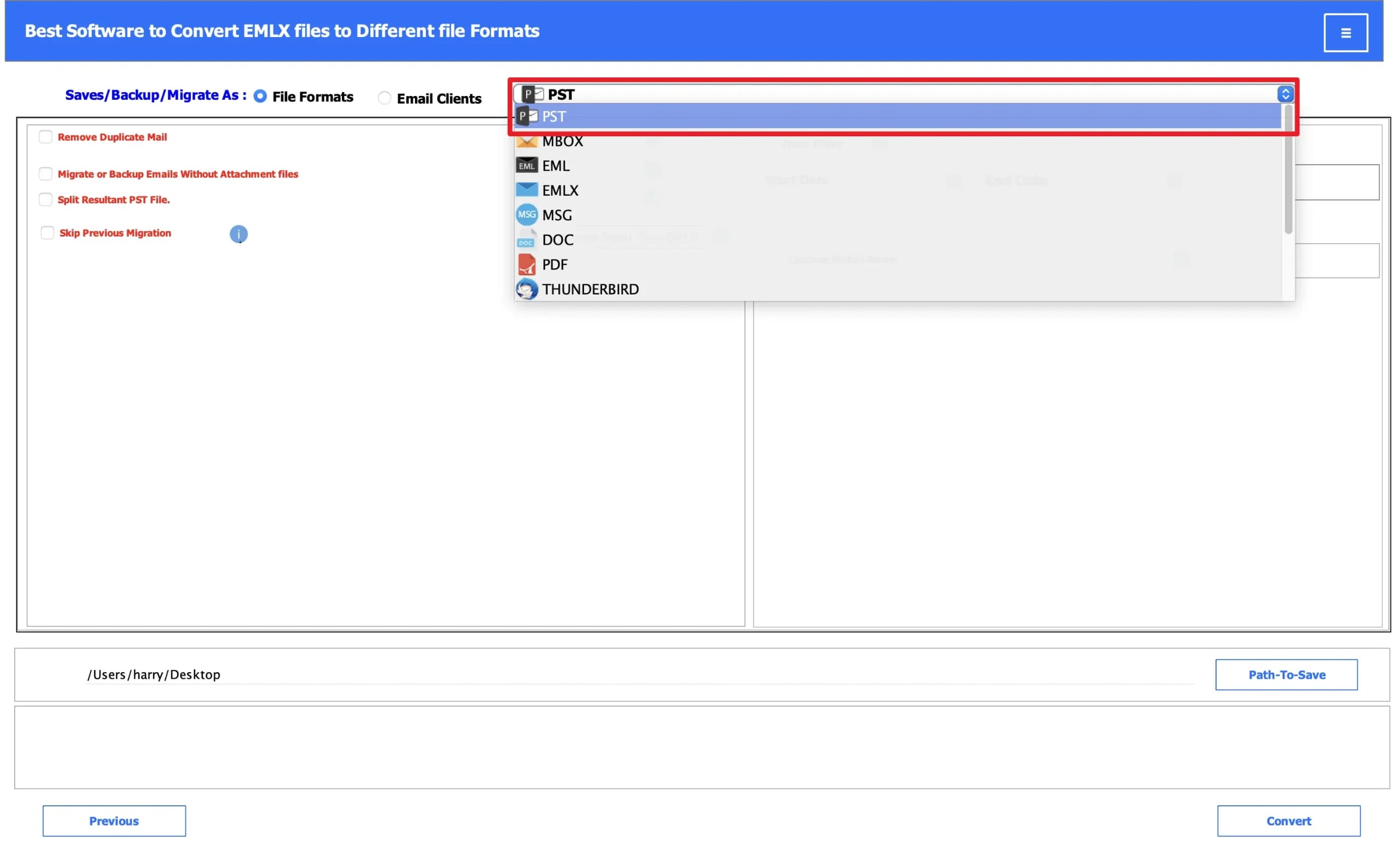
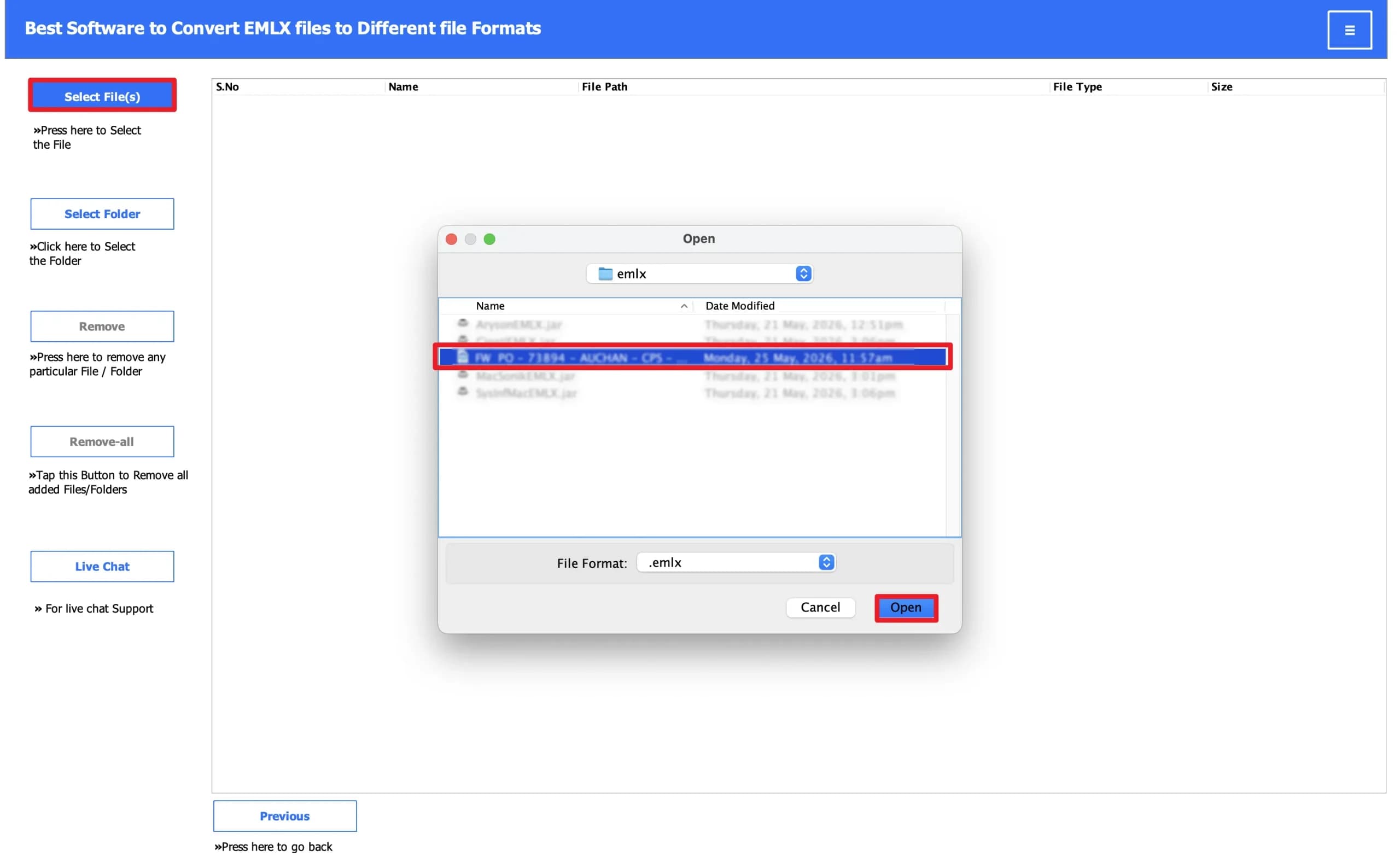
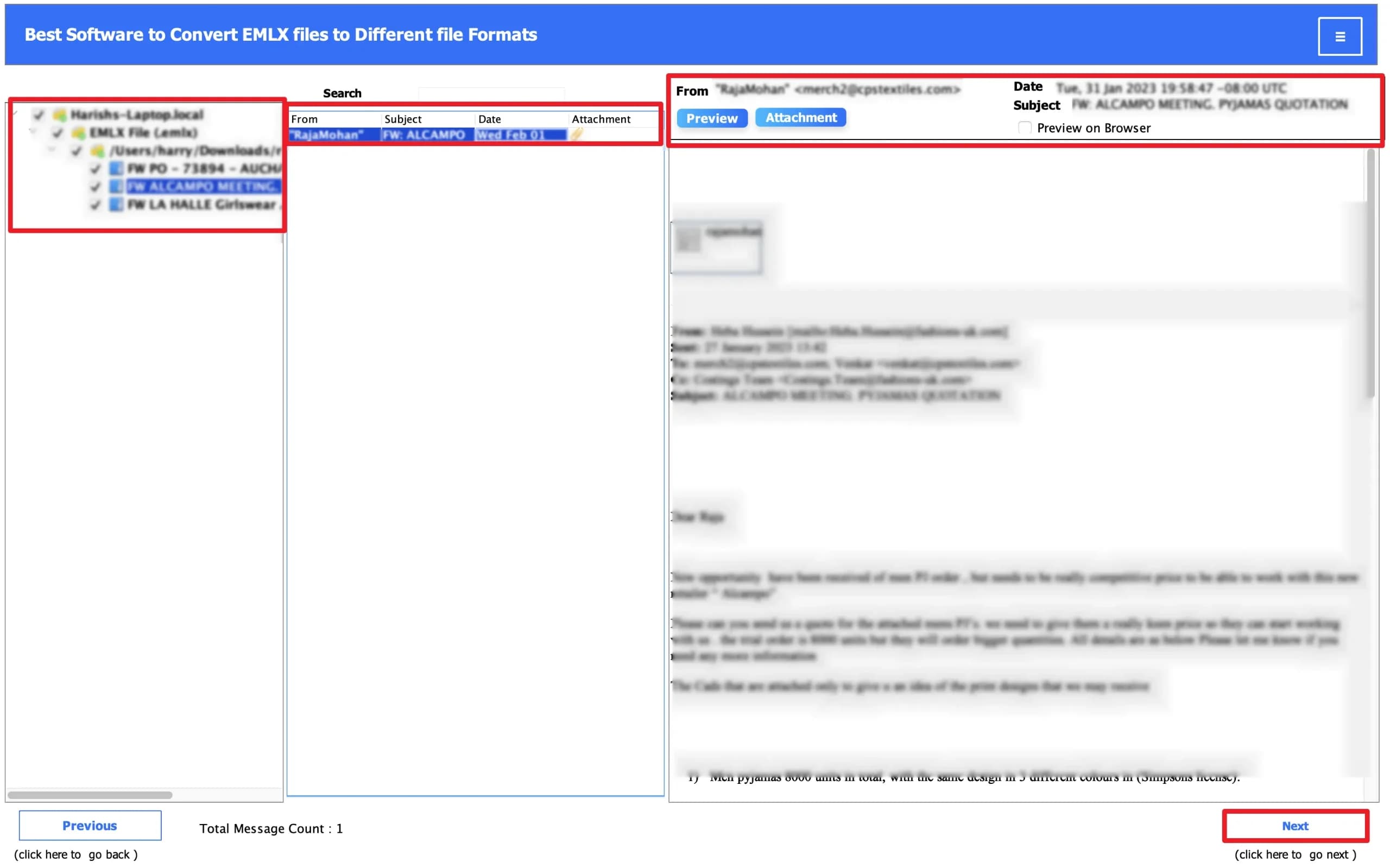
About this app
MacSonik EMLX Converter Tool is a professional-grade utility designed for converting Apple Mail EMLX files into multiple formats including PST, PDF, MBOX, EML, MSG, OFT, and CSV. It also supports direct migration to Office 365, Gmail, and IMAP-based email clients. Built for enterprises, IT administrators, legal teams, and individual Mac users, the tool preserves email formatting, attachments, metadata, and folder hierarchy throughout the conversion process. Key features include bulk conversion, email preview before conversion, duplicate email removal, advanced filters (date range, subject, to/from), custom naming options, and cross-platform compatibility with both macOS and Windows. The software offers a free demo version limited to 50 emails per folder, with premium licensing available for home, administrator, technician, and enterprise use. With a 4.6-star average rating from over 5,600 users, it's a reliable solution for secure email migration and archiving. The tool is particula...
Key features
- 1Bulk EMLX conversion to PST, PDF, MBOX, EML, MSG, OFT and CSV with preserved formatting and metadata.
- 2Direct migration to Office 365, Gmail and IMAP clients, with folder hierarchy retention.
- 3Advanced filters: date range, subject, to/from, duplicate removal, attachment exclusion and PST splitting.
- 4Free demo limited to 50 emails per folder; premium licensing for home, administrator, technician and enterprise.
Target customer profile
Drawn from the product itself, not from a survey.
Demographic
IT administrators and enterprise IT teams managing large-scale email migrations
Pain points
Manual EMLX conversion is slow, error-prone, and risks data loss during bulk mailbox transfers
Primary needs
Bulk conversion with preserved folder hierarchy, attachments, and metadata; direct migration to Office 365/Gmail
Demographic
Legal and compliance professionals archiving email records for audits or litigation
Pain points
Need to preserve email integrity and metadata for legal admissibility while converting to accessible formats
Primary needs
Accurate conversion to PDF/PST with complete metadata retention and duplicate removal for clean archives
Demographic
Individual Mac users and business professionals switching from Apple Mail to Windows or cloud platforms
Pain points
EMLX files are not natively readable on Windows or other email clients; conversion tools are often complex or expensive
Primary needs
Simple, affordable conversion to PST/MBOX/PDF with preview and selective export options
Scout Review
Written by AI from measured evidence, scored out of 100.
MacSonik EMLX Converter is a competent, fast-loading utility site for a real migration problem. The marketing page is dated and keyword-heavy, with QA typos and inconsistent visuals, but the workflow is well documented and the primary actions are clear above the fold. Security headers are complete while enterprise compliance evidence is absent. Accessibility has five failing audits. The product's core pitch — bulk EMLX conversion with preserved hierarchy and direct cloud migration — is credible but not differentiated enough from established peers to stand out on its own.
Measure by measure
Usability
58Clear above-the-fold Mac/Windows toggle and download/purchase buttons, plus a step-by-step guide covering the full workflow. But the homepage buries key facts under ten sections and in-app instructions are set in tiny type.
Design
45Dated, template-assembled homepage: consistent blue palette and a scannable comparison table, but inconsistent icon styles, keyword-stuffed copy, a cramped app UI, and QA typos ('License Tyes', duplicate PST) undercut polish.
Speed
88Lighthouse mobile 98/100 (LCP 1.8s, CLS 0.041, TBT 68ms) and desktop 96/100. The marketing site is genuinely fast and stable, with no lag complaints in the collected evidence.
Security
74Full security-header stack present (HSTS, CSP, frame protection, Referrer/Permissions-Policy) with SPF and DMARC, 12/12 checklist points. No SOC 2, ISO, pen-test or bug bounty evidence found, so enterprise compliance claims stay unverified.
Accessibility
57Lighthouse accessibility 87/100 but five failing audits: insufficient contrast, non-sequential headings, unnamed links, small touch targets, missing main landmark. No accessibility statement or multi-language support observed.
Growth
62Real, narrow problem (EMLX unreadable off Apple Mail) with named segments and concrete differentiators — bulk conversion, folder hierarchy, dedup, direct O365/Gmail migration. Crowded category with established peers.
Improvement areas
- Fix QA typos ('License Tyes', duplicate PST in dropdown) and unify icon/card styles across sections.
- Publish a security or compliance page with SOC 2/ISO status or pen-test summary for enterprise buyers.
- Resolve five Lighthouse accessibility failures: contrast, heading order, unnamed links, touch targets, main landmark.
- Trim keyword-stuffed homepage copy and surface key facts earlier; ten sections before the comparison table is too many.
Design & Usability
The homepage is a long, keyword-stuffed sales page that reads as SEO filler rather than product explanation. The blue palette is consistent and the comparison table is genuinely scannable, but inconsistent icon styles, a cramped app UI, and QA typos ('License Tyes', duplicate PST in the dropdown) make it feel assembled from templates. Usability is stronger: the Mac/Windows toggle and Free Download/Purchase Now buttons sit above the fold, and the guide page walks through numbered steps from launch to filters and export. The cost is density — roughly ten sections before the comparison table, with key facts buried and in-app instructions set in tiny type.
Speed & Security
Speed is the standout: Lighthouse mobile 98/100 with LCP 1.8s, CLS 0.041 and TBT 68ms, desktop 96/100. The marketing site is lightweight and stable. Security plumbing is also solid — HTTPS enforced with HSTS, CSP, frame protection, Referrer-Policy and Permissions-Policy, plus SPF and DMARC, for 12/12 checklist points. What's missing is the paperwork enterprises actually ask for: no SOC 2, ISO 27001, pen-test report or bug bounty page was found. For a tool pitched at legal and compliance teams handling litigation archives, that gap matters more than the headers.
Accessibility & Growth
Accessibility lands at 87/100 on Lighthouse but with five failing audits: insufficient color contrast, non-sequential heading order, links without discernible names, small touch targets, and no main landmark. There is no accessibility statement and no multi-language support. Growth is a judgement call: the problem is real — EMLX files are not natively readable off Apple Mail — and the site names specific segments (IT admins, legal/compliance, MSPs) with concrete differentiators like bulk conversion, folder hierarchy retention, deduplication and direct Office 365/Gmail migration. But Aid4Mail, SysTools and Stellar already sell overlapping conversion and migration features, so the wedge is narrow and the category crowded.
Conclusion
If you need to move Apple Mail EMLX data to PST, PDF or Office 365 and you value a fast, well-documented workflow, this is a reasonable candidate — especially for smaller teams that don't require a vendor compliance program. If you're a legal or enterprise buyer who needs SOC 2 or ISO evidence before trusting a vendor with litigation archives, ask for it directly; the site doesn't publish it. And if accessibility is a procurement requirement, the five failing Lighthouse audits are worth raising before you buy.
Suggestions for improvement
- Fix the QA typos: 'License Tyes' in the spec table and the duplicate PST entry in the format dropdown.
- Publish a security or compliance page with SOC 2/ISO status or a pen-test summary for enterprise and legal buyers.
- Resolve the five Lighthouse accessibility failures: contrast, heading order, unnamed links, touch targets, main landmark.
- Trim the homepage's keyword-stuffed copy and surface key facts earlier; ten sections before the comparison table is too many.
Alternatives comparison
Named competitors, point by point. Nobody paid to appear here or to be left out.
 MacSonik EMLX Converter Tool |  Aid4Mail |  SysTools EMLX Converter |  Stellar Converter for EMLX | |
|---|---|---|---|---|
| Bulk EMLX conversion to PST/PDF/MBOX/EML/MSG | Yes — PST, PDF, MBOX, EML, MSG, OFT, CSV | Yes — broad format support including EMLX, MBOX, PST | Yes — PST, PDF, MBOX and other formats | Yes — PST, MSG, EML, PDF |
| Preserves folder hierarchy and metadata | Yes — claims full hierarchy and metadata retention | Yes — preserves structure and metadata | Yes — maintains folder structure and attachments | Yes — data integrity maintained |
| Direct migration to Office 365 / Gmail / IMAP | Yes — Office 365, Gmail, IMAP | Yes — supports migration to cloud and IMAP | Not stated in provided description | Not stated in provided description |
| Duplicate email removal and advanced filters | Yes — dedup, date/subject/to/from filters, PST split | Yes — filtering and deduplication | Not stated in provided description | Not stated in provided description |
| Free demo / trial availability | Free demo limited to 50 emails per folder | Trial available (details not in provided description) | Demo typically offered (not stated in provided description) | Demo typically offered (not stated in provided description) |
Aid4Mail
Aid4Mail is a powerful email conversion and migration tool that supports EMLX, MBOX, PST, and many other formats. It offers batch processing, filtering, and deduplication, making it suitable for both individual and enterprise use.
SysTools EMLX Converter
SysTools EMLX Converter is a dedicated tool for converting Apple Mail EMLX files to PST, PDF, MBOX, and other formats. It supports bulk conversion, maintains folder structure, and preserves attachments and metadata.
Stellar Converter for EMLX
Stellar Converter for EMLX is a reliable tool for converting EMLX files to PST, MSG, EML, and PDF. It offers a user-friendly interface, preview option, and supports large file conversion with data integrity.
Comparing options? See MacSonik EMLX Converter Tool alternatives, scored side by side
More E-Mail apps
View all E-Mail
EML to PDF
88Convert .eml, .msg and .mbox emails to PDF in your browser

youtubetomp3.ink
87Free online YouTube to MP3 converter with no signup or so...

AgentiSend
87Resend alternative: email API for developers and AI agents

PitchCentric
86AI podcast booking intelligence with probability scoring.

PCDOTS PST Converter
85Convert Outlook PST files to 16 formats and clouds withou...

EmailFig
85Email marketing that gets out of your way, with all featu...

Postfleet
83Email infrastructure that turns inbound mail into safe JS...

Mailwell
83A calm, fast Mac mail app for all your accounts. Your mail stays on your Mac, with no servers in between.

CaptainVerify
82.5CaptainVerify is a powerful email and mobile number verif...

Mailmodo
82Mailmodo revolutionizes email marketing with AMP-powered interactive emails, AI tools, and automation to boost engagement and ROI.

VerifiedEmail
82A specialized tool for real-time email verification and list cleaning, boosting deliverability and compliance.

Gblock
81A Chrome extension that blocks hidden email trackers in Gmail, ensuring privacy by detecting spy pixels and anonymizing links.


A platform dedicated to providing unbiased reviews of newly launched applications, analyzing everything from their features to their full potential.
info@scoutforge.net© 2026 Scoutforge. All rights reserved.
