Cycling through all six. Tap any point to stop.
Measured on six things
AI-assisted floor plan concepts from text or sketches, with browser editing and static 3D previews.
Security
41HTTPS isn't enforced and there's no HSTS, CSP, frame protection, or Referrer-Policy — 2/12 on the header checklist. SPF and DMARC exist. No security page, SOC 2, or bug bounty found. Standard early-stage gaps, not a breach.
Screenshots
1 / 1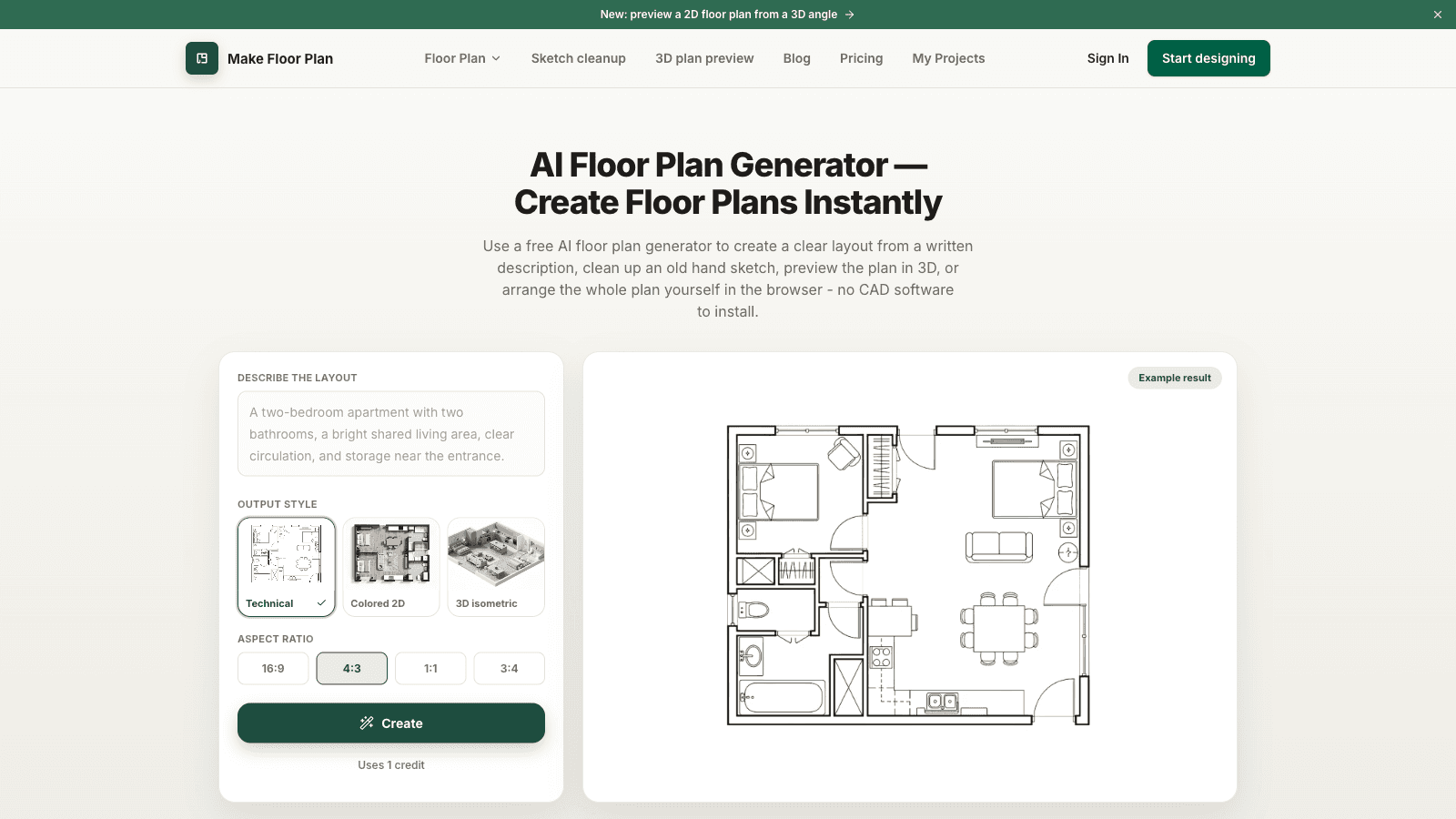
About this app
Make Floor Plan is an AI-assisted floor plan generator and editor for early layout exploration. Users can start from a text description, clean up a rough sketch, refine layouts in a browser and view a static 3D preview. It is intended to support conversations about room relationships and circulation before detailed design. AI actions use credits: a limited trial is available, with paid credits for additional use. Dimensions, structure and local requirements require independent professional checks. Outputs are conceptual visualizations, not CAD/BIM files, construction or permit drawings, exact measurements, editable 3D models or walkthroughs. Submitted by an authorized AI assistant on behalf of Make Floor Plan; this description is product information, not a customer review.
Key features
- 1AI text-to-plan: describe rooms and a brief, get a labeled 2D floor plan in seconds.
- 2Sketch cleanup and image-to-plan conversion from rough drawings or old images.
- 3Editable browser canvas for walls, doors, windows, furniture, and notes.
- 4Static 3D/isometric preview of a 2D plan; PNG and print-ready PDF export.
- 5Version history with non-destructive AI restyling and annotations.
Target customer profile
Drawn from the product itself, not from a survey.
Demographic
Homeowners planning renovations or furniture layouts
Pain points
Difficulty discussing early room relationships and circulation from a rough idea
Primary needs
Quick visual concept to test ideas before committing to a renovation
Demographic
Real estate agents and listing marketers
Pain points
Buyers can't picture the space from photos alone; drafting is slow
Primary needs
Conceptual layout illustrations for early discussions, with measurements checked separately
Demographic
Interior designers and builders drafting early concepts
Pain points
Concept iteration is time-consuming; client communication lags
Primary needs
Early visual concepts with browser-based layout refinement
Scout Review
Written by AI from measured evidence, scored out of 100.
Make Floor Plan is a focused AI floor-plan generator that nails the demo: describe a room, get a labeled 2D plan, refine it on a canvas, preview in 3D. The homepage is polished and the pricing is honest (Free trial, $14.99 Pro, $49.99 Studio). Speed is excellent on desktop and good on mobile. The gaps are the usual early-stage ones — thin documentation, unhardened security headers, and a contrast issue — plus a competitive reality: Floorplanner and SketchUp already own the browser and 3D lanes. It's a credible concept tool for homeowners and agents who want a fast visual before committing to a real drafter.
Measure by measure
Usability
68You can generate a plan straight from the hero without an account, and the 'Uses 1 credit' note plus human-check set expectations up front. Clear three-step flow and a real pricing matrix. Docs are thin — mostly marketing guide sections.
Design
71Polished, consistent green branding and a hero that shows the actual text-to-plan demo beside a rendered plan. Crisp line-drawing examples sell the concept. Below the fold it gets repetitive and low-contrast gray cards blur together.
Speed
73Desktop Lighthouse 99/100 and mobile 85/100 with near-zero layout shift (CLS 0.002). Mobile LCP of 3.5s is the one soft spot, above the 2.5s 'good' line, but TBT 137ms keeps it snappy.
Security
41HTTPS isn't enforced and there's no HSTS, CSP, frame protection, or Referrer-Policy — 2/12 on the header checklist. SPF and DMARC exist. No security page, SOC 2, or bug bounty found. Standard early-stage gaps, not a breach.
Accessibility
79Lighthouse accessibility 96/100 with one failing audit: insufficient color contrast, matching the washed-out gray cards seen in the visual audit. No WCAG statement and English-only, but keyboard-friendly layout and readable structure otherwise.
Growth
58Real, specific problem (early layout before CAD) with four named segments and a clear wedge: AI text/sketch-to-plan plus browser editing at $14.99/mo. Very early (domain from 2026), and Floorplanner already owns browser 2D/3D.
Improvement areas
- Security headers: enforce HTTPS and add HSTS, CSP, frame protection, Referrer-Policy.
- Accessibility: fix the failing color-contrast audit on pale gray cards and text.
- Documentation: replace marketing guide sections with real prompt and export docs.
- Page copy: remove repeated feature lists below the fold to reduce redundancy.
Design & Usability
Make Floor Plan's homepage does the hard thing well: the hero is a working text-to-plan demo sitting next to a rendered result, so you understand the product in three seconds without signing up. Green branding is consistent and the plan examples are crisp. Usability follows through — a credit note and human-check set expectations before you generate, and pricing is a real matrix (Free 3 credits, Pro $14.99, Studio $49.99). The weak spots are below the fold: repetitive feature copy, washed-out persona cards, and a 'guide' that's marketing prose rather than documentation. It's a competent, honest early-stage tool that could use a real help center.
Speed & Security
Speed is a genuine strength on desktop: Lighthouse 99/100 with a CLS of 0.002, and mobile lands 85/100 with TBT at 137ms. The one blemish is mobile LCP of 3.5s, above the 2.5s 'good' threshold — ironic for a tool promising instant plans, but not a dealbreaker. Security is the soft underbelly: HTTPS isn't enforced and there's no HSTS, CSP, frame protection, or Referrer-Policy (2/12 on the header checklist). SPF and DMARC are set, but there's no security page, SOC 2, or bug bounty. For a site handling payments and saved projects, hardening headers is the cheapest credibility win available.
Accessibility & Growth
Accessibility is strong on paper — Lighthouse 96/100 — with a single failing audit for insufficient color contrast, the same pale gray that flattens the persona cards. No WCAG statement and English-only, but the layout is keyboard-friendly and readable. Growth is a judgment on the idea: the problem (early layout before CAD) is real, four segments are named, and the wedge — AI text/sketch-to-plan plus browser editing at $14.99/mo — is concrete. But Floorplanner already owns browser 2D/3D and SketchUp owns 3D, so 'AI does the first draft' is a feature incumbents can copy. The domain is barely months old, so traction is context, not a verdict.
Conclusion
If you need a quick conceptual layout to talk through room flow — not a permit drawing — Make Floor Plan is a fast, low-friction way to get there, and the free trial costs you nothing but a signup. Just treat the output as a conversation starter: dimensions and structure still need a professional check, and the security headers need work before you trust it with anything sensitive.
Suggestions for improvement
- Enforce HTTPS and add HSTS, CSP, and frame-protection headers — the 2/12 checklist is the easiest credibility fix.
- Fix the failing contrast audit by darkening the pale gray persona and guide card text.
- Replace the marketing 'guide' sections with real docs: prompt examples, export specs, and a FAQ beyond pricing.
- Tighten the below-the-fold copy — the page repeats the same feature list three times.
Alternatives comparison
Named competitors, point by point. Nobody paid to appear here or to be left out.
 Make Floor Plan Make Floor Plan |  SketchUp SketchUp |  Floorplanner Floorplanner | |
|---|---|---|---|
| Primary input method | AI text description, sketch upload, or manual canvas | Manual 3D modeling from scratch | Manual 2D/3D drawing in browser |
| AI generation | Yes — text-to-plan, sketch cleanup, AI restyle (credit-based) | Limited AI features; core is manual modeling | Manual drafting; check site for current AI features |
| 3D output | Static isometric/bird's-eye preview only, not editable 3D | Full editable 3D modeling and walkthroughs | 3D visualization of 2D plans |
| Pricing model | Free trial (3 credits); Pro $14.99/mo; Studio $49.99/mo | Free tier plus paid subscription plans | Free tier plus paid subscription plans |
| Target user | Homeowners, agents, designers, builders needing quick concepts | Designers, architects, and 3D modelers | Homeowners and real estate professionals |
SketchUp
SketchUp is a 3D modeling product; it serves a different workflow from an AI-generated floor-plan concept.
Floorplanner
Floorplanner is a browser-based floor planning product with 2D and 3D workflows. Check its official website for current capabilities.
Comparing options? See Make Floor Plan alternatives, scored side by side
More AI Generations apps
View all AI Generations
Uni-1 by Luma AI
92Uni-1 is an advanced multimodal text-to-image AI model th...

LTX 2.3 AI Video Generator
91Fast, open-source AI video generator with 4K support, mul...

IraVoice
88Private on-device dictation for Apple-silicon Macs.

OBVELO
88Privacy gateway that masks personal data in LLM traffic

tradutor de mangá com IA
88O tradutor de mangá com IA traduz capítulos em lote, personaliza textos e oferece edição visual para estúdios.

Pixelimg
88A free online AI-powered tool that instantly converts ima...

HeyVid AI
88HeyVid AI is a free all-in-one AI video and image generat...

RestorePhotosApp
88An AI-powered photo restoration app that brings old, blur...

Mygom SEO
87MygomSEO is an AI marketing agent that audits your site, writes SEO content, publishes to 12+ CMS platforms, posts to social, and monitors rankings 24/7.

pause.do
87A privacy-first browser extension that inserts gentle pau...

DeepSwapAI
87AI face swap online with no subscription, pay per use.

ContentIQ
87AI writer that fact-checks before writing, with real sour...


A platform dedicated to providing unbiased reviews of newly launched applications, analyzing everything from their features to their full potential.
info@scoutforge.net© 2026 Scoutforge. All rights reserved.
