Cycling through all six. Tap any point to stop.
Measured on six things
Turn a photo into a viral Tiny Desk concert video with up...
Security
52HTTPS enforced with SPF and DMARC, plus a stated image-use policy and linked Terms/Privacy. Missing HSTS, CSP, frame protection and Referrer-Policy — 4/12 header checks.
Screenshots
1 / 1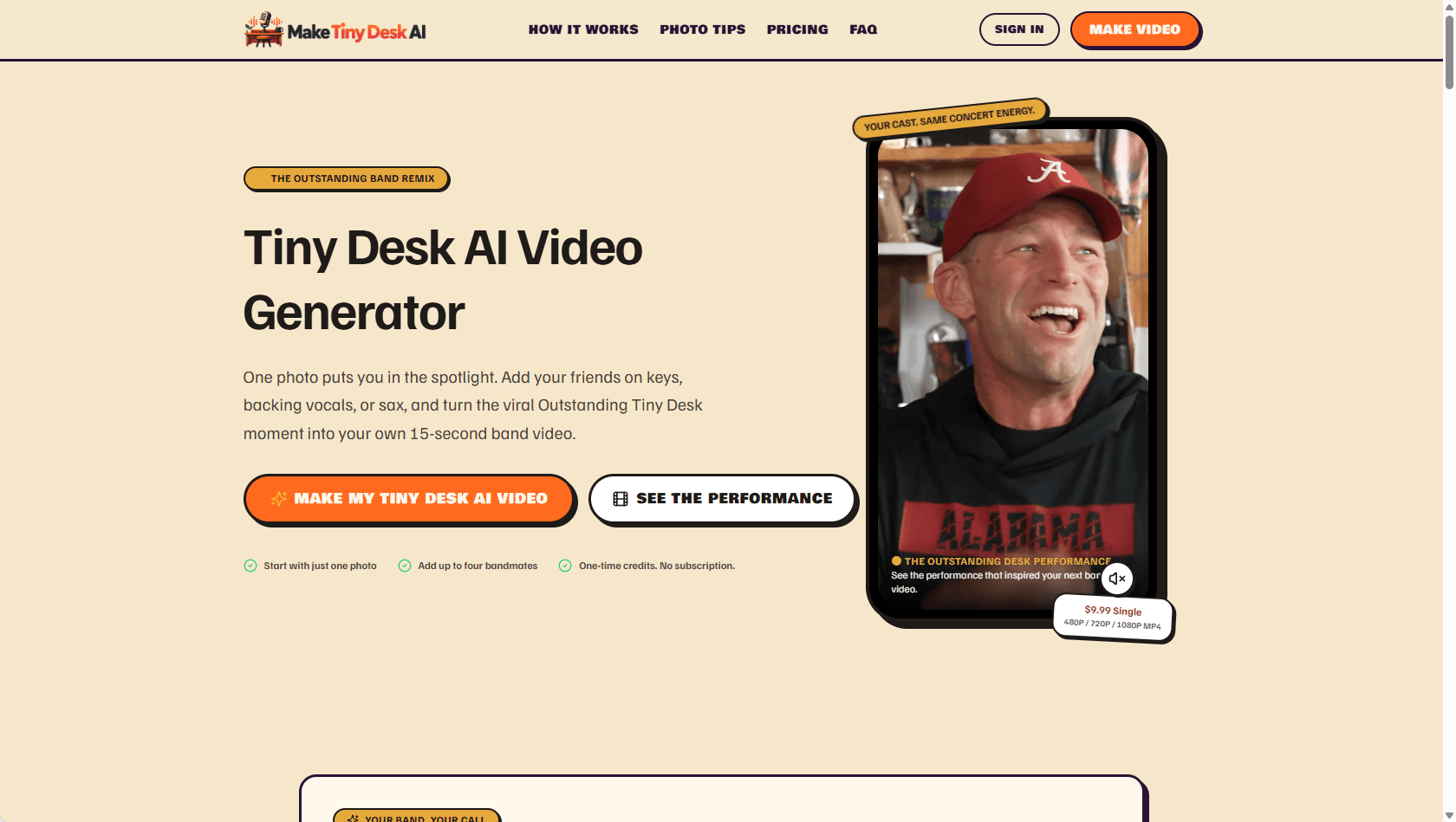
About this app
Make Tiny Desk AI is a playful, credit-based web app that drops you and your friends into the now-iconic "Outstanding" Tiny Desk concert scene. You start by uploading one clear portrait for the lead performer, then optionally slot in up to four bandmates on keyboard, left and right backing vocals, and saxophone. The generator handles the timing, camera cuts, and that famous sax solo cue without any timeline editing or text prompting on your side. Output is a 15-second MP4 you can grab in 480P, 720P, or 1080P and in 9:16, 16:9, or 1:1 aspect ratios, which makes it easy to push straight to TikTok, Reels, or Shorts. Pricing runs on one-time credit packs (a $9.99 single or $24.99 trio) with no subscription, and credits stay valid indefinitely. A single video costs 5 credits at 480P, 10 at 720P, and 20 at 1080P, and credits are automatically restored if a generation fails. It's not affiliated with NPR, and the whole appeal is casting your own people into a familiar, meme-friendly perform...
Key features
- 1Upload one lead portrait plus up to four optional bandmates (keyboard, two backing vocals, sax) in a fixed Tiny Desk-style scene.
- 215-second MP4 output in 480P/720P/1080P and 9:16, 16:9 or 1:1 aspect ratios, ready for TikTok, Reels and Shorts.
- 3One-time credit packs ($9.99 single, $24.99 trio) with no subscription; credits never expire and auto-restore on failed generations.
Target customer profile
Drawn from the product itself, not from a survey.
Demographic
Social media creators and meme makers aged 18–34
Pain points
Editing tools feel heavy; chasing a trending format takes too long
Primary needs
A fast, prompt-free way to ride a viral trend with custom faces
Demographic
Friend groups, sports teams, and office squads
Pain points
Group-chat humor needs a quick visual gag everyone can share
Primary needs
Multi-person casting (up to five) and easy social-ready exports
Demographic
Casual AI video hobbyists and gift/celebration shoppers
Pain points
Subscriptions pile up for tools used only occasionally
Primary needs
One-time credit pricing, no recurring fees, and reliable downloads
Scout Review
Written by AI from measured evidence, scored out of 100.
Make Tiny Desk AI is a focused, competently executed trend product. The casting widget, explicit credit pricing and photo guidance show someone thought about the actual user journey rather than just shipping a prompt box. Desktop performance is excellent and the page is visually coherent. The gaps are the ones that matter for this specific product: mobile LCP of 5.9s on a phone-first audience, four out of twelve security headers on a site that collects portraits of real people, and no demo or trial to prove the output before you spend credits. Growth is capped by the format itself — one meme, no affiliation, no network effect. It's a good weekend-trend tool, not a platform.
Measure by measure
Usability
68Three-step flow with no timeline or prompt, explicit credit costs per resolution, auto credit restoration on failure, and a photo-quality guide. Clear pricing; no free trial or demo video confirmed.
Design
71Cohesive dark concert-stage aesthetic with a working five-slot band-casting widget and a shot-by-shot reference preview. Polished for an indie template tool, though it leans hard on one visual motif.
Speed
58Lighthouse desktop 96/100 but mobile 69/100 with a 5.9s LCP and 3.3s FCP. TBT 18ms and CLS 0.001 show a light, stable page — mobile load is the drag.
Security
52HTTPS enforced with SPF and DMARC, plus a stated image-use policy and linked Terms/Privacy. Missing HSTS, CSP, frame protection and Referrer-Policy — 4/12 header checks.
Accessibility
60Lighthouse 86/100 with four failures: aria-hidden focusable descendants, low contrast, disabled user scaling, and mismatched accessible names. EN toggle present; no WCAG statement.
Growth
58A real, specific trend-riding wedge: multi-face casting plus one-time credits versus subscription AI video suites. Capped by dependence on one branded meme format.
Improvement areas
- No demo video or free trial showing actual output with a real user portrait — buyers spend credits blind.
- Mobile Lighthouse performance 69/100 with 5.9s LCP on a phone-first target audience.
- Only 4/12 security headers (no HSTS, CSP, frame protection) on a site collecting portrait photos.
- Four accessibility failures including disabled pinch-zoom and insufficient color contrast.
Design & Usability
The landing page is genuinely well-built for an indie template tool. The band-casting widget isn't a screenshot — it's a live five-slot interface where you toggle each role between 'Keep Original' and your own photo, and the reference preview names the exact beats the output will hit: opening close-up, keyboard, sax solo. That's a smart way to sell a fixed-format product, because it sets expectations precisely instead of promising creative control it doesn't have. The three-step flow (headliner, cameos, settings) is short, and the photo-quality guide pre-empts the most common failure mode. Pricing is unusually honest: $9.99 for one pack, $24.99 for three, 5/10/20 credits by resolution, credits never expire, auto-restored on failure. What's missing is proof — no demo video with a real face, and no free trial to test the output quality before spending credits.
Speed & Security
The measured numbers split cleanly. Desktop Lighthouse performance is 96/100, TBT is 18ms and CLS is 0.001 — this is a light, stable page, not a bloated SPA. Mobile is the problem: 69/100 with a 5.9s LCP and 3.3s FCP, which matters because the target user is a phone-first creator. Security is the weakest verified dimension. HTTPS is enforced and SPF/DMARC are configured, and the site does state that uploaded images are used only for generation with linked Terms and Privacy. But the header probe found no HSTS, no CSP, no frame protection, no X-Content-Type-Options, no Referrer-Policy and no Permissions-Policy — 4 of 12 checklist points. For a product whose core input is biometric-adjacent portrait photos of real people, that's a thin baseline. No SOC 2, ISO, pen-test or bug bounty is claimed.
Accessibility & Growth
Accessibility lands at 86/100 on Lighthouse with four real failures: aria-hidden containers holding focusable descendants, insufficient color contrast, a viewport that disables user scaling, and visible labels that don't match accessible names. The zoom block is the most avoidable of the four. There's an EN language toggle but no WCAG statement or accessibility page. Growth is a judgement on the idea, not the traction. The wedge is real and specific: Runway and Pika are prompt-driven generalists, CapCut is a full editor, and none of them ship a fixed five-role Tiny Desk template with one-time credits. Multi-person casting up to five faces is a genuine differentiator for friend groups and teams, and no-subscription pricing fits occasional use. The limit is structural — the product is a single branded format with no NPR affiliation, so it lives and dies with one meme's lifespan and carries naming risk.
Conclusion
If you want a group-chat gag with your friends' faces in a recognizable concert scene, this does exactly what it says with clear pricing and no subscription trap. Go in knowing you're buying a template, not a creative tool, and that the format has a shelf life. Before spending the $9.99, ask the maker for a sample output with a real portrait — the site shows reference moments, not a finished user video, and that's the one thing you actually need to judge.
Suggestions for improvement
- Add a real demo video with an actual user portrait so buyers can judge output quality before spending credits.
- Fix mobile LCP (5.9s) — compress hero media and preload the primary image; the phone audience is your core user.
- Add HSTS, CSP, X-Content-Type-Options and Referrer-Policy; you're collecting portraits of real people.
- Remove user-scalable=no and fix the four Lighthouse a11y failures, especially contrast and label mismatches.
Alternatives comparison
Named competitors, point by point. Nobody paid to appear here or to be left out.
 Make Tiny Desk AI Make Tiny Desk AI |  Runway Runway |  Pika Pika |  CapCut CapCut | |
|---|---|---|---|---|
| Pricing model | One-time credits: $9.99 single, $24.99 trio; no subscription, credits never expire | Subscription tiers with credit allowances; recurring monthly billing | Subscription/credit plans with recurring billing | Free tier plus Pro subscription; some features paywalled |
| Creative control | Fixed template: choose faces and settings only; no timeline or prompt | High — scene direction, camera, motion and prompt control | Medium — prompt-driven clips and effects | High — full timeline editor with templates and effects |
| Multi-person face casting | Up to 5 faces across defined roles (lead, keyboard, 2 vocals, sax) | Possible via reference images but not a built-in multi-role workflow | Limited; not a structured multi-role casting flow | Manual compositing/editing required |
| Time to finished clip | Three steps, no editing; 15s clip generated in minutes | Longer — requires prompting, iteration and editing | Fast for single clips, but iteration needed for a specific format | Template-assisted but still manual editing time |
| Output formats for social | MP4 at 480P/720P/1080P in 9:16, 16:9 and 1:1 | Multiple resolutions and aspect ratios, export options vary by plan | Several aspect ratios and resolutions | Broad export options including social presets |
Runway
A broader AI video generation suite with more manual creative control, better suited to creators who want to direct scenes rather than use a fixed template.
Pika
An AI video generator focused on quick, prompt-driven clips and effects, a stronger fit for experimental content than for recreating a specific viral format.
CapCut
A full video editor with templates and creative effects that gives hands-on control over the final cut, though it requires more manual editing and some paid features.
Comparing options? See Make Tiny Desk AI alternatives, scored side by side
More AI Generations apps
View all AI Generations
Uni-1 by Luma AI
92Uni-1 is an advanced multimodal text-to-image AI model th...

LTX 2.3 AI Video Generator
91Fast, open-source AI video generator with 4K support, mul...

DemoVexa
90Turn your code into professional product demo videos with AI-generated scripts, animated UI, and natural voiceovers.

tradutor de mangá com IA
88O tradutor de mangá com IA traduz capítulos em lote, personaliza textos e oferece edição visual para estúdios.

OBVELO
88Privacy gateway that masks personal data in LLM traffic

Pixelimg
88A free online AI-powered tool that instantly converts ima...

HeyVid AI
88HeyVid AI is a free all-in-one AI video and image generat...

RestorePhotosApp
88An AI-powered photo restoration app that brings old, blur...

IraVoice
88Private on-device dictation for Apple-silicon Macs.

Mygom SEO
87MygomSEO is an AI marketing agent that audits your site, writes SEO content, publishes to 12+ CMS platforms, posts to social, and monitors rankings 24/7.

pause.do
87A privacy-first browser extension that inserts gentle pau...

DeepSwapAI
87AI face swap online with no subscription, pay per use.


A platform dedicated to providing unbiased reviews of newly launched applications, analyzing everything from their features to their full potential.
info@scoutforge.net© 2026 Scoutforge. All rights reserved.
