Cycling through all six. Tap any point to stop.
Measured on six things
Ring sizer, on-screen ruler and level on your phone
Security
52HTTPS enforced with frame protection, X-Content-Type-Options and Referrer-Policy set, plus SPF. Missing HSTS, CSP, Permissions-Policy and DMARC (6/12 checklist). No published audits or bug bounty. On-device, no-account design is a genuine privacy strength.
Screenshots
1 / 1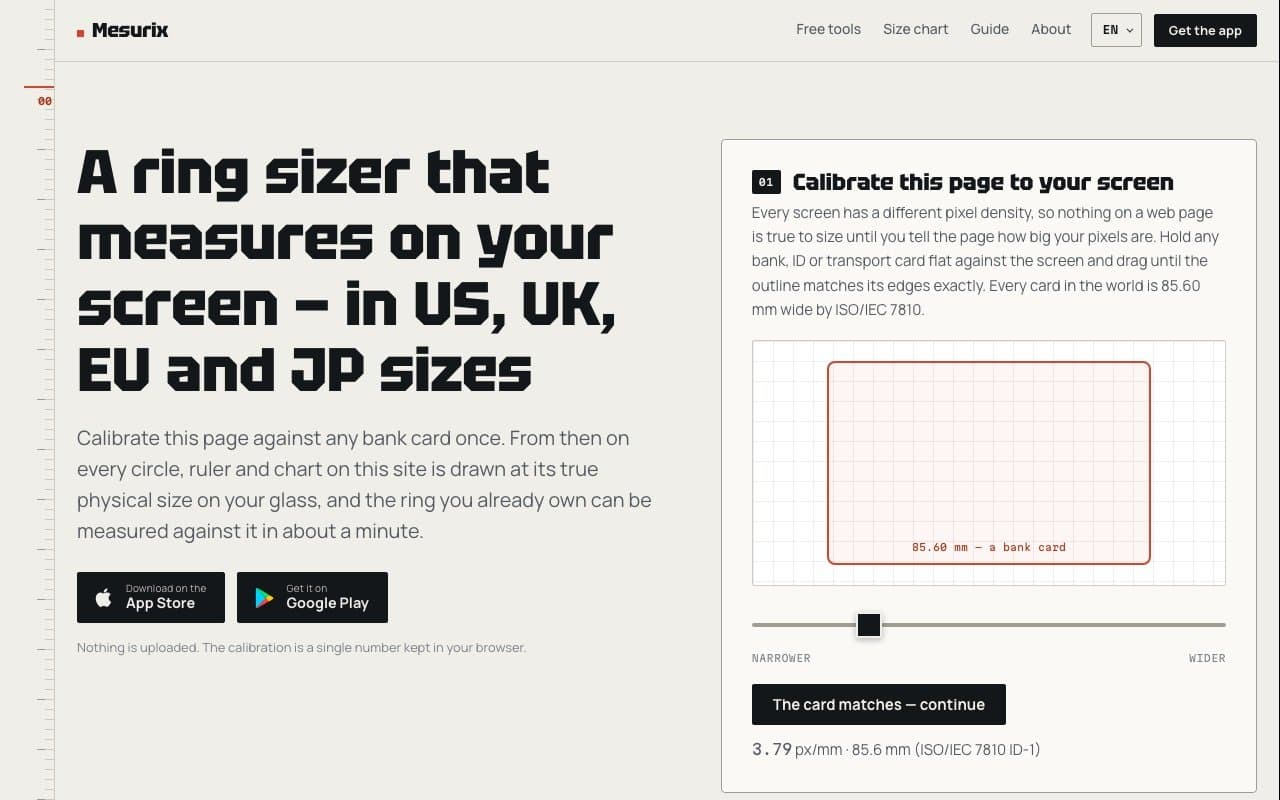
About this app
Mesurix measures ring size on the screen of your phone and adds a ruler and a level to the same app. - Place a ring or fit a circle to your finger - Read the size in US/CA, UK/AU, EU/ISO and JP standards side by side - See the inner diameter in millimetres - On-screen ruler you calibrate for your display - Bubble level for surfaces and edges No account, and measurements stay on the device. A screen measurement is an estimate; for a ring you cannot exchange, check with a jeweller.
Key features
- 1Bank-card calibration (ISO/IEC 7810) turns any phone screen into a true-to-scale ruler.
- 2Ring size readout in US/CA, UK/AU, EU/ISO and JP standards side by side, with inner diameter in mm.
- 3On-screen ruler and bubble level in the same app, calibrated to your display.
- 4No account required; calibration stored as a single number in the browser, measurements stay on-device.
Target customer profile
Drawn from the product itself, not from a survey.
Demographic
People buying a ring online
Pain points
A size they are not sure about
Primary needs
Read the size in US, UK, EU and JP standards
Demographic
People choosing a ring as a gift
Pain points
Not asking the person for the size
Primary needs
Place a ring they already wear on the screen and note the size
Scout Review
Written by AI from measured evidence, scored out of 100.
Mesurix is a focused utility that does one awkward job well: figure out a ring size without a jeweller. The bank-card calibration trick is the right idea — it converts an unknown screen into a real ruler using an object everyone owns — and the four-standard readout means you get US, UK, EU and JP in one glance instead of cross-referencing charts. The design system is coherent across web and app, the result screen is genuinely well-composed, and the page loads fast. The weaknesses are unglamorous but fixable: security headers are half-done, contrast and heading order fail automated checks, the twelve-language menu outruns the app's single localization, and the homepage buries its CTA under a whitepaper's worth of copy. None of that is structural. It is a good tool with a marketing page that needs an editor and a server config that needs an afternoon.
Measure by measure
Usability
66Calibration is the gate and the homepage puts it first, which is honest but front-loads friction. Store CTAs are unambiguous and the app's result screen keeps next actions tidy. The long tutorial-style homepage buries the table and CTA under dense copy.
Design
71Judging the app UI and store material: a coherent cream/ochre/black system with monospaced labels carries from web to app. The result screen puts one big size readout above a ruled four-row conversion list. Footnote text is too small and low-contrast.
Speed
82Lighthouse mobile 91/100 with CLS 0 and TBT 37ms, desktop 99/100. FCP 1.0s is quick; the one soft spot is a 3.5s mobile LCP. Overall a light, stable page that loads without drama.
Security
52HTTPS enforced with frame protection, X-Content-Type-Options and Referrer-Policy set, plus SPF. Missing HSTS, CSP, Permissions-Policy and DMARC (6/12 checklist). No published audits or bug bounty. On-device, no-account design is a genuine privacy strength.
Accessibility
79Lighthouse 95/100 with 12 site languages offered. Three real failures: insufficient contrast, non-sequential headings, and visible labels without matching accessible names. The App Store listing shows only 1 language, so the site's language menu overpromises.
Growth
58A real, specific problem (sizing a ring you can't try on) with a genuine wedge: bank-card calibration plus four-standard conversion, no account, on-device. Free web tools feed the app. Category is crowded with chart sites, so the moat is thin.
Improvement areas
- Security headers incomplete: no HSTS, CSP, Permissions-Policy or DMARC (6/12 checklist).
- Accessibility failures: insufficient contrast, non-sequential headings, mismatched accessible names.
- Site offers 12 languages but the App Store listing is localized in only 1.
- Homepage buries the size table and store CTA under long explanatory copy.
Design & Usability
Mesurix ships through the App Store, so the app UI is the product and the site is marketing — and both hold the same cream, ochre and black system with monospaced labels. The result screen is the strongest piece: one large size readout above a ruled four-row conversion list, so the answer is findable in a glance. The homepage hero calibration card with its red bank-card outline makes the core mechanic visible before any copy is read, and the true-scale circle strip demonstrates rather than describes. Usability is honest but front-loaded: calibration is a prerequisite and the page asks for it immediately, which is correct but demands explanation for a first-timer. Store CTAs are unambiguous and the app keeps Print/Share/Save/Measure again as a tidy secondary row. The cost is the long tutorial homepage — dense mid-page copy about CSS pixels and ISO tolerances buries the table and CTA for anyone who just wants a size.
Speed & Security
Speed is a clear strength. Lighthouse mobile lands 91/100 with CLS 0, TBT 37ms and FCP 1.0s; desktop hits 99/100. The single soft metric is a 3.5s mobile LCP, which is acceptable but not great for a page whose whole job is a fast first interaction. Security is the weakest dimension. HTTPS is enforced and frame protection, X-Content-Type-Options, Referrer-Policy and SPF are all set, but HSTS, CSP, Permissions-Policy and DMARC are absent — 6 of 12 checklist points. No SOC 2, ISO, pen-test or bug bounty is published. The compensating strength is architectural: no account, calibration stored as a single number in the browser, measurements on-device. That is a real privacy posture, but a posture is not a header set. Adding HSTS and a CSP is a one-afternoon fix that would move this dimension materially.
Accessibility & Growth
Accessibility scores 95/100 on Lighthouse, with three concrete failures: insufficient color contrast, non-sequential heading order, and visible text labels without matching accessible names. The contrast failure lands on the same footnote text the visual audit flagged as near-illegible, which is a compounding problem rather than two separate ones. The site offers twelve languages in its nav, but the App Store listing shows localization in one — the menu overpromises what the app delivers. On growth: the problem is real and specific (buying a ring online, or gifting without asking the size), and the wedge is genuine — ISO/IEC 7810 bank-card calibration plus US/UK/EU/JP conversion on one screen, no account, on-device. The free browser tools are a smart top-of-funnel. The honest limit is that ring-size charts are a crowded, low-switching-cost category, and the free web tool competes with the paid app for the same job. Domain registered June 2026, app released June 2026, no store ratings yet — early, but that is context, not the score.
Conclusion
If you are buying a ring online and you have a bank card in your wallet, this is a reasonable ten minutes. Calibrate carefully — the site is right that a 1% card-matching error costs you a quarter size — and treat the result as an estimate, exactly as the app tells you to. For an engagement ring or anything non-exchangeable, still walk into a jeweller. The app is honest about that, which is more than most sizing tools manage. The product earns its place; the security headers and the accessibility contrast do not yet earn theirs.
Suggestions for improvement
- Add HSTS, a Content-Security-Policy and DMARC — three headers that would move security from half-done to credible.
- Fix the contrast failures on footnote and eyebrow text; they are both too small and failing WCAG at once.
- Reconcile the twelve-language site menu with the app's single-language store listing, or ship the localizations.
- Move the size table and store CTA above the long 'why a phone can measure' essay, or collapse it behind a toggle.
Alternatives comparison
Named competitors, point by point. Nobody paid to appear here or to be left out.
 Mesurix - Ring Sizer and Ruler | ||
|---|---|---|
| Measures ring size on the phone screen | Yes — bank-card calibration plus on-screen circle | Not specified in provided details |
| Multi-standard size conversion (US/UK/EU/JP) | Yes — all four standards side by side | Not specified in provided details |
| Account required | No account; calibration stored in browser | Not specified in provided details |
| Additional tools (ruler, level) | On-screen ruler and bubble level included | Not specified in provided details |
| Free browser tools on website | Yes — calibration, true-scale circles, size panel | Not specified in provided details |
Comparing options? See Mesurix - Ring Sizer and Ruler alternatives, scored side by side
More Consumer Tools apps
View all Consumer Tools
QRBliss
91Branded QR codes with AI Brand Sync, 15 free dynamic code...

Cross Stitch Pattern Maker
89Free on-device photo-to-DMC/Anchor chart with skein counts.

Random Movie Generator
88Free random movie picker from 142k+ films—no sign-up.

Cromagnon
88Free, private browser-based PDF, Word, Excel, and study t...

Data Matrix Generator
88Free Data Matrix and GS1 DataMatrix code generator

Sensecast
88Weather app that explains the forecast

Fix My Ping
88Diagnose high ping, packet loss, and lag on your gaming network route.

Chickadee Bandit
87Private, all-in-one family organizer with 100+ apps, one price per household

SeatCanvas
87Drag-and-drop seating charts for weddings, quinceañeras and events. Import your guest list from Excel, export print-ready PDFs. Free up to 40 guests, no signup.

Workflo
87A Mac menu-bar app that opens & arranges all you need, on its own

PKPASS Viewer
87Open .pkpass files in any browser without installing an app

Cat Years to Human Years
86Free cat age calculator converting cat years to human years.


A platform dedicated to providing unbiased reviews of newly launched applications, analyzing everything from their features to their full potential.
info@scoutforge.net© 2026 Scoutforge. All rights reserved.
