Cycling through all six. Tap any point to stop.
Measured on six things
Open .pkpass files in any browser without installing an app
Growth
62A real, specific problem — .pkpass files that won't open outside Apple Wallet — with a browser-based, no-install wedge and multi-pass PDF export the wallets don't offer. Early stage, but the need is genuine.
Screenshots
1 / 1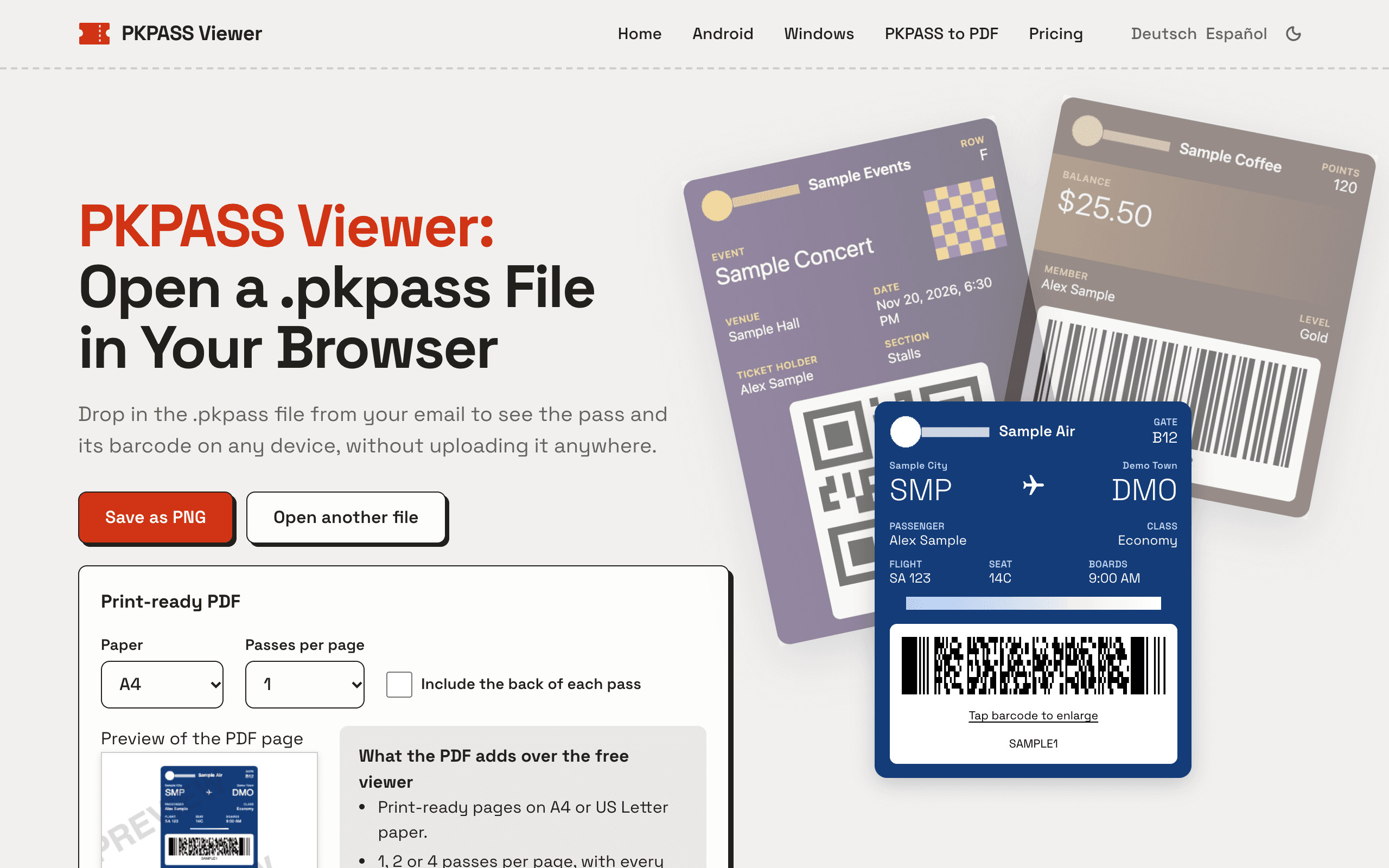
About this app
PKPASS Viewer opens Apple Wallet .pkpass files directly in your browser, so you can see a boarding pass, event ticket or store card on Android, Windows, Linux or a Mac without installing an app. It shows the pass fields, images and a scannable barcode (all barcode formats Apple Wallet supports), and it also opens .pkpasses bundles. The file is read on your device and never uploaded. Viewing passes and saving them as PNG images is free, with no sign-up and no limit. If you need paper copies, PDF export gives you print-ready pages in A4 or US Letter: 1, 2 or 4 passes per page, the barcode at full resolution, and the back of each pass if you want it. The Trip Pass is a one-time $4.90 payment for 30 days of export, with no renewal; Pro is $6.90 a month or $39 a year. Card prices include tax; PayPal is accepted on every plan, and USDT on the one-time pass.
Key features
- 1Opens .pkpass and .pkpasses files entirely in the browser — no install, no upload, no account.
- 2Renders pass fields, images and every Apple Wallet barcode format at scannable size.
- 3Free PNG save and one-pass print-ready PDF; multi-pass PDF (A4/Letter, 1/2/4 per page) from $4.90.
Target customer profile
Drawn from the product itself, not from a survey.
Demographic
Android users who get a .pkpass by email
Pain points
The file won't open on Android
Primary needs
See the pass and show its barcode
Demographic
Windows and Mac users without Apple Wallet
Pain points
Nothing on the computer opens a .pkpass
Primary needs
See the pass and keep a copy as an image
Demographic
Travellers who want a paper copy
Pain points
Wallet passes are hard to print
Primary needs
A print-ready PDF of the pass
Scout Review
Written by AI from measured evidence, scored out of 100.
PKPASS Viewer does one unglamorous thing well: it opens Apple Wallet .pkpass files in a browser on Android, Windows, Linux or Mac, shows the fields, images and a scannable barcode, and never uploads the file. The free tier is genuinely useful — view, save a PNG, print a one-pass PDF — and the paid tiers ($4.90 Trip Pass for 30 days, $6.90/mo or $39/yr Pro) only gate multi-pass PDF export. The site is fast, well-branded and technically careful with security headers. The weak spots are cosmetic and structural: low-contrast body text, a monotonous guide grid, a long repetitive homepage, and no published compliance or audit material. It's a competent, honest utility rather than a category-defining product.
Measure by measure
Usability
68The upload box is the loudest thing on the page and 'Try a sample pass' gives hesitant visitors a no-file path. No sign-up, free tier covers real work. The long, repetitive lower half buries PDF and pricing details.
Design
71Coherent warm off-white palette with a single red accent, and a hero that shows real rendered passes with scannable barcodes before you scroll. Held back by low-contrast grey body text and a monotonous nine-card guide grid.
Speed
88Lighthouse mobile 98/100 (LCP 2.5s, CLS 0, TBT 62ms) and desktop 100/100. Files are read client-side, so the core action never waits on an upload round-trip.
Security
74HTTPS enforced with HSTS, CSP, frame protection, Referrer-Policy, SPF and DMARC — 11/12 probe points, only Permissions-Policy missing. On-device file handling is the right architecture. No published audit or bug bounty found.
Accessibility
79Lighthouse accessibility 100/100, three languages (EN/DE/ES) and a dark-mode toggle. The one real gap is the low-contrast light grey secondary text the visual audit flagged on feature cards and the PDF paragraph.
Growth
62A real, specific problem — .pkpass files that won't open outside Apple Wallet — with a browser-based, no-install wedge and multi-pass PDF export the wallets don't offer. Early stage, but the need is genuine.
Improvement areas
- Low-contrast light grey secondary text on the off-white background hurts readability.
- Homepage is long and repetitive; PDF options and pricing sit below several guidance sections.
- No published security/compliance page (SOC 2, pen-test, data-handling) behind the 'never uploaded' claim.
Design & Usability
The homepage is a cut above the usual indie tool page. A warm off-white ground, near-black type and one red accent carry the brand, and the hero shows three overlapping sample passes with real barcodes and QR codes — you see the product's output before you scroll. The upload box is the clear primary action, with 'Try a sample pass' as a low-commitment alternative, and there's no sign-up wall anywhere. Where it slips: secondary text in the feature cards and the PDF paragraph is set in a grey so light it's tiring to read, and the nine-card guide grid uses one identical treatment for every entry, flattening any sense of which guide matters. The lower half of the page is also long and repetitive — a visitor who already opened a file has to scroll past several guidance sections to reach PDF options or pricing.
Speed & Security
Speed is the standout. Lighthouse scores 98/100 on mobile (LCP 2.5s, CLS 0, TBT 62ms, FCP 1.1s) and a clean 100/100 on desktop, and because the file is parsed in the browser there's no upload round-trip on the core action. Security is solid for the stage: HTTPS enforced with HSTS, a Content-Security-Policy, frame protection, X-Content-Type-Options and Referrer-Policy, plus SPF and DMARC on the domain — 11 of 12 probe points, with only Permissions-Policy absent. The 'read on your device, never uploaded' claim is the right architecture rather than a slogan. What's missing is the paper trail: no SOC 2, ISO, pen-test summary or bug bounty turned up in the collected evidence, which is normal for a small tool but keeps this out of the top band.
Accessibility & Growth
Accessibility is strong on paper: Lighthouse scores 100/100, the site ships English, German and Spanish plus a dark-mode toggle, and the layout is responsive. The one genuine flaw is contrast — the visual audit caught light grey secondary text on the off-white ground in feature-card descriptions and the PDF explanation paragraph, which automated checks don't flag but readers will feel. On growth, the idea holds up. The named problem is specific and real: a .pkpass lands in your inbox and neither Android, Windows nor Linux opens it. The wedge — browser-based, no install, on-device, plus multi-pass print-ready PDF export at A4/Letter with 1/2/4 per page — is something Apple Wallet and Google Wallet structurally don't do. The limit is that it's a fix-it tool people reach for occasionally, and the paid tier is a narrow slice (several passes in one PDF). The domain is only months old, so traction is unproven.
Conclusion
If you've ever stared at a .pkpass attachment on a non-Apple device and had nothing open it, this is the shortest path from file to scannable barcode — free, no account, no upload. The paid PDF export is a fair ask for the narrow case of printing several passes at once. What would move it up: fix the grey-on-off-white text, give the guide grid some hierarchy, and tighten the homepage so pricing and PDF options aren't buried under six sections of instructions. A short security page stating how files are handled would also help the 'never uploaded' claim land with skeptics.
Suggestions for improvement
- Raise the contrast on feature-card descriptions and the PDF paragraph — light grey on off-white is the one real accessibility flaw.
- Give the nine-card guide grid hierarchy: feature the top two or three guides and collapse the rest into a list.
- Move PDF options and pricing higher on the homepage so returning users don't scroll past six guidance sections.
- Add a short security/data-handling page that spells out the on-device parsing claim for skeptical buyers.
Alternatives comparison
Named competitors, point by point. Nobody paid to appear here or to be left out.
 PKPASS Viewer | Apple Wallet | Google Wallet | |
|---|---|---|---|
| Opens .pkpass files on Android, Windows, Linux and Mac | Yes — in any browser, no install | No — iPhone and Apple Watch only | Partial — some passes import, many .pkpass files won't open |
| No account or sign-up required | Yes — free tier needs no account | Tied to Apple ID / device | Tied to Google account |
| Print-ready PDF export of passes | Yes — A4/Letter, 1/2/4 per page, full-res barcode; multi-pass from $4.90 | No native PDF export | No native PDF export |
| File never uploaded (on-device processing) | Yes — parsed in the browser | Stored on device / iCloud | Stored in Google account |
| Price | Free tier; $4.90 Trip Pass (30 days); $6.90/mo or $39/yr Pro | Free (Apple device required) | Free (Google account required) |
Apple Wallet
Stores .pkpass passes, but only on iPhone and Apple Watch.
Google Wallet
Can import some passes on Android. Plenty of .pkpass files still won't open in it.
Comparing options? See PKPASS Viewer alternatives, scored side by side
More Consumer Tools apps
View all Consumer Tools
QRBliss
91Branded QR codes with AI Brand Sync, 15 free dynamic code...

Cross Stitch Pattern Maker
89Free on-device photo-to-DMC/Anchor chart with skein counts.

Random Movie Generator
88Free random movie picker from 142k+ films—no sign-up.

Cromagnon
88Free, private browser-based PDF, Word, Excel, and study t...

Data Matrix Generator
88Free Data Matrix and GS1 DataMatrix code generator

Chickadee Bandit
87Private, all-in-one family organizer with 100+ apps, one price per household

SeatCanvas
87Drag-and-drop seating charts for weddings, quinceañeras and events. Import your guest list from Excel, export print-ready PDFs. Free up to 40 guests, no signup.

CapyToolkit
86A growing collection of free, privacy-first browser tools. Test gamepad drift, mouse polling rate, dead pixels, mics, and speakers. No install needed.

Cat Years to Human Years
86Free cat age calculator converting cat years to human years.

Compound Interest Calculator
84Free compound interest calculator for savings & goals.

Concrete Calculator
83Free concrete yardage, bags & cost calculator.

EchoWi
83Track and optimize your brand's visibility in AI answers.


A platform dedicated to providing unbiased reviews of newly launched applications, analyzing everything from their features to their full potential.
info@scoutforge.net© 2026 Scoutforge. All rights reserved.
