Cycling through all six. Tap any point to stop.
Measured on six things
Local PII redaction tool for docs, audio, photos.
Accessibility
55No accessibility measurement available. High contrast palette suggests readable contrast. No WCAG/a11y statement found. Keyboard navigation not mentioned. Site appears English-only despite 7 detection languages.
Screenshots
1 / 1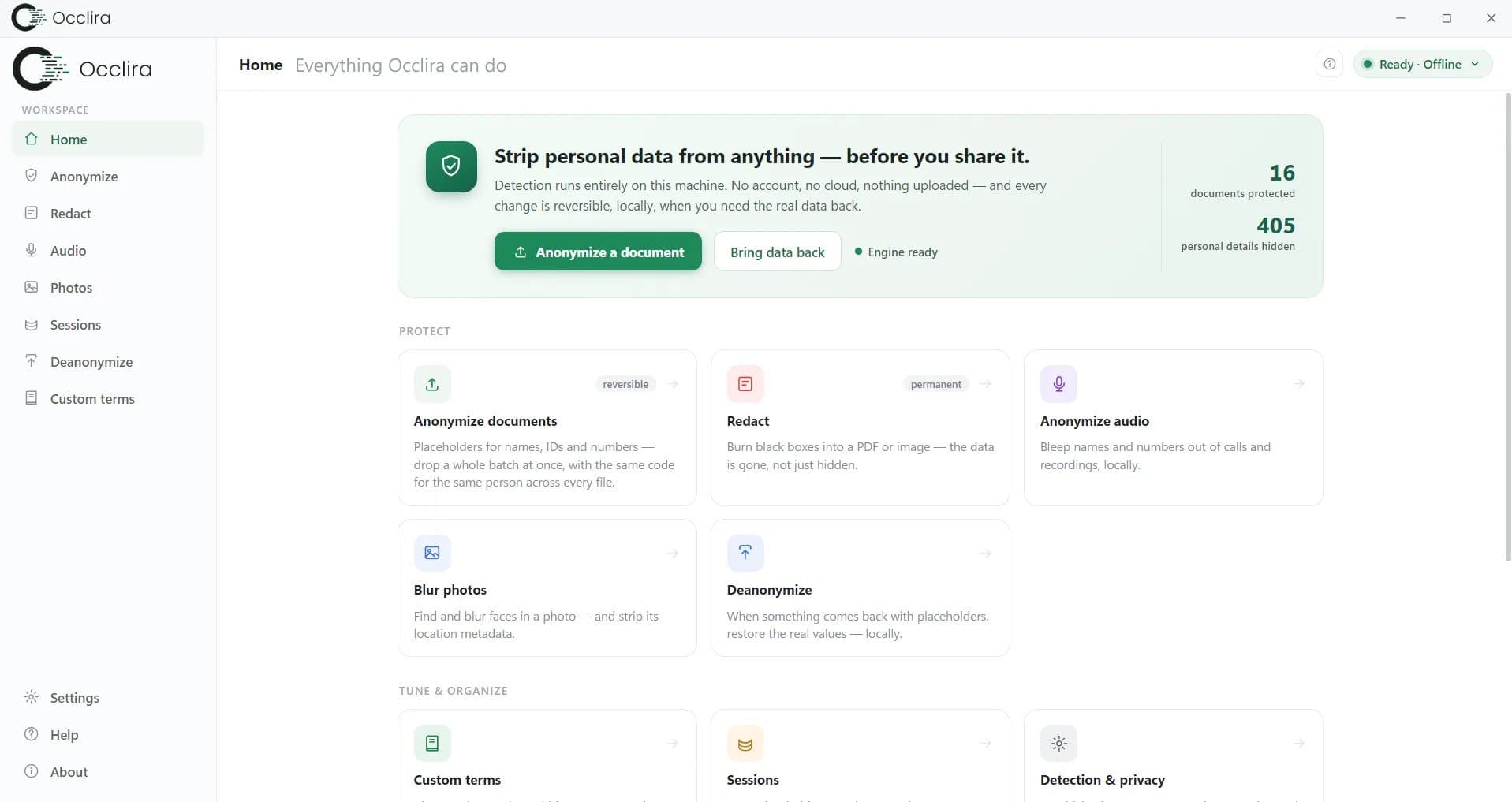
About this app
Occlira is a privacy-first desktop app that strips personal data from documents, audio, and images entirely on your own Windows or macOS computer. It's built for professionals who handle sensitive client data—lawyers, healthcare providers, accountants, HR, journalists—and want to safely use AI tools without leaking information. With Occlira, you can anonymize files before sending them to ChatGPT or Claude, then restore the original values locally when you're done. It detects 40+ types of PII across 7 languages, offers reversible redaction, and includes a human review step so you control every change. There's also a browser extension for AI chats, a Word add-in, and a Claude connector. No cloud upload, no subscription—just a one-time purchase.
Key features
- 1Reversible redaction: placeholders swap back to real values locally, enabling safe AI use.
- 2On-device processing: documents, audio, and photos anonymized entirely on your computer, no cloud uploads.
- 3Integrations: browser extension for ChatGPT/Claude/Gemini, Word add-in, and Claude Desktop connector.
Target customer profile
Drawn from the product itself, not from a survey.
Demographic
Lawyers and legal professionals at small to mid-sized firms
Pain points
Need to use AI for document review but fear exposing client confidentiality; manual redaction is tedious and error-prone.
Primary needs
Local, reversible redaction; support for legal documents; integration with Word and AI tools; GDPR compliance.
Demographic
Healthcare providers, therapists, and medical staff
Pain points
Patient records are highly sensitive; sharing them with AI or third parties violates HIPAA; existing redaction tools don't handle audio or images well.
Primary needs
On-device processing to maintain HIPAA compliance; ability to redact audio and photos; easy workflow for notes and referrals.
Demographic
Consultants, accountants, and financial advisors
Pain points
Client spreadsheets and invoices contain financial PII; using cloud-based redaction tools risks data leaks; need to anonymize before AI analysis.
Primary needs
Accurate detection of financial identifiers (IBANs, SSNs); local processing; reversible redaction for round-tripping with AI; one-time pricing.
Scout Review
Written by AI from measured evidence, scored out of 100.
Occlira is a promising privacy-first tool for professionals who need to use AI on sensitive files without leaking data. Its on-device processing, reversible redaction, and support for documents, audio, and photos are compelling differentiators. The design is clean and functional, though not groundbreaking. Security is solid but lacks enterprise-grade certifications. Accessibility is unverified, and the site's English-only presentation may limit reach. Growth potential is strong given the increasing AI adoption in regulated industries, but the one-time pricing model and lack of social proof are risks. Overall, Occlira is a competent product with a clear value proposition, but it needs to build trust through certifications, user reviews, and broader language support to reach its full potential.
Measure by measure
Usability
68Interactive demo on homepage, task-based guides, clear pricing with free trial. Offline status prominently shown. No user reviews found; usability reputation not independently assessed.
Design
72Consistent card-based UI with clear iconography and strong reversible/permanent redaction distinction. Clean sidebar, high contrast palette. Minor spacing issues. Homepage render unavailable; judged from catalogue images and site content.
Speed
60No performance measurement available this run. Site claims 100% local processing, no cloud uploads; app speed likely depends on local hardware. No user complaints found. Score in category-typical band due to lack of data.
Security
64HTTPS enforced, frame protection, X-Content-Type-Options, Referrer-Policy, Permissions-Policy present; HSTS and CSP missing. SPF/DMARC configured. Claims 100% local processing, no telemetry. No SOC 2/ISO claims found.
Accessibility
55No accessibility measurement available. High contrast palette suggests readable contrast. No WCAG/a11y statement found. Keyboard navigation not mentioned. Site appears English-only despite 7 detection languages.
Growth
68Real problem with specific differentiators: reversible redaction, on-device processing, audio/photo support, integrations. Targets regulated professionals with clear pain points. Category has headroom as AI adoption grows.
Improvement areas
- Add SOC 2/ISO certification and publish a security whitepaper to build enterprise trust.
- Publish an accessibility statement and ensure full keyboard navigation support.
- Localize the website into the 7 supported detection languages to expand global reach.
Design & Usability
Occlira presents a clean, card-based interface that clearly distinguishes reversible anonymization from permanent redaction. The sidebar navigation is intuitive, and the offline status indicator reinforces the local-first value proposition. The interactive demo on the homepage is a strong onboarding tool, letting users try the workflow without signing up. The guides section is comprehensive, covering tasks, professions, and compliance topics. However, the homepage render was unavailable for direct inspection, and the lack of user reviews makes it hard to gauge real-world usability. The pricing page is transparent, with a free 14-day trial and a one-time €149 license, but the node-locked license might frustrate users who switch devices frequently.
Speed & Security
No performance data was available for this review, so speed is assessed cautiously. The app's local processing model means performance depends on the user's hardware, which is a trade-off for privacy. Security-wise, Occlira shows a solid baseline: HTTPS enforced, frame protection, and proper DNS records. However, missing HSTS and CSP headers are notable gaps. The company claims 100% local processing with no telemetry, which is a strong privacy stance, but there's no SOC 2 or ISO certification mentioned. For a tool handling sensitive client data, these certifications would be a significant trust signal. The absence of a bug bounty program is also a missed opportunity to build community trust.
Accessibility & Growth
Accessibility is an area of uncertainty. The color palette appears high-contrast, but there's no WCAG statement or keyboard navigation documentation. The site is English-only despite supporting seven detection languages, which limits its global appeal. Growth potential is strong: the problem is real and urgent for regulated professionals, and the reversible redaction feature is a clear differentiator. The integrations with Word, browser extensions, and Claude Desktop create a sticky ecosystem. However, the one-time pricing model may limit recurring revenue, and the lack of a free tier beyond the trial could slow adoption. The category has headroom as AI tools become more prevalent in law and healthcare, but Occlira must prove its reliability through certifications and user testimonials to win trust.
Conclusion
If you're a lawyer, therapist, or accountant who's been copy-pasting client data into ChatGPT with a guilty conscience, Occlira is worth a look. The free trial lets you test the full workflow without commitment. The one-time €149 price is reasonable for a tool that could save you from a professional ethics violation. Just be aware that the lack of SOC 2 and user reviews means you're taking a bit of a leap of faith. But the local-first approach is genuinely refreshing in a world of cloud-everything. Give it a try — your clients' privacy might depend on it.
Suggestions for improvement
- Add a SOC 2 Type II report or at least a security whitepaper to build trust with enterprise clients.
- Publish a clear accessibility statement and ensure keyboard navigation is fully supported.
- Consider a subscription tier with cloud backup of encrypted mappings for users who want convenience without sacrificing privacy.
- Localize the website into the 7 supported detection languages to expand global reach.
Alternatives comparison
Named competitors, point by point. Nobody paid to appear here or to be left out.
 Occlira |  Adobe Acrobat Pro |  Redacted.ai |  Irwin | |
|---|---|---|---|---|
| Redaction approach | Reversible placeholders + permanent burn boxes, local processing | Permanent redaction only, manual setup | Cloud-based redaction, uploads files | On-premise, PDF-focused, limited AI integration |
| File format support | DOCX, PDF, XLSX, EML, TXT, MD, CSV, audio (MP3/WAV/M4A/FLAC/OGG), photos (HEIC, etc.) | PDF only | Documents (PDF, DOCX, etc.) | PDF-focused |
| AI integrations | Browser extension for ChatGPT/Claude/Gemini, Word add-in, Claude Desktop connector | None | None specified | Limited AI integration |
| Pricing model | One-time €149, free 14-day trial | Subscription (Creative Cloud) | Subscription-based | On-premise licensing, likely subscription |
| Data privacy | 100% local processing, no cloud uploads, no telemetry | Cloud-based features, files may be uploaded | Cloud-based, files uploaded to servers | On-premise, but limited AI integration |
Adobe Acrobat Pro
PDF redaction tool that can permanently redact text and images in PDFs. Lacks support for other formats and requires manual setup.
Redacted.ai
Cloud-based solution for redacting documents, but it uploads files to the cloud, raising privacy concerns.
Irwin
Specialized tool for legal redaction, focused on PDFs, with on-premise deployment but limited integration with AI tools.
Comparing options? See Occlira alternatives, scored side by side
More Security apps
View all Security
issued.live
89Free certificate transparency search and SSL lookup with ...

OBVELO
88Privacy gateway that masks personal data in LLM traffic

SendVeil
88Send large original files through private, expiring links, with EU storage.

BenchFleet
88Desktop hub to control real Android phones with AI agents...

Vigilance
88Checks code AI tools install and replaces harmful updates.

Postdate
88Share one link now that opens at the time you choose.

Vaultin AI
88Private AI for law, accounting and advisory firms that ke...

kosa8
88Sealed VMs for AI agents with instant rewind, audit trails & zero key exposureSealed VMs for AI agents with instant rewind and audit tr...

Sidenty
87Sidenty is a professional digital identity protection ser...

Tokitool
87Free, private browser tools for images, chats, QR codes, ...

tmps.fyi
87Share text, images, screenshots and files across devices using a free online clipboard.

Magery Forge
87Weekly security audits for vibe-coded sites, explained in...


A platform dedicated to providing unbiased reviews of newly launched applications, analyzing everything from their features to their full potential.
info@scoutforge.net© 2026 Scoutforge. All rights reserved.
