Cycling through all six. Tap any point to stop.
Measured on six things
Restore old, faded or damaged family photos online. Upload a scan, get a restored version, and colorize black and white photos.
Security
41HTTPS enforced and a clear privacy FAQ (7-day retention, no AI training, third-party model use disclosed). But only 3/12 security headers: no HSTS, CSP, frame protection, or Referrer-Policy, and no SPF record.
Screenshots
1 / 1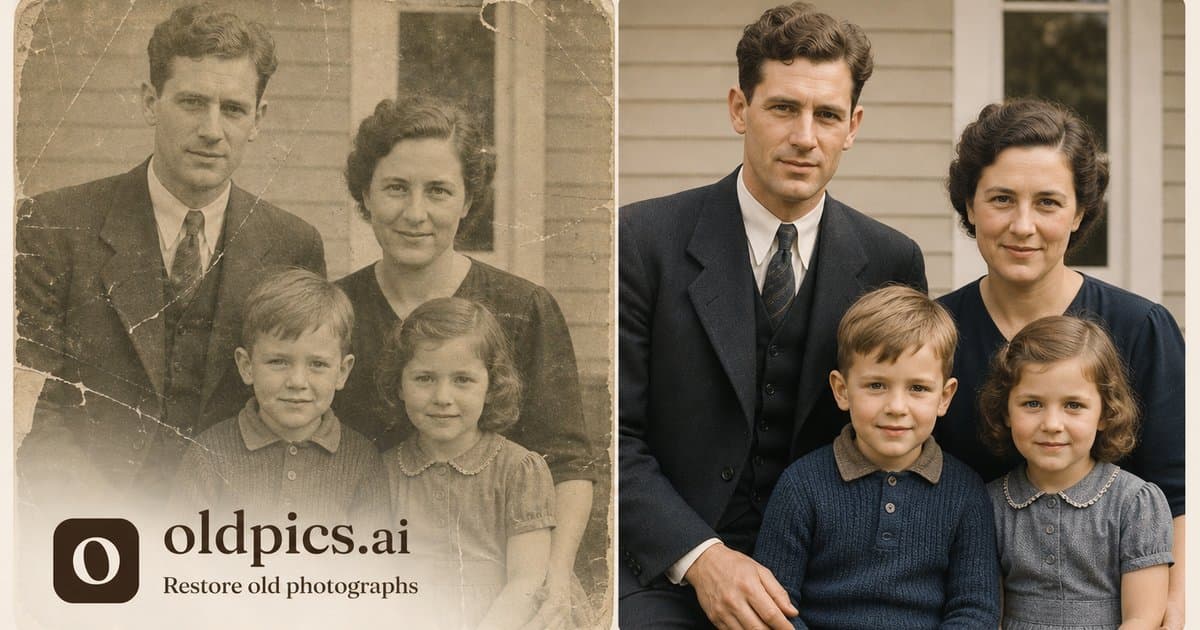
About this app
OldPics AI is a web-based tool that restores and colorizes old photographs using artificial intelligence. It repairs scratches, tears, stains, and fading on both color and black-and-white prints. The standout feature is Compare, which generates multiple restore versions at once, letting you pick the best result. The process is simple: upload a JPG, PNG, or WebP up to 10MB (no account required), run a restore, and download the file without a watermark. Free users get 5 Standard restores per device, which take about 5–20 seconds each. Paid packs offer High quality restores (about a minute each) at $9 for 20 restores or $29 for 100—one-time purchases, no subscription. Restored photos are kept for 7 days for download, and uploads are not used for AI training. The tool also supports colorization and cleaning of water-damaged prints. While results can occasionally be imperfect, a retry often helps. OldPics AI is ideal for genealogists, families preserving memories, and anyone looking to r...
Key features
- 1AI restoration of scratches, tears, stains, and fading on color and black-and-white prints.
- 2Compare mode: multiple restore versions in one run (2 free, 6 on packs) to pick the best result.
- 3No account required; 5 free Standard restores per device, no watermark, JPG/PNG/WebP up to 10MB.
- 4One-time packs: $9 for 20 High quality restores, $29 for 100 — no subscription.
- 5Colorize and water-damage cleaning modes; 7-day file retention with no AI training on uploads.
Target customer profile
Drawn from the product itself, not from a survey.
Demographic
Genealogists and family historians
Pain points
Old family photos are faded, scratched, or damaged, making details hard to see.
Primary needs
Restore and colorize historical photos to identify ancestors and preserve heritage.
Demographic
Families with old photo collections
Pain points
Printed photos deteriorate over time; professional restoration is costly and slow.
Primary needs
Affordable, quick, and easy restoration to share and archive memories.
Demographic
Casual users and hobbyists
Pain points
Limited time and budget; want to enhance old photos without learning complex software.
Primary needs
Free or low-cost, no-account tool with instant results and comparison options.
Scout Review
Written by AI from measured evidence, scored out of 100.
OldPics is a focused, fast, no-nonsense photo restoration tool with a genuinely appealing pricing model: 5 free restores, then one-time packs at $9 for 20 or $29 for 100, no subscription, no account. The heritage-appropriate design and clear 3-step flow make it easy to try. Speed is excellent (Lighthouse 92/100 mobile). The main gaps are security headers (3/12 checklist items, no HSTS/CSP/SPF) and accessibility (unlabeled form inputs, color-only links, non-sequential headings). The Compare feature — multiple restore versions in one run — is a real differentiator against Remini and MyHeritage.
Measure by measure
Usability
71No account, 5 free restores, no watermark, and a clear 3-step flow make trying it frictionless. Standard vs High quality wait times and 7-day retention are disclosed. Small light-grey body copy slows mobile reading.
Design
68Warm cream-and-brown palette and serif display type fit the heritage subject well. The before/after upload card puts the core action up front. Undercut by a taupe CTA that looks disabled and an empty grey 'After' placeholder.
Speed
82Lighthouse mobile performance 92/100 with LCP 918ms and CLS 0.001 — a genuinely fast, lightweight page. Standard restores run 5-20s and High quality ~1 minute, both disclosed up front.
Security
41HTTPS enforced and a clear privacy FAQ (7-day retention, no AI training, third-party model use disclosed). But only 3/12 security headers: no HSTS, CSP, frame protection, or Referrer-Policy, and no SPF record.
Accessibility
68Lighthouse accessibility 89/100 with a responsive layout and readable type pairing. Failing audits: non-sequential headings, unlabeled form elements, and color-only link distinction. No WCAG statement published.
Growth
58A real, specific problem (faded family photos) with a clear wedge: no account, no subscription, one-time $9/$29 packs, and Compare multi-version output. Category has headroom, but Remini and MyHeritage loom.
Improvement areas
- Security headers are thin (3/12): add HSTS, CSP, frame protection, Referrer-Policy, and SPF.
- Accessibility failures: unlabeled form inputs, non-sequential headings, color-only link distinction.
- Primary CTA reads as disabled; trust pills and meta text are low-contrast and too small.
- Empty grey 'After' placeholder wastes above-fold space before any restore runs.
Design & Usability
OldPics has a coherent, heritage-appropriate visual identity: cream background, dark brown wordmark, serif display headlines over a quiet sans body. The before/after upload card is the first interactive object on the page, making the core workflow legible without scrolling. The main weakness is the primary 'Restore photo' button, styled in a washed-out taupe that reads as disabled, plus a large empty grey 'After' placeholder that wastes above-fold space. Usability is a genuine strength: no account, 5 free restores per device, no watermark, and a clear 3-step flow. Standard vs High quality wait times and 7-day retention are disclosed in the FAQ. Small light-grey body copy in step cards slows mobile reading.
Speed & Security
Speed is the standout measured dimension: Lighthouse mobile performance 92/100 with LCP 918ms, CLS 0.001, and TBT 363ms — a genuinely lightweight page. Restore times (5-20s Standard, ~1 minute High quality) are disclosed up front. Security is the weak spot. HTTPS is enforced and the privacy FAQ is unusually clear (7-day retention, no AI training, third-party model use disclosed, email deletion), but the HTTP header probe found only 3/12 checklist items: no HSTS, no CSP, no frame protection, no X-Content-Type-Options, no Referrer-Policy, no Permissions-Policy, and no SPF record. For a tool that handles personal family photos, that header posture is thin.
Accessibility & Growth
Accessibility scores 89/100 on Lighthouse with a responsive layout and readable type, but three real failures remain: heading elements out of sequential order, form elements without associated labels, and links distinguishable only by color. No WCAG statement is published. On growth: the idea is well-positioned. The problem — faded, scratched family photos — is real and specific, and the target customer (genealogists, family historians, casual hobbyists) is named clearly. The wedge against Remini and MyHeritage is concrete: no account, no subscription, one-time $9/$29 packs, and Compare multi-version output. The category has headroom, but the incumbents are large and well-funded, so the wedge is real but not unassailable.
Conclusion
If you have a shoebox of faded prints and don't want another subscription, OldPics is a sensible first stop: upload, compare versions, download, done. The pricing is honest and the speed is real. Before it scales, the team should tighten the security headers and fix the accessibility failures — unlabeled form inputs and color-only links are cheap to fix and matter for a tool handling personal family photos. The idea is sound; the execution is competent; the polish is uneven.
Suggestions for improvement
- Add HSTS, CSP, X-Content-Type-Options, Referrer-Policy, and Permissions-Policy headers; publish an SPF record.
- Fix accessibility failures: label form inputs, use sequential heading order, and don't rely on color alone for links.
- Restyle the primary 'Restore photo' CTA so it doesn't read as disabled; increase contrast on trust pills and meta lines.
- Replace the empty grey 'After' placeholder with a sample restored image or a subtle loading state to use above-fold space.
Alternatives comparison
Named competitors, point by point. Nobody paid to appear here or to be left out.
 OldPics |  Remini |  MyHeritage Photo Enhancer | |
|---|---|---|---|
| Account required | No account required | Account/subscription typically required | MyHeritage account required |
| Pricing model | 5 free restores; one-time packs $9/20 or $29/100 | Subscription-based | Bundled with MyHeritage subscription |
| Multi-version compare | Compare: 2 versions free, 6 on packs | Single enhanced output | Single enhanced output |
| Colorization | Yes, optional Colorize mode | Yes, colorization available | Yes, colorization available |
| Watermark on output | No watermark | Watermark on free tier | Varies by plan |
Remini
AI photo enhancer that improves clarity and quality of old photos, often using a subscription model.
MyHeritage Photo Enhancer
Part of MyHeritage genealogy platform; enhances and colorizes old photos but requires account.
Comparing options? See OldPics alternatives, scored side by side
More AI Generations apps
View all AI Generations
Uni-1 by Luma AI
92Uni-1 is an advanced multimodal text-to-image AI model th...

Gerty
91Private, local AI assistant for Mac that runs offline

LTX 2.3 AI Video Generator
91Fast, open-source AI video generator with 4K support, mul...

DemoVexa
90Turn your code into professional product demo videos with AI-generated scripts, animated UI, and natural voiceovers.

All of Us
89Add deceased loved ones to photos with AI and see free pr...

Voqusa
89Transcribe social media video and audio links into text (free signup, 5 free credits, then pay-as-you-go)

PodRescale
89Every episode becomes two weeks of posts. In your voice. Posted for you.

AI Vocals Generator
89Add AI singers or rappers to your own beat, get two takes...

IraVoice
88Private on-device dictation for Apple-silicon Macs.

HeyVid AI
88HeyVid AI is a free all-in-one AI video and image generat...

OBVELO
88Privacy gateway that masks personal data in LLM traffic

tradutor de mangá com IA
88O tradutor de mangá com IA traduz capítulos em lote, personaliza textos e oferece edição visual para estúdios.


A platform dedicated to providing unbiased reviews of newly launched applications, analyzing everything from their features to their full potential.
info@scoutforge.net© 2026 Scoutforge. All rights reserved.
