Cycling through all six. Tap any point to stop.
Measured on six things
Share your screen, not your data.
Security
41HTTPS not enforced, no HSTS, CSP, frame protection, or Referrer-Policy — 2/13 checklist points. Local-first and MV3 claims are good, but the site's own headers are wide open.
Screenshots
1 / 1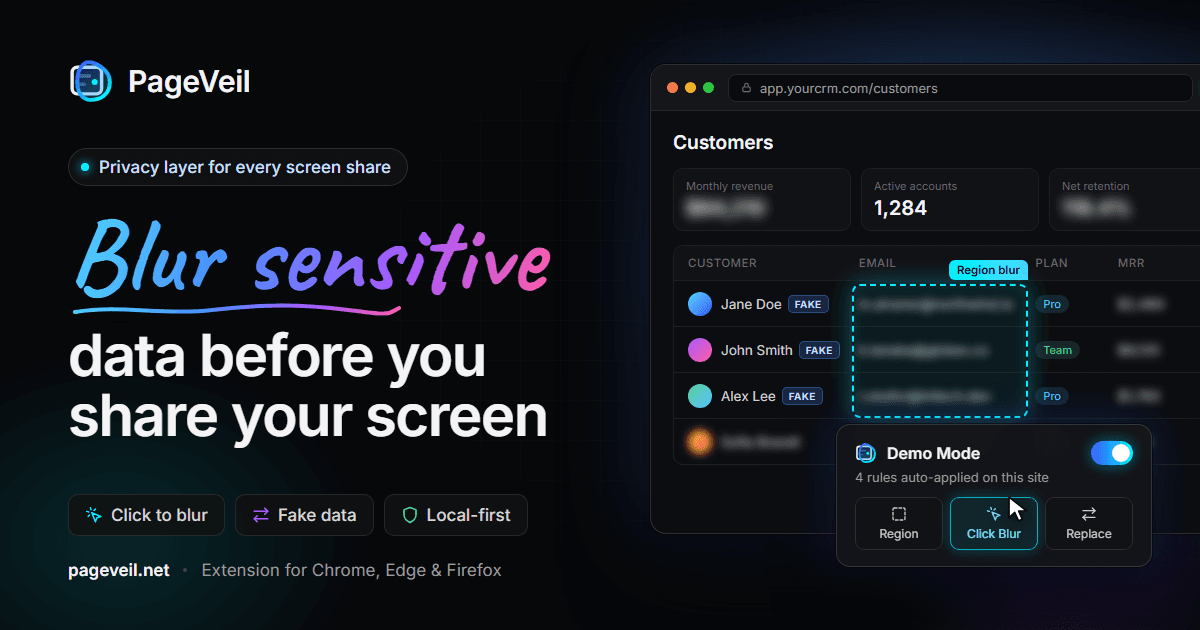
About this app
PageVeil is a browser extension for Chrome, Edge, and Firefox that acts as a privacy layer over real, live webpages. Instead of blurring screenshots after the fact, it lets you click, draw, or select sensitive elements and hide, blur, or replace them with realistic fake data before any demo, Zoom call, Loom recording, or support screenshot. You can save protection rules by URL, path, or domain so they auto-apply after refreshes and SPA navigation, toggle everything on with one-click Demo Mode, and even mask the browser tab title and favicon to prevent leaks. It is local-first, with no page content uploaded for normal workflows. Free covers manual blur for one-offs; Pro unlocks unlimited saved rules, fake data replacement, auto-scan, and tab masking.
Key features
- 1Click, region-draw, and text-selection blur on live webpages
- 2Realistic fake-data replacement for names, emails, totals, IDs, and API keys
- 3Saved rules by URL, path, or domain that auto-reapply after refresh and SPA navigation
- 4One-click Demo Mode toggle plus tab title and favicon masking
- 5Local-first processing with no page content uploaded for normal workflows
Target customer profile
Drawn from the product itself, not from a survey.
Demographic
Sales engineers and solutions consultants running SaaS demos
Pain points
Manually checking every client name and revenue figure before each Zoom call is slow and error-prone.
Primary needs
Repeatable, domain-wide protections that auto-apply and keep demos believable without exposing real customer data.
Demographic
Product marketers and content creators recording product videos
Pain points
Heavy blue blurs make product footage look amateur and unprofessional.
Primary needs
Realistic fake data replacement and light, adjustable masking so dashboards still look production-ready.
Demographic
Support and operations teams capturing bug screenshots
Pain points
Hundreds of daily screenshots require manual post-editing to hide billing, PII, and ticket details.
Primary needs
Fast click-to-blur, region blur, and tab title masking directly in the browser to save hours of editing.
Demographic
IT consultants and healthcare teams on live calls
Pain points
Need to verify an API key or invoice value without exposing it, while strict compliance rules demand PII control.
Primary needs
Hold-to-reveal shortcuts, automatic PII scanning, and a practical compliance-friendly privacy layer.
Scout Review
Written by AI from measured evidence, scored out of 100.
PageVeil is a browser extension that acts as a privacy layer over live webpages — click, draw, or select sensitive elements and blur, hide, or replace them with believable fake data before a demo, recording, or screenshot. Saved rules by URL, path, or domain auto-reapply after refreshes and SPA navigation, Demo Mode toggles everything at once, and tab title/favicon masking closes an easy leak. It's local-first with no page content uploaded for normal workflows, and it ships on Chrome, Edge, and Firefox. Free covers manual blur; Pro unlocks unlimited saved rules, fake data, auto-scan, and tab masking. The product idea is sharp and the workflow is well explained. The execution has gaps: a landing page that hides its own pitch below the fold, and site security headers that don't match the privacy promise.
Measure by measure
Usability
63Click, region, and selection blur plus saved URL/path/domain rules and Demo Mode are a genuinely useful workflow, clearly explained in three steps. Nav is thin and the pitch hides below the fold.
Design
58Playful script-and-sans headline and a clear promo card show real brand intent, but an empty first viewport and a headline pushed ~1,100px down undercut it. Inconsistent logo strip.
Speed
88Lighthouse mobile 100/100 with LCP 1.1s, CLS 0, TBT 60ms; desktop 98/100. Genuinely fast, lightweight landing page with no measured lag.
Security
41HTTPS not enforced, no HSTS, CSP, frame protection, or Referrer-Policy — 2/13 checklist points. Local-first and MV3 claims are good, but the site's own headers are wide open.
Accessibility
78Lighthouse accessibility 95/100 with only contrast and missing main-landmark failures. No WCAG statement or a11y docs found, so it lands mid-band rather than higher.
Growth
62Real, specific pain for demo-heavy roles, with saved rules and fake-data replacement as a clear wedge over ZeroBlur and BlurWeb. Category is niche but underserved.
Improvement areas
- Hero headline and CTA sit below the fold behind an empty gradient
- Site security headers missing: no HSTS, CSP, frame protection, or Referrer-Policy
- No accessibility statement or WCAG conformance documentation
- Free tier limited to manual blur; automation locked behind Pro
Design & Usability
PageVeil's landing page has personality — the script-accented 'Blur sensitive' headline and the promo card showing click-blur, region-blur, and fake-data replacement communicate the product better than most SaaS sites manage. The problem is placement: the first viewport is an empty dark gradient, and the actual headline sits roughly 1,100px down, so a visitor's first impression is 'did this fail to load?' The integration logo strip mixes full-colour and greyed icons, which reads as unfinished. Usability is stronger than design: the three-step workflow, saved rules by URL/path/domain, Demo Mode toggle, and tab title masking are all clearly explained and map to real demo-prep pain. The nav is conventional but thin, and the small, low-contrast feature chips undersell genuinely useful capabilities.
Speed & Security
Speed is the standout: Lighthouse mobile 100/100 with a 1.1s LCP, zero CLS, and 60ms TBT, desktop 98/100. The site is genuinely snappy and lightweight — no bloat, no heavy SPA. Security is the weak spot. The HTTP probe found HTTPS not enforced, no HSTS, no CSP, no frame protection, no X-Content-Type-Options, no Referrer-Policy, and no Permissions-Policy — 2 of 13 checklist points, with only SPF and DMARC present. For a product whose entire pitch is privacy, that's an uncomfortable gap: the extension may be local-first and Manifest V3 with no remote code, but the marketing site itself is not hardened. No SOC 2, ISO, or bug bounty signals were found to offset it.
Accessibility & Growth
Accessibility scores 95/100 on Lighthouse, with only two failing audits: insufficient colour contrast and a missing main landmark. There's no WCAG conformance statement or dedicated accessibility documentation, so it sits comfortably mid-band rather than at the top. Growth is a judgement on the idea: PageVeil names a real, specific problem — sales engineers, product marketers, support teams, and IT/healthcare consultants all need to hide live data before a demo or screenshot, and manual checking is slow and error-prone. Against ZeroBlur and BlurWeb, the differentiators are concrete: saved rules that auto-reapply after refresh and SPA navigation, realistic fake-data replacement instead of heavy blur, tab title/favicon masking, and a one-click Demo Mode. That's a legitimate wedge in an underserved niche, though the category is narrow and the free tier covers only manual blur.
Conclusion
If you run demos, record product videos, or capture support screenshots all day, PageVeil solves a real, recurring annoyance with a workflow that's faster than post-editing in a screenshot tool. The saved-rules and fake-data angle is the reason to pick it over a plain blur utility. Before you commit, weigh two things: the free tier is manual-only, so the useful automation sits behind Pro, and the site's own security posture is loose for a privacy product — worth flagging to your security team if you're in a regulated environment. The extension itself claims local-first processing and Manifest V3 with no remote code, which is the right architecture. Fix the fold, tighten the headers, and this is a genuinely handy tool.
Suggestions for improvement
- Move the hero headline and CTA into the first viewport — the empty gradient wastes the strongest impression.
- Enforce HTTPS and add HSTS, CSP, and frame protection to match the privacy positioning.
- Publish an accessibility statement and fix the contrast and main-landmark failures.
- Normalise the integration logo strip so icons are consistently styled.
Alternatives comparison
Named competitors, point by point. Nobody paid to appear here or to be left out.
 PageVeil | ZeroBlur |  BlurWeb | |
|---|---|---|---|
| Saved rules that auto-reapply after refresh and SPA navigation | Yes — by URL, path, or domain | Not a documented core feature | Limited; not a headline feature |
| Realistic fake-data replacement instead of blur | Yes — names, emails, totals, IDs, API keys | No — blur/mask only | No — blur/mask only |
| One-click Demo Mode toggle | Yes | No | No |
| Tab title and favicon masking | Yes | No | No |
| Cross-browser support | Chrome, Edge, Firefox | Desktop tool, not browser extension | Browser-based |
| Local-first processing (no page upload) | Yes — claimed local-first | Local desktop blur | Browser-based |
ZeroBlur
A screen-blurring tool often used to hide desktop data before screen shares; PageVeil differentiates by targeting real webpages with saved rules and fake data replacement.
BlurWeb
A browser-based blurring utility for hiding on-screen information; PageVeil adds Demo Mode, auto-scan, tab title masking, and local-first rule persistence.
Comparing options? See PageVeil alternatives, scored side by side
More Security apps
View all Security
issued.live
89Free certificate transparency search and SSL lookup with ...

OBVELO
88Privacy gateway that masks personal data in LLM traffic

kosa8
88Sealed VMs for AI agents with instant rewind, audit trails & zero key exposureSealed VMs for AI agents with instant rewind and audit tr...

C2PA Lab
87Free C2PA Content Credentials Checker

Xsilent Vault: Hide Photos
87Private Android vault for photos, videos, PDFs and files, with no required account, no ads and no mandatory cloud.

Magery Forge
87Weekly security audits for vibe-coded sites, explained in...

Sidenty
87Sidenty is a professional digital identity protection ser...

ProcessSpy
87A native macOS process explorer and advanced monitor that...

Basalt
86Eighteen PDF tools in one native Mac window: merge, split, compress, OCR, Bates numbering, forms, signing and redaction. Offline. $29 once.

PromptTrace
85Free hands-on AI security labs for prompt injection and L...

Sanctix
85Sanctions screening with verifiable SHA-256 audit trails.

Privacy Requests
84DSAR management software for small teams.


A platform dedicated to providing unbiased reviews of newly launched applications, analyzing everything from their features to their full potential.
info@scoutforge.net© 2026 Scoutforge. All rights reserved.
