Cycling through all six. Tap any point to stop.
Measured on six things
Free printable and online coloring pages with new themes ...
Security
52HTTPS enforced with HSTS, but no CSP, frame protection, X-Content-Type-Options, Referrer-Policy, or Permissions-Policy, and no SPF/DMARC. Checklist 4/12. No published audits or security page found.
Screenshots
1 / 1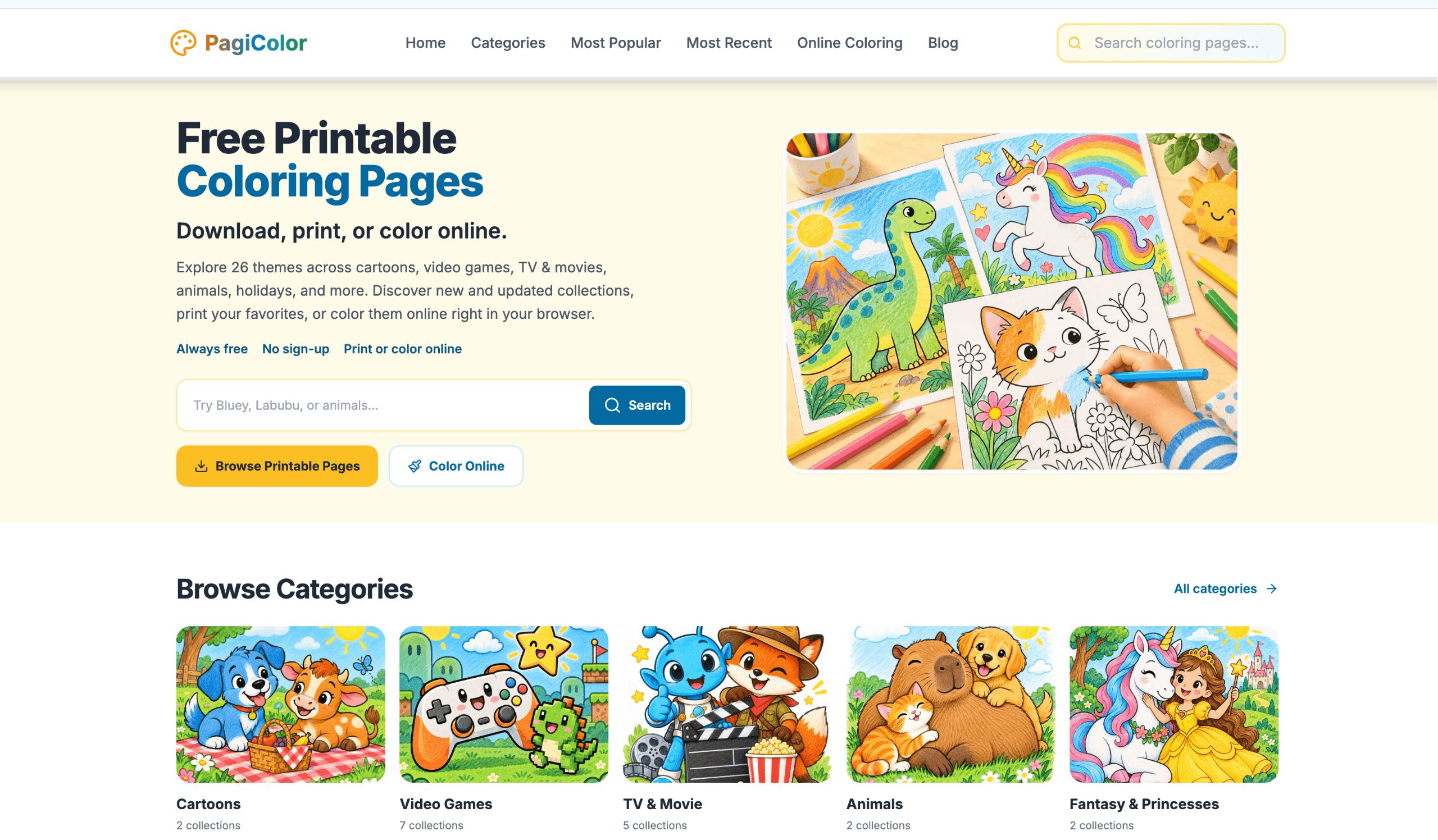
About this app
PagiColor is a free web platform offering a vast collection of printable coloring pages and an online coloring tool for both kids and adults. With over 26 themes spanning cartoons, video games, TV & movies, animals, fantasy, holidays, and more, it provides fresh and updated content without requiring any sign-up or payment. The site features popular collections like Sonic, Bluey, Labubu, Unicorn, Halloween, and more, with new pages added frequently. Users can either download high-quality images to print or color them digitally in the browser using an intuitive online tool. The online tool allows color selection, fill enclosed areas, erase, reset, and export finished artwork as PNG. PagiColor is designed to be family-friendly and educational, with adjustable difficulty levels suitable for all ages. Its simple three-step process makes it easy to find, color, and save pages. Whether for home, classroom, or personal relaxation, PagiColor offers a seamless and enjoyable coloring experience.
Key features
- 126 themes of free printable coloring pages across cartoons, video games, TV & movies, animals, holidays, and more — no sign-up required.
- 2In-browser online coloring tool: pick colors, fill enclosed areas, erase, reset, and export finished artwork as PNG.
- 3Character-driven collections (Sonic, Bluey, Labubu, Minecraft, Spider-Man) with a Most Recent feed and per-collection update dates.
Target customer profile
Drawn from the product itself, not from a survey.
Demographic
Parents with young children (ages 3-10)
Pain points
Finding free, safe, and engaging activities to keep kids occupied without screen time overload.
Primary needs
Quick access to printable coloring pages featuring popular characters (e.g., Bluey, Sonic) to entertain and educate.
Demographic
Teachers and educators (K-6)
Pain points
Limited budget for classroom materials and need for curriculum-aligned, themed coloring activities.
Primary needs
Printable and online coloring pages for holidays, animals, and educational themes to supplement lessons.
Demographic
Adult coloring enthusiasts
Pain points
Expensive coloring books and limited variety; desire for relaxation and creative expression.
Primary needs
Free, diverse, and detailed coloring pages (e.g., fantasy, intricate designs) for stress relief and artistic enjoyment.
Scout Review
Written by AI from measured evidence, scored out of 100.
PagiColor is a free, no-sign-up coloring site with 26 themes, printable pages, and a browser tool that fills, erases, resets, and exports PNG. The measured profile is genuinely good on the things that matter to a casual visitor: mobile Lighthouse performance 91, desktop 94, CLS 0, accessibility 93, and a homepage that looks like someone cared. It is not a deep product. The online tool is a flood-fill canvas, not an editor. Security headers are mostly absent (4/12 checklist points, no CSP, no SPF/DMARC). The design has credibility leaks — future-dated publish labels, a dense footer, repeated links. And the growth story rests on character content that anyone can replicate. For its actual audience — a parent at 7am, a teacher with no budget, an adult who wants twenty quiet minutes — it does the job cleanly and for free, which is more than most sites in this space manage.
Measure by measure
Usability
74No sign-up, three-step how-to, and a FAQ that answers paper size, formats, and classroom use. Dual search and large tappable category cards. Online tool covers fill, erase, reset, and PNG export.
Design
71Clean pastel palette, rounded cards, and genuinely on-brand illustrations throughout. Docked for a dense five-column footer, repetitive 'All categories' links, and future-dated labels (Oct 2026) that undercut trust.
Speed
79Lighthouse mobile 91/100 and desktop 94/100, with CLS 0 and TBT 79ms. The 3.5s mobile LCP is the one number keeping this out of the top band; everything else is snappy.
Security
52HTTPS enforced with HSTS, but no CSP, frame protection, X-Content-Type-Options, Referrer-Policy, or Permissions-Policy, and no SPF/DMARC. Checklist 4/12. No published audits or security page found.
Accessibility
70Lighthouse accessibility 93/100, but two real failures: insufficient color contrast and links without discernible names. No a11y statement or multi-language support found. Responsive and keyboard-navigable basics are in place.
Growth
58A real, evergreen need — free kid activities with no sign-up — and a browser coloring tool that Crayola's static printables don't offer. Character-driven content (Bluey, Sonic, Labubu) is the hook, but the wedge is copyable.
Improvement areas
- Accessibility: fix insufficient color contrast and links without discernible names; add an accessibility statement.
- Security: add CSP, X-Content-Type-Options, Referrer-Policy, Permissions-Policy, and SPF/DMARC records.
- Content credibility: correct future-dated publish labels (Oct 2026) and reduce repetitive 'All categories' links and footer density.
Design & Usability
PagiColor's homepage is a genuinely pleasant piece of work: a soft cream hero, a pastel palette that matches the product, and thumbnails that are real illustrations rather than placeholder gray boxes. The category grid, the Halloween row, and the 'Printable and Online Favorites' section all hold a consistent visual rhythm. Where it slips is the details — a five-column dark footer that turns into link soup, 'All categories →' repeated until it stops meaning anything, and publish dates stamped Jun 2025 and Oct 2026 on the same page, which is the kind of thing that makes a parent wonder what else is made up. Usability is the stronger half. There is no sign-up, no paywall, no account wall — you land, you search, you print or you color. The three-step how-to and the FAQ actually answer the questions people have (A4 or US Letter? Can I use this in class? What does the online tool do?). Dual search fields and large tappable category cards make it easy on a phone. The online tool is narrow but honest: pick a color, fill enclosed areas, erase, reset, export PNG. For a parent, a teacher, or an adult who just wants to color for twenty minutes, the path from landing to finished page is short and unobstructed.
Speed & Security
Speed is the standout measured result. Lighthouse puts mobile performance at 91/100 and desktop at 94/100, with a cumulative layout shift of zero and a total blocking time of 79ms — this is a light, stable page that does not jump around while you are trying to tap a category card. The one soft number is mobile LCP at 3.5s, which is slower than the rest of the profile suggests and worth attention given the image-heavy content. Security is where the picture gets thin. The probe confirms HTTPS is enforced and HSTS is set, which covers the basics for a site that collects no accounts and no payments. Past that, the checklist is mostly empty: no Content-Security-Policy, no frame protection, no X-Content-Type-Options, no Referrer-Policy, no Permissions-Policy, and no SPF or DMARC records on the domain. That is 4 of 12 checklist points. For a free, no-login coloring site the risk surface is small — there is no user data to leak — but missing email authentication records and a missing CSP are cheap fixes that also protect visitors from injected content. No published audits, security page, or bug bounty were found in the collected evidence.
Accessibility & Growth
Accessibility lands at a solid-but-imperfect 70. The automated Lighthouse audit scores 93/100, which is a good baseline, but the two failing checks are not cosmetic: background and foreground colors do not meet contrast ratios in places, and some links have no discernible name, which means a screen reader announces them as nothing. Neither is hard to fix, and neither is present in the site's own marketing. There is no accessibility statement and no multi-language support in the collected content, which limits reach for non-English-speaking families. Growth is a judgement about the idea, not the traction. The problem PagiColor names is real and evergreen: parents and teachers need free, safe, immediately usable activities, and adult colorers want variety without buying another book. The differentiator against the listed alternatives is concrete — Crayola offers static printables, SuperColoring offers printables and online coloring, and PagiColor combines a browser coloring tool with print and adds no-sign-up access. The character-driven catalogue (Bluey, Sonic, Labubu, Minecraft, Spider-Man) is what actually pulls search traffic. The limit is that this wedge is copyable: the content is licensed-adjacent character art and the tool is a flood-fill canvas, so nothing compounds. It can grow into a solid niche site; it is unlikely to become defensible without original art, a community, or a workflow teachers cannot get elsewhere.
Conclusion
The honest read: PagiColor is a well-executed utility with a narrow ceiling. It nails the first thirty seconds — fast, free, no account, obvious next step — and that is exactly the thirty seconds that decides whether a parent stays or bounces back to Google. The measured numbers back it up rather than just the marketing copy. What it has not done is build anything that gets harder to copy. The coloring tool is a fill bucket. The catalogue is character art. The security posture is HTTPS and hope. None of that is fatal for a free site with no user accounts, but it caps how far this goes. The fixes that would move the needle are unglamorous and cheap: label the unnamed links, fix the contrast, add a CSP and DMARC, stop stamping 2026 on pages published in 2025, and start commissioning original art that nobody else can print. Do those and the ceiling lifts. Skip them and PagiColor stays a nice free site that people use once and forget the URL of.
Suggestions for improvement
- Fix the two accessibility failures: raise contrast on low-ratio text and give every link a discernible name for screen readers.
- Add the missing security headers (CSP, X-Content-Type-Options, Referrer-Policy, Permissions-Policy) and publish SPF/DMARC records.
- Correct the future-dated publish labels (Oct 2026) and tighten the five-column footer into fewer, clearer groups.
- Commission original artwork alongside licensed characters so the catalogue becomes something competitors cannot simply copy.
Alternatives comparison
Named competitors, point by point. Nobody paid to appear here or to be left out.
 PagiColor |  Crayola Coloring Pages |  SuperColoring | |
|---|---|---|---|
| Price and sign-up requirement | Free, no sign-up or account required | Free; no account needed to print pages | Free; account optional for saving online work |
| Online coloring tool in the browser | Yes — fill, erase, reset, export PNG | No — printables only | Yes — online coloring with save options |
| Breadth of themes and collections | 26 themes; character-led (Sonic, Bluey, Labubu, Minecraft) | Crayola characters and seasonal themes | Very large catalogue for kids and adults |
| Print formats and paper sizes | Image downloads; A4/US Letter PDF print pack for one collection | Printable pages for standard home printers | Printable pages plus PDF output options |
| Educational and classroom use | Terms allow classroom and homeschooling use | Classroom-friendly printables from a known brand | Educational categories and teaching resources |
Crayola Coloring Pages
Free printable coloring pages from Crayola, featuring characters and seasonal themes.
SuperColoring
Large collection of free coloring pages for kids and adults, with printable and online options.
Comparing options? See PagiColor alternatives, scored side by side
More Lifestyle & Entertainment apps
View all Lifestyle & Entertainment
Factory Direct Mattress Overland Park
92A locally-owned mattress store in Overland Park, KS offer...

RoomCreator
92An AI-powered interior and exterior design tool that tran...

Seating Chart Generator
90Free seating chart maker for weddings and events

SheetScroll
90> You play; SheetScroll turns the page. It listens through the microphone or a MIDI piano and holds the page until it's sure where you are.

Hireci
89Save every recipe. Plan every meal.

TUNL - Cave Flyer
89A hold-to-thrust cave flyer with a new daily level, ghost races, and a global leaderboard.

NOSTRES
88Free step-by-step guides for moving to Berlin: documents,...

Random Movie Generator
88Free random movie picker from 142k+ films—no sign-up.

Portrait Gift
88AI-powered personalized face swap art platform creating c...

Roami eSIM
88A global travel eSIM app offering instant activation, no ...

TranscriptYou
88Free YouTube transcript generator with timestamps and AI ...

Sensecast
88Weather app that explains the forecast


A platform dedicated to providing unbiased reviews of newly launched applications, analyzing everything from their features to their full potential.
info@scoutforge.net© 2026 Scoutforge. All rights reserved.
