Cycling through all six. Tap any point to stop.
Measured on six things
Calculate photo print crops, borders and resolution offline.
Design
56The README screenshot shows a coherent sage-and-white print-shop identity with clearly split fill/fit result panels. But the live homepage is GitLab's repository chrome, and the only CTA is an inline text link.
Screenshots
1 / 1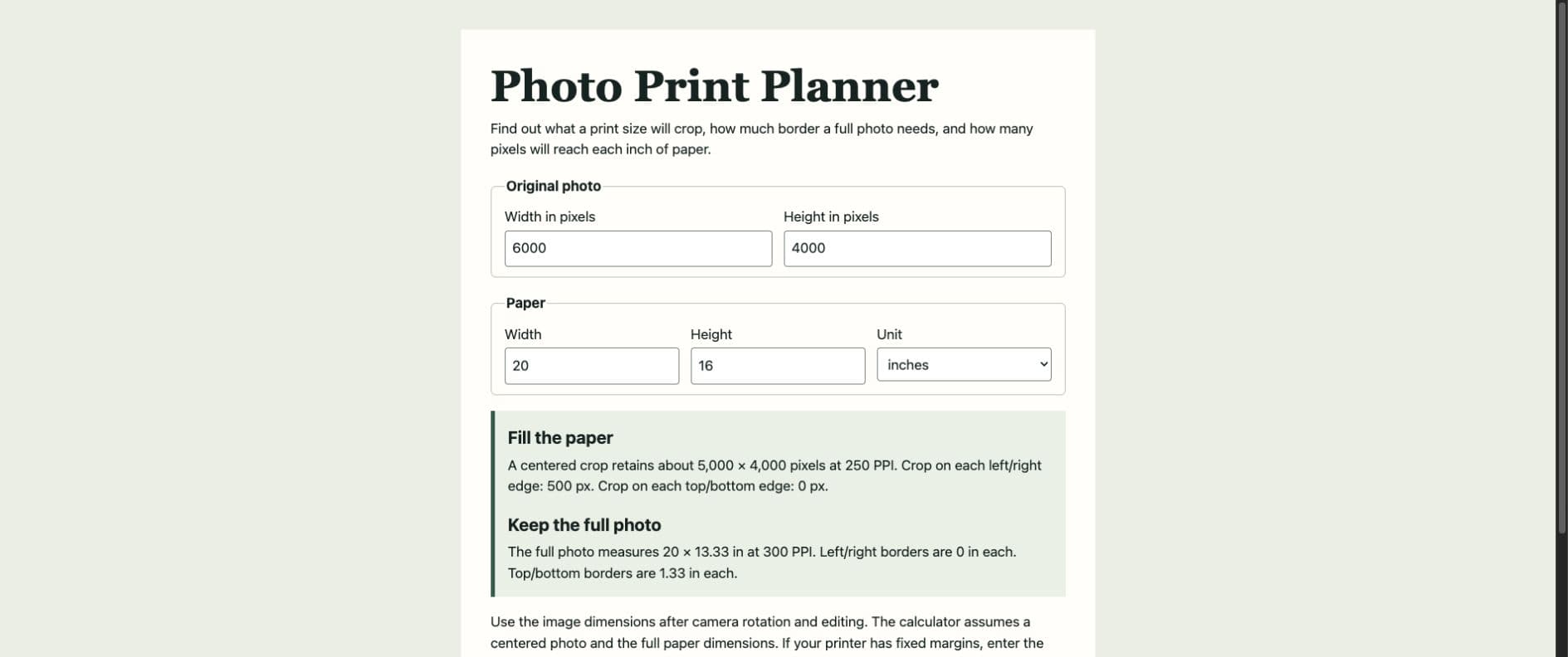
About this app
Photo Print Planner is a free, single-file tool from Best Suggestions (https://bestsuggestions.com/). Download the HTML file from the project page and open it in a web browser. Enter the width and height of the photo in pixels, then enter a paper size in inches or centimeters. The planner shows two options: a centered crop that fills the paper, or a full image with borders. It reports the effective pixels per inch in each case. For example, a 6000 × 4000 image cropped to fill a 20 × 16-inch print retains 5000 × 4000 pixels at 250 PPI. Keeping the full frame instead gives a 20 × 13.33-inch image at 300 PPI. The tool works offline and does not request or upload an image.
Key features
- 1Estimates fill vs fit dimensions, center-crop losses, border size and effective PPI from image and paper dimensions alone.
- 2Works offline as a single HTML file and never requests or uploads the image.
- 3Labelled inputs with instant in-place results, split into 'Fill the paper' and 'Keep the full photo' panels.
Target customer profile
Drawn from the product itself, not from a survey.
Demographic
Photographers preparing images for prints
Pain points
Paper and image aspect ratios may differ, making it hard to predict which parts a centered crop will trim.
Primary needs
Compare fill and fit dimensions, center-crop losses, border size and effective PPI before exporting.
Scout Review
Written by AI from measured evidence, scored out of 100.
Photo Print Planner is a genuinely useful single-file tool for a real prepress problem: predicting fill vs fit dimensions, center-crop losses, border size and effective PPI before exporting. The measured evidence backs it up — Lighthouse mobile 87/100, accessibility 98/100, and a full 13/13 security header checklist. The design inside the tool is considered: serif title, sage palette, and two clearly labelled result panels. The weak point is presentation. The live homepage is a GitLab repository page where the product's identity is buried under GitLab's chrome, and the download CTA is an inline text link rather than a button. The idea is sound and the execution is competent; the distribution and front-door experience are where it loses points.
Measure by measure
Usability
62Labelled inputs, instant in-place results, and a README that states the offline/no-upload model plainly. The main friction is finding the download: it's a hyperlink in body copy, not a button.
Design
56The README screenshot shows a coherent sage-and-white print-shop identity with clearly split fill/fit result panels. But the live homepage is GitLab's repository chrome, and the only CTA is an inline text link.
Speed
74Lighthouse mobile 87/100 with LCP 1.8s and TBT 245ms; desktop 71/100. The tool itself is a single offline HTML file with no upload, so runtime cost after download is negligible.
Security
78Full 13/13 header checklist: HTTPS enforced, HSTS, CSP, frame protection, Referrer-Policy, Permissions-Policy, secure cookies, SPF and DMARC. No SOC 2 or pen-test claims, but the tool runs locally and never uploads an image.
Accessibility
82Lighthouse accessibility 98/100 with only a heading-order failure. Labelled inputs and in-place results support keyboard and screen-reader use. No WCAG statement or multi-language support is published.
Growth
58A real prepress problem — predicting crop loss and effective PPI before printing — with a specific offline, no-upload wedge. GIMP does the same math but needs the image and a heavier editor; the ceiling is a niche utility.
Improvement areas
- The live homepage is a GitLab repository page; the product's identity is buried under GitLab's chrome.
- The download CTA is an inline text link in body copy rather than a prominent button.
- No WCAG conformance statement or multi-language support is published.
Design & Usability
Design and usability are tangled together here because the product's presentation is a GitLab README. The screenshot shows a genuinely considered interface: serif title, sage palette, and two clearly labelled result panels for fill vs fit. That's good craft. The problem is the wrapper — visitors land on repository chrome, a file table, and commit metadata, with the download CTA as an inline text link inside a paragraph. Usability inside the tool is strong: labelled inputs, instant in-place results, no submit step, and a README that plainly states the offline, no-upload model. The friction is entirely at the front door. A visitor has to read the README to find the thing the README is about.
Speed & Security
Speed is measured, not vibed: Lighthouse mobile 87/100 with LCP 1.8s and TBT 245ms, desktop 71/100. The desktop number being lower than mobile is odd but not alarming. The tool itself is a single offline HTML file with no image upload, so once downloaded the runtime cost is essentially zero. Security is the strongest measured dimension: 13/13 on the header checklist, including HTTPS enforcement, HSTS, CSP, frame protection, Referrer-Policy, Permissions-Policy, secure cookies, SPF and DMARC. There's no SOC 2 or pen-test claim, but the architecture — local file, no upload — is the honest security story. The headers are GitLab's, not the product's, which is worth knowing.
Accessibility & Growth
Accessibility scores 98/100 on Lighthouse with a single failing audit: heading elements not in sequentially-descending order. Inputs are labelled and results update in place, which supports keyboard and screen-reader use. No WCAG statement or multi-language support is published, so the automated score is real but the conformance claim isn't. Growth is a judgement call on the idea: photographers preparing prints where paper and image aspect ratios differ genuinely need to predict crop loss and effective PPI before exporting. The offline, no-upload, single-file approach is a real wedge against GIMP, which does the same math but requires the image and a heavier editor. The category is niche, though — this is a utility, not a platform, and the ceiling is bounded by how many people print photos and care about PPI math.
Conclusion
If you print photos and care about PPI, this tool does exactly what it says with no upload and no install. The math is shown in the README with concrete numbers, the results are split into fill and fit modes, and the whole thing runs offline. The gap is that nobody will find it: a GitLab README is not a landing page, and an inline text link is not a call to action. Fix the front door — a proper product page with a download button, the worked example above the fold, and a clear statement of the offline/no-upload model — and this goes from a hidden gem to a tool people actually use.
Suggestions for improvement
- Replace the GitLab README as the landing page with a simple product page: headline, worked example, and a prominent download button.
- Move the download CTA out of the paragraph and into a button above the fold, with the offline/no-upload model stated next to it.
- Fix the heading hierarchy in the README and the tool so the Lighthouse accessibility score reaches 100.
- Publish a short WCAG conformance statement and consider multi-language labels for the calculator inputs.
Alternatives comparison
Named competitors, point by point. Nobody paid to appear here or to be left out.
 Photo Print Planner |  GIMP | |
|---|---|---|
| Estimates fill vs fit dimensions and effective PPI from dimensions alone | Yes — shows fill and fit options with PPI for each | No — requires the image and manual crop/print setup |
| Works offline without uploading the image | Yes — single HTML file, no upload | Yes — desktop app, image stays local |
| Edits the image itself | No — estimates from dimensions only | Yes — full image editor |
| Installation required | No — download one HTML file and open it | Yes — desktop application install |
Comparing options? See Photo Print Planner alternatives, scored side by side
More Consumer Tools apps
View all Consumer Tools
QRBliss
91Branded QR codes with AI Brand Sync, 15 free dynamic code...

Cross Stitch Pattern Maker
89Free on-device photo-to-DMC/Anchor chart with skein counts.

Random Movie Generator
88Free random movie picker from 142k+ films—no sign-up.

Cromagnon
88Free, private browser-based PDF, Word, Excel, and study t...

Data Matrix Generator
88Free Data Matrix and GS1 DataMatrix code generator

Sensecast
88Weather app that explains the forecast

Fix My Ping
88Diagnose high ping, packet loss, and lag on your gaming network route.

Chickadee Bandit
87Private, all-in-one family organizer with 100+ apps, one price per household

SeatCanvas
87Drag-and-drop seating charts for weddings, quinceañeras and events. Import your guest list from Excel, export print-ready PDFs. Free up to 40 guests, no signup.

Workflo
87A Mac menu-bar app that opens & arranges all you need, on its own

PKPASS Viewer
87Open .pkpass files in any browser without installing an app

Cat Years to Human Years
86Free cat age calculator converting cat years to human years.


A platform dedicated to providing unbiased reviews of newly launched applications, analyzing everything from their features to their full potential.
info@scoutforge.net© 2026 Scoutforge. All rights reserved.
