Cycling through all six. Tap any point to stop.
Measured on six things
AI thumbnail generator for YouTube—create multiple clicka...
Growth
28Essentially zero visible traction: no reviews, no GitHub, no launch buzz. A handful of directory listings but nothing indicating real user adoption yet.
Screenshots
1 / 1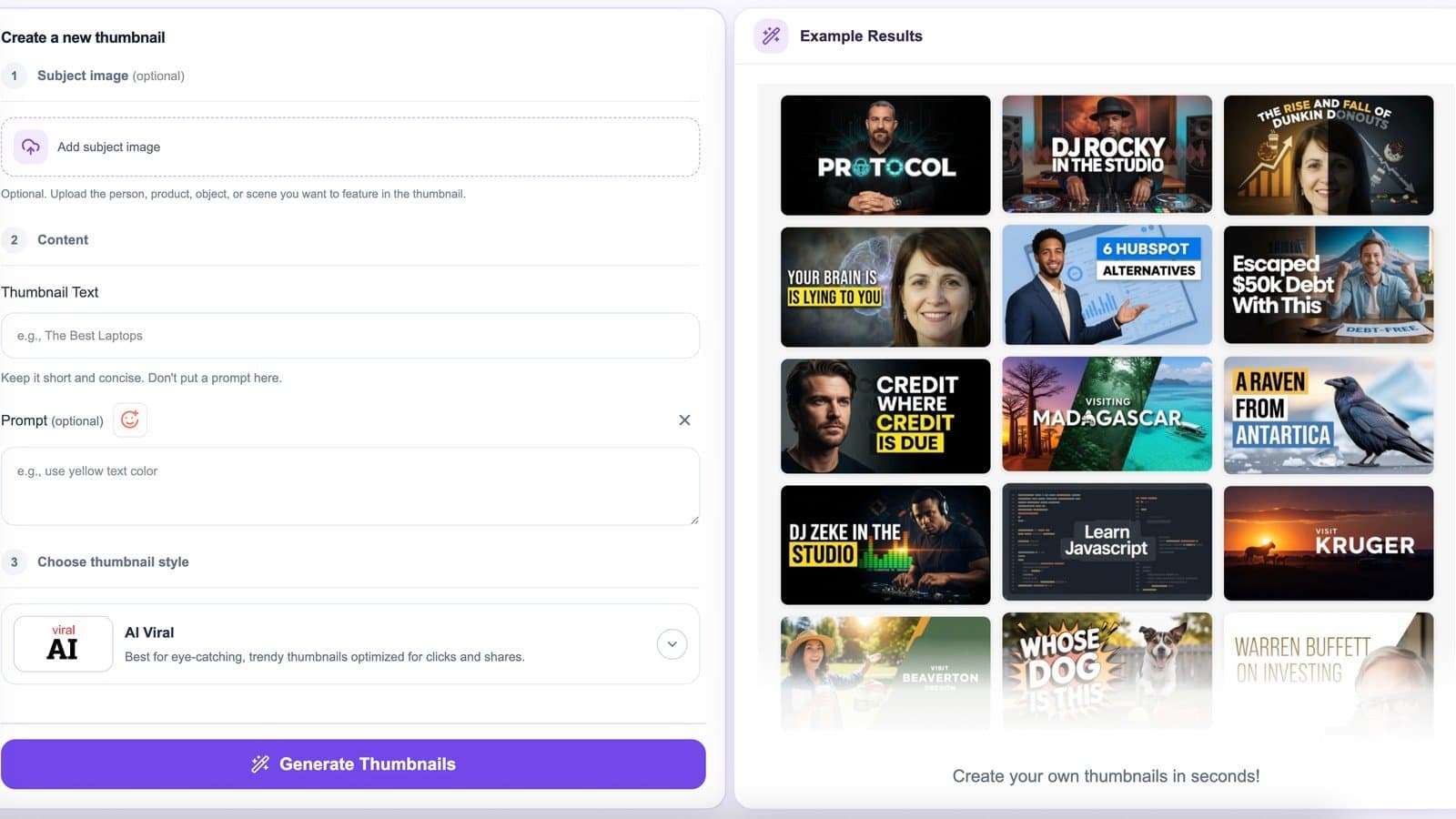
About this app
StopScroll is an AI-powered thumbnail maker designed to help YouTube creators, marketers, and faceless channel operators generate multiple thumbnail options from a video URL, title, or custom prompt. Unlike traditional design tools, StopScroll analyzes video metadata, transcripts, and context to produce distinct visual directions that align with your content. You can preview, compare, and download the best option. The platform also includes utility tools like a YouTube Thumbnail Resizer, Shorts Thumbnail Downloader, and 4K Thumbnail Downloader. Pricing is credit-based starting at $9 for 40 generations, with no expiry on credits. It's a practical, time-saving solution for anyone looking to boost click-through rates without manual design work.
Key features
- 1AI thumbnail generation from YouTube URL (metadata + transcript analysis) or title/prompt
- 2Multiple visual directions generated for comparison and direct download
- 3Utility tools: YouTube Thumbnail Resizer, 4K/Shorts/Live downloaders
Target customer profile
Drawn from the product itself, not from a survey.
Demographic
YouTubers and content creators (especially faceless channels)
Pain points
Spending too much time designing thumbnails; lack of design skills; unsure which thumbnail works best
Primary needs
Quick, AI-generated thumbnail ideas; multiple options to test; easy download; no design expertise required
Demographic
Social media managers and marketing teams
Pain points
Need to produce consistent, high-CTR thumbnails for multiple videos; limited design resources; deadline pressure
Primary needs
Efficient thumbnail generation from URL; ability to compare concepts; integration with existing workflows
Demographic
Small business owners and educators using YouTube
Pain points
No budget for professional designers; want to improve video performance; overwhelmed by design tools
Primary needs
Affordable, easy-to-use thumbnail maker; AI suggestions; no learning curve; pay-as-you-go pricing
Scout Review
Written by AI from measured evidence, scored out of 100.
StopScroll offers a practical, AI-driven shortcut for YouTube creators who need multiple thumbnail concepts without design skills. Its URL-analysis feature and bundled utilities are genuine time-savers, and the pay-as-you-go credits remove subscription pressure. Execution is solid on usability and accessibility but average on design polish and speed, with security and growth still in early days. It fits the 'good enough for solo creators' niche well but lacks the polish or proof to stand out yet.
Measure by measure
Usability
62Straightforward 3-step flows for URL or prompt input plus handy utility tools. Credit packs are simple but no free tier or live demo slows first-value time.
Design
58Clean, functional landing page with clear numbered flows and example grid. Visual polish is average; empty preview box and inconsistent example quality hold it back.
Speed
58Lighthouse scores sit in the middle: mobile 60 with 3.5s LCP. No complaints or benchmarks surfaced; feels responsive enough for a lightweight generator.
Security
50HTTPS and several standard headers in place. Zero published audits, bug bounty, or compliance claims; typical for a small new tool but nothing to write home about.
Accessibility
80Perfect 100/100 Lighthouse score. Responsive design and language toggle present; deeper manual a11y (keyboard, screen readers) not explicitly documented.
Growth
28Essentially zero visible traction: no reviews, no GitHub, no launch buzz. A handful of directory listings but nothing indicating real user adoption yet.
Improvement areas
- No free tier or demo generations visible on site
- Limited public proof of quality or user results
- Basic security posture with no compliance documentation
Design & Usability
StopScroll's homepage delivers a clean, step-by-step experience that makes thumbnail generation feel approachable for non-designers. The two input paths (YouTube URL analysis or custom prompt) plus utility tools like the resizer and 4K downloader create a focused workflow. Visual execution is competent but not exceptional — the example grid proves output variety while the empty hero preview and occasional mismatched faces in samples keep the design from feeling premium. Usability benefits from explicit labeling and consistent CTAs, though the credit-only model with no free trial creates friction for first-time users who want to test before committing $9.
Speed & Security
Performance lands squarely in the middle of the road. Lighthouse metrics (mobile 60/100, 3.5s LCP) suggest acceptable load times for a modern web app without heavy client-side rendering. No user complaints about lag appear in searches. Security follows the same pattern: HTTPS and several protective headers are present, but the absence of any SOC 2, ISO, or even DMARC leaves it at baseline for a small SaaS. For a credit-based thumbnail tool handling image generation, this is table-stakes rather than a differentiator.
Accessibility & Growth
Accessibility stands out positively with a perfect 100/100 automated score and responsive layout plus language switching. This puts it ahead of many indie tools on basic compliance. Growth, however, is the clear weak point — virtually no discoverable reviews, community signals, or launch traction exist. Directory listings are recent and sparse. The product is early-stage and will need visible user proof (reviews, case studies, or community) before it can compete with more established thumbnail platforms.
Conclusion
For faceless channels or busy creators tired of Canva templates, StopScroll removes the blank-canvas problem effectively. Just don't expect enterprise-grade security docs or a bustling community — yet.
Suggestions for improvement
- Add a small free credit allowance or demo generation so users can test before the $9 paywall
- Tighten example thumbnails for consistent faces and higher visual quality to match marketing claims
- Publish a simple security or privacy page even if basic, to build early trust
- Collect and display early user testimonials or CTR results to bootstrap growth signals
Alternatives comparison
Named competitors, point by point. Nobody paid to appear here or to be left out.
 StopScroll StopScroll |  Canva Canva |  Adobe Express Adobe Express |  Thumbnail Blaster Thumbnail Blaster | |
|---|---|---|---|---|
| Input methods | YouTube URL (metadata/transcript) or title/prompt + image upload | Templates + manual drag-and-drop editing | Templates + quick editing tools | AI features but no URL analysis or multi-concept comparison |
| Output options | Multiple distinct concepts for comparison + download | Single editable design per project | Single editable design per project | AI-generated thumbnails, fewer comparison tools |
| Pricing model | Credit packs: $9/40, $29/140 (no expiry) | Free tier + Pro subscription (~$15/mo) | Free tier + Premium subscription | Subscription or one-time purchase options |
Canva
General design tool with thumbnail templates, but requires manual editing and design skills.
Adobe Express
Quick design tool with templates, but less AI-driven automation and no URL-based generation.
Thumbnail Blaster
YouTube thumbnail maker with some AI features, but lacks URL analysis and multi-concept comparison.
Comparing options? See StopScroll alternatives, scored side by side
Sources
What the review was written against. A verdict with no sources is an opinion.
More AI Generations apps
View all AI Generations
Uni-1 by Luma AI
92Uni-1 is an advanced multimodal text-to-image AI model th...

LTX 2.3 AI Video Generator
91Fast, open-source AI video generator with 4K support, mul...

DemoVexa
90Turn your code into professional product demo videos with AI-generated scripts, animated UI, and natural voiceovers.

tradutor de mangá com IA
88O tradutor de mangá com IA traduz capítulos em lote, personaliza textos e oferece edição visual para estúdios.

OBVELO
88Privacy gateway that masks personal data in LLM traffic

Pixelimg
88A free online AI-powered tool that instantly converts ima...

HeyVid AI
88HeyVid AI is a free all-in-one AI video and image generat...

RestorePhotosApp
88An AI-powered photo restoration app that brings old, blur...

IraVoice
88Private on-device dictation for Apple-silicon Macs.

Mygom SEO
87MygomSEO is an AI marketing agent that audits your site, writes SEO content, publishes to 12+ CMS platforms, posts to social, and monitors rankings 24/7.

pause.do
87A privacy-first browser extension that inserts gentle pau...

DeepSwapAI
87AI face swap online with no subscription, pay per use.


A platform dedicated to providing unbiased reviews of newly launched applications, analyzing everything from their features to their full potential.
info@scoutforge.net© 2026 Scoutforge. All rights reserved.
