Cycling through all six. Tap any point to stop.
Measured on six things
Convert Lotus Notes DXL files to Outlook PST and more.
Design
46Dated corporate layout with a legacy utility bar and a promo-tagged nav. Clear hero CTAs and a consistent three-card system help, but justified text rivers, overlapping chat bubble, and visible typos ('needful', 'Window Defender') drag it down.
Screenshots
1 / 1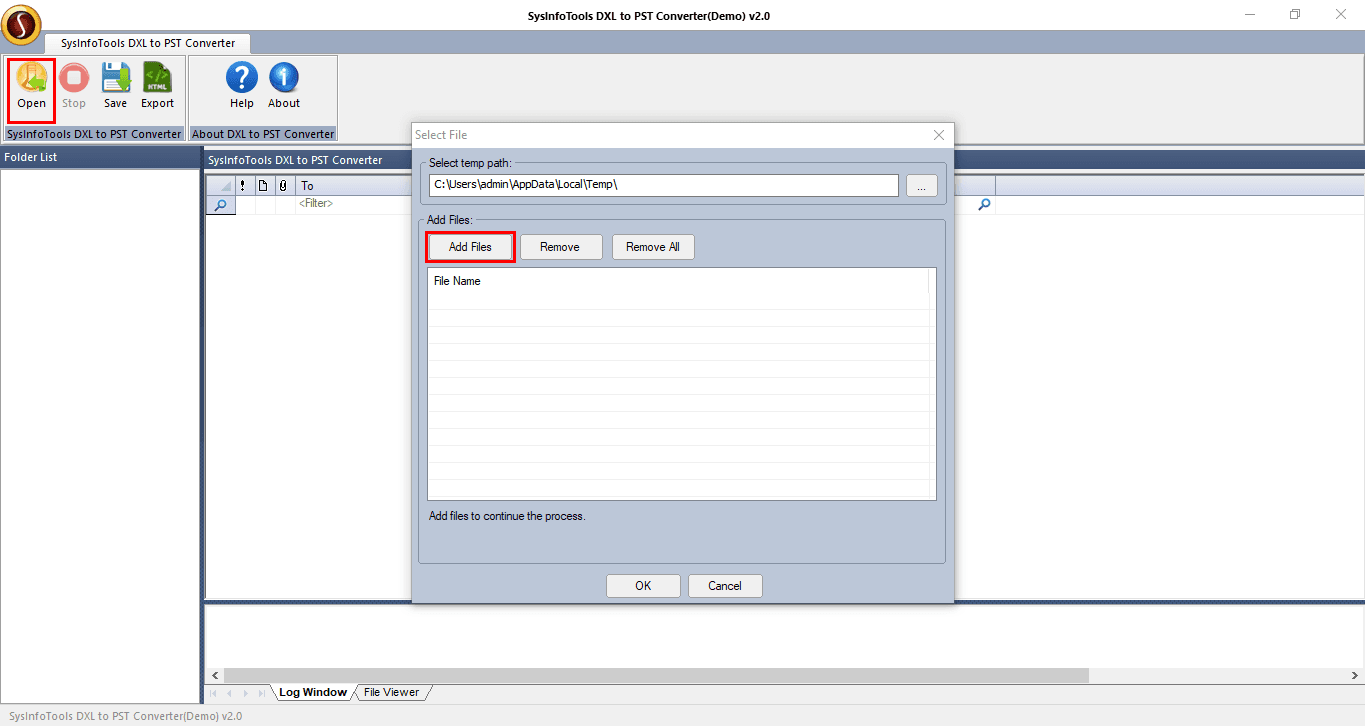
About this app
SysInfo DXL to PST Converter is a specialized tool designed to convert IBM Lotus Domino DXL (Domino Extensible Language) files into Outlook PST format, as well as other formats like EML, MSG, RTF, HTML, and MBOX. It caters to users migrating from Lotus Notes to Outlook or those needing to access DXL data in compatible formats. The software offers batch conversion, preview before saving, date range filtering, and options to create a single PST or separate PSTs per DXL file. It also can directly attach the output PST to Outlook and handles minor corruption issues. With a free version allowing 25 emails per folder and a full version for unlimited conversion, it supports various Windows OS and Lotus Domino versions. The tool is user-friendly, with a straightforward three-step process, and is backed by positive user reviews and awards.
Key features
- 1Batch conversion of IBM Lotus Domino DXL files to Outlook PST, plus EML, MSG, RTF, HTML and MBOX output
- 2Date-range filtering (predefined or manual) and choice of single PST or one PST per DXL file
- 3Preview before saving, direct attach of output PST to Outlook, and minor corruption handling
- 4Free version exports 25 emails per folder; full version unlocks unlimited conversion
Target customer profile
Drawn from the product itself, not from a survey.
Demographic
IT administrators in enterprises using Lotus Notes/Domino
Pain points
Need to migrate email data from Lotus Notes to Outlook efficiently and accurately
Primary needs
Reliable batch conversion of DXL files to PST with folder hierarchy preservation
Demographic
Small business owners transitioning from Lotus Notes to Microsoft Outlook
Pain points
Limited technical expertise and budget for complex migration tools
Primary needs
Affordable, easy-to-use tool with preview and selective conversion
Demographic
Individual users with legacy DXL files needing access in Outlook
Pain points
Inability to open DXL files directly in Outlook; risk of data loss during conversion
Primary needs
Simple, safe conversion with data integrity and support for multiple formats
Scout Review
Written by AI from measured evidence, scored out of 100.
SysInfo DXL to PST Converter is a focused, fast, competent utility for a specific migration problem: getting IBM Lotus Domino DXL data into Outlook PST (or EML, MSG, RTF, HTML, MBOX). The feature set is genuinely thought-through — batch conversion, date-range filtering, single vs per-file PST output, direct Outlook attach, and minor corruption handling — and the free tier (25 emails per folder) lets you test before buying. The marketing site is the weak link: a dated corporate template with justified-text rivers, overlapping chat widgets, and copy typos that undercut trust. Speed is excellent and security headers are mostly in place, but there are no published audits. Best suited to IT admins and small businesses with a one-time migration need who want an affordable, simple tool rather than an enterprise suite.
Measure by measure
Usability
58Sticky anchor bar and an FAQ that pre-empts install friction are genuinely helpful, and the three-step flow is simple. But the steps screenshot is unreadable, the demo limit is visible from the first screen, and proof sits far below repeated claims.
Design
46Dated corporate layout with a legacy utility bar and a promo-tagged nav. Clear hero CTAs and a consistent three-card system help, but justified text rivers, overlapping chat bubble, and visible typos ('needful', 'Window Defender') drag it down.
Speed
88Lighthouse mobile 100/100 with LCP 1.3s, CLS 0 and TBT 35ms; desktop 98/100. A genuinely snappy, lightweight marketing page with no lag complaints in the collected evidence.
Security
74HTTPS enforced with HSTS, CSP, Referrer-Policy, Permissions-Policy, SPF and DMARC — 10/12 on the header checklist. Missing X-Frame-Options and X-Content-Type-Options; no published audits or bug bounty found.
Accessibility
80Lighthouse accessibility 98/100 with only minor failures: no main landmark, role=presentation conflicts, and some visible labels lacking matching accessible names. No WCAG statement or multi-language support found.
Growth
58A real, narrow migration problem with concrete differentiators (batch, date-range, single vs per-file PST, direct Outlook attach). But it's a shrinking niche against broader suites like Aid4Mail and Stellar.
Improvement areas
- Dated marketing site with justified-text rivers, overlapping chat widget, and visible copy typos
- Step-by-step screenshot is too small to read; proof sits far below repeated claims
- Missing X-Frame-Options and X-Content-Type-Options headers; no published security/audit page
- No WCAG statement or multi-language support; no <main> landmark on the homepage
Design & Usability
The homepage is a legacy corporate template: a utility bar of Help/Mail/Call links, a red 'Offers & Services' promo tag in the nav, and a hero that repeats 'DXL to PST' and the format list enough times to feel keyword-driven rather than benefit-driven. What works: the dual green/blue CTAs with trust microcopy are unmistakable, the three 'When to Use' cards share a consistent illustration system, and the specification table scans cleanly. What doesn't: justified copy in narrow columns produces visible rivers, the orange chat bubble overlaps the product art, and typos like 'needful DXL file items' and a 'Window Defender' FAQ heading undercut credibility. Usability is better than design — a sticky anchor bar jumps straight to Features, Specification and Software Guide, and the FAQ pre-empts real install friction. But the step-by-step screenshot is too small to read, and visitors scroll past several repeated-claim sections before reaching anything concrete.
Speed & Security
Speed is the standout: Lighthouse mobile 100/100 with LCP 1.3s, CLS 0 and TBT 35ms, desktop 98/100. The marketing page is lightweight and snappy, and nothing in the collected evidence suggests lag complaints. Security is competent but unremarkable: HTTPS is enforced with HSTS, CSP, Referrer-Policy, Permissions-Policy, SPF and DMARC, landing 10/12 on the header checklist. The two gaps — X-Frame-Options and X-Content-Type-Options — are standard hardening that a tool handling mailbox data should close. There is no published SOC 2, ISO certification, penetration test or bug bounty in the collected evidence, which is normal for a small vendor but leaves buyers relying on the vendor's word for data handling.
Accessibility & Growth
Accessibility scores 98/100 on the Lighthouse audit, with only minor failures: no main landmark, role=presentation conflicts, and a few visible labels without matching accessible names. There is no WCAG statement and the site is English-only, so the automated score is the main signal. Growth is the harder question. The problem is real — Lotus Notes/Domino shops migrating to Outlook need DXL handled, and Outlook cannot open DXL natively. The product names concrete differentiators: batch conversion, predefined or manual date-range filtering, single PST vs one-per-file, direct attach to Outlook, and minor corruption handling. But the category is a shrinking niche, and the two listed alternatives (Aid4Mail, Stellar Converter for NSF) are broader multi-format migration suites with wider brand reach. The wedge is real but narrow, and nothing in the material shows it widening.
Conclusion
If you have a stack of DXL files and a deadline, this does the job and does it quickly. Download the free version, run a folder through it, and check the output in Outlook before you buy — the 25-email limit is enough to validate fidelity. If your migration is large, multi-source, or compliance-sensitive, compare against Aid4Mail and Stellar first; they cost more but carry broader format coverage and brand track record. Either way, the site's typos are a marketing problem, not a product one — judge the tool by the output, not the landing page.
Suggestions for improvement
- Fix the visible copy typos ('needful DXL file items', 'Window Defender') and switch justified paragraphs to left-aligned to kill the text rivers.
- Reposition or collapse the floating chat bubble so it stops overlapping the hero product art.
- Replace the unreadable step-by-step screenshot with a larger, legible capture or a short embedded video.
- Add X-Frame-Options and X-Content-Type-Options headers, and publish a short data-handling/security page to close the trust gap.
Alternatives comparison
Named competitors, point by point. Nobody paid to appear here or to be left out.
 SysInfo DXL to PST Converter |  Aid4Mail |  Stellar Converter for NSF | |
|---|---|---|---|
| DXL to PST conversion | Yes — core function | Yes — among many formats | Yes — via NSF/DXL support |
| Additional output formats (EML, MSG, RTF, HTML, MBOX) | Yes — EML, MSG, RTF, HTML, MBOX | Yes — broad multi-format support | Primarily PST-focused |
| Batch conversion | Yes — multiple DXL files at once | Yes — batch processing | Yes — batch migration |
| Date-range / selective filtering | Yes — predefined or manual dates | Yes — filtering options | Yes — selective conversion |
| Free trial / free version | Free version — 25 emails per folder | Trial available | Free trial available |
| Direct attach output to Outlook | Yes — attach PST to Outlook | Export-focused; manual import | Import to Outlook supported |
Aid4Mail
Aid4Mail is a email conversion tool that supports DXL to PST conversion among many other formats, with batch processing and filtering options.
Stellar Converter for NSF
Stellar Converter for NSF converts Lotus Notes NSF files to PST, but also supports DXL files, offering a comprehensive migration solution.
Comparing options? See SysInfo DXL to PST Converter alternatives, scored side by side
More E-Mail apps
View all E-Mail
EML to PDF
88Convert .eml, .msg and .mbox emails to PDF in your browser

youtubetomp3.ink
87Free online YouTube to MP3 converter with no signup or so...

AgentiSend
87Resend alternative: email API for developers and AI agents

PitchCentric
86AI podcast booking intelligence with probability scoring.

PCDOTS PST Converter
85Convert Outlook PST files to 16 formats and clouds withou...

EmailFig
85Email marketing that gets out of your way, with all featu...

Postfleet
83Email infrastructure that turns inbound mail into safe JS...

Mailwell
83A calm, fast Mac mail app for all your accounts. Your mail stays on your Mac, with no servers in between.

CaptainVerify
82.5CaptainVerify is a powerful email and mobile number verif...

Mailmodo
82Mailmodo revolutionizes email marketing with AMP-powered interactive emails, AI tools, and automation to boost engagement and ROI.

VerifiedEmail
82A specialized tool for real-time email verification and list cleaning, boosting deliverability and compliance.

Gblock
81A Chrome extension that blocks hidden email trackers in Gmail, ensuring privacy by detecting spy pixels and anonymizing links.


A platform dedicated to providing unbiased reviews of newly launched applications, analyzing everything from their features to their full potential.
info@scoutforge.net© 2026 Scoutforge. All rights reserved.
