Cycling through all six. Tap any point to stop.
Measured on six things
Convert Lotus Notes NSF files to EML format while preserv...
Design
44Dated landing page with competing green/blue hero CTAs, a template-sourced product cover, and copy that drifts between EML, PST and Office 365. The 'When to Use' cards are the one disciplined module.
Screenshots
1 / 1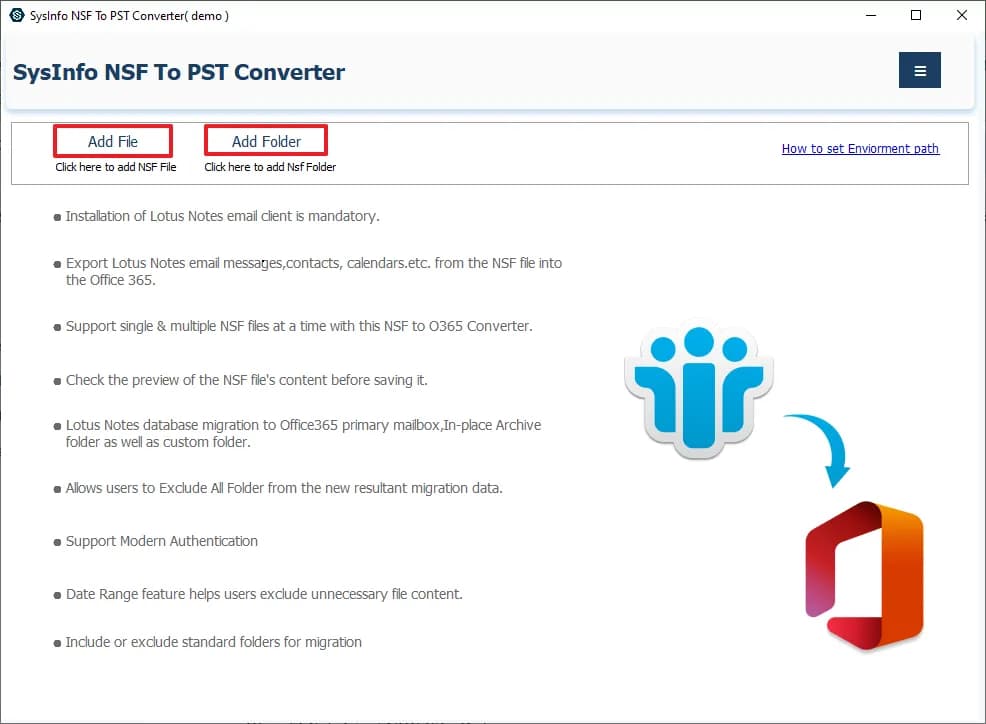
About this app
SysInfo NSF to EML Converter is a reliable and efficient tool that allows users to export the complete database from Lotus Notes to EML file format. It is smartly programmed to convert Lotus Notes emails, contacts, tasks, calendars, and journals to EML files. The tool facilitates various built-in features like excluding all folders, Removing Duplicate Mail, Date Filter, Preview, Bulk migration, and many more. It supports converting single or multiple NSF files, maintains folder hierarchy and data integrity, and provides a preview option. The software is compatible with all versions of Lotus Notes and Windows OS. It also offers additional features like date range saving, duplicate email removal, and customizable saving formats. The free version allows exporting 50 items per folder, while the full version supports unlimited conversion.
Key features
- 1Bulk conversion of single or multiple NSF files to EML with folder hierarchy and data integrity preserved
- 2Preview of NSF mailbox items (emails, contacts, tasks, calendars, journals) before conversion
- 3Duplicate email removal, date-range filter, and 'Exclude All Folder' options
- 4Free version exports 50 items per folder; full version unlimited
Target customer profile
Drawn from the product itself, not from a survey.
Demographic
IT administrators in enterprises using Lotus Notes
Pain points
Difficulty migrating large NSF databases to EML format for archiving or switching email clients.
Primary needs
Efficient bulk conversion of NSF files to EML with folder hierarchy preservation and data integrity.
Demographic
Small business owners replacing Lotus Notes with Outlook or Thunderbird
Pain points
Lack of technical expertise to manually convert NSF files and costly migration tools.
Primary needs
Affordable, user-friendly tool to convert NSF to EML without data loss and with preview capability.
Demographic
Individual users who need to access old Lotus Notes emails in other email clients
Pain points
NSF files are incompatible with most email clients; manual conversion is complex and time-consuming.
Primary needs
Quick and reliable conversion of selected NSF emails to EML format for use in Apple Mail, Windows Live Mail, etc.
Scout Review
Written by AI from measured evidence, scored out of 100.
SysInfo NSF to EML Converter is a competent, long-established utility (domain registered 2010) for a real and painful migration: getting Lotus Notes mail into EML for Thunderbird, Apple Mail or archiving. The site is fast (Lighthouse 100 mobile) and the free tier is genuinely useful, but the landing page is dated, the copy wanders between EML/PST/Office 365, and the tool requires Lotus Notes installed to work. Security headers are solid but unaudited; accessibility is strong on automation but lacks a main landmark and a WCAG statement.
Measure by measure
Usability
60Clear entry points (Add File/Add Folder), a sticky anchor bar, and a 50-item free tier make it easy to try. But the hero checklist and Benefits list repeat the same claims, and Lotus Notes must be installed to use it.
Design
44Dated landing page with competing green/blue hero CTAs, a template-sourced product cover, and copy that drifts between EML, PST and Office 365. The 'When to Use' cards are the one disciplined module.
Speed
88Lighthouse mobile 100/100 (LCP 1.1s, CLS 0, TBT 44ms) and desktop 99/100. The marketing site is genuinely fast and lightweight, with no lag complaints in the collected evidence.
Security
74HTTPS enforced with HSTS, CSP, Referrer-Policy, Permissions-Policy, SPF and DMARC (10/12 checklist). Missing frame protection and X-Content-Type-Options; no published SOC 2 or audit claims.
Accessibility
82Lighthouse accessibility 98/100, but three failing audits (no main landmark, role conflicts, mismatched accessible names) and no WCAG statement. English-only, no multi-language support.
Growth
52A real, specific migration pain with clear differentiators (preview, dedupe, date filter, cheap). But the addressable base is a legacy platform in decline, capping how far it can run.
Improvement areas
- Dated landing page with competing CTAs and inconsistent EML/PST/Office 365 messaging
- Missing security headers (X-Frame-Options, X-Content-Type-Options) and no published audit
- Accessibility gaps: no main landmark, role conflicts, no WCAG statement, English-only
- Lotus Notes installation requirement is buried rather than stated up front
Design & Usability
The landing page is functional but dated: a pale-blue gradient hero, a clip-art product cover, and two equally loud CTAs (green Free Download, blue Purchase Now) that never establish priority. Copy drifts between EML, PST and Office 365, and the app window title doesn't match the product name. Usability is better than design: Add File/Add Folder are obvious, a sticky anchor bar tames a very long page, and a 50-item free tier lets you test before paying. The cost is repetition — the hero checklist and the Benefits list say the same thing twice — and a hard dependency on having Lotus Notes installed, which is awkward for a tool whose whole job is escaping Lotus Notes.
Speed & Security
Speed is the standout: Lighthouse mobile 100/100 with LCP 1.1s, CLS 0 and TBT 44ms, desktop 99/100. The site is lean and snappy, and nothing in the collected evidence suggests lag. Security is competent but unremarkable: HTTPS enforced with HSTS, CSP, Referrer-Policy, Permissions-Policy, SPF and DMARC (10/12 checklist points), but frame protection and X-Content-Type-Options are missing, and there is no published SOC 2, ISO or pen-test to point at. For a desktop utility handling corporate mail archives, that's acceptable hygiene without the compliance receipts an enterprise buyer might want.
Accessibility & Growth
Accessibility scores 98/100 on the automated audit, but three real failures remain — no main landmark, role=none/presentation conflicts, and visible labels without matching accessible names — and there's no WCAG statement or multi-language support. Growth is a judgement on the idea: the problem (NSF files are unreadable outside Lotus Notes) is real and specific, and the product differentiates on preview, duplicate removal, date filtering and a low price versus Aid4Mail and LotusNotes2Outlook. The honest limit is the market itself: Lotus Notes is a legacy platform in long decline, so the addressable base shrinks every year. A solid niche business, not a growth rocket.
Conclusion
If you're an IT admin or small business sitting on NSF archives and need a cheap, previewable path to EML, this does the job and the 50-item free tier lets you prove it first. If you need enterprise compliance paperwork or a growing platform to standardize on, look at Aid4Mail's broader format support. Either way, test on a sample NSF before buying — and budget for the Lotus Notes install it quietly requires.
Suggestions for improvement
- Fix the hero: one primary CTA, and remove the PST/Office 365 references from an EML product page.
- Add a <main> landmark and correct the role/accessible-name failures flagged by Lighthouse.
- Publish a security/compliance page (SOC 2 status, data handling) to satisfy enterprise buyers.
- Clarify the Lotus Notes installation requirement up front, before the download button.
Alternatives comparison
Named competitors, point by point. Nobody paid to appear here or to be left out.
 SysInfo NSF to EML Converter |  Aid4Mail | LotusNotes2Outlook | |
|---|---|---|---|
| NSF to EML conversion | Yes — core function | Yes — plus many other formats | Yes — NSF to EML and PST |
| Free trial / free tier | Free version: 50 items per folder | Trial available (limited) | Demo/trial available |
| Preview before conversion | Yes — built-in preview | Limited preview | Preview supported |
| Duplicate removal & date filter | Yes — both included | Filtering options available | Date filter supported |
| Format breadth beyond EML | EML, PST, PDF, Office 365 | Very broad multi-format support | PST and EML focus |
Aid4Mail
Aid4Mail is an email conversion tool that supports NSF to EML conversion along with many other formats. It offers batch conversion and filtering options.
LotusNotes2Outlook
A tool specifically designed to convert Lotus Notes NSF files to Outlook PST and EML formats, with support for attachments and folder structure.
Comparing options? See SysInfo NSF to EML Converter alternatives, scored side by side
More E-Mail apps
View all E-Mail
EML to PDF
88Convert .eml, .msg and .mbox emails to PDF in your browser

youtubetomp3.ink
87Free online YouTube to MP3 converter with no signup or so...

AgentiSend
87Resend alternative: email API for developers and AI agents

PitchCentric
86AI podcast booking intelligence with probability scoring.

PCDOTS PST Converter
85Convert Outlook PST files to 16 formats and clouds withou...

EmailFig
85Email marketing that gets out of your way, with all featu...

Postfleet
83Email infrastructure that turns inbound mail into safe JS...

Mailwell
83A calm, fast Mac mail app for all your accounts. Your mail stays on your Mac, with no servers in between.

CaptainVerify
82.5CaptainVerify is a powerful email and mobile number verif...

Mailmodo
82Mailmodo revolutionizes email marketing with AMP-powered interactive emails, AI tools, and automation to boost engagement and ROI.

VerifiedEmail
82A specialized tool for real-time email verification and list cleaning, boosting deliverability and compliance.

Gblock
81A Chrome extension that blocks hidden email trackers in Gmail, ensuring privacy by detecting spy pixels and anonymizing links.


A platform dedicated to providing unbiased reviews of newly launched applications, analyzing everything from their features to their full potential.
info@scoutforge.net© 2026 Scoutforge. All rights reserved.
