Cycling through all six. Tap any point to stop.
Measured on six things
Free voice isolator for video and audio: split the voice from music or noise in one click. 1 free file a day (up to 10 min), no sign-up, full-quality downloads.
Growth
62Real problem, specific wedge: video-in-video-out, free downloads, no sign-up, cheap per-file credits. Category has paid incumbents (lalal.ai, Kapwing) so headroom exists but the moat is thin.
Screenshots
1 / 1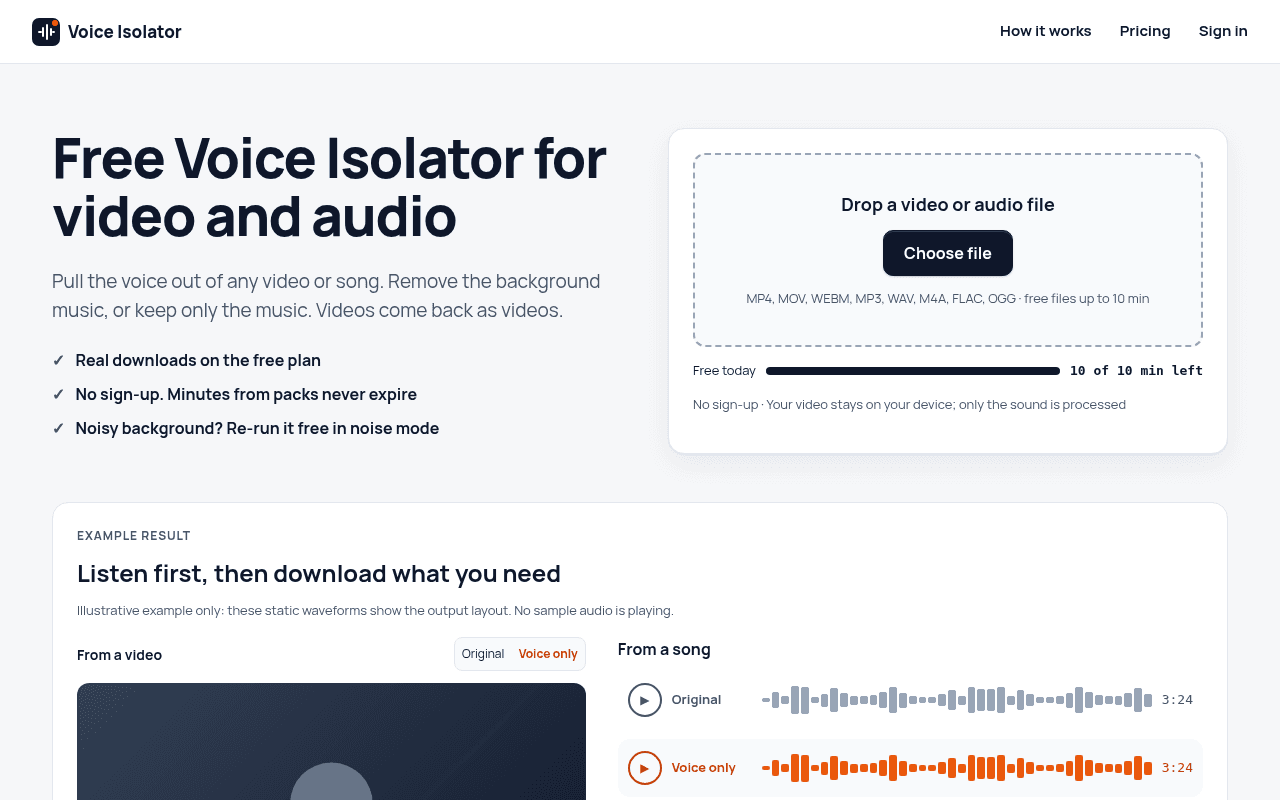
About this app
Voice Isolator (voice-isolator.com) is a web tool for separating a voice from music or background noise in audio and video files. Upload a recording and it returns two downloadable tracks: the isolated voice and the background. If the first result is not what you need, you can rerun the same file in the other mode for free. For video files, the audio is processed on our servers and your browser puts the cleaned voice back into the original video, so video comes back as video, without a watermark. The free plan gives 10 minutes a day with no sign-up, for files up to 10 minutes. Paid plans add longer files (up to 60 minutes), batches and more minutes: a one-time 120-minute pack that never expires, or monthly and yearly subscriptions. Downloads are available for 24 hours after processing. Please use only recordings you own or have permission to process.
Key features
- 1Separates voice from music or background noise in audio and video files, returning voice and background as separate downloadable tracks.
- 2Video in, video out: audio is processed server-side while the picture stays on the device, returned without a watermark.
- 3Free tier: 1 file a day, up to 10 minutes, no sign-up required; paid file credits never expire.
Target customer profile
Drawn from the product itself, not from a survey.
Scout Review
Written by AI from measured evidence, scored out of 100.
voice-isolator.com is a focused, competently built stem-separation tool with a clear pitch: upload a video or song, get the voice and the background back as separate tracks, video stays video, no watermark. The execution is above average for an indie tool — a strong hero upload card, real sample output on the page, transparent per-file pricing, and a security header setup that beats most of its peers. The weaknesses are the ones you'd expect from a young product: mobile LCP at 4.8s, low-contrast fine print, a page that runs long past the point of usefulness, and no published audits or accessibility statement. It's a good tool that knows exactly what it is.
Measure by measure
Usability
68Free rules are repeated near the upload control, pricing is four legible tiers, and no sign-up lowers the barrier. Cloudflare verification before the first upload and a very long page before any closing action cost it points.
Design
71Coherent navy/neutral palette, a hero upload card that owns the fold, and a real sample module with color-coded stems. Held back by low-contrast fine print, a near-empty footer, and no closing CTA after a long scroll.
Speed
73Desktop Lighthouse 99/100 and mobile 83/100 with CLS 0.002 and TBT 13ms — snappy and stable. Mobile LCP of 4.8s is the one real drag, likely the hero media.
Security
76Full 12/12 header checklist — HSTS, CSP, frame protection, Permissions-Policy — plus SPF and DMARC. Clear data-handling copy (audio deleted within two days). No published audits or bug bounty.
Accessibility
79Lighthouse accessibility 100/100 with a responsive layout and readable primary contrast. Secondary grey copy in explainers and table footnotes is low contrast, and there's no a11y statement or multi-language support.
Growth
62Real problem, specific wedge: video-in-video-out, free downloads, no sign-up, cheap per-file credits. Category has paid incumbents (lalal.ai, Kapwing) so headroom exists but the moat is thin.
Improvement areas
- Mobile LCP of 4.8s drags an otherwise fast page; the hero media needs compression or lazy-loading.
- Low-contrast secondary copy in explainer columns and comparison-table footnotes hurts readability despite a 100/100 automated a11y score.
- No published security page, accessibility statement, or closing CTA/footer content to convert strong technical signals into visible trust.
Design & Usability
The homepage does the hard part right: the upload card is unmistakably the primary action, formats and limits sit right under the drop zone, and the 'Real samples' module shows actual output — a canoe clip with matched waveform stems — instead of describing it. Color coding (orange for voice, blue for music) carries meaning across the page. The problems are downstream: secondary copy in the explainer columns and comparison tables is small and light grey, the footer is nearly empty, and the page ends after a long FAQ with no closing call to action. Usability is solid where it counts — no sign-up, free rules repeated near the control, four legible pricing tiers — but a Cloudflare human-verification widget sits above the fold on the upload card, and the sheer density of tables and specs means most visitors will never scroll to the end.
Speed & Security
Speed is genuinely strong on desktop: Lighthouse 99/100, with CLS at 0.002 and TBT at 13ms, meaning the page is stable and responsive almost immediately. Mobile drops to 83/100, and the culprit is a 4.8s LCP — the hero media is slow to paint on a phone even though everything else is already done. Security is the quiet overachiever: the HTTP probe found all 12 checklist items present (HTTPS enforced, HSTS, CSP, frame protection, X-Content-Type-Options, Referrer-Policy, Permissions-Policy) plus SPF and DMARC. The site also states plainly that video stays on the device, only audio is uploaded, and audio plus results are deleted within two days. What's missing is the paperwork — no SOC 2, ISO, pen-test summary, or bug bounty — which is normal for a tool this young but caps the score below the excellent band.
Accessibility & Growth
Accessibility scores a clean 100/100 on the Lighthouse audit, and the layout is responsive with readable primary contrast. The gap is the same one the visual audit flagged: secondary grey copy in explainers and table footnotes is low contrast, and there's no accessibility statement or multi-language support to point to. Growth is a judgment on the idea, and the idea is decent: separating voice from music or noise is a real, recurring problem, and the product names a specific wedge — video in, video out with the picture untouched, free-plan downloads, no sign-up, and non-expiring file credits at 20–30¢ a file. The site even publishes a hand-checked comparison against tordar.ai, lalal.ai and Kapwing. The limit is that stem separation is a crowded category with established paid incumbents, and the differentiators here are pricing and packaging rather than a technology moat. It can win on convenience and price; it won't win on lock-in.
Conclusion
If you need to pull a voice out of a video or a song and you don't want a subscription or a sign-up, this is one of the more honest options in the category — the free tier actually downloads, and the credits don't expire. Go in expecting a utilitarian interface rather than a polished studio app, and check the mobile load time if you're uploading from a phone. The category is crowded and the incumbents are bigger, but the pricing and the video-in-video-out handling give it a real reason to exist.
Suggestions for improvement
- Fix the 4.8s mobile LCP — compress or lazy-load the hero media; everything else on the page is already fast.
- Raise contrast on the explainer columns and comparison-table footnotes; they read as fine print and fail visually even at 100/100 automated a11y.
- Add a closing CTA after the FAQ and fill out the footer with links to docs, refund policy, and contact.
- Publish a short security/data-handling page and an accessibility statement to convert the strong header setup into visible trust.
Alternatives comparison
Named competitors, point by point. Nobody paid to appear here or to be left out.
 voice-isolator.com |  |  | ||
|---|---|---|---|---|
| Free plan allows downloading results | Yes — 1 file a day, no sign-up | Not verified | Not verified | Not verified |
| Video in, video out (picture preserved) | Yes — MP4/MOV/WebM returned with replaced audio | Not verified | Not verified | Not verified |
| Sign-up required to use | No — free tier works without an account | Not verified | Not verified | Not verified |
| Pricing model | Free tier; $2.99/10 files; $4.90/25 files; $9.90/mo or $79/yr Pro | Not verified | Not verified | Not verified |
| Maximum file length | 60 minutes (10 minutes on free tier) | Not verified | Not verified | Not verified |
Comparing options? See voice-isolator.com alternatives, scored side by side
More AI Generations apps
View all AI Generations
Uni-1 by Luma AI
92Uni-1 is an advanced multimodal text-to-image AI model th...

Gerty
91Private, local AI assistant for Mac that runs offline

LTX 2.3 AI Video Generator
91Fast, open-source AI video generator with 4K support, mul...

DemoVexa
90Turn your code into professional product demo videos with AI-generated scripts, animated UI, and natural voiceovers.

AI Vocals Generator
89Add AI singers or rappers to your own beat, get two takes...

All of Us
89Add deceased loved ones to photos with AI and see free pr...

Voqusa
89Transcribe social media video and audio links into text (free signup, 5 free credits, then pay-as-you-go)

Pixelimg
88A free online AI-powered tool that instantly converts ima...

Cantoro
88Custom AI songs with a name, heard free before paying $4....

tradutor de mangá com IA
88O tradutor de mangá com IA traduz capítulos em lote, personaliza textos e oferece edição visual para estúdios.

IraVoice
88Private on-device dictation for Apple-silicon Macs.

OBVELO
88Privacy gateway that masks personal data in LLM traffic


A platform dedicated to providing unbiased reviews of newly launched applications, analyzing everything from their features to their full potential.
info@scoutforge.net© 2026 Scoutforge. All rights reserved.
