Cycling through all six. Tap any point to stop.
Measured on six things
Free browser-based 3D home design with AI, BIM, and 2D/3D...
Security
52HTTPS enforced with frame protection and several security headers, but no HSTS, CSP or DMARC, and 7/13 on the header checklist. Local-only storage is a real privacy plus, not an audited guarantee.
Screenshots
1 / 1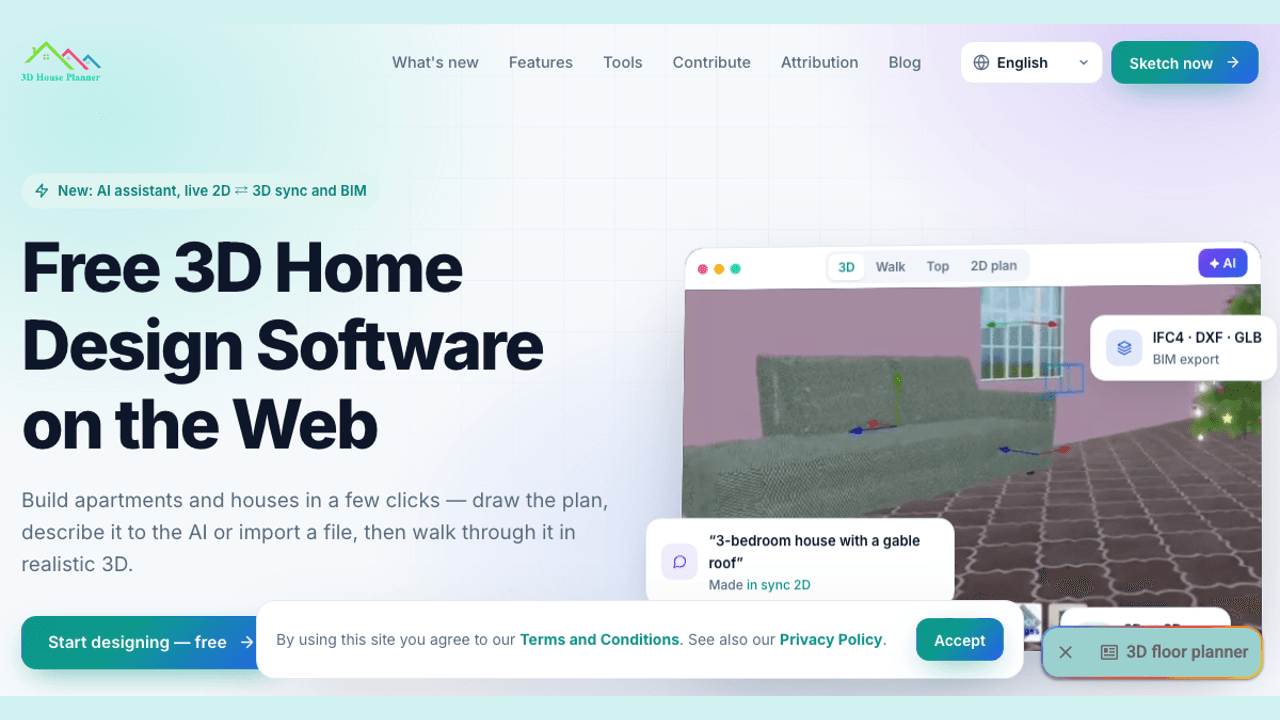
About this app
3D House Planner is a free, browser-based 3D home design tool that lets you create floor plans, furnish rooms, and visualize in realistic 3D without any installation. It stands out with an AI assistant that can generate layouts from text or images, live 2D/3D synchronization, and BIM export (IFC4) for professional workflows. Projects are saved locally in your browser, ensuring privacy, and the app is free for personal and commercial use. With support for up to 50 floors, extensive import/export formats, and a vast catalog of 3D objects, it's a powerful alternative to paid design software.
Key features
- 1AI design assistant that generates layouts from text prompts or uploaded plan images.
- 2Live 2D⇄3D synchronization with realistic rendering modes and AI-generated photos.
- 3IFC4 BIM import/export with property sets, plus DXF, GLB, glTF, OBJ, STL and CSV export.
- 4Browser-only operation with no login, local project storage, autosave and crash recovery.
- 5Support for up to 50 floors per project and a catalog of thousands of 3D objects.
Target customer profile
Drawn from the product itself, not from a survey.
Demographic
Homeowners planning renovations
Pain points
Expensive software, complex tools, difficult visualization
Primary needs
Affordable, easy-to-use design tool with realistic previews
Demographic
Interior designers and architects
Pain points
Limited collaboration, lack of BIM integration in free tools
Primary needs
Professional features like BIM, AI assistance, and multi-format export
Demographic
Real estate agents and property managers
Pain points
Slow property visualization, costly 3D rendering services
Primary needs
Quick 3D modeling from floor plans, virtual tours
Demographic
Students and educators in architecture
Pain points
Budget constraints, steep learning curve of pro software
Primary needs
Free, accessible tool with learning resources and BIM support
Scout Review
Written by AI from measured evidence, scored out of 100.
3D House Planner is a genuinely capable free browser-based home design tool. The feature set — AI layout generation, live 2D/3D sync, 50 floors, IFC4 BIM export, 10+ import/export formats — is unusually deep for something that costs nothing and requires no install. The execution around it is uneven: a strong accessibility score and clear workflow sit next to a 16-second mobile LCP, missing security headers, and a homepage that undercuts itself with an intrusive book ad. It is a solid pick for students, hobbyists and budget-conscious designers; professionals should treat the BIM claims as a starting point, not a replacement for audited tooling.
Measure by measure
Usability
63No-login, browser-only workflow with a clear three-step path and broad import support (IFC, DXF, GLB, OBJ, STL) is genuinely low-friction; the intrusive modal and paragraph-heavy feature copy drag it down.
Design
57Clean, modern hero with a live 3D viewport and clear BIM/AI badges, but the layout is undercut by a book-ad modal over the hero, repetitive checkmark cards and decorative progress bars.
Speed
57Lighthouse mobile 60/100 and desktop 64/100, with a punishing 16.1s LCP on mobile. TBT of 43ms and CLS of 0.037 are fine — the hero just takes forever to paint.
Security
52HTTPS enforced with frame protection and several security headers, but no HSTS, CSP or DMARC, and 7/13 on the header checklist. Local-only storage is a real privacy plus, not an audited guarantee.
Accessibility
79Lighthouse a11y 97/100 with only contrast and label-matching failures, plus a 10-language selector. No WCAG statement published, so it sits at the top of the measured band rather than beyond it.
Growth
68A free, no-install browser planner with AI layout generation and IFC4 BIM export is a real wedge against SketchUp, Sweet Home 3D and Floorplanner — if it can convert free users into anything.
Improvement areas
- Remove the intrusive book-ad modal blocking the hero and primary CTA.
- Reduce mobile LCP (16.1s) via asset compression and lazy loading.
- Add HSTS, CSP and DMARC; publish a security or compliance page.
- Publish a WCAG accessibility statement and fix contrast/label failures.
Design & Usability
The homepage is competently built: a live 3D viewport, AI prompt bubble and BIM export tags communicate the product in seconds, and the three-step workflow (draw/describe/import → furnish → visualize) is easy to follow. The no-login, browser-only promise is repeated clearly and backed by a broad import list. What holds it back is self-inflicted: a modal advertising an unrelated Titanic novel sits on top of the hero, feature cards repeat the same checkmark lists, and the render-quality bars look interactive but aren't. Fix the modal and tighten the copy and this jumps a tier.
Speed & Security
Speed is the weak spot. Lighthouse mobile scores 60/100 with a 16.1s LCP and 4.6s FCP; desktop is 64/100. TBT (43ms) and CLS (0.037) are healthy, so the problem is heavy hero/3D assets painting late, not runaway JavaScript. Security is mid-pack: HTTPS is enforced with frame protection, X-Content-Type-Options, Referrer-Policy and Permissions-Policy, but HSTS, CSP and DMARC are missing (7/13 checklist points). The local-storage, no-upload architecture is a genuine privacy advantage, but it is a design choice, not a certification.
Accessibility & Growth
Accessibility is a strength: Lighthouse scores 97/100 with only contrast and accessible-name failures, and the site ships a ten-language selector. There is no WCAG statement, so it lands at the top of the measured band rather than above it. Growth is the interesting question. The category — SketchUp, Sweet Home 3D, Floorplanner — is crowded, but this product's wedge is concrete: free, no install, AI generation from text or images, live 2D⇄3D sync, and IFC4 BIM export that the free alternatives lack. That is a real reason for a homeowner or student to pick it. The limit is monetization: 'free, we accept donations' gives no obvious path to convert the audience it attracts.
Conclusion
If you want to sketch a house in your browser for free and export it to IFC without paying SketchUp, this is one of the better options available. Go in expecting a fast-moving indie tool rather than an enterprise platform: verify exports before relying on them in a professional pipeline, and don't expect the site to be snappy on mobile. The foundation is strong; the polish is the work left to do.
Suggestions for improvement
- Remove the book-ad modal from the hero — it blocks the primary CTA and the product preview.
- Cut mobile LCP from 16.1s by compressing/lazy-loading hero 3D assets and serving responsive images.
- Add HSTS, a Content-Security-Policy and DMARC to close the obvious header gaps.
- Publish a short WCAG/accessibility statement and fix the two contrast/label failures Lighthouse flags.
Alternatives comparison
Named competitors, point by point. Nobody paid to appear here or to be left out.
 3D House Planner 3D House Planner |  SketchUp SketchUp |  Sweet Home 3D Sweet Home 3D |  Floorplanner Floorplanner | |
|---|---|---|---|---|
| Pricing | Free, including commercial use (donations accepted) | Free web tier; paid Pro/Studio plans | Free and open source | Free basic plan; paid Pro tiers |
| Installation required | No — runs entirely in the browser | Web version available; desktop app for full features | Yes — desktop application | No — browser-based |
| AI layout generation | Yes — from text prompts or uploaded images | No native AI layout generation | No | No native AI layout generation |
| BIM / IFC export | Yes — IFC4 import/export with property sets, free | Via paid extensions/Pro workflows | No native IFC export | Limited; not a core BIM workflow |
| Account / login required | No — projects stored locally in browser | Account required for web/cloud features | No account needed | Account required |
SketchUp
Professional 3D modeling software with a free tier, widely used in architecture and design.
Sweet Home 3D
Free, open-source interior design application for desktop, with 2D plan and 3D preview.
Floorplanner
Online floor plan tool with free basic plan, offering 2D/3D design and rendering.
Comparing options? See 3D House Planner alternatives, scored side by side
More Design & Creativity apps
View all Design & Creativity
RoomCreator
92An AI-powered interior and exterior design tool that tran...

What the GIF
89Frame-perfect video-to-GIF maker that runs entirely in yo...

TranscriptYou
88Free YouTube transcript generator with timestamps and AI ...

RestorePhotosApp
88An AI-powered photo restoration app that brings old, blur...

Portrait Gift
88AI-powered personalized face swap art platform creating c...

ButterKit
82macOS app for App Store screenshots: 3D mockups, auto-tra...

BeartIMAGE
88BeartIMAGE is a free, web-based image processing platform engineered for fast, bulk photo editing and conversion directly in your browser.

Pixelimg
88A free online AI-powered tool that instantly converts ima...

Coloring Pages Pro
87A massive collection of free printable coloring pages for...

QRocodile
87Design And Animate QR Codes People Want to Scan

FaceSwapAI
87AI face swap for photos, videos, GIFs with free trial.

Book Cover Generator
87AI book cover generator for indie authors—turn your story...


A platform dedicated to providing unbiased reviews of newly launched applications, analyzing everything from their features to their full potential.
info@scoutforge.net© 2026 Scoutforge. All rights reserved.
