Cycling through all six. Tap any point to stop.
Measured on six things
Free AI video clips from text prompts or first and last frames
Security
41HTTPS is enforced and SPF is set, but there's no HSTS, CSP, frame protection, Referrer-Policy, or DMARC — 3/13 checklist points. No security page, audit, or bug bounty is published.
Screenshots
1 / 1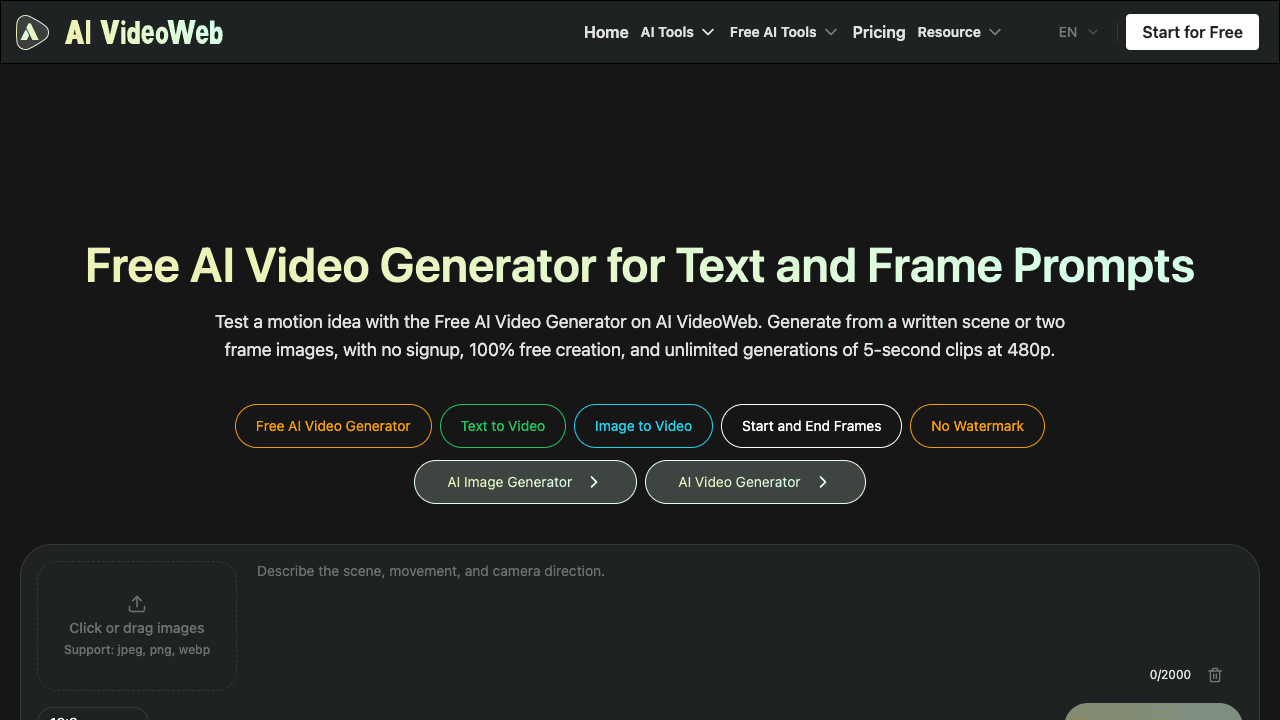
About this app
AI VideoWeb Free AI Video Generator creates short video clips in a browser from a text prompt or from uploaded first and last frames. It produces 5-second clips at 480p and supports 16:9, 9:16, and 1:1 aspect ratios. The free workflow does not require an account or credits, and exports without a watermark. Requests are processed in a shared queue, so waiting times can vary. It is intended for creators, marketers, and small teams who want to explore a visual idea or make a quick motion draft without installing software.
Key features
- 1Text-to-video and first/last-frame image-to-video generation in the browser.
- 25-second 480p clips in 16:9, 9:16, and 1:1 aspect ratios.
- 3Free workflow with no account, no credits, and no watermark; shared generation queue.
Target customer profile
Drawn from the product itself, not from a survey.
Scout Review
Written by AI from measured evidence, scored out of 100.
AI VideoWeb's free generator is a genuinely useful little tool: type a prompt or drop two frames, pick an aspect ratio, get a 5-second 480p clip with no watermark and no account. The composer is clean and the accessibility score is strong. The cracks show in the details — a misspelled App Store name, a Chinese-language store UI, dim unreadable body copy, a 12-second mobile LCP, and a 'no credits' pitch that the pricing page quietly contradicts. It's a competent free funnel, not a polished product.
Measure by measure
Usability
58The prompt box is above the fold with a clear empty state, and no-signup free generation is a real draw. But a modal blocks the page on arrival, and the 'no credits' pitch collides with a pricing page selling credits.
Design
57Judging the app UI plus store material: the dark theme and yellow-green accent are consistent and the composer is clean, but store screenshots are generic mockups, the header is misspelled 'AI Vedio', and homepage body copy is near-unreadable.
Speed
44Lighthouse mobile scores 44/100 with a 12.0s LCP and 875ms TBT; desktop is a healthier 75/100. The generation queue is shared by design, so waits are expected, but the page itself is heavy.
Security
41HTTPS is enforced and SPF is set, but there's no HSTS, CSP, frame protection, Referrer-Policy, or DMARC — 3/13 checklist points. No security page, audit, or bug bounty is published.
Accessibility
80Lighthouse accessibility lands at 96/100 with a single failing contrast audit — the same dim-text problem visible on the homepage. No WCAG statement, and the app is localized in only one language.
Growth
58A real, growing need with a genuine wedge — free, no-signup, no-watermark 5s clips. But the free tool is a funnel to credit packs and 'Flaq AI' APIs, and the category is crowded with better-funded generators.
Improvement areas
- Mobile performance: 12.0s LCP and 44/100 Lighthouse score need real optimization.
- Security headers: add HSTS, CSP, frame protection, Referrer-Policy, and DMARC.
- Store listing quality: fix 'AI Vedio' typo and localize the app UI to English.
- Contrast: raise homepage body-copy contrast to pass the failing Lighthouse audit.
Design & Usability
Design and usability are the strongest parts of the product. The composer is genuinely well built — upload tile, 2000-character prompt field, aspect-ratio choice, and a clear 'your video will appear here' empty state — and the dark/yellow-green identity carries from web to app. The problems are execution details: the App Store listing misspells its own name as 'AI Vedio', the store UI is in Chinese while the web product is English, and homepage body copy is set so dim it's nearly unreadable. Usability is undercut by a welcome modal on arrival and by a 'no credits needed' promise that the pricing page contradicts with 5,000-credit bundles.
Speed & Security
Speed is the weak spot. Lighthouse mobile scores 44/100 with a 12.0s LCP and 875ms TBT; desktop is a more respectable 75/100. Some of that is inherent — the site openly says free generations run through a shared queue — but the landing page itself is heavy enough to hurt first impressions. Security is thin: HTTPS and SPF are in place, but there's no HSTS, CSP, frame protection, Referrer-Policy, or DMARC, landing at 3/13 checklist points. No security page, audit, or bug bounty is published, which is normal for an indie tool but leaves users with little to verify.
Accessibility & Growth
Accessibility is the surprise bright spot: 96/100 on Lighthouse with a single failing contrast audit, which mirrors the dim-text problem seen on the homepage. There's no WCAG statement and the app is localized in one language, so it's good-but-not-complete. Growth is a judgment call on the idea: free, no-signup, no-watermark 5-second clips at 480p is a real wedge for creators testing motion ideas, and the category has headroom. But the free tool is clearly a funnel to credit packs and 'Flaq AI' model APIs, and the space is crowded with better-funded generators — the wedge is real but narrow.
Conclusion
If you want to test a motion idea without signing up or paying, this does exactly that, and the queue wait is the price of admission. If you need reliable, fast, higher-resolution output for real production, the paid tiers and the 'Flaq AI' API route are where this product actually wants you — and where you should compare against dedicated generators before committing.
Suggestions for improvement
- Fix the App Store listing: correct 'AI Vedio' and localize the store UI to match the English web product.
- Raise homepage body-copy contrast — it's the same issue flagged by the Lighthouse contrast audit.
- Add HSTS, CSP, frame protection, Referrer-Policy, and DMARC; publish a short security page.
- Cut mobile LCP from 12s by trimming hero assets and deferring the 'What's new' modal until after first paint.
Alternatives comparison
Named competitors, point by point. Nobody paid to appear here or to be left out.
 AI VideoWeb Free AI Video Generator |  |  |  | |
|---|---|---|---|---|
| Free tier without account or credits | Yes — no signup, no credits, no watermark, shared queue | Not specified in provided details | Not specified in provided details | Not specified in provided details |
| Output resolution and clip length | 480p, 5 seconds | Not specified in provided details | Not specified in provided details | Not specified in provided details |
| Input modes | Text prompt, or first + last frame images | Not specified in provided details | Not specified in provided details | Not specified in provided details |
| Aspect ratios | 16:9, 9:16, 1:1 | Not specified in provided details | Not specified in provided details | Not specified in provided details |
| Paid upgrade path | Credit packs from $9.99/mo to $49.99/mo plus one-time bundles | Not specified in provided details | Not specified in provided details | Not specified in provided details |
Comparing options? See AI VideoWeb Free AI Video Generator alternatives, scored side by side
More AI Generations apps
View all AI Generations
Uni-1 by Luma AI
92Uni-1 is an advanced multimodal text-to-image AI model th...

Gerty
91Private, local AI assistant for Mac that runs offline

LTX 2.3 AI Video Generator
91Fast, open-source AI video generator with 4K support, mul...

DemoVexa
90Turn your code into professional product demo videos with AI-generated scripts, animated UI, and natural voiceovers.

All of Us
89Add deceased loved ones to photos with AI and see free pr...

Voqusa
89Transcribe social media video and audio links into text (free signup, 5 free credits, then pay-as-you-go)

Pixelimg
88A free online AI-powered tool that instantly converts ima...

IraVoice
88Private on-device dictation for Apple-silicon Macs.

OBVELO
88Privacy gateway that masks personal data in LLM traffic

tradutor de mangá com IA
88O tradutor de mangá com IA traduz capítulos em lote, personaliza textos e oferece edição visual para estúdios.

HeyVid AI
88HeyVid AI is a free all-in-one AI video and image generat...

RestorePhotosApp
88An AI-powered photo restoration app that brings old, blur...


A platform dedicated to providing unbiased reviews of newly launched applications, analyzing everything from their features to their full potential.
info@scoutforge.net© 2026 Scoutforge. All rights reserved.
