Cycling through all six. Tap any point to stop.
Measured on six things
Encrypted photo and file vault for iPhone. AES-256 on device, pattern lock, decoy vault and calculator disguise. No account, no cloud.
Security
54Strong on-device crypto story (AES-256-GCM, PBKDF2, Secure Enclave, iCloud-excluded) and HTTPS enforced, but no HSTS, CSP, or DMARC, and no third-party audit, SOC 2, or bug bounty published.
Screenshots
1 / 1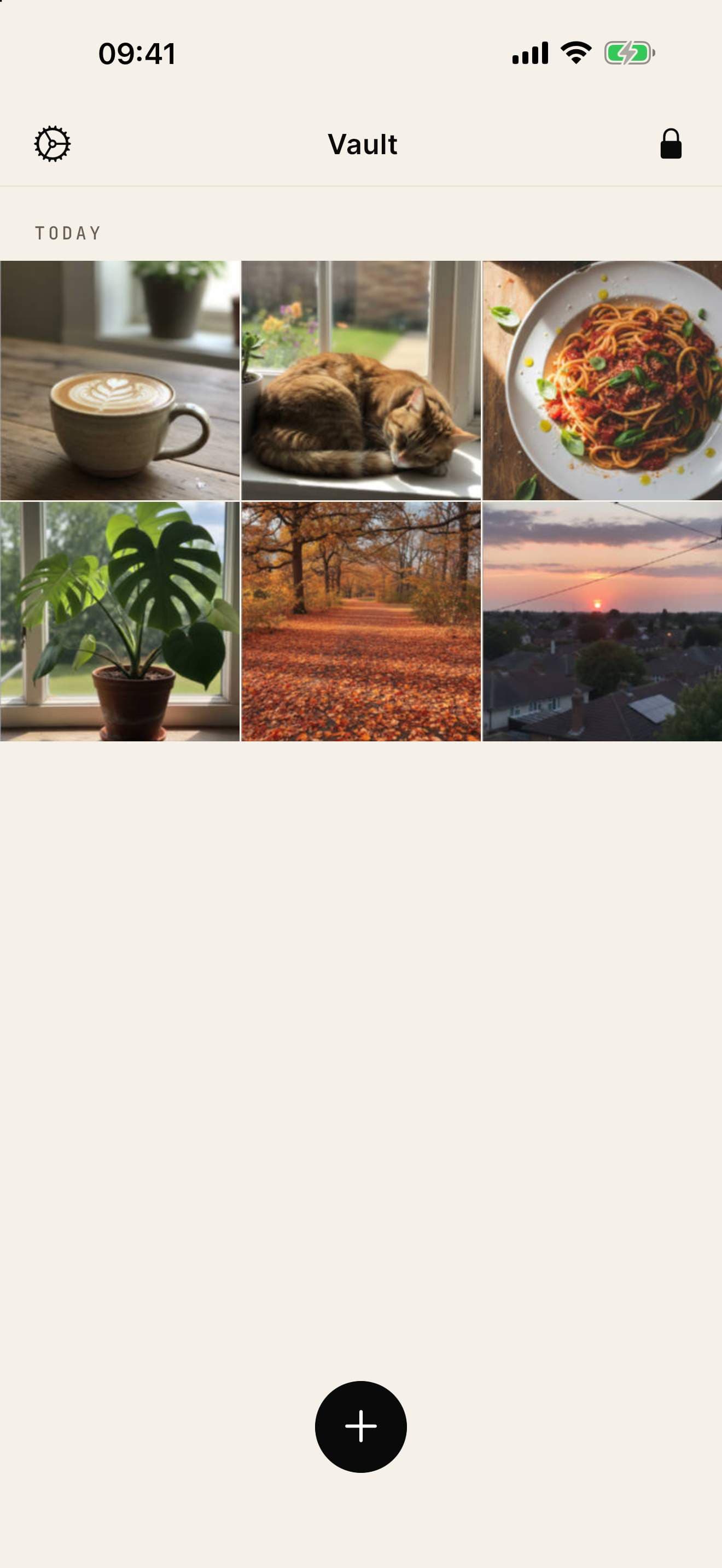
About this app
App-Vault is a private vault for iPhone that keeps your photos, videos and documents encrypted right on the device. Everything is sealed with AES-256-GCM and the key comes from a pattern you draw on a 5x5 grid, so there's no password to leak. There's no account and no server. Your files never leave the phone, and the vault is excluded from iCloud backup. It's made for people who sometimes have to hand their phone over: travelers at border checks, journalists, lawyers, shared family devices. A working calculator can hide the vault on your home screen, a second pattern opens a decoy album, and Intruder Selfie snaps whoever tries the wrong pattern. A 12-word recovery phrase gets you back in if you forget the pattern, and File Shredder overwrites files before deleting them. No ads, no tracking, no IDFA reads. Free to start, Premium unlocks unlimited files and every protection feature.
Key features
- 1AES-256-GCM on-device encryption with PBKDF2 key derivation from a 5x5 pattern; no account, no server.
- 2Calculator launcher disguise plus decoy vault (second pattern) and Intruder Selfie on wrong-pattern attempts.
- 3Vault excluded from iCloud backup via NSURLIsExcludedFromBackupKey and ThisDeviceOnly Keychain access.
Target customer profile
Drawn from the product itself, not from a survey.
Demographic
Journalists and lawyers
Pain points
Risk of client/privileged photos being exposed on a lost or seized phone
Primary needs
Secure, encrypted vault with no cloud dependency and plausible deniability
Demographic
Travelers and frequent border crossers
Pain points
Customs agents scrolling through camera roll
Primary needs
Discreet hide photos and documents behind a calculator or pattern lock
Demographic
Parents sharing iPhones/iPads with kids
Pain points
Accidental deletion or viewing of personal photos
Primary needs
Calculator launcher disguise and decoy vault for separate albums
Scout Review
Written by AI from measured evidence, scored out of 100.
App-Vault is a focused, well-built iPhone vault with a credible privacy thesis: on-device AES-256-GCM, no account, no server, and a calculator disguise that actually makes sense for the people it names. The marketing site is fast and polished, the guides library is substantive, and the niche targeting is sharper than most competitors. The weak spots are the thin free tier (one file), missing security hardening headers and third-party audits, and an early-stage store presence with no ratings. It's a product with a real point of view that hasn't yet earned the external proof its pitch demands.
Measure by measure
Usability
63Pattern lock and calculator launcher are immediately legible in screenshots, and the guides library (38 articles) is a real help resource. But no visible onboarding or empty-state cues, and the free tier caps at one file.
Design
71Judging the app UI and store material: cohesive green/gold palette, serif accents, and a legible calculator disguise. Homepage is polished but the 11-card grid and faint READ MORE links dilute hierarchy.
Speed
88Lighthouse mobile 98/100 with LCP 1.7s, CLS 0, TBT 17ms; desktop a clean 100/100. The marketing site is genuinely snappy with no layout shift.
Security
54Strong on-device crypto story (AES-256-GCM, PBKDF2, Secure Enclave, iCloud-excluded) and HTTPS enforced, but no HSTS, CSP, or DMARC, and no third-party audit, SOC 2, or bug bounty published.
Accessibility
79Lighthouse accessibility 100/100 on the site, nine language options including Arabic and Japanese, and responsive layout. No published WCAG statement, and the App Store listing is localized in only one language.
Growth
62Sharp niche (journalists, lawyers, border crossers) with real differentiators — no account, no server, calculator disguise, decoy vault — against Keepsafe and Vaultaire. Category has headroom; wedge is credible.
Improvement areas
- Free tier caps at one file, pushing users to $29.99/year faster than most will tolerate.
- No HSTS, CSP, Permissions-Policy, or DMARC on the marketing site; no third-party audit or bug bounty.
- App Store listing localized in only one language and has no ratings yet; no visible in-app onboarding.
Design & Usability
App-Vault's design reads as intentional: a green/gold palette, serif headlines, and a calculator disguise that's immediately understandable in the store screenshots. The vault grid and pattern lock are legible at a glance. Where it slips is density — the homepage stacks eleven feature cards with faint READ MORE links, and the app screenshots show no onboarding or empty-state guidance. Usability is carried by a genuinely useful guides library (38 articles) and a clear pricing page, but the one-file free tier and low-contrast tab labels make the first-run experience feel thinner than the marketing promises.
Speed & Security
Speed is the standout: Lighthouse mobile 98/100 with a 1.7s LCP and zero layout shift, desktop a perfect 100. The site loads faster than most vault apps open. Security is a mixed picture. The on-device story is strong and specific — AES-256-GCM, PBKDF2 key derivation, Secure Enclave, ThisDeviceOnly Keychain, iCloud backup exclusion — and HTTPS is enforced with frame protection and Referrer-Policy set. But the probe found no HSTS, no CSP, no Permissions-Policy, and no DMARC, and there's no published third-party audit, SOC 2, or bug bounty. For a product whose entire pitch is 'mathematically yours,' the missing external validation is the gap that matters most.
Accessibility & Growth
Accessibility scores well on the measurable side: a 100/100 Lighthouse audit and nine site languages including Arabic and Japanese. The gap is that the App Store listing is localized in only one language, and there's no published WCAG statement. Growth is the most interesting dimension. App-Vault names specific customers — journalists, lawyers, border crossers, shared family devices — and backs it with differentiators the alternatives structurally can't match: no account, no server, calculator launcher, decoy vault, intruder selfie. Keepsafe requires an account and defaults to cloud backup; Vaultaire lacks the calculator launcher. The wedge is real. The limit is distribution: no ratings yet, one-language store listing, and a category where trust is earned slowly.
Conclusion
If you're a journalist, lawyer, or frequent border crosser who wants a vault that never touches a server, App-Vault is worth the download — the crypto story and disguise features are the real deal. If you're a casual user who wants to hide a few photos, the one-file free tier will push you to the $29.99/year plan faster than you'd like. Either way, watch for a published audit and more store reviews before trusting it with anything you can't afford to lose.
Suggestions for improvement
- Publish a third-party security audit or bug bounty program — the crypto pitch deserves external validation.
- Add HSTS, CSP, Permissions-Policy, and DMARC to the marketing site to match the on-device security story.
- Raise the free tier above one file, or offer a limited-time full-feature trial to reduce the paywall cliff.
- Localize the App Store listing beyond one language to match the nine-language website.
Alternatives comparison
Named competitors, point by point. Nobody paid to appear here or to be left out.
 App-Vault App-Vault |  Keepsafe Keepsafe |  Vaultaire Vaultaire | |
|---|---|---|---|
| Account required | No account, no email | Account required | Not specified |
| Cloud dependency | None — on-device only, excluded from iCloud backup | Cloud backup by default | Not specified |
| Calculator launcher disguise | Yes — long-press equals to unlock | No | No |
| Decoy vault | Yes — second pattern opens separate album | Not specified | Not specified |
| Encryption | AES-256-GCM on-device, PBKDF2 key derivation | Encrypted, cloud-backed | Encrypted on-device |
| Free tier | 1 file, full encryption | Limited free tier with account | Not specified |
| Pricing | Free; $3.99/week or $29.99/year | Subscription-based | Not specified |
Keepsafe
A popular photo vault app with similar features but requires an account and uses cloud backup by default.
Vaultaire
Another encrypted photo vault for iOS, but offers less customization and no calculator launcher.
Comparing options? See App-Vault alternatives, scored side by side
More Security apps
View all Security
OBVELO
88Privacy gateway that masks personal data in LLM traffic

Sidenty
87Sidenty is a professional digital identity protection ser...

ProcessSpy
87A native macOS process explorer and advanced monitor that...

PromptTrace
85Free hands-on AI security labs for prompt injection and L...

Sanctix
85Sanctions screening with verifiable SHA-256 audit trails.

eGuard
84Verifiable parental controls for families in the Philippines

VaultKeepR
84Password manager with no email, no account, no tracking. ...

Noden
84Native macOS SSH, SFTP & RDP client with a Keychain-backe...

Archonum
84Real-device browser automation for AI agents

Privacy Requests
84DSAR management software for small teams.

PCDOTS Email Recovery Software
83Recovers emails from corrupt mailboxes across 50+ platforms.

CertAssist.io
83Simple, affordable compliance certification for ISO 27001...


A platform dedicated to providing unbiased reviews of newly launched applications, analyzing everything from their features to their full potential.
info@scoutforge.net© 2026 Scoutforge. All rights reserved.
