Cycling through all six. Tap any point to stop.
Measured on six things
AI image and video studio in your browser, no download
Security
42HTTPS is enforced and DMARC is set, but the header probe found no HSTS, CSP, frame protection or Referrer-Policy — 3/12 checklist points. No SOC 2, ISO or bug bounty claims surfaced.
Screenshots
1 / 1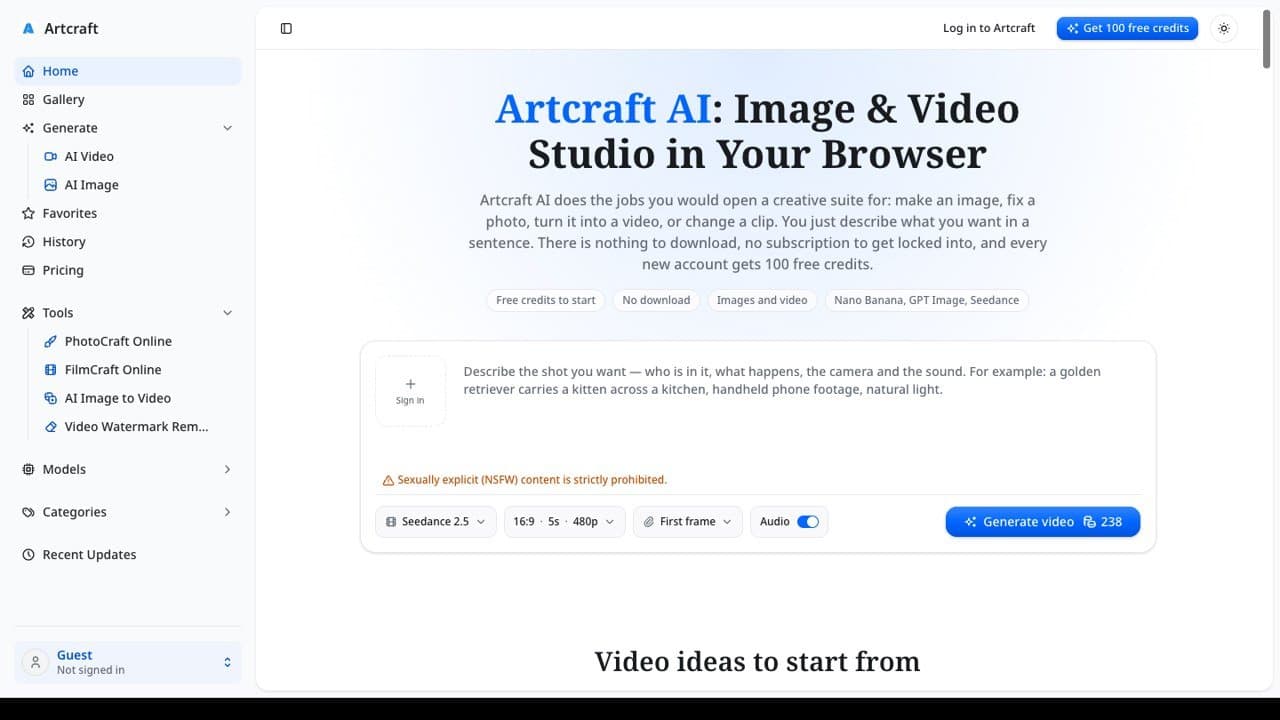
About this app
Artcraft AI is a browser-based studio for making and editing images and videos with AI, and a no-download Adobe alternative. Describe what you want or upload a photo, pick a model such as Nano Banana Pro, GPT Image 2 or Seedance 2.5, and download the result. PhotoCraft edits photos by describing the change: remove a background, clear people out of a shot, swap the sky or fix the light, without layers or masks. FilmCraft makes videos from a prompt or a photo, with sound, or changes a short clip of your own with a sentence. Image to Video keeps faces, outfits and products the same, and the Video Watermark Remover paints out a logo or caption from a clip you own. It works the same on a laptop, a Chromebook, a tablet or a phone. New accounts get 100 free credits; paid credit plans for more generations.
Key features
- 1PhotoCraft: describe-the-edit photo fixes — background removal, sky swap, light correction — without layers or masks.
- 2FilmCraft and image-to-video: prompt-to-video with sound, plus identity-preserving animation of your own photos.
- 3Video Watermark Remover: paints out logos and captions from clips you own, even when they move.
- 4100 free credits on signup, no card required; credit plans with non-expiring one-time packs.
Target customer profile
Drawn from the product itself, not from a survey.
Demographic
Social media creators & content marketers
Pain points
Need fast thumbnails, posts & vertical clips without editing skills
Primary needs
Quick AI images and short videos with sound from a prompt or a photo
Demographic
Small business owners & e-commerce sellers
Pain points
No budget for studios or monthly Adobe subscriptions
Primary needs
Product shots, background swaps, and short ad clips
Demographic
Casual/hobbyist editors & photo retouchers
Pain points
Intimidated by layers, masks, and timelines
Primary needs
Describe-the-edit photo fixes and image-to-video animation
Demographic
Freelancers & agencies on tight budgets
Pain points
Subscription lock-in for tools they only need occasionally
Primary needs
Credit-based pricing and fast results in the browser
Scout Review
Written by AI from measured evidence, scored out of 100.
Artcraft AI is a browser-based AI image and video studio positioning itself as the no-download, no-subscription Adobe alternative. It bundles PhotoCraft (describe-the-edit photo fixes), FilmCraft (prompt-to-video with sound), image-to-video with identity preservation, and a video watermark remover — all behind a credit system with 100 free credits to start. The product is real and the feature set is genuinely broad for a new entrant. The execution is uneven: desktop speed is excellent but mobile LCP drags at 5.0s, accessibility is a clean 100 but security headers are thin (3/12), and the UI has visible rough edges like a sign-in button inside the prompt box and a 15-item sidebar. Against Adobe, Canva and Runway, it competes on price and simplicity rather than depth or polish.
Measure by measure
Usability
60100 free credits with no card and six ready-made sample prompts lower the barrier nicely, but generation is gated behind sign-in and the dense multi-level sidebar slows first-time scanning.
Design
58Clean hero hierarchy and logically grouped model controls, but a 15+ item sidebar and a '+ sign in' button floating inside the prompt box read as unfinished. Credit cost on the generate button shifts without explanation.
Speed
60Desktop Lighthouse 99/100 is snappy, but mobile lands at 72 with a 5.0s LCP and 3.5s FCP — the heavy media-heavy homepage drags on phones where most creators actually are.
Security
42HTTPS is enforced and DMARC is set, but the header probe found no HSTS, CSP, frame protection or Referrer-Policy — 3/12 checklist points. No SOC 2, ISO or bug bounty claims surfaced.
Accessibility
78Lighthouse accessibility scored a perfect 100/100, with one failing audit on label/accessible-name mismatch. No WCAG statement or a11y docs found, so the score sits mid-band on automated evidence alone.
Growth
58Real problem, real wedge: describe-the-edit photo fixes, identity-preserving image-to-video and a watermark remover in one browser studio. But it's a crowded AI-generation category and the domain is brand new.
Improvement areas
- Security headers are thin (3/12 checklist points) — no HSTS, CSP, frame protection or Referrer-Policy.
- Mobile Lighthouse performance is 72 with a 5.0s LCP; desktop is 99.
- UI rough edges: '+ sign in' inside the prompt textarea and a 15+ item multi-level sidebar.
- No published security page, SOC 2 roadmap, WCAG statement or bug bounty program.
Design & Usability
Artcraft AI's interface is competent but cluttered. The hero does its job — big blue product name, clear subtitle, a prompt box front and center — and the model selectors (Seedance 2.5, H3 Max Turbo, Nano Banana Pro) are grouped sensibly next to the generate button. But the left sidebar carries 15+ items with nested Generate and Tools sections, and a '+ sign in' button floats inside the prompt textarea like a leftover from a half-finished auth flow. Usability is friendlier than the design suggests: 100 free credits with no card, six sample prompts with one-click 'Use this prompt' buttons, and pricing that includes non-expiring one-time credit packs. The friction is the sign-in gate sitting inside the input and the multi-level nav that makes first-time scanning slow.
Speed & Security
Speed is a tale of two devices. Desktop Lighthouse scores 99/100 — genuinely snappy. Mobile scores 72 with a 5.0s LCP, 3.5s FCP and 94ms TBT, which is mediocre for a media-heavy homepage where most creators will actually land. Security is the weakest dimension: HTTPS is enforced and DMARC is present, but the header probe found no HSTS, no CSP, no frame protection, no X-Content-Type-Options, no Referrer-Policy and no Permissions-Policy — 3/12 checklist points. No SOC 2, ISO 27001, pen-test report or bug bounty program surfaced in the collected content. For a tool that asks users to upload personal photos and clips, that's a thin public security posture.
Accessibility & Growth
Accessibility is the standout: Lighthouse scored a perfect 100/100, with only one failing audit (a label/accessible-name mismatch). No WCAG statement or dedicated a11y docs were found, so the score rests on automated evidence rather than a published commitment. Growth is a judgment on the idea, not the traction. The problem is real — creators and small businesses want fast AI images and clips without Adobe's subscription or a layers-and-masks learning curve. The wedge is specific: describe-the-edit PhotoCraft, identity-preserving image-to-video, and a watermark remover in one browser studio. But the category is brutally crowded (Runway, Canva, Adobe Firefly, a dozen others) and the domain was registered in October 2026, so there's no moat yet beyond execution speed.
Conclusion
If you're a creator or small business that wants quick AI images and short clips without touching layers, masks or a monthly Adobe bill, Artcraft AI is worth the free 100 credits to test. The describe-the-edit workflow and identity-preserving image-to-video are the real draws. But go in knowing the security posture is thin for a tool that handles your photos and clips, mobile performance needs work, and the interface still feels like a v1.0. It's a promising indie studio, not yet a polished Adobe replacement — try it free, keep sensitive uploads minimal until the security story matures, and watch the changelog for the polish that would justify a paid plan.
Suggestions for improvement
- Publish a security page with SOC 2 roadmap, data-handling policy and a bug bounty or disclosure contact.
- Add HSTS, CSP, X-Content-Type-Options, Referrer-Policy and Permissions-Policy headers — cheap wins.
- Cut mobile LCP from 5.0s by lazy-loading sample video cards and compressing hero media.
- Move the sign-in prompt out of the textarea and collapse the sidebar into grouped sections.
Alternatives comparison
Named competitors, point by point. Nobody paid to appear here or to be left out.
 Artcraft AI Artcraft AI |  Adobe Creative Cloud Adobe Creative Cloud |  Canva Canva |  Runway Runway | |
|---|---|---|---|---|
| Pricing model | Credit-based: 100 free credits, subscriptions from $19.50/mo, one-time packs from $49 | Monthly/annual subscription, no free tier beyond trial | Freemium with Pro subscription; free tier is generous | Credit-based subscription tiers, limited free credits |
| Learning curve | Describe-the-edit, no layers or masks — low barrier | Steep — layers, masks, timelines, professional depth | Low — template-driven, drag and drop | Moderate — generative tools with some learning curve |
| AI video generation | Yes — prompt-to-video with sound, image-to-video, watermark remover | Yes via Firefly, integrated into Premiere | Basic AI video features, template-focused | Yes — core focus, advanced generative video and motion tools |
| Browser-based, no download | Yes — runs in browser on laptop, Chromebook, tablet, phone | Mostly desktop apps; some web versions | Yes — fully browser-based | Yes — browser-based |
| Photo editing without layers/masks | Yes — PhotoCraft describe-the-edit workflow | No — layer and mask based by design | Partial — simple edits, not AI describe-the-edit | Limited — focused on video, not photo retouching |
Adobe Creative Cloud
Industry-standard Photoshop and Premiere for professional, layer-based and timeline editing; subscription-based.
Canva
Template-driven design and basic video editing with AI features, popular for social content.
Runway
AI video generation and editing platform focused on generative clips and motion tools.
Comparing options? See Artcraft AI alternatives, scored side by side
More Design & Creativity apps
View all Design & Creativity
RoomCreator
92An AI-powered interior and exterior design tool that tran...

What the GIF
89Frame-perfect video-to-GIF maker that runs entirely in yo...

TranscriptYou
88Free YouTube transcript generator with timestamps and AI ...

RestorePhotosApp
88An AI-powered photo restoration app that brings old, blur...

Portrait Gift
88AI-powered personalized face swap art platform creating c...

ButterKit
82macOS app for App Store screenshots: 3D mockups, auto-tra...

BeartIMAGE
88BeartIMAGE is a free, web-based image processing platform engineered for fast, bulk photo editing and conversion directly in your browser.

Pixelimg
88A free online AI-powered tool that instantly converts ima...

Coloring Pages Pro
87A massive collection of free printable coloring pages for...

QRocodile
87Design And Animate QR Codes People Want to Scan

FaceSwapAI
87AI face swap for photos, videos, GIFs with free trial.

TryInk
86Try on a tattoo on your own body photo before you book.


A platform dedicated to providing unbiased reviews of newly launched applications, analyzing everything from their features to their full potential.
info@scoutforge.net© 2026 Scoutforge. All rights reserved.
