Cycling through all six. Tap any point to stop.
Measured on six things
Recover lost MS Access database passwords safely and quic...
Growth
54Real niche (legacy Access password recovery) with a concrete differentiator: no Access install needed. But the category is shrinking as Access fades.
Screenshots
1 / 1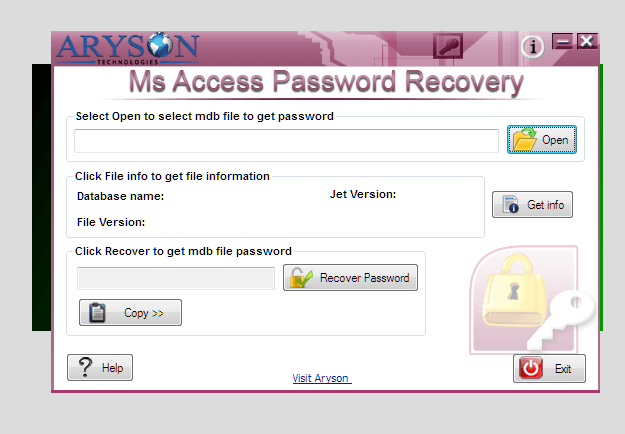
About this app
Aryson Access Password Recovery Tool is a specialized utility designed to help users regain access to password-protected Microsoft Access databases (MDB and ACCDB files). Whether you've forgotten the password to a critical database, inherited a legacy file with no known password, or need to access data after an employee departure, this tool provides a secure and efficient solution. The software employs advanced algorithms to recover or remove passwords without altering the original database structure, ensuring data integrity. It supports multilingual passwords, various encoding types (ANSI, Unicode, numeric, alphanumeric), and works independently of Microsoft Access installation. With a user-friendly interface, it caters to both technical and non-technical users. Key features include read-only mode for safety, compatibility with all Windows versions, and support for both encrypted and non-encrypted databases. The tool is available in a free trial version that allows previewing recov...
Key features
- 1Recovers or removes passwords from MDB and ACCDB files without altering database structure.
- 2Works independently of Microsoft Access installation; supports multilingual and ANSI/Unicode/numeric/alphanumeric passwords.
- 3Read-only mode for safety; free trial available for preview before purchase.
Target customer profile
Drawn from the product itself, not from a survey.
Demographic
IT administrators and database managers
Pain points
Forgotten passwords to critical Access databases; need to recover access without data loss.
Primary needs
Secure, reliable password recovery that preserves database integrity.
Demographic
Businesses with legacy Access databases
Pain points
Archived MDB files with lost passwords; need to access historical data for compliance.
Primary needs
Ability to unlock old databases quickly and safely.
Demographic
Small business owners and non-technical users
Pain points
Locked out of essential databases; lack of technical expertise for manual recovery.
Primary needs
Simple, intuitive tool that requires no Access installation or coding.
Scout Review
Written by AI from measured evidence, scored out of 100.
Aryson Access Password Recovery Tool is a competent niche utility for unlocking password-protected MS Access databases. The site is fast and technically secure, the free trial lowers the barrier, and the core differentiator — no Microsoft Access installation required — is genuinely useful for IT admins dealing with legacy files. The weaknesses are a dated sales-page design, thin documentation, accessibility gaps that the 90/100 score papers over, and a market that is slowly disappearing as Access itself fades. It's a solid tool for a shrinking problem.
Measure by measure
Usability
62Clear nav to features, specs, screenshots, video, FAQs, and download. Free trial available. No interactive demo or deep docs beyond the page.
Design
58Long-form sales page with screenshots, video, and testimonials. Functional but dated template styling and dense text blocks; no modern polish.
Speed
88Lighthouse mobile 95/100 (LCP 1.1s, CLS 0, TBT 272ms) and desktop 93/100. Genuinely fast, lightweight page.
Security
76Full security header suite (HSTS, CSP, frame protection, etc.), SPF and DMARC present, 12/12 checklist. No published audits or bug bounty.
Accessibility
70Lighthouse 90/100 but fails on color contrast, heading order, touch targets, missing main landmark, and role conflicts. No a11y statement.
Growth
54Real niche (legacy Access password recovery) with a concrete differentiator: no Access install needed. But the category is shrinking as Access fades.
Improvement areas
- Dated landing page design and stock-style testimonials reduce trust for a security-adjacent tool.
- No real documentation or help center beyond the FAQ section.
- Accessibility failures (contrast, heading order, touch targets, main landmark) despite 90/100 score.
Design & Usability
The site is a classic long-form software sales page: feature bullets, screenshots, a video, spec tables, FAQs, and a wall of 'expert reviews' from CNET, Soft32, and Software Informer. Navigation is clear and the free trial download is prominent. Design-wise it's dated — dense text, template styling, stock testimonials — but functional. Usability is competent: you can find features, specs, screenshots, and a download without hunting. What's missing is depth: no interactive demo, no real documentation beyond the page, and the 'intuitive interface' claim is asserted rather than shown. For a utility tool, that's acceptable but unremarkable.
Speed & Security
Speed is the standout: Lighthouse mobile 95/100 with LCP 1.1s, CLS 0, and TBT 272ms; desktop 93/100. The page is lightweight and snappy. Security is solid on the technical side — HTTPS enforced, HSTS, CSP, frame protection, X-Content-Type-Options, Referrer-Policy, Permissions-Policy all present, plus SPF and DMARC, for 12/12 checklist points. What's absent is the compliance layer: no SOC 2, ISO 27001, pen-test report, or bug bounty mentioned. For a password-recovery tool that handles sensitive database files, that's a gap worth noting, though not unusual for a small vendor.
Accessibility & Growth
Accessibility scores 90/100 on Lighthouse but fails several real audits: insufficient color contrast, non-sequential heading order, small touch targets, missing main landmark, and role conflicts. There's no accessibility statement or WCAG claim on the page. Growth is a judgment call: the problem is real (forgotten passwords on legacy Access databases) and the differentiator is concrete (works without Microsoft Access installed, supports multilingual and encoded passwords). But the category is structurally shrinking — Access is legacy software and the pool of locked MDB files only declines. The vendor is established (domain since 2013, LinkedIn and YouTube presence), which is context, not a growth score. The idea can sustain a niche business; it won't scale into a category.
Conclusion
If you're an IT admin staring at a locked MDB file from 2007 and no one remembers the password, this tool does the job and the trial lets you verify before paying. If you're evaluating it as a long-term platform bet, the category's decline is the real constraint. Buy it for the task, not for the roadmap.
Suggestions for improvement
- Add a real documentation/help center beyond the FAQ section — screenshots and a video aren't docs.
- Publish a security/compliance page (SOC 2 or pen-test summary) given the sensitive nature of password recovery.
- Fix the accessibility failures: contrast ratios, heading order, touch target sizes, and add a main landmark.
- Modernize the landing page — the template styling and stock testimonials undercut trust for a security-adjacent tool.
Alternatives comparison
Named competitors, point by point. Nobody paid to appear here or to be left out.
 Aryson Access Password Recovery Tool Aryson Access Password Recovery Tool |  PassFab for Access PassFab for Access |  Stellar Password Recovery for Access Stellar Password Recovery for Access | |
|---|---|---|---|
| Supported file formats | MDB and ACCDB | MDB and ACCDB | MDB and ACCDB |
| Works without Microsoft Access installed | Yes | Yes | Yes |
| Free trial available | Yes (preview recovery) | Yes | Yes |
| Multilingual password support | Yes | Not specified | Not specified |
| Read-only / non-destructive mode | Yes | Yes | Yes |
PassFab for Access
A password recovery tool for MS Access databases that supports MDB and ACCDB files, offering fast recovery with a user-friendly interface.
Stellar Password Recovery for Access
Professional software to recover or remove passwords from Access databases, ensuring data safety and compatibility with various versions.
Comparing options? See Aryson Access Password Recovery Tool alternatives, scored side by side
More Security apps
View all Security
OBVELO
88Privacy gateway that masks personal data in LLM traffic

kosa8
88Sealed VMs for AI agents with instant rewind, audit trails & zero key exposureSealed VMs for AI agents with instant rewind and audit tr...

Sidenty
87Sidenty is a professional digital identity protection ser...

ProcessSpy
87A native macOS process explorer and advanced monitor that...

Basalt
86Eighteen PDF tools in one native Mac window: merge, split, compress, OCR, Bates numbering, forms, signing and redaction. Offline. $29 once.

Sanctix
85Sanctions screening with verifiable SHA-256 audit trails.

PromptTrace
85Free hands-on AI security labs for prompt injection and L...

eGuard
84Verifiable parental controls for families in the Philippines

yourdrive
84YourDrive is a self-hosted file manager and media timeline that runs entirely on your own infrastructure. Organize files in nested folders, move them with drag-and-drop, search instantly, and browse photos and videos by month and year. Files stream straight to your own AWS S3, Azure Blob, MinIO, Cloudflare R2 or Wasabi storage. Install with one command. Free for personal use; teams pay per server, not per seat.

Noden
84Native macOS SSH, SFTP & RDP client with a Keychain-backe...

VaultKeepR
84Password manager with no email, no account, no tracking. ...

Archonum
84Real-device browser automation for AI agents


A platform dedicated to providing unbiased reviews of newly launched applications, analyzing everything from their features to their full potential.
info@scoutforge.net© 2026 Scoutforge. All rights reserved.
