Cycling through all six. Tap any point to stop.
Measured on six things
Free browser-based AI auto subtitle and caption generator
Security
52HTTPS and HSTS are in place and video stays local, but the header probe found no CSP, no frame protection, no DMARC, and only 5/12 checklist points. No SOC 2 or audit claim published.
Screenshots
1 / 1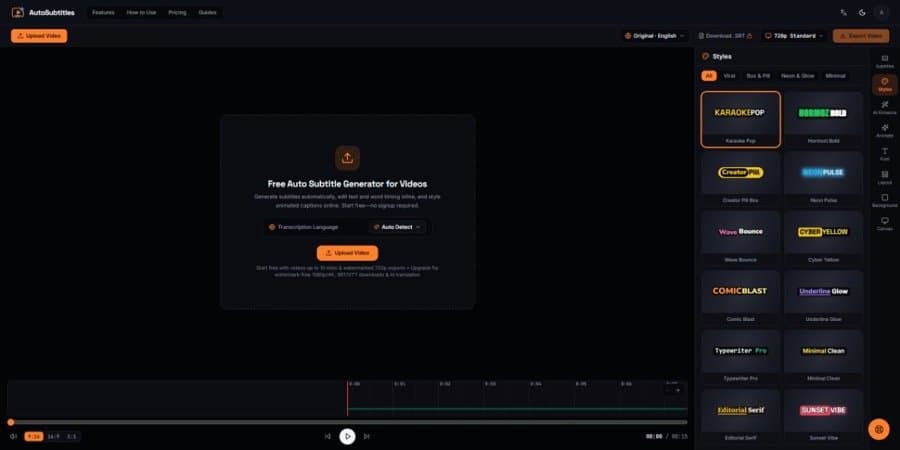
About this app
Auto Subtitles is a browser-based caption studio that turns raw video into fully styled, word-synced subtitles in minutes—no installation or account required. You drop in an MP4, MOV, or WebM file, and its AI speech-to-text engine auto-detects over 100 languages, aligning every word to the millisecond. From there, you can edit the transcript inline, drag start and end timestamps, split or merge caption blocks, and strip out awkward silences from a full multi-track timeline. Style-wise, there are 28+ animated presets (Karaoke Pop, Hormozi Bold, Neon Pulse, Pill Box, Wave Bounce, and more) with one-click control over fonts, casing, strokes, shadows, and vertical safe-zone positioning—ideal for 9:16 TikTok, Reels, and Shorts. The standout technical choice is local rendering: using HTML5 Canvas and WebCodecs, the app burns captions into your video right on your device, so you skip cloud upload queues while your full footage stays local (only a lightweight audio stream is sent for transc...
Key features
- 1Word-level AI transcription in 100+ languages with millisecond alignment.
- 228+ animated caption presets (Karaoke Pop, Hormozi Bold, Neon Pulse, etc.) with full style control.
- 3Local browser rendering via Canvas/WebCodecs — no cloud upload queue for the video.
- 4Multi-track timeline editor with inline transcript editing, split/merge, and silence removal.
- 5SRT/VTT/TXT export and 30+ language AI translation on paid plans.
- 6No signup required; free tier up to 10 min and watermarked 720p.
Target customer profile
Drawn from the product itself, not from a survey.
Demographic
Short-form video creators on TikTok, Reels & Shorts (18–34)
Pain points
Spending hours hand-timing captions; losing muted-feed viewers in the first seconds
Primary needs
Fast word-by-word animated captions in 9:16 with trendy viral presets
Demographic
YouTubers, podcasters & long-form producers
Pain points
Manual transcription is slow and costly; YouTube needs accurate SRT/VTT files
Primary needs
Accurate transcription and frame-accurate SRT/VTT/TXT exports
Demographic
Global brands & video marketers localizing content
Pain points
Translating ad creatives is expensive; inconsistent brand styling across languages
Primary needs
AI subtitle translation into 30+ languages with locked brand fonts and layout
Demographic
Educators & online course creators
Pain points
Accessibility compliance is tedious; lecture captions require lots of cleanup
Primary needs
Readable caption templates, inline transcript edits, and quick browser rendering
Scout Review
Written by AI from measured evidence, scored out of 100.
Auto Subtitles is a browser-based caption studio that does the hard part well: word-synced transcription, 28+ animated presets, and local rendering that keeps your footage off someone else's server. The pricing is creator-friendly ($9 Pro, $15 Max) and the free tier is genuinely usable. The problems are polish and trust: the homepage opens on an empty editor, accessibility has real gaps, and the security headers are half-finished. It's a promising tool with a clear wedge, but it needs to look and feel as finished as it actually is.
Measure by measure
Usability
62No signup, a demo video, and a repeated Upload button make the first step obvious. But free-tier limits hide in tiny text and the dense timeline/export controls will slow newcomers down.
Design
58Cohesive dark theme with one orange accent and genuinely well-crafted caption style tiles. But the homepage opens on an empty black editor canvas with no hero or sample, so first impression is a void.
Speed
68Lighthouse mobile 86/100 and desktop 97/100, with CLS 0 and FCP 1.1s. Local Canvas/WebCodecs rendering skips cloud queues, though a 3.5s mobile LCP drags the first paint.
Security
52HTTPS and HSTS are in place and video stays local, but the header probe found no CSP, no frame protection, no DMARC, and only 5/12 checklist points. No SOC 2 or audit claim published.
Accessibility
68Lighthouse a11y 91/100, but failing audits include unnamed buttons, insufficient contrast, and out-of-order headings. A language switcher exists; no WCAG statement found.
Growth
62Real, crowded category (CapCut, Submagic, Veed) with a genuine wedge: local rendering and no signup. Differentiated enough to compete, but the moat is thin and the domain is brand new.
Improvement areas
- Homepage opens on an empty editor canvas — add a sample video or poster frame.
- Free-tier limits are buried in tiny grey text — surface them clearly.
- Missing security headers (CSP, frame protection, DMARC) and no published audit.
- Accessibility gaps: unnamed buttons, contrast failures, and heading order.
Design & Usability
The design language is coherent — dark UI, one orange accent, and a style grid that actually shows off the product's value. The caption preset tiles are the best thing on the page. But the homepage opens on the editor itself with a large empty black canvas and no sample content, so a first-time visitor sees a void instead of a pitch. Usability is decent: no signup, a demo video, and a repeated Upload button make the path clear. The friction is in the details — free-tier limits are buried in tiny grey text, and the dense timeline and export controls will slow down anyone who isn't already a video editor.
Speed & Security
Speed is the strongest measured dimension: Lighthouse mobile 86/100 and desktop 97/100, with CLS 0 and FCP 1.1s. The local Canvas/WebCodecs rendering is a real architectural choice that avoids cloud upload queues, and it shows. The 3.5s mobile LCP is the one blemish. Security is the weak spot: HTTPS and HSTS are enforced, but the header probe found no CSP, no frame protection, no X-Content-Type-Options, no Referrer-Policy, and no DMARC — 5/12 checklist points. No SOC 2, ISO, or audit claim is published, and the privacy story rests on the claim that only a lightweight audio stream leaves the device.
Accessibility & Growth
Accessibility scores 91/100 on Lighthouse, but the failing audits are not trivial: buttons without accessible names, insufficient contrast, non-sequential headings, and visible labels that don't match accessible names. There's a language switcher, but no WCAG statement. Growth is a judgement call: the short-form caption category is real and crowded, with CapCut, Submagic, and Veed as the named alternatives. Auto Subtitles' wedge is local rendering and a no-signup free tier — genuinely different from cloud-based competitors, but a thin moat. The domain was registered in November 2026, so this is very early; the idea has room, but the execution needs to earn its place.
Conclusion
If you're a short-form creator who hates upload queues and wants a no-signup caption tool, this is worth a try. If you're evaluating it for a team or brand, wait for the security and accessibility story to mature. The local-rendering approach is the right bet — now the rest of the product needs to catch up to it.
Suggestions for improvement
- Add a sample video or poster frame to the homepage editor so first-time visitors see the product working, not an empty canvas.
- Move free-tier limits (10 min, watermarked 720p) out of tiny grey text and into a visible comparison or tooltip.
- Ship the missing security headers (CSP, frame protection, X-Content-Type-Options, Referrer-Policy, DMARC) — they're cheap wins.
- Fix the failing accessibility audits: accessible names on buttons, contrast ratios, and heading order.
Alternatives comparison
Named competitors, point by point. Nobody paid to appear here or to be left out.
 Auto Subtitles |  CapCut |  Submagic |  Veed.io | |
|---|---|---|---|---|
| Pricing | Free tier; Pro $9/mo; Max $15/mo | Free with paid Pro tiers | Paid subscription, free trial | Free tier; paid plans for subtitles/translation |
| No signup required | Yes — start free without an account | No — requires install and account | No — account required | No — account required |
| Local rendering (no cloud upload) | Yes — Canvas/WebCodecs burns captions on-device | No — desktop/mobile app processing | No — cloud-based | No — cloud-based |
| Animated caption presets | 28+ presets with full style control | Yes — animated text presets | Yes — viral templates and emojis | Yes — subtitle styles |
| AI subtitle translation | 30+ languages on Pro/Max | Limited / not core | Yes — translation available | Yes — translation on paid plans |
| SRT/VTT export | Yes — on Pro/Max | Yes | Yes | Yes — on paid plans |
CapCut
Popular free video editor with auto-caption and animated text presets; requires app install and account.
Submagic
Cloud-based AI caption tool with viral templates and emojis, aimed at short-form creators.
Veed.io
Browser-based video editor with auto subtitles, translation, and SRT export on paid plans.
Comparing options? See Auto Subtitles alternatives, scored side by side
More AI Generations apps
View all AI Generations
Uni-1 by Luma AI
92Uni-1 is an advanced multimodal text-to-image AI model th...

Gerty
91Private, local AI assistant for Mac that runs offline

LTX 2.3 AI Video Generator
91Fast, open-source AI video generator with 4K support, mul...

DemoVexa
90Turn your code into professional product demo videos with AI-generated scripts, animated UI, and natural voiceovers.

All of Us
89Add deceased loved ones to photos with AI and see free pr...

Voqusa
89Transcribe social media video and audio links into text (free signup, 5 free credits, then pay-as-you-go)

Pixelimg
88A free online AI-powered tool that instantly converts ima...

IraVoice
88Private on-device dictation for Apple-silicon Macs.

OBVELO
88Privacy gateway that masks personal data in LLM traffic

tradutor de mangá com IA
88O tradutor de mangá com IA traduz capítulos em lote, personaliza textos e oferece edição visual para estúdios.

HeyVid AI
88HeyVid AI is a free all-in-one AI video and image generat...

RestorePhotosApp
88An AI-powered photo restoration app that brings old, blur...


A platform dedicated to providing unbiased reviews of newly launched applications, analyzing everything from their features to their full potential.
info@scoutforge.net© 2026 Scoutforge. All rights reserved.
