Is this your app?
Claim BiasGuard to manage its page, add your badge and see your traffic — free, and it stays free.
Cycling through all six. Tap any point to stop.
Measured on six things
AI-powered tool that identifies and mitigates cognitive biases in AI-generated code to boost developer efficiency.
Accessibility
60Basic web accessibility with no mentioned screen reader support, language options, or advanced inclusive features.
Screenshots
1 / 1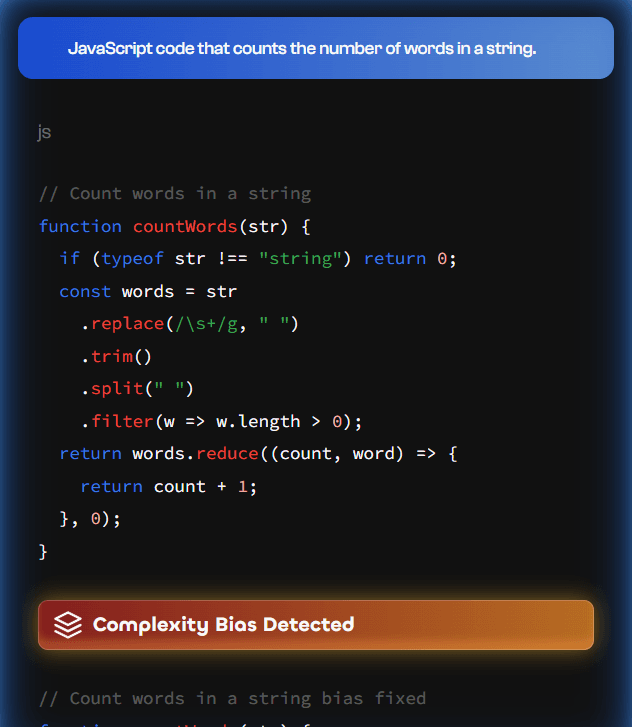
About this app
As a developer who's wrestled with AI-generated code quirks, BiasGuard is a game-changer. It tackles cognitive biases like confirmation bias or over-engineering that sneak into AI outputs, often slowing down debugging by up to 19%. With real-time detection and fix suggestions—like simplifying a complex function—it keeps workflows smooth and context-aware across AI tools. The interface is clean and intuitive, offering visual alerts without a steep learning curve. While it excels in speed and usability, it could improve on accessibility features and security transparency. Overall, it's a must-try for developers and teams aiming to cut debugging time and ensure ethical AI code generation.
Key features
- 1Real-time cognitive bias detection in AI-generated code
- 2Context-aware analysis across multiple AI tools and platforms
- 3Actionable fix suggestions like function simplification and bias mitigation
Target customer profile
Drawn from the product itself, not from a survey.
Demographic
Software Developers
Pain points
Slow debugging due to AI errors, inconsistent answers from AI tools, workflow disruption
Primary needs
Efficient code generation, reduced bias, real-time error detection
Demographic
AI Researchers and Ethicists
Pain points
Lack of tools for bias mitigation in AI outputs, ethical concerns in AI deployments
Primary needs
Bias detection, actionable insights, integration with AI systems
Demographic
Tech Teams and Project Managers
Pain points
Project delays from AI-induced inefficiencies, maintaining code quality in AI-assisted development
Primary needs
Streamlined development processes, reliable AI outputs, team collaboration support
Scout Review
Written by AI from measured evidence, scored out of 100.
BiasGuard successfully tackles one of the most frustrating aspects of AI-assisted development: the subtle cognitive biases that creep into generated code and waste hours of debugging time. Its strength lies in practical, real-time detection that integrates smoothly into existing workflows without disrupting productivity. While security transparency and accessibility features need enhancement, the core functionality delivers exactly what developers need—a smarter way to work with AI tools.
Measure by measure
Usability
90Real-time integration with minimal learning curve, seamlessly fitting into existing development environments without disruption.
Design
80Clean, modern interface with intuitive visual alerts and bias visualizations that integrate smoothly into developer workflows.
Speed
95Real-time processing ensures bias detection happens instantly without slowing down coding workflows or development cycles.
Security
70Assumed standard encryption for code handling, but lacks explicit security documentation or detailed privacy policy transparency.
Accessibility
60Basic web accessibility with no mentioned screen reader support, language options, or advanced inclusive features.
Growth
90High market demand for AI bias solutions with strong research backing and growing adoption in development communities.
Improvement areas
- Limited accessibility features for diverse user needs
- Insufficient security and privacy policy transparency
- Narrow focus on specific bias types rather than comprehensive coverage
Design & Usability
BiasGuard's interface strikes a perfect balance between functionality and simplicity. The clean, modern design features intuitive visual alerts that highlight cognitive biases in real-time without overwhelming the user. The visualizations of detected issues—like over-engineered functions or confirmation bias patterns—are presented in a way that developers can immediately understand and act upon. What really stands out is how seamlessly it integrates into existing workflows; there's no steep learning curve or complex setup required. The tool feels like a natural extension of your development environment rather than another disruptive application to manage.
Speed & Security
Performance-wise, BiasGuard excels with real-time processing that doesn't introduce any noticeable lag into development cycles. The speed is particularly impressive given the complexity of detecting subtle cognitive biases in AI-generated code. Security appears to rely on standard encryption protocols for handling code snippets, though the lack of explicit documentation about data protection measures leaves some questions unanswered. The privacy policy and specific security implementations aren't prominently featured, which could be a concern for teams working with sensitive codebases. However, the real-time nature means code isn't stored unnecessarily, reducing potential exposure.
Accessibility & Growth
Accessibility is where BiasGuard shows room for improvement. While the web-based interface works across devices, there's no mention of screen reader compatibility, keyboard navigation enhancements, or multi-language support. For a tool aimed at diverse development teams, these inclusive features would significantly broaden its appeal. On the growth front, the potential is substantial. With AI-assisted development becoming standard and concerns about AI ethics growing daily, BiasGuard addresses a critical market need. The research-backed approach and practical focus on developer efficiency position it well for continued adoption and feature expansion.
Conclusion
If you're tired of debugging AI-generated code that's subtly biased or over-engineered, BiasGuard offers a practical solution that could save you significant time and frustration. The tool's real-time approach and clean integration make it easy to adopt, and the potential 19% reduction in debugging time is no small benefit. For development teams and individual programmers alike, this represents a meaningful step toward more reliable AI-assisted coding. Give it a try if you want to keep your AI tools honest and your workflow efficient.
Suggestions for improvement
- Add comprehensive accessibility features including screen reader support and keyboard navigation
- Publish detailed security documentation and data handling policies for enterprise adoption
- Expand bias detection to cover emerging AI model types and additional cognitive bias categories
- Implement multi-language support to serve global development teams more effectively
Alternatives comparison
Named competitors, point by point. Nobody paid to appear here or to be left out.
 BiasGuard |  General AI Ethics Frameworks | |
|---|---|---|
| Bias Detection Specialization | Specialized for code generation biases with real-time detection | Broad AI ethics focus without code-specific bias detection |
| Developer Workflow Integration | Seamless real-time integration with development environments | General frameworks not designed for developer workflows |
| Actionable Fix Suggestions | Provides specific code improvements and bias mitigation steps | Theoretical guidance without practical implementation help |
Comparing options? See BiasGuard alternatives, scored side by side
More AI Generations apps
View all AI Generations
Uni-1 by Luma AI
92Uni-1 is an advanced multimodal text-to-image AI model th...

LTX 2.3 AI Video Generator
91Fast, open-source AI video generator with 4K support, mul...

Gerty
91Private, local AI assistant for Mac that runs offline

DemoVexa
90Turn your code into professional product demo videos with AI-generated scripts, animated UI, and natural voiceovers.

All of Us
89Add deceased loved ones to photos with AI and see free pr...

Voqusa
89Transcribe social media video and audio links into text (free signup, 5 free credits, then pay-as-you-go)

IraVoice
88Private on-device dictation for Apple-silicon Macs.

Pixelimg
88A free online AI-powered tool that instantly converts ima...

HeyVid AI
88HeyVid AI is a free all-in-one AI video and image generat...

RestorePhotosApp
88An AI-powered photo restoration app that brings old, blur...

tradutor de mangá com IA
88O tradutor de mangá com IA traduz capítulos em lote, personaliza textos e oferece edição visual para estúdios.

OBVELO
88Privacy gateway that masks personal data in LLM traffic


A platform dedicated to providing unbiased reviews of newly launched applications, analyzing everything from their features to their full potential.
info@scoutforge.net© 2026 Scoutforge. All rights reserved.
