Cycling through all six. Tap any point to stop.
Measured on six things
Bulk color edit, resize, and rename your pictures in the browser. Bulk Photo Editor is free and requires no downloading or registrations
Growth
35Launched mid-July 2026. One Reddit post with modest upvotes; no reviews or community presence yet.
Screenshots
1 / 1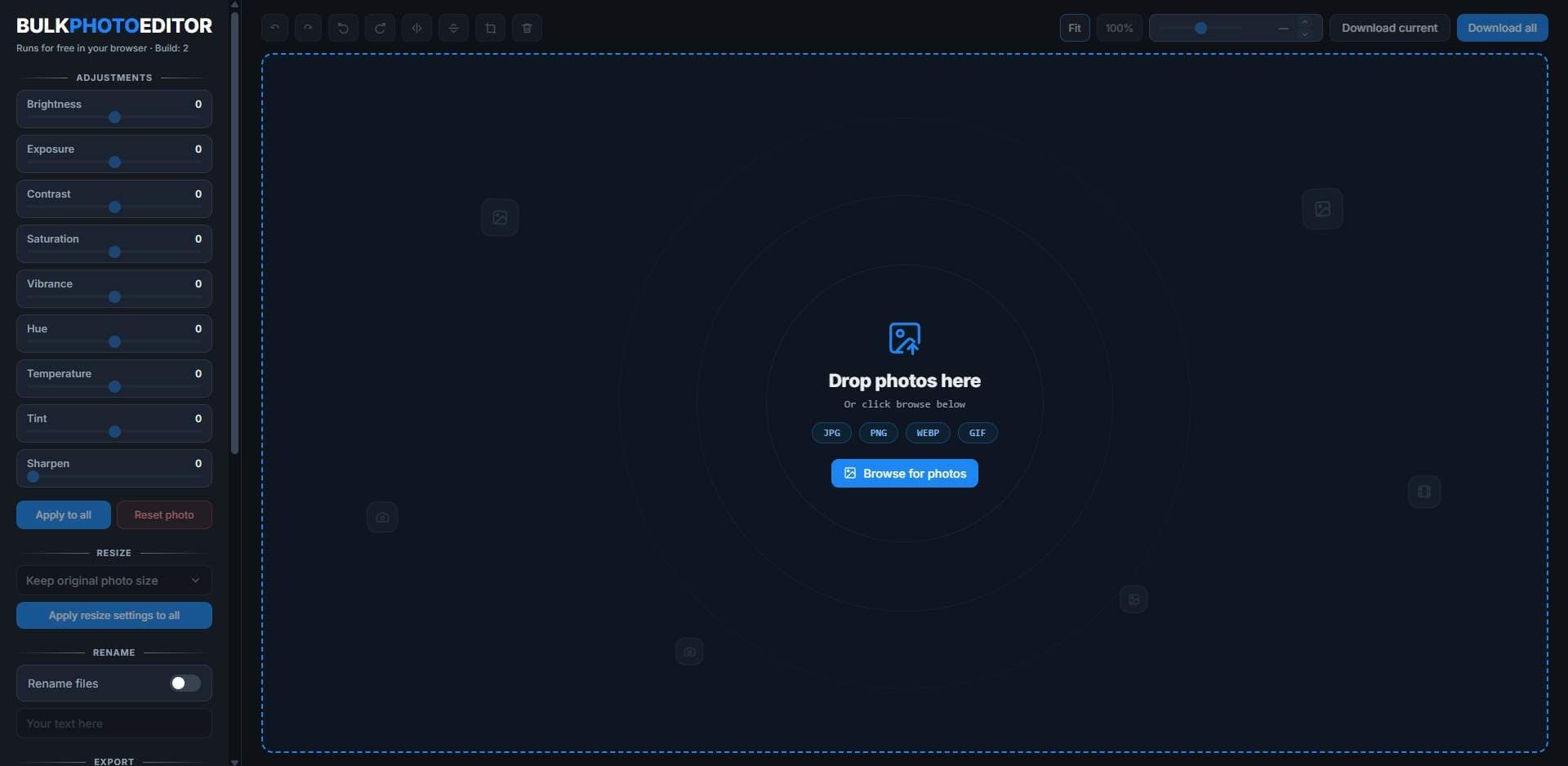
About this app
Made for anyone who comes home with hundreds of photos and no patience to edit them one by one. Bulk Photo Editor batch-processes your shots right in the browser. Resize them all to one size, lift colors with vibrance and contrast, sharpen, crop and rotate, rename with automatic numbering, and export everything as a single zip. Free to use, nothing gets uploaded, no account needed, nothing to download
Key features
- 1100% browser-based batch editing with no uploads or accounts
- 2Simultaneous resize, crop, rotate, color adjustments and automatic numbering rename
- 3Single-click export of all processed images as one zip file
Target customer profile
Drawn from the product itself, not from a survey.
Demographic
E-commerce store owners
Pain points
Need to edit multiple product images quickly and consistently without expensive software
Primary needs
Bulk resize, crop, and color correct images for uniform product listings
Demographic
Social media managers
Pain points
Time-consuming manual editing of photos for posts and ads
Primary needs
Rapid batch editing to maintain visual consistency across channels
Demographic
Bloggers and content creators
Pain points
Lack of photo editing skills and slow uploads to online editors
Primary needs
Simple, free tool to crop, resize, and adjust multiple images without registration
Scout Review
Written by AI from measured evidence, scored out of 100.
Bulk Photo Editor is a genuinely useful, zero-friction browser tool for quick batch edits without accounts or uploads. It hits the core needs of e-commerce sellers and social managers who want consistent resizing, cropping and color tweaks across dozens of images. The young age shows in missing polish, documentation and traction, but the local processing model and recent updates demonstrate clear intent to improve. It sits comfortably alongside Canva and Adobe Express for simple tasks while staying lighter than desktop alternatives like IrfanView.
Measure by measure
Usability
62Zero-friction browser tool: drop files, adjust, export zip. No signup required. Early user feedback on Reddit notes working numbering.
Design
58Dark navy theme with blue accents and consistent sidebar sections. Cramped sliders and empty decorative canvas reduce polish.
Speed
70Pure client-side processing, no uploads. Recent build added full-size handling and zoom controls.
Security
52HTTPS and basic DNS records present. Missing HSTS, CSP and most security headers; no compliance audits published.
Accessibility
48No accessibility statements, WCAG mentions or multi-language support found. Basic responsive layout observed.
Growth
35Launched mid-July 2026. One Reddit post with modest upvotes; no reviews or community presence yet.
Improvement areas
- Cramped sidebar layout and lack of visual defaults or presets
- Missing security headers and any accessibility documentation
- Extremely early stage with minimal user feedback or community
Design & Usability
Bulk Photo Editor delivers a clean dark interface with a prominent dropzone and organized sidebar sections for adjustments, resize, rename and export. The design stays consistent but packs many sliders tightly, creating a cramped feel once files are loaded. Usability shines through zero-account browser execution and instant local processing, letting users drop photos, tweak colors, crop, resize and batch-rename with automatic numbering before exporting a zip. Early Reddit feedback confirms the numbering works as expected. The main friction is the initial wall of controls with no guided defaults or thumbnails until files are added.
Speed & Security
Speed benefits from fully client-side execution with no server round-trips, matching the 'nothing gets uploaded' promise. The July 21 build added full-size handling and manual zoom, improving workflow for larger batches. Security is basic but functional: HTTPS is enforced with SPF and DMARC records, yet the site lacks HSTS, CSP and most protective headers. No audits or compliance claims appear anywhere, which is typical for a new free indie tool but leaves it in the lower-middle range for the category.
Accessibility & Growth
Accessibility receives no explicit attention on the site or in external materials, with no WCAG references or testing notes. The responsive dropzone and sidebar work on desktop but lack documented keyboard or screen-reader support. Growth is still embryonic: the domain launched in April 2026 and the tool itself went live July 18. A single Reddit post in r/IMadeThis earned five upvotes and a lighthearted comment about thumbnails, with no reviews on major platforms and no community channels yet. Trajectory depends on continued changelog activity and word-of-mouth.
Conclusion
For anyone tired of editing product shots one by one, this is worth bookmarking. It won't replace professional suites, but it removes the friction of signing up or installing anything.
Suggestions for improvement
- Add default presets or recommended slider starting points for common product-photo looks
- Show live thumbnails and image count immediately after drop to clarify app state
- Publish a short keyboard-navigation and contrast audit to lift accessibility score
- Create a public changelog RSS or in-app notification so users see Build 2+ updates without visiting the site
Alternatives comparison
Named competitors, point by point. Nobody paid to appear here or to be left out.
 Bulk Photo Editor Bulk Photo Editor |  Canva Canva |  Adobe Photoshop Express Adobe Photoshop Express |  IrfanView IrfanView | |
|---|---|---|---|---|
| Browser-based, no account or upload required | Yes - fully client-side | No - requires free account | No - requires free account | No - desktop Windows app |
| Batch rename with automatic numbering | Yes - built-in | Limited - via bulk create | No | Yes - via batch rename |
| Free core batch editing features | Yes - entirely free | Freemium - paid plans for advanced batch | Freemium - limited without subscription | Yes - free desktop app |
Canva
Full-featured design platform with batch editing capabilities, but requires account and has paid plans
Adobe Photoshop Express
Free basic online photo editor with batch editing, but limited to certain features without subscription
IrfanView
Desktop batch image editor for Windows, powerful but less convenient than browser-based tools
Comparing options? See Bulk Photo Editor alternatives, scored side by side
Sources
What the review was written against. A verdict with no sources is an opinion.
More Design & Creativity apps
View all Design & Creativity
RoomCreator
92An AI-powered interior and exterior design tool that tran...

What the GIF
89Frame-perfect video-to-GIF maker that runs entirely in yo...

TranscriptYou
88Free YouTube transcript generator with timestamps and AI ...

RestorePhotosApp
88An AI-powered photo restoration app that brings old, blur...

Portrait Gift
88AI-powered personalized face swap art platform creating c...

ButterKit
82macOS app for App Store screenshots: 3D mockups, auto-tra...

BeartIMAGE
88BeartIMAGE is a free, web-based image processing platform engineered for fast, bulk photo editing and conversion directly in your browser.

Pixelimg
88A free online AI-powered tool that instantly converts ima...

Coloring Pages Pro
87A massive collection of free printable coloring pages for...

QRocodile
87Design And Animate QR Codes People Want to Scan

FaceSwapAI
87AI face swap for photos, videos, GIFs with free trial.

Book Cover Generator
87AI book cover generator for indie authors—turn your story...


A platform dedicated to providing unbiased reviews of newly launched applications, analyzing everything from their features to their full potential.
info@scoutforge.net© 2026 Scoutforge. All rights reserved.
