Cycling through all six. Tap any point to stop.
Measured on six things
Free all-in-one AI image editor, generator & video creator.
Accessibility
52Basic web interface with multilingual text support in generations. No specific mentions of screen reader optimization, keyboard navigation, color contrast, or WCAG compliance. Targets designers but not accessibility-focused.
Screenshots
1 / 1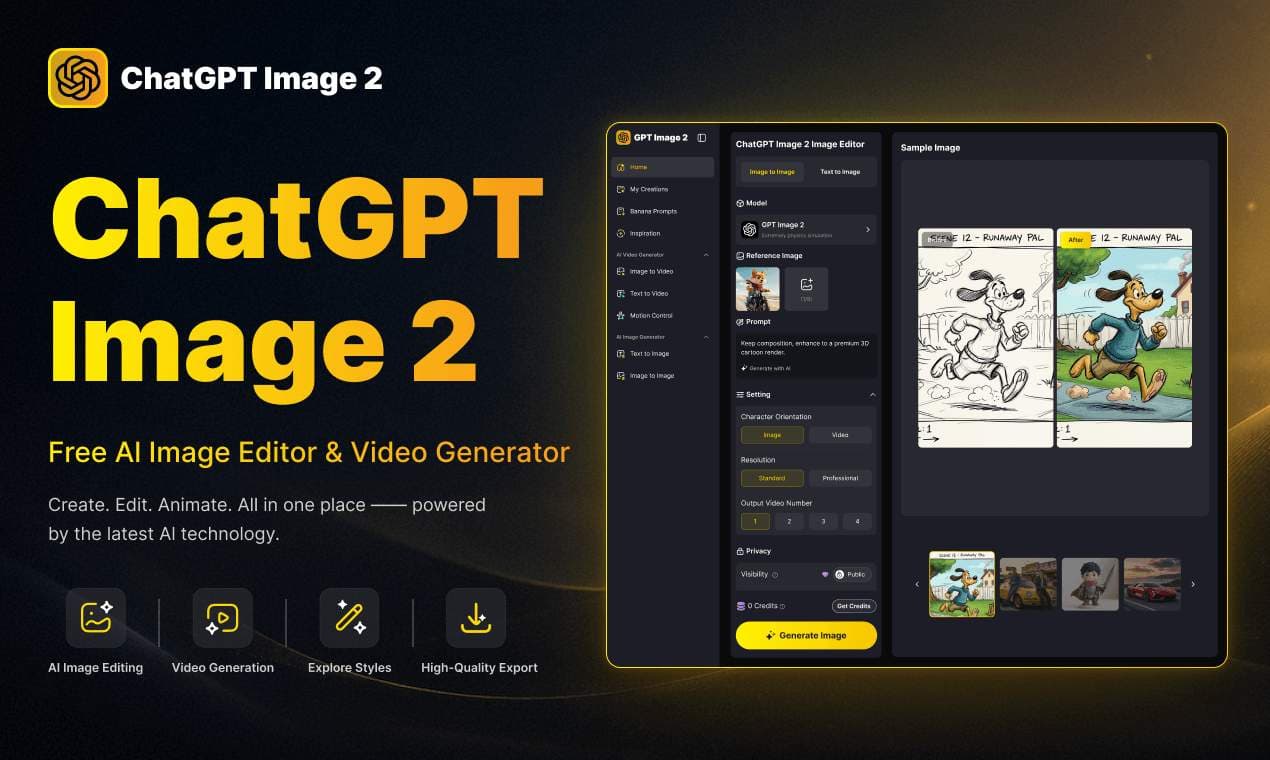
About this app
ChatGPT Image 2 is a powerful all-in-one workspace for AI image editing, generation, and video creation. It offers features like text-to-image, image-to-image, pixel-level editing, 4K output, and near-perfect text rendering. Built on autoregressive multimodal architecture, it delivers fast, high-quality results for commercial use. The platform also provides AI video generation, style transfer, scene editing, and more. Ideal for designers, marketers, and content creators who need studio-grade visuals quickly.
Key features
- 1Native 4K output with near-perfect text rendering for marketing materials and UI concepts
- 2Advanced image editing: virtual try-on, smart scene replacement, outpainting, damaged photo restoration, pixel-level control
- 3All-in-one with text-to-image, image-to-video, style transfer, anime effects, and multi-image fusion
Target customer profile
Drawn from the product itself, not from a survey.
Demographic
Freelance designers and illustrators
Pain points
Time-consuming manual editing, need for quick mockups
Primary needs
Fast, high-quality image generation and editing without professional software skills
Demographic
E-commerce sellers and marketers
Pain points
High cost of product photography, inconsistent brand visuals
Primary needs
Hyper-realistic product images, text-perfect marketing materials, and brand consistency
Demographic
Short-form content creators and social media managers
Pain points
Need for engaging, trend-driven visuals fast
Primary needs
Diverse styles, quick generation, and easy-to-share outputs
Scout Review
Written by AI from measured evidence, scored out of 100.
ChatGPT Image 2 (gptimages2.net) is a capable independent AI workspace combining strong text-to-image, image-to-image with precise editing tools, pixel-level control, native 4K, and video generation. Built with reasoning capabilities, it targets non-technical creators needing fast, brand-consistent visuals for marketing and social content. The simple workflow and diverse tools (try-on, scene editing, restoration, anime effects) are strengths, but the free tier is very limited, the site lacks any output examples, and claims of industry-leading quality feel unproven without a gallery. Security and commercial terms are vague. It's a decent all-in-one for quick mockups but doesn't stand out as exceptional against established players. Realistic score reflects good usability offset by transparency and proof issues. Average overall — useful but not groundbreaking.
Measure by measure
Usability
75Simple upload → prompt → generate flow. Strong prompt adherence via autoregressive multimodal setup with reasoning (Chain-of-Thought). Pixel-level edits, style transfer, and image-to-video. Free tier limited to 1 task/day.
Design
68Clean 3-step workflow interface with organized sections for advanced editing tools (virtual try-on, scene replacement, outpainting, smart text editing). Supports multiple models (ChatGPT Image 2, Nano Banana Pro, Midjourney v7). Lacks image gallery or demos on site.
Speed
65Claims 30-second 4K generation. Reasoning mode (thinking before generating) adds time but improves quality. Video generation from images is supported but details are vague.
Security
55Claims to protect user privacy and data security. Independent platform with private generation option and copy protection. No detailed policy visible; commercial use rights not clearly stated in main pages.
Accessibility
52Basic web interface with multilingual text support in generations. No specific mentions of screen reader optimization, keyboard navigation, color contrast, or WCAG compliance. Targets designers but not accessibility-focused.
Growth
58Targets freelancers, e-commerce, and social creators with fast mockups and brand-consistent visuals. Free tier for testing; paid subscriptions ($47.99/mo Standard with credits). Leverages hype around GPT Image 2 but is an independent platform. No public user metrics.
Improvement areas
- Add extensive before/after gallery and example prompts to substantiate quality claims
- Expand free tier limits and clearly document commercial use, ownership, and privacy policy
- Provide detailed video generation specs and improve site accessibility features
Design & Usability
The interface follows a straightforward 3-step process: upload or select image, describe edits or style via text prompt, and generate. This makes it approachable for freelance designers and marketers who want quick product shots or social assets without learning complex software. Features like smart scene replacement, AI virtual try-on, damaged photo restoration, outpainting, and pixel-level editing that preserves lighting/shadows are genuinely useful for commercial workflows. It positions itself as an all-in-one for image + video with strong text rendering claims. However, the complete absence of a public gallery or example outputs on the site undermines trust — you're buying the promise rather than seeing proven results. Usability shines for beginners but feels limited on the free plan.
Speed & Security
The platform advertises efficient 30-second generation for native 4K outputs, avoiding upscaling artifacts. The autoregressive multimodal architecture with reasoning (Chain-of-Thought) helps with prompt fidelity and complex instructions, though this can increase actual time versus instant modes. Video generation turns static images into dynamic clips, but specifics on length, quality, or speed are light. On security, it mentions privacy protection and offers private generations with copy protection, yet lacks transparent details on data usage, model training, or clear commercial licensing — a common issue with independent AI platforms. This scores it average; fast enough for mockups but not revolutionary, and security is 'trust us' territory.
Accessibility & Growth
Accessibility is underdeveloped — while generations support multilingual and complex text (a strong point for global marketing), the tool itself has no documented features for users with disabilities, such as robust keyboard support or high-contrast modes. Growth potential is solid for its target audience: e-commerce sellers needing consistent product visuals, social managers wanting trend-driven graphics, and illustrators needing fast iterations. The credit-based model (free tier extremely restricted at 1 task/day, Standard at ~$48/mo) encourages upgrades but may frustrate heavy users. It competes in a crowded space by bundling editing, generation, and video, but success hinges on delivering on the 'studio-grade' and 'near-perfect text' promises that currently lack visual proof on-site.
Conclusion
If you're a freelancer or marketer tired of manual editing or expensive photoshoots, this can save serious time on product mockups and social graphics. Just start with the limited free tasks, inspect the output quality closely, and consider paid credits only after verifying it meets your brand standards. Strong on paper for text rendering and editing precision; execution and trust need more transparency.
Suggestions for improvement
- Add a large public gallery with before/after examples and prompt details to build credibility and demonstrate near-perfect text rendering.
- Clarify commercial use rights, output ownership, and data privacy policy prominently — essential for e-commerce and client work.
- Improve free tier to at least 5-10 daily tasks or offer better trial credits to reduce friction for new users.
- Provide clearer video generation specs (length, resolution, styles) and add accessibility features like better contrast and keyboard navigation.
Alternatives comparison
Named competitors, point by point. Nobody paid to appear here or to be left out.
 ChatGPT Image 2 |  Midjourney |  DALL·E 3 |  Stable Diffusion | |
|---|---|---|---|---|
| Text Rendering Quality | Near-perfect, multilingual, OCR-level claims; strong for marketing text | Historically weak; v7 improved but site notes limitations | Good prompt adherence; GPT Image 2 significantly better | Varies by model; custom fine-tunes can excel but base is inconsistent |
| Resolution & Output Quality | Native 4K, commercial-grade, preserves lighting/shadows | Up to 2048x2048; strong artistic quality | 1024x1024 standard; high coherence | Highly customizable, up to 2048+ with upscaling |
| Editing Capabilities | Pixel-level, scene replacement, virtual try-on, restoration, outpainting, smart text | Primarily generation; limited native editing | Basic variations and edits via ChatGPT | Excellent with img2img, ControlNet, plugins for precise control |
| Speed | Claimed 30s for 4K; reasoning adds time; queue on free | 30-60s typical | Fast 10-30s | 2-60s depending on hardware/local vs cloud |
| Ease of Use | Simple 3-step web UI, no pro skills needed | Discord-based, medium learning curve | Very easy via ChatGPT chat | Hard without tools; easy with web UIs like Automatic1111 |
Midjourney
Specializes in artistic and stylized image generation with 2048×2048 resolution.
DALL·E 3
OpenAI's image generator known for strong prompt adherence and creative outputs.
Stable Diffusion
Open-source AI image generator with extensive customization via models and plugins.
Comparing options? See ChatGPT Image 2 alternatives, scored side by side
Sources
What the review was written against. A verdict with no sources is an opinion.
More AI Generations apps
View all AI Generations
Uni-1 by Luma AI
92Uni-1 is an advanced multimodal text-to-image AI model th...

Gerty
91Private, local AI assistant for Mac that runs offline

LTX 2.3 AI Video Generator
91Fast, open-source AI video generator with 4K support, mul...

DemoVexa
90Turn your code into professional product demo videos with AI-generated scripts, animated UI, and natural voiceovers.

All of Us
89Add deceased loved ones to photos with AI and see free pr...

Voqusa
89Transcribe social media video and audio links into text (free signup, 5 free credits, then pay-as-you-go)

Pixelimg
88A free online AI-powered tool that instantly converts ima...

IraVoice
88Private on-device dictation for Apple-silicon Macs.

OBVELO
88Privacy gateway that masks personal data in LLM traffic

tradutor de mangá com IA
88O tradutor de mangá com IA traduz capítulos em lote, personaliza textos e oferece edição visual para estúdios.

HeyVid AI
88HeyVid AI is a free all-in-one AI video and image generat...

RestorePhotosApp
88An AI-powered photo restoration app that brings old, blur...


A platform dedicated to providing unbiased reviews of newly launched applications, analyzing everything from their features to their full potential.
info@scoutforge.net© 2026 Scoutforge. All rights reserved.
