Cycling through all six. Tap any point to stop.
Measured on six things
Free AI chibi generator: turn photos into adorable chibi ...
Speed
44Desktop Lighthouse performance is 90/100, but mobile collapses to 47/100 with an 18.3s LCP and 9.8s FCP. That mobile gap is severe for a photo-upload tool used on phones.
Screenshots
1 / 2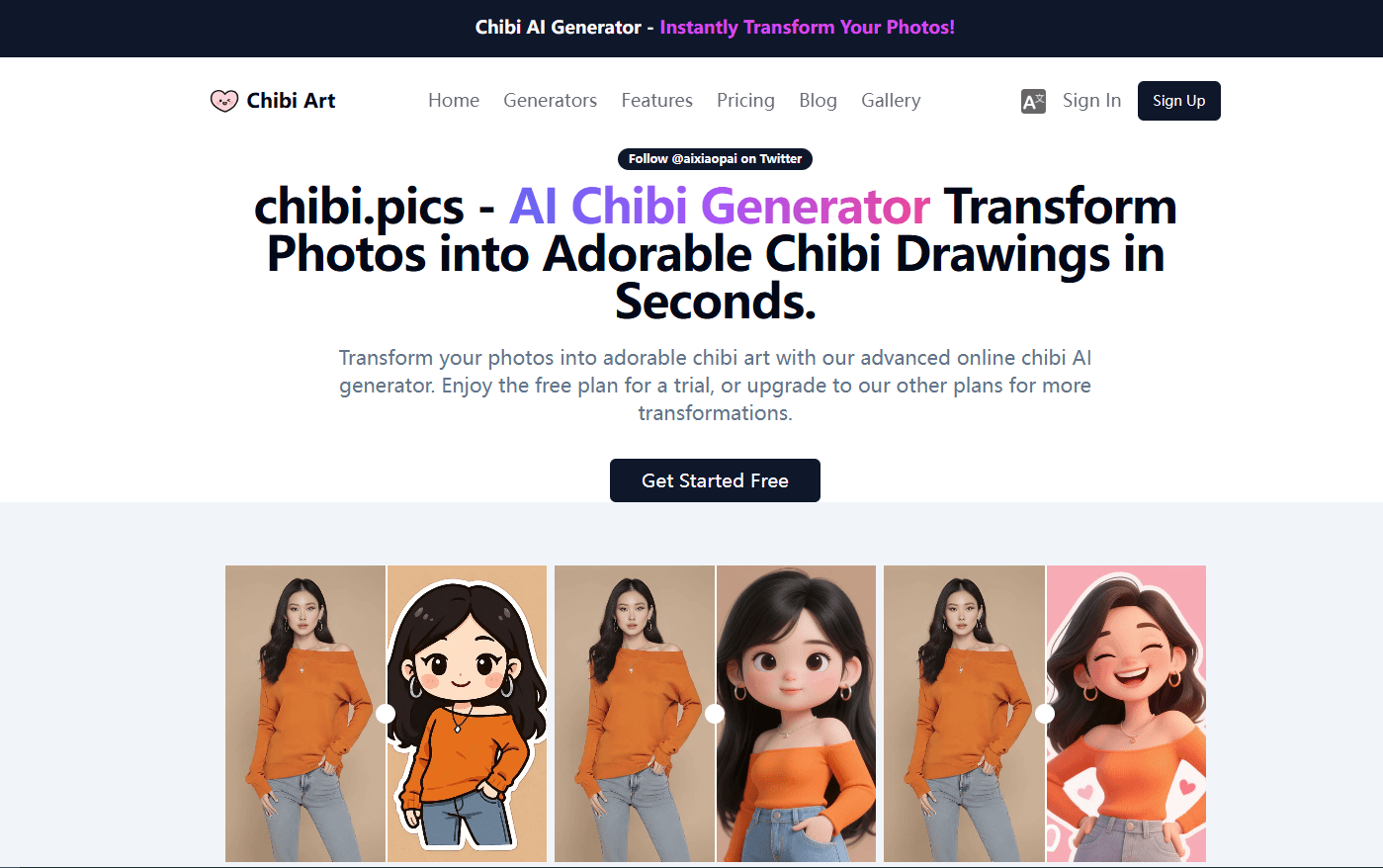
About this app
Chibi Art (chibi.pics) is a free AI chibi generator that transforms photos into adorable chibi-style artwork in seconds. With no drawing skills required, users can create chibi avatars, stickers, emojis, couple portraits, pet portraits, and even animated chibi characters. The platform offers a wide range of generators, including image-to-image, text-to-image, custom chibi, emoji packs, chibi sheets, couple merge, pet portrait, and image animation. It also features hundreds of curated style templates spanning 3D, anime, watercolor, cyberpunk, claymation, and more. The intuitive interface and instant generation make it ideal for social media creators, artists, gamers, parents, and entrepreneurs. The free plan includes 1 credit per month for a taste of the magic, while premium plans offer more credits and higher resolution downloads. Chibi Art stands out for its simplicity, variety, and quality, making chibi creation accessible to everyone.
Key features
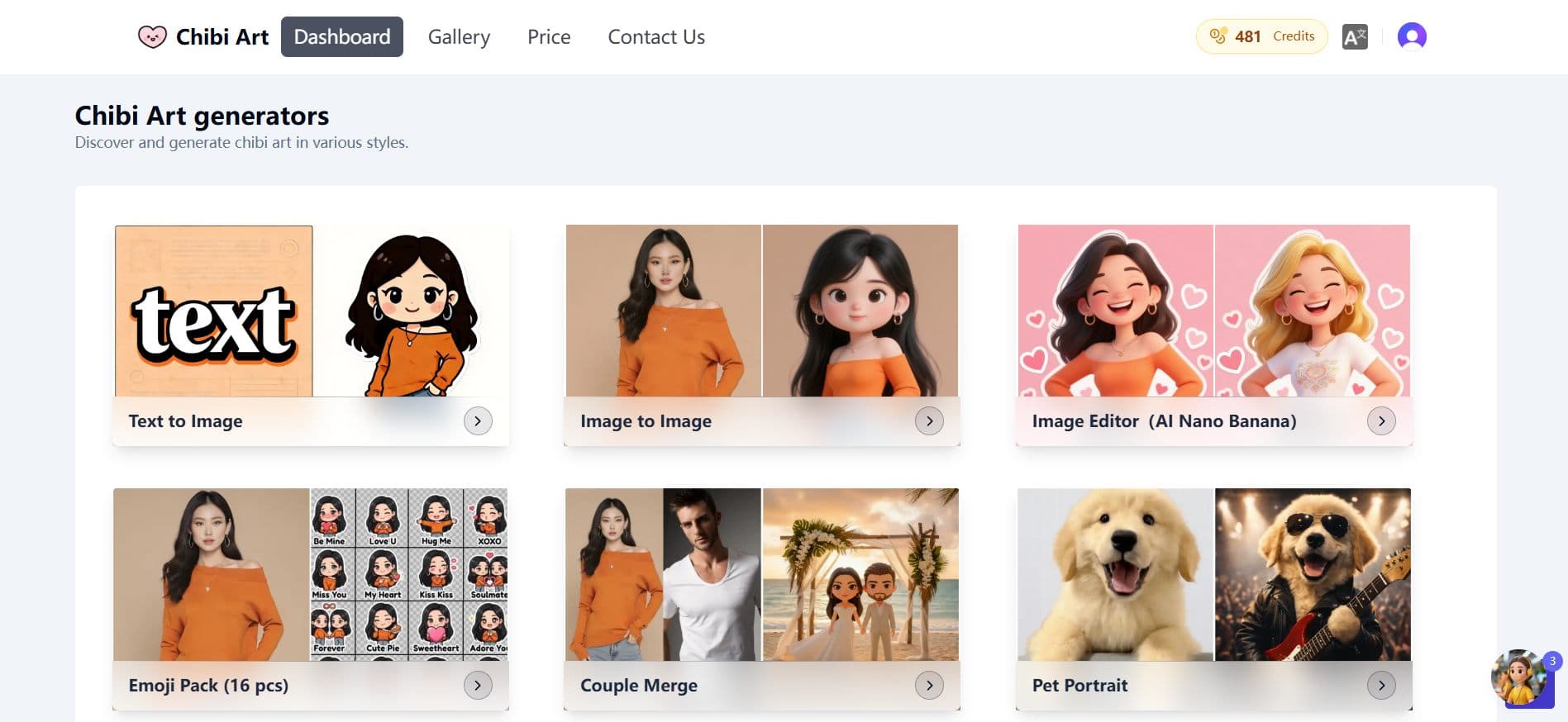
- 1Nine AI generators including image-to-image, text-to-image, custom chibi, emoji packs, chibi sheets, couple merge, pet portrait, and image animation
- 2Hundreds of curated style templates spanning 3D, anime, watercolor, cyberpunk, claymation, and more — no prompt writing required
- 3Free plan with 1 credit per month; premium plans offer more credits and higher resolution downloads
Target customer profile
Drawn from the product itself, not from a survey.
Demographic
Social media creators and influencers
Pain points
Need eye-catching visuals to boost engagement and stand out on Instagram, TikTok, and X.
Primary needs
Quickly create personalized chibi avatars, stickers, and thumbnails without design skills.
Demographic
Artists and designers
Pain points
Seek inspiration and rapid prototyping for character concepts.
Primary needs
Generate chibi variations of existing artwork or brainstorm new ideas efficiently.
Demographic
Gamers and cosplayers
Pain points
Want cute, quirky versions of favorite characters for profiles, fan art, or accessories.
Primary needs
Transform game characters or cosplay photos into chibi art for social sharing.
Demographic
Parents and kids
Pain points
Desire fun, personalized family images for gifts or digital frames.
Primary needs
Create adorable chibi portraits of children or family members with ease.
Demographic
Entrepreneurs and merch sellers
Pain points
Need unique designs for merchandise with minimal effort.
Primary needs
Produce chibi art for stickers, pins, T-shirts, and other products quickly.
Scout Review
Written by AI from measured evidence, scored out of 100.
Chibi Art is a focused AI chibi generator that does one thing well: turn photos into chibi art without prompt engineering. The design is strong where it counts — before/after proof and a clean generator grid — and the breadth of nine generators plus hundreds of templates gives it more chibi-specific depth than general AI tools. But the cracks show. Mobile performance is dire at 47/100 with an 18.3-second LCP, which is brutal for a phone-first use case. The free plan's one credit per month is barely a taste. Accessibility has five failing audits including a keyboard trap. Security is early-stage with a 5/13 header checklist. Growth potential is solid but the moat is thin. It's a competent niche tool that needs to fix mobile speed and accessibility before it can scale.
Measure by measure
Usability
58Nine generators and hundreds of templates give real breadth, and the dashboard shows credits clearly. But 1 free credit per month is a stingy trial, and 'Generators' vs 'Explore' nav overlap confuses first-timers.
Design
70Strong before/after chibi proof and clear generator cards make the value obvious. But the long hero headline wraps awkwardly, template thumbnails feel cramped, and truncated card names hurt scannability.
Speed
44Desktop Lighthouse performance is 90/100, but mobile collapses to 47/100 with an 18.3s LCP and 9.8s FCP. That mobile gap is severe for a photo-upload tool used on phones.
Security
52HTTPS and HSTS are in place, but the header probe found no CSP, no frame protection, no secure cookies, and no DMARC. No SOC 2, ISO, or bug bounty signals either — typical for an early-stage tool.
Accessibility
58Lighthouse accessibility scored 82/100, but five audits fail: contrast, missing alt text, unnamed links, no main landmark, and focusable elements inside aria-hidden containers. No WCAG statement found.
Growth
62A real niche with a clear wedge: zero-prompt chibi generation versus Midjourney's prompt engineering. Nine generators and hundreds of templates give it depth, but the category is crowded and the moat is thin.
Improvement areas
- Mobile performance: 47/100 Lighthouse score with 18.3s LCP and 9.8s FCP will drive phone users away
- Accessibility: five failing audits including missing alt text, poor contrast, unnamed links, and focusable elements inside aria-hidden containers
- Security headers: no CSP, frame protection, secure cookies, or DMARC; checklist scored 5/13
Design & Usability
Chibi Art's design does the heavy lifting: before/after photo strips immediately show the transformation, and the generator grid is scannable with distinct thumbnails. The dashboard keeps credits visible, which is smart. But the hero headline is a paragraph in disguise, wrapping awkwardly and burying the CTA. Template thumbnails are packed so tightly they blur together, and card names truncate mid-word. Usability is a mixed bag: nine generators and hundreds of templates deliver genuine breadth, and the dashboard is clean. But one free credit per month is barely a trial, and the nav's 'Generators' vs 'Explore' split will confuse first-timers. The core flow works, but the onboarding friction is real.
Speed & Security
Speed is the sharpest split in this review. Desktop Lighthouse performance hits 90/100, but mobile collapses to 47/100 with an 18.3-second LCP and 9.8-second FCP. For a tool built around uploading photos from a phone, that mobile performance is a serious problem — users will bounce before the page even renders. Security is early-stage standard: HTTPS and HSTS are enforced, and SPF is configured, but the header probe found no CSP, no frame protection, no secure cookies, and no DMARC. The checklist scored 5/13. There's no SOC 2, ISO, or bug bounty page, which is normal for a young product but still leaves gaps. For a site handling user-uploaded photos, tightening headers and adding a security page would be cheap wins.
Accessibility & Growth
Accessibility scored 82/100 on Lighthouse, but the failing audits matter: insufficient color contrast, images without alt text, links without discernible names, no main landmark, and focusable elements inside aria-hidden containers. That last one can trap keyboard users. There's no accessibility statement or WCAG mention anywhere on the site. Growth is the most interesting dimension. Chibi Art targets a real niche — social creators, gamers, parents, and merch sellers who want chibi art without prompt engineering. Its nine generators and hundreds of templates give it more chibi-specific depth than Midjourney or Stable Diffusion, which require technical setup or prompt skills. Avatoon offers avatars but lacks AI photo-to-chibi transformation. The wedge is real: zero-prompt, chibi-first generation. But the moat is thin — a general AI tool could add a chibi preset tomorrow. The domain was registered in May 2025, so it's early, and the category is crowded.
Conclusion
If you're a social creator or parent who wants chibi art without learning prompt engineering, Chibi Art delivers. The before/after proof is convincing, the generator variety is real, and the dashboard is clean. But the mobile experience is a genuine problem — an 18.3-second LCP means phone users will bail before they see anything. The one-credit free plan won't tell you much either. Fix the mobile performance, add alt text and contrast fixes, tighten the security headers, and this becomes a much easier recommendation. Until then, it's a promising niche tool with a speed problem it can't afford.
Suggestions for improvement
- Fix mobile performance: an 18.3s LCP and 47/100 mobile score will kill phone-first adoption. Optimize images and reduce main-thread work.
- Add alt text to images, fix color contrast, name your links, and add a main landmark to clear the five failing accessibility audits.
- Tighten security headers: add CSP, frame protection, secure cookies, and DMARC. A security page would also build trust.
- Increase the free plan to at least 3-5 credits per month so users can actually evaluate the output quality before paying.
Alternatives comparison
Named competitors, point by point. Nobody paid to appear here or to be left out.
 Chibi Art Chibi Art |  Midjourney Midjourney |  Stable Diffusion Stable Diffusion | Avatoon | |
|---|---|---|---|---|
| Ease of use / learning curve | Zero prompt engineering; upload a photo and click to generate chibi art | Discord-based interface requiring prompt engineering and a steeper learning curve | Open-source model demanding technical setup and fine-tuning | Avatar maker app with customization but no AI photo-to-chibi transformation |
| Chibi-specific style variety | Hundreds of curated chibi templates across 3D, anime, watercolor, cyberpunk, claymation, and more | General image generation; chibi style possible but requires prompt crafting | Chibi possible with specific models but requires technical setup and fine-tuning | Focuses on cartoon and chibi avatars with customization options |
| Free tier / trial availability | Free plan includes 1 credit per month | No free tier; subscription required | Open-source model is free to run locally; API usage may cost | Free app with in-app purchases |
| Photo-to-chibi transformation | Core feature: upload a photo and transform it into chibi art instantly | Can generate chibi-style images but not a dedicated photo-to-chibi pipeline | Image-to-image possible with setup but not a dedicated chibi transformation | Lacks advanced AI photo-to-chibi transformation |
| Additional generators beyond chibi | Nine generators including emoji packs, chibi sheets, couple merge, pet portrait, and image animation | General-purpose image generation across many styles and subjects | General-purpose image generation with community models | Avatar creation and customization tools |
Midjourney
A popular AI image generator with a Discord-based interface. It can create chibi-style images but requires prompt engineering and has a steeper learning curve.
Stable Diffusion
An open-source AI model for image generation. Users can generate chibi art with specific models, but it demands technical setup and fine-tuning.
Avatoon
An avatar maker app that focuses on cartoon and chibi avatars. It offers customization but lacks the advanced AI photo-to-chibi transformation and variety of styles.
Comparing options? See Chibi Art alternatives, scored side by side
More Design & Creativity apps
View all Design & Creativity
RoomCreator
92An AI-powered interior and exterior design tool that tran...

What the GIF
89Frame-perfect video-to-GIF maker that runs entirely in yo...

TranscriptYou
88Free YouTube transcript generator with timestamps and AI ...

RestorePhotosApp
88An AI-powered photo restoration app that brings old, blur...

Portrait Gift
88AI-powered personalized face swap art platform creating c...

ButterKit
82macOS app for App Store screenshots: 3D mockups, auto-tra...

BeartIMAGE
88BeartIMAGE is a free, web-based image processing platform engineered for fast, bulk photo editing and conversion directly in your browser.

Pixelimg
88A free online AI-powered tool that instantly converts ima...

Coloring Pages Pro
87A massive collection of free printable coloring pages for...

QRocodile
87Design And Animate QR Codes People Want to Scan

FaceSwapAI
87AI face swap for photos, videos, GIFs with free trial.

TryInk
86Try on a tattoo on your own body photo before you book.


A platform dedicated to providing unbiased reviews of newly launched applications, analyzing everything from their features to their full potential.
info@scoutforge.net© 2026 Scoutforge. All rights reserved.
