Cycling through all six. Tap any point to stop.
Measured on six things
Recreate viral video effects with AI
Security
42HTTPS enforced and SPF present, but 3/12 on the header checklist: no HSTS, CSP, frame protection, or DMARC. No SOC 2, ISO, security page, or bug bounty found in fetched content.
Screenshots
1 / 1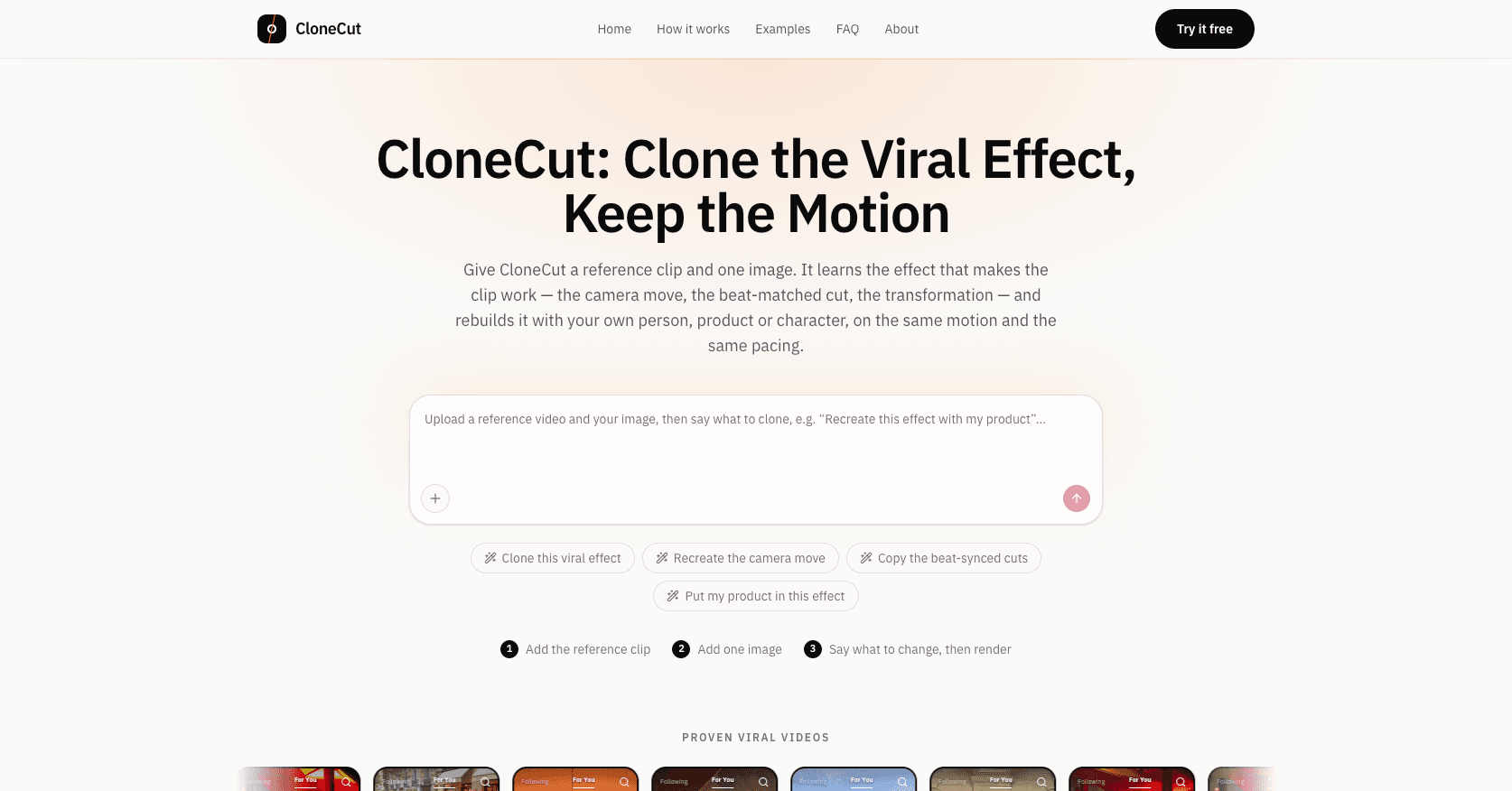
About this app
CloneCut recreates viral video effects from a reference clip, one image, and a short instruction. It preserves the original motion, camera work, timing, and framing while using your own person, product, or character. The browser-based workflow needs no timeline, keyframes, or masking. New accounts receive free credits to try it.
Key features
- 1Reference-clip-driven effect cloning that preserves motion, camera work, timing, and framing
- 2Single-image input for swapping in your own person, product, or character
- 3Browser-based workflow with no timeline, keyframes, or masking required
- 4Per-render credit cost shown before generation; credits returned on confirmed failures
- 5Output in 480p, 720p, or 1080p with no watermark, up to 20 seconds per clip
Target customer profile
Drawn from the product itself, not from a survey.
Demographic
Short-form content creators (TikTok, Reels, Shorts)
Pain points
Trends move faster than editing skills; recreating effects manually is slow.
Primary needs
Recreate viral video effects with their own person or product.
Demographic
Social media marketers and small agencies
Pain points
High cost and turnaround for trend-based video ads; limited editing resources.
Primary needs
Scalable, low-friction tool to test multiple presenters or products quickly.
Demographic
E-commerce brands and product sellers
Pain points
Product videos lack the motion and pacing that make trends perform.
Primary needs
Clone product moments and transitions with their own item in the same motion.
Scout Review
Written by AI from measured evidence, scored out of 100.
CloneCut is a focused, well-presented tool with a clear thesis: clone the effect from a reference clip, keep the motion, swap in your own subject. The homepage sells that thesis cleanly, the pricing is transparent about per-render cost, and the site is genuinely fast. The gaps are the ones you'd expect from something this new — no docs or demo, a security posture that's basically HTTPS and good intentions, and a few unfinished-looking design details. Against Runway and Pika it has a real angle, but the moat is a workflow choice, not a technology lock-in. Worth trying with the free credits; worth scrutinizing before you upload anything personal.
Measure by measure
Usability
62Three-step strip and hero prompt box make the flow obvious before scrolling, and pricing shows per-render cost up front. But no visible docs, help center, or live demo in fetched content — you learn by doing or not at all.
Design
70Consistent type system, orange accent bars, and a strong ORIGINAL/EDITED split-screen that sells the promise instantly. Undercut by an empty black card, a placeholder illustration, and low-contrast carousel captions.
Speed
88Lighthouse mobile 100/100 with LCP 1.1s, CLS 0.002, TBT 0ms; desktop 96/100. Genuinely snappy lab metrics with no lag complaints in collected evidence.
Security
42HTTPS enforced and SPF present, but 3/12 on the header checklist: no HSTS, CSP, frame protection, or DMARC. No SOC 2, ISO, security page, or bug bounty found in fetched content.
Accessibility
78Lighthouse a11y 100/100 with one failing audit on mismatched accessible names. No WCAG statement or multi-language support found, and visual audit flags low-contrast carousel captions.
Growth
58Real, specific problem with a clear wedge: reference-clip-driven cloning vs prompt-driven generation from Runway/Pika. Named segments and tiered pricing, but the category is crowded and the moat is thin.
Improvement areas
- No visible docs, help center, or live demo — onboarding relies on trial and error
- Security posture is thin: 3/12 headers, no HSTS/CSP/DMARC, no security page or SOC 2
- Unfinished design details: empty black card, placeholder illustration, low-contrast captions
- No accessibility statement, WCAG mention, or multi-language support
Design & Usability
CloneCut's homepage is genuinely well-crafted: a disciplined type system, consistent orange accent bars, and an ORIGINAL/EDITED split-screen that explains the product without a word of copy. The hero prompt box and suggestion chips make the interaction model obvious at a glance, and the numbered three-step strip walks you through the flow before you scroll. Where it slips is in the details — an empty black card in the effects grid, a placeholder illustration in the 'How to Clone' section, and carousel captions you have to squint at. Usability is solid on the surface but thin underneath: no visible docs, help center, or live demo in the fetched content, so you learn the tool by doing. Pricing transparency is a genuine strength — per-render cost is shown before you commit, and failed renders return credits.
Speed & Security
Speed is the standout: Lighthouse mobile 100/100 with LCP 1.1s, CLS 0.002, and TBT 0ms, plus 96/100 on desktop. The site is lightweight and snappy, and no lag complaints surfaced in the collected evidence. Security is the weak flank. HTTPS is enforced and SPF is present, but the header probe scored 3/12 — no HSTS, no CSP, no frame protection, no DMARC, no Referrer-Policy. There is no SOC 2, ISO, security page, or bug bounty mentioned anywhere in the fetched content. For a tool that asks users to upload personal photos and reference clips, that's a thin posture. None of this is unusual for an early-stage indie product, but it's a real gap against category norms, not just an unverified absence.
Accessibility & Growth
Accessibility scores well on automated checks — Lighthouse 100/100 — with one failing audit on mismatched accessible names. The visual audit flags low-contrast carousel captions and light grey small-caps labels, and there's no WCAG statement or multi-language support in the fetched content. Growth is the more interesting question. CloneCut names a real, specific problem — recreating viral effects with your own person or product while keeping motion, timing, and framing — and its wedge against Runway and Pika is explicit: start from a reference clip that already performs, not a text prompt inventing a scene. Target segments are named (creators, marketers, e-commerce) and pricing scales from $29 to $119 monthly. The limit is that the category is crowded and the differentiator is a workflow choice incumbents could copy. The domain was registered in late 2026, so this is very early — traction is context, not the score.
Conclusion
If you're a short-form creator who keeps seeing effects you want to steal but can't rebuild, CloneCut is aimed squarely at you, and the free credits make the trial cheap. Go in with a clean 3-20 second reference clip and a sharp front-facing photo, and expect to iterate. If you're uploading client photos or product shots, read the privacy terms first — the security page is a blank. And if you're comparing against Runway or Pika, the honest test is whether reference-driven cloning actually beats prompt-driven generation for your specific effect. Try both on the same clip before you subscribe.
Suggestions for improvement
- Fix the empty black card in the effects grid and the placeholder illustration in 'How to Clone' — they read as broken assets
- Add a docs/help center or a short live demo showing what a good reference clip and input image look like
- Ship the standard security headers (HSTS, CSP, frame protection, DMARC) and publish a security/privacy page
- Raise contrast on carousel captions and the grey small-caps step labels to match the rest of the page's polish
Alternatives comparison
Named competitors, point by point. Nobody paid to appear here or to be left out.
 CloneCut |  Runway |  Pika | |
|---|---|---|---|
| Primary input model | Reference clip + one image + text instruction | Text prompt, image, or video input | Text prompt or image input |
| Preserves original motion/timing from a reference | Core feature — keeps camera, timing, rhythm, framing | Partial via video-to-video; not the primary workflow | Limited; prompt-driven generation |
| Max clip length | Up to 20 seconds | Varies by model; typically longer | Short clips, typically under 10s per generation |
| Pricing model | Credits; $29/$59/$119 monthly, 50% off yearly, credit packs | Tiered subscription with credits | Freemium with paid credit tiers |
| Free trial / credits | Free credits for new accounts | Free tier with limited credits | Free tier with limited credits |
| Watermark on output | No watermark on all paid plans | Watermark on free tier | Watermark on free tier |
Runway
AI video generation suite with text-to-video and video editing tools.
Pika
AI video platform for generating and editing short clips from prompts.
Comparing options? See CloneCut alternatives, scored side by side
More AI Generations apps
View all AI Generations
Uni-1 by Luma AI
92Uni-1 is an advanced multimodal text-to-image AI model th...

Gerty
91Private, local AI assistant for Mac that runs offline

LTX 2.3 AI Video Generator
91Fast, open-source AI video generator with 4K support, mul...

DemoVexa
90Turn your code into professional product demo videos with AI-generated scripts, animated UI, and natural voiceovers.

All of Us
89Add deceased loved ones to photos with AI and see free pr...

Voqusa
89Transcribe social media video and audio links into text (free signup, 5 free credits, then pay-as-you-go)

Pixelimg
88A free online AI-powered tool that instantly converts ima...

IraVoice
88Private on-device dictation for Apple-silicon Macs.

OBVELO
88Privacy gateway that masks personal data in LLM traffic

tradutor de mangá com IA
88O tradutor de mangá com IA traduz capítulos em lote, personaliza textos e oferece edição visual para estúdios.

HeyVid AI
88HeyVid AI is a free all-in-one AI video and image generat...

RestorePhotosApp
88An AI-powered photo restoration app that brings old, blur...


A platform dedicated to providing unbiased reviews of newly launched applications, analyzing everything from their features to their full potential.
info@scoutforge.net© 2026 Scoutforge. All rights reserved.
